Author: way0utwest

  • Getting the Previous Row Value before SQL Server 2012

    Another post for me that is simple and hopefully serves as an example for people trying to get blogging as #SQLNewBloggers.

    I ran across a post where someone that was trying to access the previous value in a table for some criteria. This is a common issue, and  one that’s very easily solved in SQL Server 2012+ with the windowing functions.

    However, what about in SQL Server 2008 R2-?

    NOTE: I’m solving this quickly, the way many people do, but this is an inefficient solution. I’ll show that in another post. However, I’m showing how you can describe and solve a problem here. If you need to solve this, look for a temp table solution (or find a later post from me).

    Setup

    It’s pretty easy. Let’s get some data together. I’ll use a big sample since that’s easier to see the differences.

    CREATE TABLE MyID
    ( myid INT
    , myvalue INT
    );
    GO
    INSERT MyID
    VALUES (1, 10 ),
            (1, 20 ),
            (2, 400),
            (2, 500),
            (2, 600),
            (3, 8000),
            (3, 9000),
            (3, 10000),
            (3, 11000);

    Now, what I want is something that returns the previous row, assuming we’re ordering by the ID and value. If there is no previous value, let’s return a zero. Essentially what we want is something like this:

    select MyID        , MyValue       , MyPrevValue = ISNULL( x, 0)
    from …

    That’s the pseudocode. Obviously I need to fill in blanks. However, let’s build a test. Why? Well, I can then see my result data, and I can re-run the test over and over as I experiment with the query. It’s not hard, I promise.

    EXEC tsqlt.NewTestClass
      @ClassName = N'WindowTests';
      go
    CREATE PROCEDURE [WindowTests].[test check the previous row value for MyID]
    AS
    BEGIN
    -- assemble
    CREATE TABLE #expected (id INT, myvalue INT, PrevValue int) INSERT #expected
    VALUES (1, 10  , 0  ),
            (1, 20  , 10 ),
            (2, 400 , 20 ),
            (2, 500 , 400),
            (2, 600 , 500),
            (3, 8000 , 600),
            (3, 9000 , 8000),
            (3, 10000 , 9000),
            (3, 11000 , 10000) SELECT *
    INTO #actual
      FROM #expected AS e
      WHERE 1 = 0 -- act
    INSERT #actual
    EXEC dummyquery;
    -- assert
    EXEC tsqlt.AssertEqualsTable
      @Expected = N'#expected'
    , @Actual = N'#actual'
    , @FailMsg = N'Incorrect query' END

    If you examine the test, you’ll see that I create a table, insert the results I expect, and then call some procedure. I compare the results of the procedure with the table I built.

    That’s it. A simple test, but I’ll let the computer compare the result sets rather than trusting my eyes.

    Last thing, I’ll build my dummy procedure, which can look like this:

    CREATE PROCEDURE dummyquery
    -- alter procedure dummyquery
    AS
    BEGIN select MyID   , MyValue , PrevValue = MyValue from MyID
      END

    Now I have the outline of what I need. If I run the test now, I’ll get this:

    2016-06-07 10_18_23-Photos

    The test output tells me it has failed, the values in the #expected table (with a <), and the values from my query in the #actual table (with a >).

    Now I can debug and work on this.

    Solving the Problem

    First, I want to order the data and get a number that counts the order. The ROW_NUMBER function does this, which is available in SQL Server 2005+. I won’t go into SQL 2000- solutions because, well they’re more complex and there should be very few SQL 2000 instances left coming up with new problems.

    I can do this with this code:

    2016-06-07 10_21_40-Photos

    Note that I have a sequential counter that lets me order every row with an index. Now, I can access the previous row, since I know the MyKey value will be one less than the current row.

    With this in mind, let’s turn this into a CTE (removing the previous value). Outside of the CTE, I’m going to self-join the CTE to itself. I’ll use a LEFT JOIN since not every row will have a previous row. In fact, the first row won’t.

    The join condition, which you can play with, will be on the outer table’s ID being one less than the first table’s key. You could reverse the math as well, but that’s up to you.

    2016-06-07 10_29_37-Photos

    One last issue. Add an ISNULL to the previous value to return a 0 if there is no match. Now, let’s run the test.

    2016-06-07 10_31_58-Photos

    SQLNewBlogger

    This was a slightly longer post, where I tried to explain how I setup the problem and solved it. I included a test, which didn’t add much coding time. In fact, the writing took far longer than the coding itself.

    This is the type of problem I’d encourage you to solve on your blog. If you want to repeat this, look for a solution with temp tables, as the CTE incurs a lot of reads. This isn’t really what you’d like to do in production code.

  • Why Use R Services?

    I ran across a blog post from the very talented Joe Sack recenty, who I hope makes a few more minutes for me the next time we’re in the same town together ;).

    The post is a look at some of the customers that are using R Services in SQL Server 2016. As you might expect, there are highlights from customers that show dramatic improvement in performance. Going from 200 valuations/hour to 12,000/minute and taking a process from 2 days to 1 hour. I’m sure not all operations improved that much, but I bet most had some improvement. R Services is a big improvement in the way data is analyzed with the R language.

    What I really like, however, is that the piece includes some of the gotchas customers experienced, with links on how one might go about fixing the issues. There are also hints on visualizations and performance tuning options. I like looks at technology that include some details on those items that work well or don’t work well. This is a good overview that I hope gets more customers interested in using R services.

    But, I hope that we see deeper pieces that can give technical guidance on specific scenarios. Which models scale well and which don’t? Which options in some analysis improved (or hurt) performance? There are plenty of items which are best answered with specific examples, rather than general advice. With all the customers and data Microsoft gathers, especially for companies that might use R Services in azure, I’d expect that we could get some useful, detailed examples on how this (and other) technologies actually work in the real world. I’d like to see this guidance, not just with R Services, but with other technologies as well. Certainly providing some sample data sets and code that performs well really (or tuning options), is what most of us want to see.

    Of course, I’d like to see more of these stories and details at SQLServerCentral as well, so if you are solving problems and want to publish something, drop us a note. We’d love articles from the real world, whether on SQL Server 2016, or any prior version. The more reference problems and solutions we have, the more people learn to code better.

    Steve Jones

    The Voice of the DBA Podcast

    Listen to the MP3 Audio ( 3.1MB) podcast or subscribe to the feed at iTunes and LibSyn.

  • Not a Great Search

    Tldr: A bit of a rant. I’m not spending a bunch of time crafting this.

    I have mixed feelings about searching for information on Microsoft sites. It kind of works, kind of doesn’t. I know that there are resource constraints to upgrading their sites, but I’m more and more annoyed.

    Perhaps this is one reason I don’t use Bing. Maybe, not sure. I need to think about this.

    Anyway, I go to the main BOL page online often. It’s supposed to be more updated than the local help, and I don’t have to use some procedure to get to it. I went today and entered in a search, getting these results.

    2016-06-22 13_47_36-t-sql wildcard characters - MSDN Search

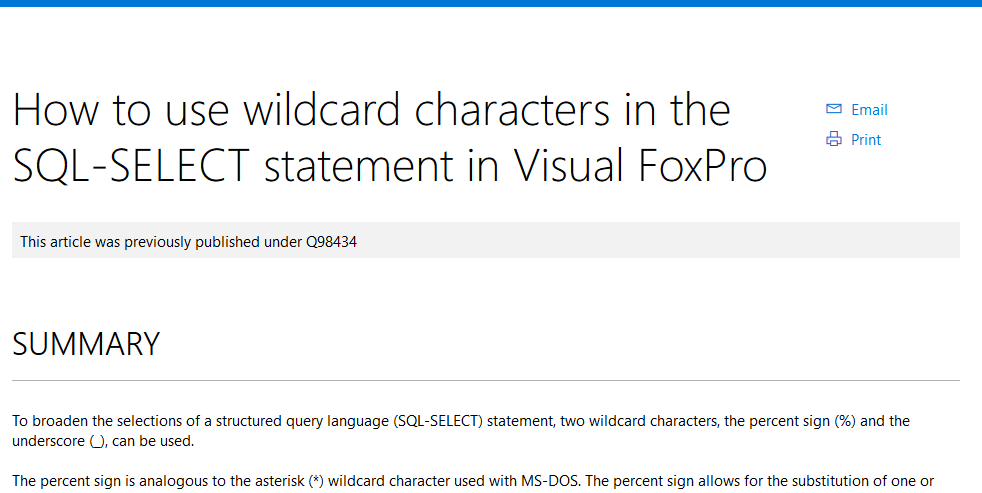
    Check out the second one. That might be interesting, and it’s in the Support KB. I click on it and see this:

    2016-06-22 13_53_40-How to use wildcard characters in the SQL-SELECT statement in Visual FoxPro

    That. Is. Not. What. I. Want. (at least not these days)

    Even surfacing the entire title, or maybe tagging this as a VFP article in addition to a kb one.

    As I delve into more technologies, I find acronyms crossing over, so I want to look for a term in SQL Server, or in C#, and right now I have to search and then try to limit things with a click on the left. Except that I don’t always get a good way to limit searches.

    2016-06-22 13_55_37-Settings

    That’s not a great example, but that’s the term of I thought of today that crosses over.

    Can we please get some way to default a search to the areas we’re working in? I can click something if I’m working with SQL and need to search wider, but I seem to get (more and more) results from Sharepoint, C#, etc that aren’t relevant.

    Ugh, I know I’m ranting a bit, but search becomes more and more important in the see of data, especially with things like Azure rev’ing every quarter. Give me a way to search current docs, in my area, easily, by default.

  • Starting ReadyRoll with an Existing DB

    I’ve been working with ReadyRoll quite a bit the last few months, and wanted to start putting out some information. I’m looking to do a longer series, but here’s a quick post on getting started.

    When you install ReadyRoll, you get a new project type under SQL Server.

    2016-06-14 12_27_14-Photos

    This is a database project that will track all changes to your database as a series of migration scripts. Let’s get started. I’ll choose this and give it a name.

    Once I do this, I get the ReadyRoll window with some information. What I really want to do here is point this to my existing database. Right now it’s looking at a LocalDB instance.

    2016-06-14 12_28_07-Photos

    I’ll click the configure link and get the Connection String dialog. This is the database that mirrors one of the SSC databases, with lots of objects in it.

    2016-06-14 12_29_38-Photos

    Once I’ve done this, the project will use this database. The Shadow database will also be on this instance.

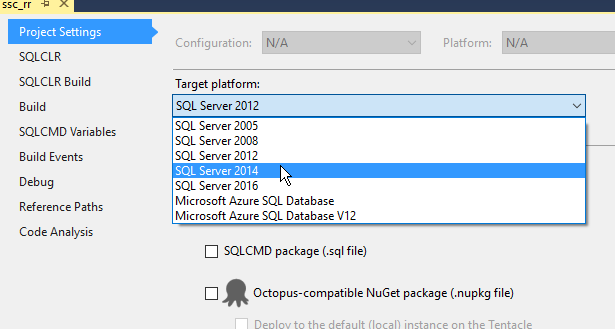
    I need to make one other change and set the correct version in the Project Settings.

    2016-06-14 12_48_29-Photos

    Now, back to the ReadyRoll window. I’ve configured the DB connection, so I can ignore that. What I want to do is import my database, getting a baseline script.

    2016-06-14 12_49_32-Movies & TV

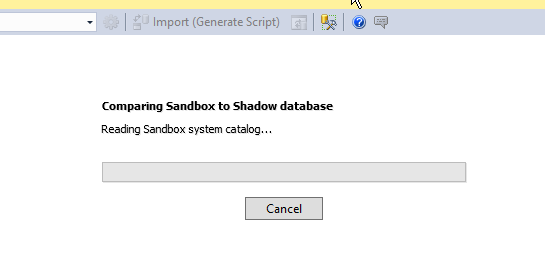
    I click that and ReadyRoll creates a Shadow database (since one doesn’t exist) and begins to import objects.

    2016-06-14 12_49_39-Photos

    Once that’s done, I get a list.

    2016-06-14 12_49_48-Photos

    And a migration script.

    2016-06-14 12_49_58-Movies & TV

    This is my baseline, starting script. This contains all the objects that exist in the database at this point. These are also added to the Schema-Model, but I can ignore those. I’m going to work on the database itself.

    The ReadyRoll widget notes this was an import, and there’s no need to deploy anything since these aren’t changes, but just the state of the db.

    2016-06-14 12_52_09-Movies & TV

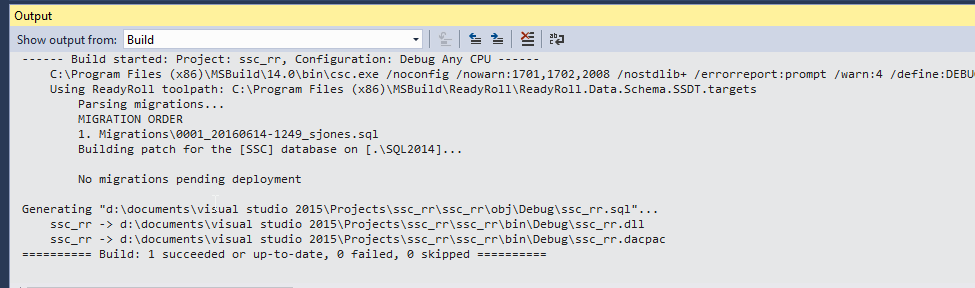
    I can see this if I do a Visual Studio build. Note the message in the middle: No migrations pending deployment. The changes in script 1 (001_20160614-1249_sjones.sql) are already in the db.

    2016-06-14 12_52_50-Photos

    Now I can make changes to my database and get new scripts. Add a table in the designer?

    2016-06-14 12_54_55-Photos

    When I click Update (and Generate Script), I get a new migration script.

    2016-06-14 12_55_09-Movies & TV

    Note that I just generated this script. I’ll write more about this process later, but for now, I’ll click Deploy Project to execute this against my database. When I do that, VS does a build, and one migration is executed.

    2016-06-14 12_56_06-Photos

    Add a procedure?

    2016-06-14 12_57_13-Photos

    Generate a new migration script.

    2016-06-14 12_57_35-Movies & TV

    And so it goes. I can work with my database in VS and get new scripts. I can also do an import if someone else makes changes to the database from their own machine with VS, SSMS, SQLCMD, isql, etc. The import will generate another migration script that gets added.

    This is a really basic look at ReadyRoll, but it will get you started. I’ll tackle more topics and different ways of working with database development in another series of posts.