Author: way0utwest

  • Getting Database Properties – DatabasePropertyEx()

    Another post for me that is simple and hopefully serves as an example for people trying to get blogging as #SQLNewBloggers.

    I had someone ask me a question about security recently, and while working through the answer, I ran across something I didn’t know well: databasepropertyex(). Here’s a few notes.

    Each database in SQL Server has all sorts of options and settings. Most people (including me) get in the habit of checking here for the information. First we right click the database (after starting SSMS if it isn’t running)

    dbproperty

    Then you get this dialog, with lots of stuff.

    dbproperty2

    And more on the other tabs.

    dbproperty4

    Time consuming, and error prone. As I get older, I find that trying to decide which selection is set for which option becomes harder. I find my finger tracing across the screen. It’s entirely possible I’d make a mistake when glancing at this to check the ArithAbort setting.

    Use T-SQL

    Scripting and querying is usually better. Not the sp_configure scripting where you get a whole list of options, but looking for a particular item. That’s where DatabasePropertyEx() comes in. This lets you query for a database property.

    The problem comes in when you run it. If you run the function, you get little information.
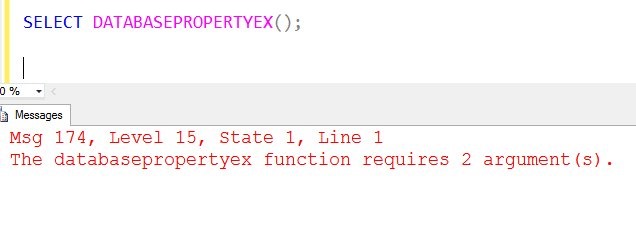
    dbprop_a

    Certainly you can go look at BOL to get more data, but that’s annoying. If I run sp_configure, I get data. However here, nothing. Even if I do what I think would be helpful, with a NULL parameter, I don’t get a list of stuff. SQL Prompt alerted me to the fact that the first parameter is the database, and the second is the property, but that doesn’t work.

    dbprop_b

    Fortunately, I have SQL Prompt, so I get this when I put in quotes for the second parameter.
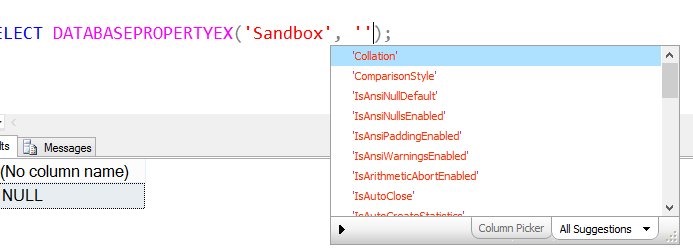
    dbprop_c

    As you can see, the parameters don’t map to the properties, though you can figure out what they mean if you see them. They tend to follow the conventions that most application programmers use (IsAutoClose).

    That’s fine, and it just means you need to have a reference handy for properties to query. I wish MS would give all properties with a NULL parameter, or a link to BOL.

    Writing

    This one took a bit longer to write. Once I realized I didn’t know databasepropertyex() very well, I had to read about it (5 minutes) and experiment a bit. I took some screen shots, which is always cumbersome. As I wrote this, I had to change the wording and ordering a few times to try and convey a simple message. I was originally going to look at more details, but decided to keep this simple and talk about just querying properties.

    This was about 30-40 minutes for me.

    You can do this. Join the #SQLNewBlogger group and start documenting your career. You can see all my posts that fall into this area by looking through the SQLNewBlogger tag here.
    References

  • Documenting with Tests

    Documenting code isn’t a task that many people enjoy. Those of you that have been through a computer science curriculum probably added lots of verbose, and obvious, comments to code. It’s probably unlikely that you ever found much value in the comments in a paying job.

    There are all sorts of ideas on how to document your software, writing good comments, and even refactoring code to remove unnecessary comments. I’m sure that if we put five developers in a room, we’d end up with eight different ways to comment code that would be debated, with no agreement on how to proceed.

    I ran across an interesting approach from Ed Elliot on documenting your code with unit tests. I hadn’t thought about the tests providing some documentation, but it’s an interesting idea. I’d have to work with the concept a bit, but I’m skeptical I’d get enough information from unit tests to ensure I understood what a stored procedure was doing, especially if I had 10 tests for a long procedure.

    I do think unit tests are important, and perhaps in conjunction with some type of code header that gives the requirements the procedure fulfills, I’ll get enough information to understand the code.

    I don’t have a universal solution that I think will work in most situations, but I do think that having a tool like intellisense or SQL Prompt helps you self document code with expressive names for columns, variables, and aliases. If nothing else, those phrases for variables can clue the next programmer in to what is happening better than single letter names.

    Steve Jones

    The Voice of the DBA Podcast

    Listen to the MP3 Audio ( 2.2MB) podcast or subscribe to the feed at iTunes and LibSyn.

  • Database Lifecycle Workshops

    Trying to implement version control, and Continuous Integration (CI), and automated releases of code is hard. The concept is simple, but all of the various processes, tools, and links that need to be connected can be hard. I’ve seen too many organizations that struggle to get started, often because they see the entire process as just too complex and overwhelming.

    It’s not.

    Whether you’re trying to release application code or database code, you need to treat them in a similar manner. While there are lots of books, tools, blogs, and companies that can help you work with application code, the database has been more challenging.

    At Redgate, we’ve put together a few workshops to help break down the stages of engineering your database delivery and get you moving to help smooth the process of making database changes. These workshops are coming to locations all around the US and UK in the next few months. Check out our schedule, which has dates in :

    • Bellevue, WA (May 15)
    • London, UK (May 20)
    • Philadelphia (June 4)
    • Belfast, Northern Ireland (June 26)
    • London (July 8)
    • San Diego, CA (July 16)
    • Manchester, UK (July 24)
    • Baton Rouge, LA (July 31)

    There are more dates, and we’re certainly open to scheduling more locations and even private classes if you’d like. Contact us if you have a request.

    Most of these classes are delivered by experienced partners of Redgate, often consultancy organizations that have been working with clients for years to build smoother application delivery processes, and are moving into the database space. The classes use our tools, and Grant, myself, or one of our other Redgate experts will be on hand to help you learn the skills you need to start implementing DLM concepts. We can even recommend consultants to work with you for a two day DLM Health Check or on longer term projects that help you build better software. Contact DLMPartners@red-gate.com for more information.

    We find that many of our customers are struggling with different parts of building a smooth software pipeline. They want to get better, and they find the Redgate tools help, but they need a little push or confidence to implement an engineered process.

    Our three workshops are designed to teach you about different parts of a DLM environment. They map to the Database Lifecycle, helping you move to a different stage and a better engineered process at each step. The three workshops are:

    • Database Source Control – getting your database code into a Version Control System and dealing with the issues of branching, merging, team coordination and more.
    • Database Continuous Integration – learning to automate the building and testing of your code each time a change is checked into a VCS. This lets you find issues quickly.
    • Automated Database Deployment – Gain the skills to automatically generate upgrade scripts and ensure they are tested and deployed smoothly, without any of the release day stress many of you experience.

    These classes won’t solve your DLM challenges in a day, but they’ll give you the skills and confidence to move forward. Ask you boss to send you and get a bit of training to help you start building better software.

    Come join us and learn to ship often and ship safe.

  • T-SQL Tuesday #66 – Monitoring SQL Server

    tsqltuesdayThis is a T-SQL Tuesday that not only makes me smile, but makes my boss happy. In fact, I’m sure that quite a few people at Redgate Software, my employer, are thrilled with this topic since we have a product that helps you here: SQL Monitor.

    T-SQL Tuesday #66 has the theme of monitoring, hosted by Catherine Wilhelmsen. Anything having to do with monitoring is fair game. Custom scripts, home grown applications, even third party software.

    If you’re a #SQLNewBlogger, this is a great chance to keep going with a new post. If you can’t write now, come back and publish something later. If you post something on May 12, 2015, you’ll get included in Catherine’s roundup. However if you can’t make it, you’re still a T-SQL Tuesday writer.

    Either way, follow #tsql2sday and learn a few things.

    Self Monitoring

    My post is going to be more of a philosophical one, with a little code.

    Most of the time I’ve worked with SQL Server, I’d had some responsibility for a production instance. Even when I was writing code and building software, I’d still find myself as the backup, if not the primary, accidental DBA. I learned early on that I needed to have some way to track what was happening on an instance.

    One of the ways in which I did this was by ensuring each instance could monitor itself. I’d found far too many times that having a process connect remotely to the instance and gather data was a way to lose data. Too often something would get missed. The exact time that a process connected was the time things didn’t work.

    As a result, I decided to keep some monitoring on the local instance. Even though I usually had a central server roll up information, if that instance dropped off the network (or my monitoring server died), I’d still know what was going on. This was especially important when I worked in the financial industry or was bound by ISO 9000 standards.

    Note: These days I don’t bother to manage monitoring software of my own on an instance. I use SQL Monitor because I work for Red Gate, but no matter who my employer might be, I’d buy software because it’s worth the cost. I don’t have the time to worry about maintaining my own software for most monitoring tasks.

    DBAAdmin

    I had a setup routine that I used to use on every instance. It did a few things, the first of which was create a DBAAdmin database. This was the place I could put anything I needed to monitor my instance. I tried to keep all the code the same between instances, and tried to write idempotent code so that re-running the install wouldn’t cause issues.

    Once I had the database, I’d add tables and procedures for various purposes. For example, one of the things that needed to be tracked each day was the backups for the databases. So I created a table called DBBackups.

    CREATE TABLE DBBackups ( BackupID INT IDENTITY(1,1) , Backupdate DATETIME , DatabaseName VARCHAR(2000) , BackupType CHAR(1) , Filename VARCHAR(2000) , sizeGB NUMERIC(15,2) ) ;

    This table had a corresponding procedure that was designed to scan the filesystem and report back on the latest backups written to the file system. The details of each file are recorded here.

    Why? If there’s a problem with monitoring, the local machine still has the information about backups. What’s more, I can usually get more details here than I’m capturing in a monitoring system that’s looking at the last backup date or just getting full backups. If msdb history is wiped, I have a second copy here.

    However I also need to remove data over time, so this solution usually has three parts.

    • Table for data storage
    • Procedure(s) for gathering data
    • Procedure and job to remove data older than xx days

    That’s simple, but it’s a decent amount of work. However I only use this for certain areas. I used to really care about backups, but SQL Monitor captures that for me. However I might care about sp_configure settings. While SQL Monitor can alert me if there are changes, how do I know what changed? I’ve used a process like this to keep the last week’s worth of sp_configure information, captured every day to let me look back.

    As I noted above, I wouldn’t rebuild a monitoring solution for overall checking of a database, but I might capture specific information using this process, with the table and procedures tailored to the specific information I care about.