Author: way0utwest

  • What Have You Learned Lately?

    Recently we had the 60th T-SQL Tuesday blog party. This was hosted by Chris Yates, and had the theme of Something New Learned. That’s a great topic and a lot of fun to write about.

    There were some great posts, and while it’s good to see people participating, it’s also the chance for everyone in the community to learn a few things. I’d bookmark some of these posts, and across the next few months, read one and dig into the topic a little. Do you know about the PSR in SQL Server? Do you know how to determine who has access to what in your SQL Server?

    These posts, and many other posts written for the various T-SQL Tuesday events are a great way to dig into a particular topic area, learn a few things and help guide your learning. There have been a few times that the topic itself has gotten me to experiment with some aspect of SQL Server prior to writing something, but you could just as easily go back and look at previous topics and start improving your learning.

    While there are many sites like SQLServerCentral to help you learn new skills, it can be fun to pick a single topic and dive in for a few weeks, practicing using the skill to solve some problems. This might be a great way for those of you that aren’t challenged at work to gain some new skills.

    I’ve had far too many friends find the need to unexpectedly look for a new job in the last year. I never take my employment for granted, and it’s one reason I try to continue to learn more about my craft, and build skills that might be in demand. After all, you never know when your company might make a change and you’ll need to look for new employment.

    Steve Jones

    The Voice of the DBA Podcast

    Listen to the MP3 Audio ( 2.0MB) podcast or subscribe to the feed at iTunes and LibSyn.

  • SQL Injection Issues–Password Hashing

    I’ve got a demo for one of my talks that really highlights some issues we have with SQL Injection. It’s part of my encryption talk, and it goes like this.

    NOTE: I am showing a simple example here, not one that I would deploy into production. The concepts are similar, but this specific code is not designed or applicable for cut/paste into a production system.

    Imagine I have a simple table of users and passwords.

    go
    create table UserTest
    ( firstname varchar(50)
    , passwordhash varbinary(max)
    );
    go
    -- insert passwords
    insert usertest select 'Steve', HASHBYTES('SHA2_512', 'AP@sswordUCan!tGuess');
    insert usertest select 'Andy', HASHBYTES('SHA2_512', 'ADiffP@sswordUCan!tGuess');
    go

    I’ve got two users and a fairly strong hash of their passwords. I’m using the SHA2 algorithm, at 512 bits, and complex passwords. I’m showing this in T-SQL, though you could easily hash these passwords in the application layer and just store the values in the database.

    I create a simple proc that takes a username and a password as parameters.

    create procedure CheckPassword
       @user varchar(200)
     , @password varchar(200)
    as
    if hashbytes('SHA2_512', @password) = (select passwordhash 
                                     from UserTest
                                     where firstname = @user
                                    )
      select 'Password Match'
    else
      select 'Password Fail'
      ;
    return
    go

    NOTE: This is shown at the DB layer for simplicity, but having a user’s password transit the network in plaintext and be passed to a proc is a poor practice. It would be better to hash this and only send the hash to SQL Server.

    If I want to verity a user, I can do this:

    declare @p varchar(200);
    select @p = 'AP@sswordUCan!tGuess';
    exec CheckPassword 'Steve', @p;
    go

    The result of this call is the password matches.

    pwd1

    If I try a different password, say the one for the other user, it will fail.

    pwd2

    That’s good. This is very similar to how many applications, including AD and SQL Server, validate users. However, here’s one problem with a simplistic implementation like this.

    Imagine that through SQLInjection, someone learns the structure of the table. Not hard to do. Now the data in the table is hashed, and there are lots of hashing algorithms. Certainly it’s a lot of work to try all different combinations of possible passwords, and algorithms to find a match. It’s possible and it’s a brute force attack.

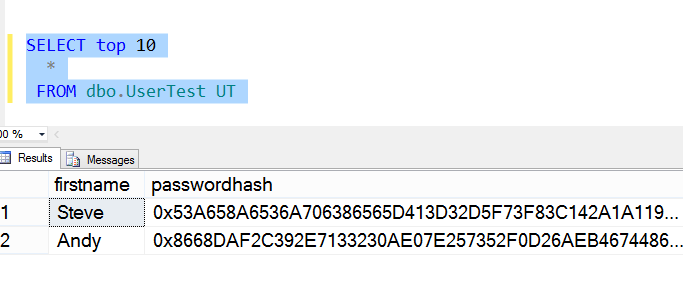
    Here’s the data in the table.

    pwd3

    However, the hacker, Andy,  doesn’t need to decode the password. Imagine that the hacker creates his own account, which is probably a low level account. However the hacker runs code like this, substituting different accounts for “Steve” until a privileged account is found.

    pwd4

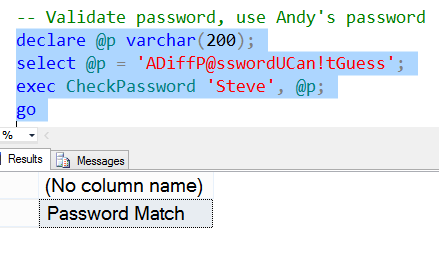
    Now the attacker does this. They use my (Steve’s) privileged account, with their password:

    pwd5

    The hacker (Andy), can now log in as Steve using his password. Any rights that are assigned to Steve are available for Andy.

    We have an attack without decryption.

    This is one reason that SQL Injection is a big problem in applications, especially those that implement some type of their own security. Solving this is slightly tricky, and I’ll talk about it in another post.

    One side note, the only way this is usually detected is if Steve logs in with his password. He’ll see this:

    pwd6

    Even then, unless Steve suspects an attack, he might write this off to a mistyped password, try multiple times and eventually reset his password without a second thought.

  • T-SQL Tricks – Customizing SSMS Templates with Parameters

    I wrote briefly about templates in Management Studio (SSMS), and showed the default templates that come with SQL Server. I now want to customize some of the templates in a way that makes sense for me.

    If I grab a script I use often, like this one, I can make it generic.

    SELECT
            username
        ,   topic
        ,   COUNT(replies)
        FROM
            users u
            INNER JOIN posts p
            ON u.userid = p.userid
        WHERE
            u.email = 'bob@bob.com'
        GROUP BY
            username
        ,   topic;

    I run this often to check things, but I rarely need Bob’s information. Instead, I’ll often get different users, and sometimes I need dates. I can add these changes:

    SELECT
            username
        ,   topic
        ,   COUNT(replies)
        FROM
            users u
            INNER JOIN posts p
            ON u.userid = p.userid
        WHERE
            u.email = '<email, varchar, bob@bob.com>'
        AND startdate > <startdate, datetime, dateadd(m, -1, getdate())> 
        AND enddate <lessthan, char <> <enddate, datetime, getdate()>
        GROUP BY
            username
        ,   topic;

    I’ve changed some of my variable items to parameters. I do this by taking an item that I want to make variable, like “bob@bob.com” and changing it to “<email, varchar, bob@bob.com>”.

    The format for a template is:

    • name
    • type
    • default

    all of which are placed inside angled brackets and separated by commas. Now when I click CTRL+Shift+M, I get this:

    templates16

    I can click OK for the defaults to be placed in the script, or I can enter new ones. Either way, I save time and effort with saved queries, but saved as templates, not queries I need to edit constantly.

    UPDATE: Someone pointed out that the less than, the <, was . I got this from Stack Overflow, which had a good solution. I made the < a parameter as well.

  • Always Canary

    Deploying software is hard. Despite decades of experience working to update software smoothly, it seems that many of us tasked with that responsibility find ourselves nervous about making changes. This is especially true for database changes, where we must not only update the schema and code, but we must preserve the data as well. If only we could drop and recreate the database during every deployment.

    One of the ways in which you can make changes in a live environment is to have a second system already in place and running. With a second system available, you can stop the secondary system from handling user requests, make changes, test them, and if things are working well, you can have users connect to the updated system while you take the one one offline and perform your updates there.

    This is the same process that many people use to patch clustered database servers, though the “rolling upgrades” are usually done for patches from Microsoft. It would be great if we could easily apply this same system for our schema upgrades. Deploy our changes to the passive node, have the application able to connect to this node through some switch, test the changes, and if things are working, switch users over. The problem is that our databases on the passive node aren’t live.

    Really the ability to deploy database changes to a live system and perform checks requires a strong architecture in both the database and application to support this. Your code must be able to handle additions to the database objects without breaking. The use of feature flags, turning functionality on and off with switches, allows certain users to test new features without most clients being aware of the changes.

    It’s a pattern that more and more software companies are using when they want to deploy changes rapidly to systems for limited numbers of users. However it’s not a design pattern that is widely used. I hope we get more sample applications and reference architectures in the future that will help developers and DBAs code more robust and resilient applications, allowing changes to be deployed live without affecting every user.

    Steve Jones

    The Voice of the DBA Podcast

    Listen to the MP3 Audio ( 2.5MB) podcast or subscribe to the feed at iTunes and LibSyn. feed