Author: way0utwest

  • A Break from Databases

    What do you recommend from Oscar season? I'll say The Descendents

    Last weekend I was all alone Sunday night. Monday was a holiday for me, my wife and kids were out of town, and it was too quiet in the house, so I decided to go see a movie. Safe House was my choice, and it was one I enjoyed during a two hour break from life. I don’t go see too many movies a year, outside of the kid-related ones, but this was fun.

    This Sunday the 84th Annual Academy Awards take place, and while I won’t be watching them, it’s always interesting to me to see which movies and people win awards. A winning actor or actress might entice me to go see a future movie that ordinarily wouldn’t capture my interest. It’s always nice to see talented people working their craft, at least to me.

    We tend to work hard in Information Technology, and it’s nice to get a break. With that in mind, I thought we might take a break this Friday from talking about work, and talk about leisure. The poll this week is:

    Which movies from the 2011/2012 Oscar season would you recommend?

    These don’t have to be movies that are up for awards, just anything released from last February until now. What did you like, or what would you recommend the rest of us avoid? Let us know this Friday which films might provide a nice escape from the pressures and stress of reality.

    Steve Jones


    The Voice of the DBA Podcasts

    We publish three versions of the podcast each day for you to enjoy.

  • No MVP Summit for Me

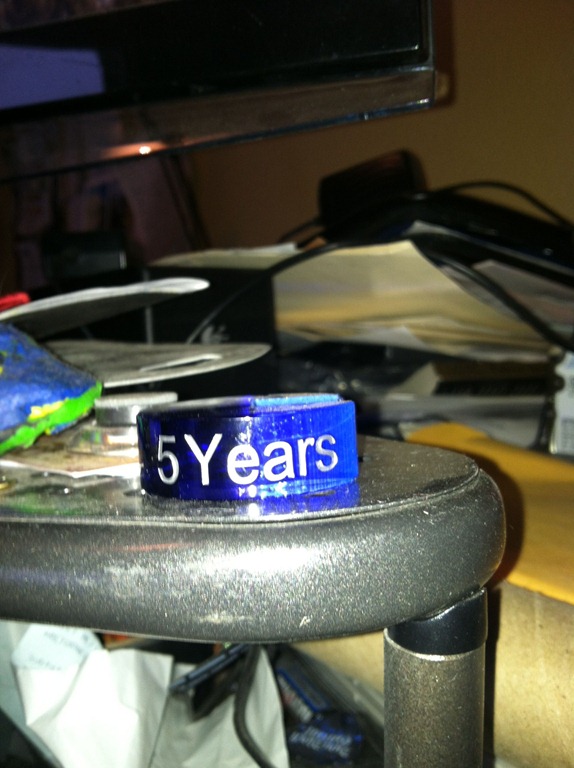
    Photo Feb 23, 5 11 56 PMOn the corner of my rather messy desk is little recognition item in the image to the right. It’s a 5 year marker, representing my 5 years as a Microsoft MVP. I’m honored that they think I’m doing enough for the community to be recognized.

    Next week is the annual MVP Summit in Redmond, where MVPs from all over the world get together and have a chance to see advance presentations from Microsoft developers, and get the chance to get to know each other, and the staff at Microsoft.

    From past experience, it can be a lot of fun, and it’s a good time to network and bond. The presentations can be hit or miss, but overall it’s been an enjoyable experience when I’ve gone (3 times). I’ve learned things, and getting to know someone on the SQL Server team face to face is invaluable. Those contacts have been helpful when trying to work with Microsoft or get more information about topics that I present to the community.

    I’m not going this year, and a little disappointed in that. Despite the fact that it’s a good experience, it’s not worth the time to me right now. My wife has been traveling almost every week this year (12 trips so far) and I miss her. Travel for work is stressful, even when you’re not the one traveling, and it feels very chaotic at the ranch.

    I’ve also got a lot of prep still to do for future presentations coming up at Dev Connections, SQL in the City, and more. I’ve still got more to learn about SQL Server 2012, and time is getting short.

    I’ll miss seeing friends in Redmond, but I don’t regret not going. Even if I had the time, I would have skipped the Summit in favor of a week with SQL Skills in Tampa. I know I’d learn more, and definitely would prefer the weather there.

  • Future Virtual Machines

    Vritualization madness can be very handy

    I recently virtualized my Windows Home Server. I have had multiple boot drive failures, and I was getting tired of reinstalling the product. So I installed VirtualBox, then created a series of virtual disk drives and set my home server back up. It’s built on RAID 1 drives, so I’m hoping that it will last a long time, and even migrate to newer hardware over time.

    On my laptop and desktop, I use VMWare to build test machines, and then use them for various versions of SQL Server in presentations. I can easily make changes in a VM on the desktop, copy the VHD files to my laptop, and then have the same environment ready when I deliver a presentation. Over the last ten years, virtualization has become a fantastic test environment for me and I can’t imagine doing without it. On the server side, I haven’t even noticed the migration of the SQLServerCentral servers from physical hosts to virtual machines, and they have performed very well.

    However in one sense, nothing has changed for me on the server side. Our VMs are over provisioned, to prevent issues with the performance, just as they often were with physical machines. I suspect that is the case with many other virtual SQL Servers out there in production. However I’m not sure it’s a bad way to deploy VMs for a database server, especially with hardware so cheap.

    I ran across a series of reports on the hypervisors of the future, which talks about the changes from the various vendors, and has a large section devoted to desktop hypervisors. It’s an interesting read, though quite a bit of the information is related to open source products. On the Windows 8 front, the Hyper-V changes look good, but I worry that licensing might prevent most of us from taking advantage of the enhancements.

    I find virtualization to be an amazing way to get more work done on a desktop, in a very stable manner. I can test software in a VM and then remove it, or delete the host if the software causes issues. I can also simulate a large amount of hardware with much less effort than in the past. I urge you to try some virtualization software and experiment with the capabilities. Whether you build experience by working with software you can’t install elsewhere, or just learn some of the capabilities of the virtualization software, it will help you at some point in your career. I only expect there to be more and more VM deployment in all companies over the next decade.

    Steve Jones

  • Checking Your Service Account with T-SQL

    Somehow this slipped by me, but there were some new DMVs added in SQL Server 2008 R2 SP1. I suspect my test machines were mostly SQL Server 2008 or SQL Server 2012, and I hadn’t been paying attention to the changes in SP1.

    You can now use T-SQL to check for services information, as well as registry information, without using extended stored procedures or any hacks of xp_cmdshell. There are two new DMVs:

    These were not present in the RTM of SQL Server 2008 R2, but after installing SP1, they appear. The KB article for SQL Server 2008 R2 SP1 includes a note that new trace templates for Profiler are included, but I did not see a note about these two DMVs.

    So much for not adding features in Service Packs.

    In any case, you can query the sys.dm_server_services for service account information. You will get the service name, the startup type, the account, and more.

    If you aren’t a Windows administrator on your SQL Server boxes, you should still be able to get information regarding the services from this DMV as long as you have VIEW SERVER STATE permission.