Author: way0utwest

  • The Programming Languages We Use

    Many of you reading this probably work primarily in SQL. Even if you are a developer whose main language is something else, you write a lot of SQL. Even if you have an ORM writing the SQL that goes into production, I bet a lot of you are writing queries against a database to check that the data coming back in your application is correct.

    As for me, I mostly work in SQL, with PowerShell and Python being second and third. I tried R for a while, but I think Python does everything R can do and it’s much cleaner. I find R very cumbersome. I rarely write C# or experiment with anything else, but that’s the nature of my job. PowerShell is important, as I do a bunch of DevOps and PoSh is a good choice to work with on the command line for gluing processes together.

    There was a set of the top articles on programming languages from 2022 that I saw recently. I found it interesting to see what was popular. The top one was about Python being the most popular, but it shouldn’t be. This one feels like clickbait, and I find many of the conclusions not making an argument against python in a meaningful way.

    There are some other links on the “hotness” of various languages. I think these are clicked on as many developers are just curious about what others are doing, and what they might experiment with. While I like curiosity and experimentation, I do think that many of our important systems in organizations need to be built with mainstream technologies. Support and staffing are a challenge, and while Golang might be great, finding people to read and code in it is hard. I don’t know how to balance the growth of new tech with the safety of old tech, but I wouldn’t stray too far from the mainstream for anything important.

    I do find it interesting that COBOL makes the list. I know there are still lots of COBOL systems, and while there aren’t a ton of jobs, there are jobs and little competition. If I were 10-15 years younger, this would be tempting. Of course, I’d have to be willing to adapt to the jobs, but it is tempting. I know a few people making well into the six figures because of COBOL jobs.

    It’s nice to see SQL is one of the top 10 languages in use, according to this survey.. It was #9 in 2021 and #8 in 2022. I don’t know it grew in popularity so much as assembly declined compared to other skills. I certainly can’t see SQL going away, but it’s not as popular, clickbait-y, or exciting as other languages. Instead, it’s a core, required skill for any serious software development. Whether you use relational or NoSQL databases, likely you need some SQL skills.

    Steve Jones

    Listen to the podcast at Libsyn, Stitcher, Spotify, or iTunes.

  • Daily Coping 13 Jan 2023

    Today’s coping tip is to take five minutes to sit still and breathe.

    Sounds simple. I find this to be very challenging. If I’m just sitting here, why am I now getting something done? I could be productive during this five minutes.

    I struggle to do this, but I’m taking this time to do this. It’s a few days earlier in the week, and I’m at a customer site for a bit of work. During the time someone else was working with the customer, I took five minutes to sit in the lobby of as building. I set a timer and put my phone in lap. I then sat, looked at the fountain for a bit, closed my eyes a bit, and tried to just sit.

    It took a few minutes to relax. I kept thinking about things I needed to do, reflect on the customer visit, and more. After a bit, I could quiet my mind and just relax.

    It was nice, though I still felt like I could have been productive during that five minutes. Clearly I need to practice this more.

    I started to add a daily coping tip to the SQL Server Central newsletter and to the Community Circle, which is helping me deal with the issues in the world. I’m adding my responses for each day here. All my coping tips are under this tag.

  • Daily Coping 12 Jan 2023

    Today’s coping tip is to write a list of things you feel grateful for and why.

    1. My wife – our relationship continues to grow, and I cherish this after more than 27 years.
    2. Health – no major issues for me
    3. Finances – secure enough to not worry, with relatively minor stresses over expenses.
    4. Children – healthy and doing well in life. I’m proud of them
    5. Coaching – I love working with kids and am grateful for the chance to do so.
    6. Animals – The dogs, cats, and horses enrich my life. I’m grateful, even when I’m annoyed by something.

    There is plenty more, but this is a short list.

    I started to add a daily coping tip to the SQL Server Central newsletter and to the Community Circle, which is helping me deal with the issues in the world. I’m adding my responses for each day here. All my coping tips are under this tag.

  • Getting Started Connecting to a Database with Flyway

    In a previous post, I got Flyway installed as a CLI utility (command line interface). This post will look at the first connection to a database.

    If you need to install Flyway on Windows, see my previous post.

    Concepts

    Flyway is a command line executable that takes various parameters to control what it does. Essentially, these are command verbs and decide what action is running. The previous post looked at the version command.

    There are also parameters that can be included before the command. There are lots of parameters.

    However, much of the way Flyway works is controlled by the flyway.conf file, which is inside a conf folder where you installed Flyway. If this file is found in the current folder, then Flyway will use configuration parameters from this file.

    Note, the inline parameters should override those in the conf file.

    Configuration

    I find it much easier to use the configuration files. While you can specify this with the configFiles parameter, I often ensure that I run Flyway from within a particular folder that has a flyway.conf file. This has worked well.

    Copy your flyway.conf from your install folder (under conf) to a new folder where you will experiment. For me, I set up a new folder called “smoketests” where I’m doing a little experimenting. As you can see, I only have two files in here:

    2022-12-27 11_06_23-cmd

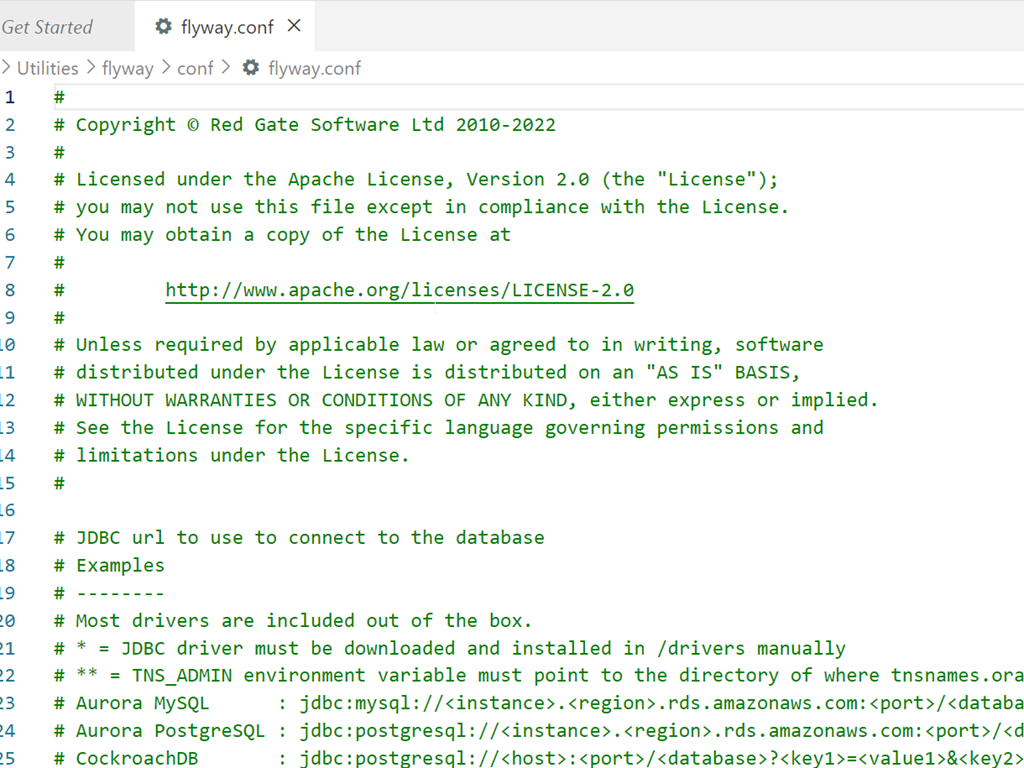
    The default conf file can get a little confusing. It’s full of many options, which are somewhat documented. My default looks like this when I open it:

    2022-12-27 11_07_28-flyway.conf - flywaysimpletalk - Visual Studio Code

    Most everything is commented out, which makes it harder to figure out what to do.

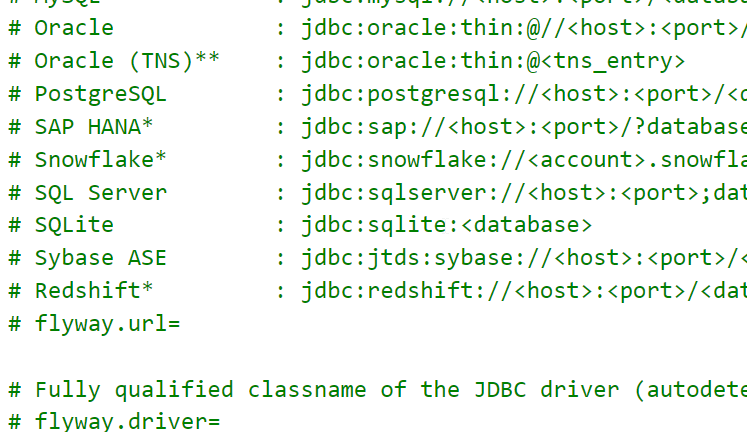
    The thing to remember is that you uncomment those settings that you want to set. For example, the drivers section is extensive. Some of theses are included, some you need to download. Since this are all Java based JDBC drivers, it can look strange to a SQL Server person.

    2022-12-27 11_15_29-flyway.conf - flywaysimpletalk - Visual Studio Code

    The thing that gets lost in here for me is that I don’t comment out the line that starts with SQL Server. Instead, I need to copy and paste the jdbc part to the flyway.url= line. My valid connection would look like this:

    2022-12-27 11_17_26-● flyway.conf - flywaysimpletalk - Visual Studio Code

    Let’s try connecting with the info command. When I run Flyway info, I get asked for a user and password. Annoying, but not that bad. However, I then get an error:

    2022-12-27 11_19_53-cmd

    This is a secure connection error. I do have TCP/IP enabled, which I know Java needs. This is more about a change the SQL Server team made, which requires secure connections.

    Let’s add this to our connection string: ;trustServerCertificate=true

    This gives me this string:

    flyway.url=jdbc:sqlserver://aristotle\SQL2022;databaseName=FWPOC_1_Dev;trustServerCertificate=true

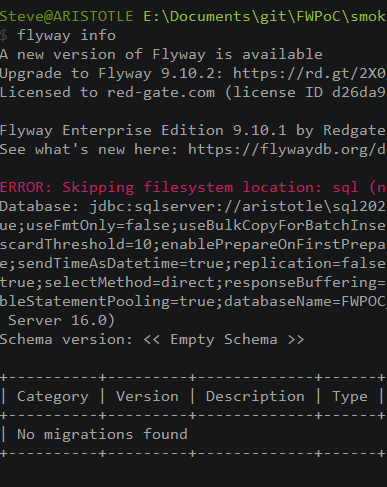
    Now when I connect, things work. I still have to enter a name and password, but I can connect and I get back something.

    2022-12-27 11_22_56-cmd

    I see some info on flyway versions. There’s a new version available. I’m also licensed for Flyway Enterprise.

    Then I see the filesystem folder, sql, is missing. This is where the migrations are stored, so if I want to add migration scripts, I need to add a folder.

    Next, I get the complete connection string. Lots of options here, of which most are defaults.

    Then I see the schema is empty. Flyway works off schemas, which is what many platforms require. We get lazy in SQL Server and often just use dbo, but most other platforms want schemas set up.

    Finally I see that there are no migrations run in this database, and I see an empty status table.

    That’s a lot, and I connected to the database. Nothing changed in the database, and no flyway_schema_history table was added. This essentially let me know Flyway was working.

    The last thing I’ll do is add this to my connection string: integratedSecurity=true

    This lets get away from the name and password on Windows, but using Windows Auth for SQL Server.

    2022-12-27 11_30_50-cmd

    That’s it. I’ll keep working on different commands in Flyway and getting to know the CLI.