Author: way0utwest

  • The 2019 Techie Gifts

    It’s Black Friday in the US, and I assume, most of the world. With the advent of so many online options, I’m not sure how big a day this is for many people, but there certainly are many deals from local retailers. While I do like to buy local, I don’t plan on doing any shopping today. It’s just too crowded and busy for me. Likely a day of chores around the ranch for me.

    There have been a number of Black Friday deals already going on for days. Brent Ozar has had a sale on training all month. Pluralsight had one last year, and I assume another coming. I expect there are other deals as well, but this week I wanted to talk about a few items that I use already or need to purchase. It’s the season for giving, so perhaps this will give you some ideas for the tech friends in your life.

    I have a couple wireless charging pads I use regularly: one on my desk and one by the bed. It’s fantastic to be able to pick up or put down my phone without wires. I also have quite a few long Anker cords for my phone (here’s a USB-C and a lightning one). The more I use a 6ft cable in different places, the more I appreciate the length. Especially when charging in a public place. To help, I also have a travel adapter with USB plugs. I’ve used this often in the US when I need to share an outlet with someone.

    I love music, and while I get by with cheap headphones often, I am tempted by a better set of noise cancelling ones. Maybe my wife will read this and get me something. She does carry a JBL speaker with us on trips, which we often use in our hotel room for some nice ambiance. I also carry around a wireless HDMI adapter, which comes in handy on the road, for work and pleasure.

    I’m about ready to get a new laptop, and I’ll likely go with an HP Spectre again, though the Lenovo X1 and the Dell XPS both look really nice. I’m still debating, and if there’s a good sale this weekend, I might grab one. These days I think most laptops will do the job for me, but I like the small, lightweight ones for traveling. I’ve had no shortage of adapters, but I am thinking to get a small USB-C hub that might work well for a variety of tasks.

    I’ve tended to stay away from any of the voice powered devices, mostly for privacy reasons. I have an older tablet, but most of the time my phone or laptop are what I use, so I don’t have a need there, but the new iPads look really nice, as do the Galaxy’s. I have a smart watch, and I love it. I certainly see the appeal of the Apple Watch or the Galaxy Watch. It’s on my list to pull down my data and start playing, something every data pro might enjoy.

    There’s a lot more to the holiday season than shopping, but since it’s a big part of today, I wanted to list a few items that I’ve enjoyed, and encourage you to add more in the discussion. Perhaps you’ll give someone a good idea for a gift, or an item to put on their list.

    Disclosure: These links are affiliate links for me, and I get a small commission from any purchases.

    Steve Jones

    Listen to the podcast at Libsyn, Stitcher or iTunes.

  • How Serverless is Working in Azure SQL Database

    When Azure SQL Database introduced the serverless option, I decided to try it. I moved one of my databases to the tier, though I had to move to a vCore model instead of the basic DTU setup. I was nervous, but I did it back in May.

    Since then, I’ve only used the database sparingly, so I haven’t noticed much change, but the billing is lower. In October, the first database I moved over here cost me US$0.35. In fact, the last three months, this has cost me US$6.90

    2019-11-25 11_18_07-Cost Management_ VS_MSDN - Cost analysis - Microsoft Azure

    Let’s compare that with the 3 months until I went serverless. When I look at this, I see US$15.45, which is what I’d expect. About $5 a month.

    2019-11-25 11_20_33-Cost Management_ VS_MSDN - Cost analysis - Microsoft Azure

    On a low usage database, this has certainly saved me money. Would it be different if I used this more? That is harder to determine, and I need to run an experiment with something I use more often. I’ve tried to manage my Azure credits wisely, and with making a few changes across the last six months, I was slightly worried about the cost of this vCore system.

    Last month I did adjust this down to a 1 hour delay before shutting down the system, so if you had a normal vCore database and could cut down on usage during some periods, this certainly might help you.

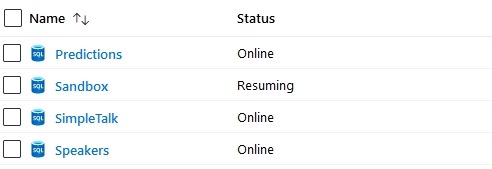
    The downside? Today I spun up a db, and saw this for about 15 minutes.

    2019-11-25 10_59_39-SQL databases - Microsoft Azure

    Now great, as this caused me SSMS issues as I tried to connect. More an SSMS issue, but still annoying.

    So far serverless has worked well for some test databases, which is where I think is shines.

  • The Pyramid of Data

    Data is an important part of our world, and arguably the most important asset in computing. All the rest of the devices, platforms, and technologies we use are designed to work with data, by manipulating, storing, accessing, and presenting data in new ways. We need devices and operating systems to host software, and applications to work with data, but the data is the key to fuel for every engine.

    I see there being a pyramid of data, with various technologies that are used to store and work with data. This is roughly how I see things, with various sources that store data as the foundation, and then systems to summarize and aggregate data, a new layer of analytics with Data Science, and the ever present ways of interacting with the data in order to use it for insights and decisions.

    (SSRS) (Visualizations) (Excel) (Power BI)
    (Data Science) (Artificial Intelligence) (Machine Learning)
    (Data Warehouses) (Data Marts) (ETL) (Data Streams) (Linked Data Sources)
    (SQL Server) (Oracle) (CosmosDB) (ElasticSearch) (Redis) (HDFS) (MongoDB) (PostgreSQL)

    That’s been my traditional view of the data pyramid, but cloud computing, the orchestration of containers, and better ways of analyzing data without moving it lead me to think that this is becoming more of a mesh inside the pyramid that multiplexes connections between layers. While I do think AI and ML systems will become more and more useful to a wider variety of applications and organizations, I do think the adoption will move more slowly than the hype suggests. Likewise, I think containers will grow slowly as there is a need to rearchitect many applications.

    Certainly cloud computing is becoming more and more commonplace. I especially am starting to see more smaller organizations taking advantage of cloud platforms that build SaaS, not for large scales, but for very small scale organizations. The platforms themselves are constantly lowering the cost of engaging with the cloud at small scales, and making it more feasible for application developers to deliver tremendous value and capabilities to very small organizations that aren’t, and don’t want to be, software companies. They just need services and capabilities without a lot of effort. The Power platform from Microsoft is likely to accelerate this with easy development for any semi-skilled software developer.

    Steve Jones

    Listen to the podcast at Libsyn, Stitcher or iTunes.

  • Cleaning up the [NOT] NULL for Columns with SQL Prompt 10

    SQL Prompt 10 is out and there are a few interesting things that have changed in the product. One of these is the Quick Fixes, inspired by some other IDEs that help developers learn to fix their code.

    This post looks at one of the most common things developers ignore, and I’m guilt of this in many of my demos and code.

    Defining Columns

    When I create a table, I often will write some code like this:

    CREATE TABLE dbo.EventSchedule
    ( EventScheduleKey INT IDENTITY(1,1)
    , ScheduleName VARCHAR(100)
    , StartTime DATETIME2
    , EndTime DATETIME2
    , Active BIT)
    GO

    This looks fine, and it works. However, it’s a SQL code smell, and it’s something that you should avoid. The problem with this code, is that I haven’t specified the nullability setting for the columns. I am assuming a default for my database, which has worked for me, but as I work with a more diverse set of customers, I know this isn’t a good practice.

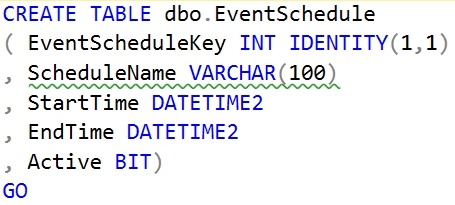
    SQL Prompt 10 actually catches this. If I screenshot the code, I can see the green squiggly that notes there’s an issue.

    2019-11-13 15_00_11-SQLQuery3.sql - Plato_SQL2017.sandbox (PLATO_Steve (60))_ - Microsoft SQL Server

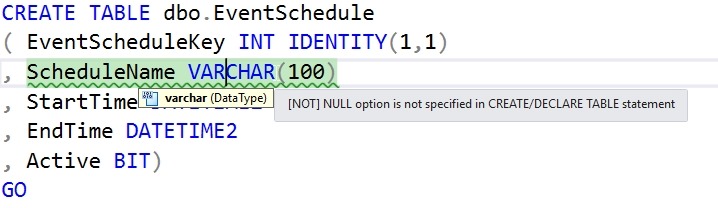
    That’s a code analysis item that our software has flagged. If I hover over the area, I see this:

    2019-11-13 15_02_49-SQLQuery3.sql - Plato_SQL2017.sandbox (PLATO_Steve (60))_ - Microsoft SQL Server

    That’s good, but if I’m a junior developer, what do I do? What does this mean? One of the very nice things with SQL Prompt 10 is that we provide some guidance, similar to what Visual Studio does.

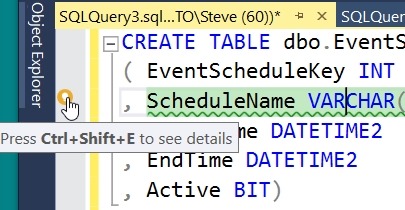
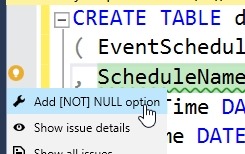
    Look on the left of the image below. I’ve put the cursor on the line with the green squiggly. There’s a little yellow light bulb in the margin. This is a note that we provide a fix here. You can click the keyboard or the yellow icon.

    2019-11-13 15_07_30-SQLQuery3.sql - Plato_SQL2017.sandbox (PLATO_Steve (60))_ - Microsoft SQL Server

    When you do this, you will see that there a few choices. I can fix this (the wrench or spanner icon), get the details for this code issue (the eye icon) or see all issues in my code.

    2019-11-13 15_07_42-SQLQuery3.sql - Plato_SQL2017.sandbox (PLATO_Steve (60))_ - Microsoft SQL Server

    If I click the “fix” icon, I’ll see this:

    2019-11-13 15_07_49-SQLQuery3.sql - Plato_SQL2017.sandbox (PLATO_Steve (60))_ - Microsoft SQL Server

    NOT NULL has been added, but the NOT is highlighted. I can hit <enter> and this will stay there, or hit Backspace and remove the NOT. Either way, I get the code cleaned up.

    At least some of it. You see the next green squiggly on the line below.

    SQL Prompt continues to be one of the best productivity tools for developers working with SQL Server. If you have it, look for the quick fixes, and code smell squiggly lines. If you haven’t, download a trial today and see how it will help you become a better T-SQL developer.