Author: way0utwest

  • The Pyramid of Data

    Data is an important part of our world, and arguably the most important asset in computing. All the rest of the devices, platforms, and technologies we use are designed to work with data, by manipulating, storing, accessing, and presenting data in new ways. We need devices and operating systems to host software, and applications to work with data, but the data is the key to fuel for every engine.

    I see there being a pyramid of data, with various technologies that are used to store and work with data. This is roughly how I see things, with various sources that store data as the foundation, and then systems to summarize and aggregate data, a new layer of analytics with Data Science, and the ever present ways of interacting with the data in order to use it for insights and decisions.

    (SSRS) (Visualizations) (Excel) (Power BI)
    (Data Science) (Artificial Intelligence) (Machine Learning)
    (Data Warehouses) (Data Marts) (ETL) (Data Streams) (Linked Data Sources)
    (SQL Server) (Oracle) (CosmosDB) (ElasticSearch) (Redis) (HDFS) (MongoDB) (PostgreSQL)

    That’s been my traditional view of the data pyramid, but cloud computing, the orchestration of containers, and better ways of analyzing data without moving it lead me to think that this is becoming more of a mesh inside the pyramid that multiplexes connections between layers. While I do think AI and ML systems will become more and more useful to a wider variety of applications and organizations, I do think the adoption will move more slowly than the hype suggests. Likewise, I think containers will grow slowly as there is a need to rearchitect many applications.

    Certainly cloud computing is becoming more and more commonplace. I especially am starting to see more smaller organizations taking advantage of cloud platforms that build SaaS, not for large scales, but for very small scale organizations. The platforms themselves are constantly lowering the cost of engaging with the cloud at small scales, and making it more feasible for application developers to deliver tremendous value and capabilities to very small organizations that aren’t, and don’t want to be, software companies. They just need services and capabilities without a lot of effort. The Power platform from Microsoft is likely to accelerate this with easy development for any semi-skilled software developer.

    Steve Jones

    Listen to the podcast at Libsyn, Stitcher or iTunes.
  • Cleaning up the [NOT] NULL for Columns with SQL Prompt 10

    SQL Prompt 10 is out and there are a few interesting things that have changed in the product. One of these is the Quick Fixes, inspired by some other IDEs that help developers learn to fix their code.

    This post looks at one of the most common things developers ignore, and I’m guilt of this in many of my demos and code.

    Defining Columns

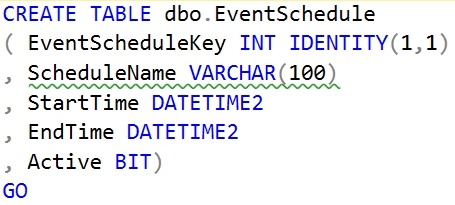
    When I create a table, I often will write some code like this:

    CREATE TABLE dbo.EventSchedule
    ( EventScheduleKey INT IDENTITY(1,1)
    , ScheduleName VARCHAR(100)
    , StartTime DATETIME2
    , EndTime DATETIME2
    , Active BIT)
    GO

    This looks fine, and it works. However, it’s a SQL code smell, and it’s something that you should avoid. The problem with this code, is that I haven’t specified the nullability setting for the columns. I am assuming a default for my database, which has worked for me, but as I work with a more diverse set of customers, I know this isn’t a good practice.

    SQL Prompt 10 actually catches this. If I screenshot the code, I can see the green squiggly that notes there’s an issue.

    2019-11-13 15_00_11-SQLQuery3.sql - Plato_SQL2017.sandbox (PLATO_Steve (60))_ - Microsoft SQL Server

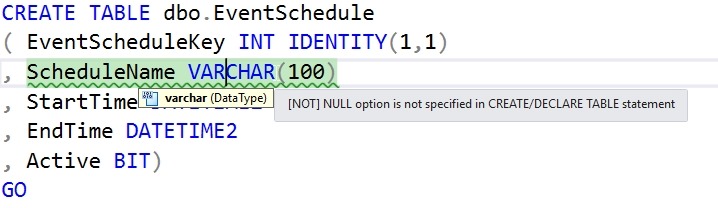
    That’s a code analysis item that our software has flagged. If I hover over the area, I see this:

    2019-11-13 15_02_49-SQLQuery3.sql - Plato_SQL2017.sandbox (PLATO_Steve (60))_ - Microsoft SQL Server

    That’s good, but if I’m a junior developer, what do I do? What does this mean? One of the very nice things with SQL Prompt 10 is that we provide some guidance, similar to what Visual Studio does.

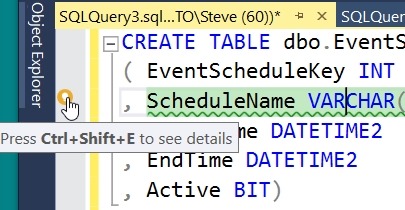
    Look on the left of the image below. I’ve put the cursor on the line with the green squiggly. There’s a little yellow light bulb in the margin. This is a note that we provide a fix here. You can click the keyboard or the yellow icon.

    2019-11-13 15_07_30-SQLQuery3.sql - Plato_SQL2017.sandbox (PLATO_Steve (60))_ - Microsoft SQL Server

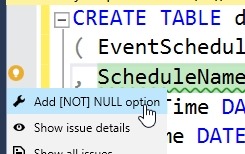
    When you do this, you will see that there a few choices. I can fix this (the wrench or spanner icon), get the details for this code issue (the eye icon) or see all issues in my code.

    2019-11-13 15_07_42-SQLQuery3.sql - Plato_SQL2017.sandbox (PLATO_Steve (60))_ - Microsoft SQL Server

    If I click the “fix” icon, I’ll see this:

    2019-11-13 15_07_49-SQLQuery3.sql - Plato_SQL2017.sandbox (PLATO_Steve (60))_ - Microsoft SQL Server

    NOT NULL has been added, but the NOT is highlighted. I can hit <enter> and this will stay there, or hit Backspace and remove the NOT. Either way, I get the code cleaned up.

    At least some of it. You see the next green squiggly on the line below.

    SQL Prompt continues to be one of the best productivity tools for developers working with SQL Server. If you have it, look for the quick fixes, and code smell squiggly lines. If you haven’t, download a trial today and see how it will help you become a better T-SQL developer.

  • DR Priority

    Those of us that act as DBAs or sysadmins for database systems know that DR is a point of emphasis for us. We usually spend plenty of time ensuring backups are working and practicing restores. The automated scripts and processes that people use are some of the most popular and discussed topics on SQLServerCentral.

    However, we can’t ensure every system is protected at the same level. It’s not cost effective to cluster or build AGs with hot standbys, or even warm standbys, for many databases. Often our organization will ensure some are ready to go and others will have to be dealt with if there are issues.

    William Durkin noticed recently that O’Reilly hadn’t prepared well enough for their learning site. They were affected by the fires and power outages in California and since they host some of their systems in an on-premises data center, there were issues. Certainly we might think they hadn’t prepared well for DR, and perhaps this is a fair view of their service, but perhaps they made the decision not to built out an expensive DR environment for a service that can tolerate some downtime.

    This week, I wonder how some of you look at the systems you support. Perhaps you are the person that has to make decisions, or perhaps your organization doesn’t fund DR well. I’m wondering, how do you decide which systems don’t get enough DR support?

    Certainly there are inexpensive, perhaps crafty ways that some people might plan for DR. I know I’ve cobbled together systems from spare parts to use for testing restores, with the idea that the hardware might need to be an emergency DR server for a single system or two in the event of an incident. If you’ve got ideas on how to be prepared even without organizational support, let us know today.

    Steve Jones

    Listen to the podcast at Libsyn, Stitcher or iTunes.
  • Data Masker Reads Column Classificiations

    One of the newer features in Data Masker for SQL Server is the ability to read column classifications and suggest rules to clean the data. I decided to give this a try and see how things work.

    Importing Column Classifications

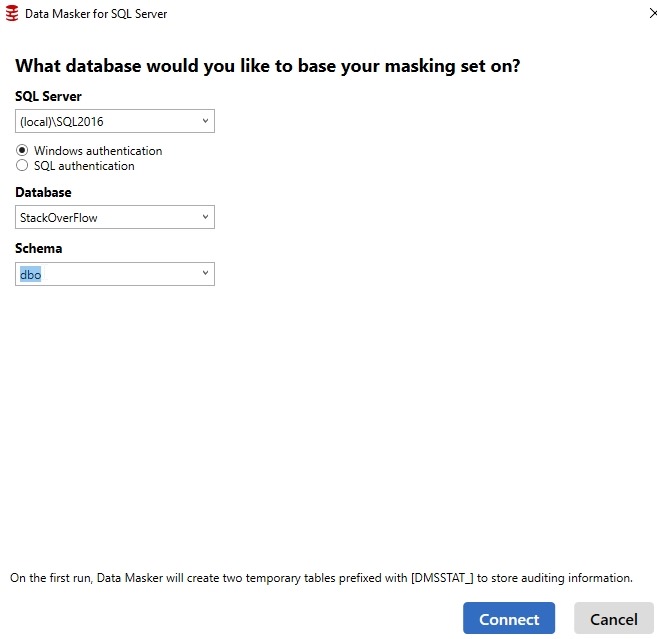
    I created a new Masking Set, and I do like the new connection dialog. It works well makes it easy for me to focus my masking on a schema.

    2019-11-13 10_49_03-Data Masker for SQL Server

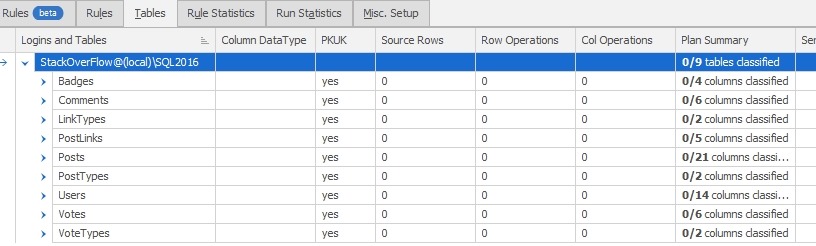
    From here, I went to the Tables tab to check on the classifications. I didn’t see any, which felt slightly strange.

    2019-11-13 11_01_39-Data Masker for SQL Server

    I went back to SSMS and double checked my work. I do have things classified.

    2019-11-13 10_47_58-Data Classification - StackOverFlow - Microsoft SQL Server Management Studio

    After a quick reach out to the team, I remembered that a plan is an item you need to create and save. In this case, the feature is importing information from the database. I can then work with it in a plan. To get the data, I click the “Export/Import Plan” button at the bottom of the Tables tab.

    2019-11-13 11_10_57-Data Masker for SQL Server

    This brings me a dialog of the plan details. I can choose to import a plan from a CSV file, or from the SSMS classifications. I’ll choose the latter.

    2019-11-13 11_11_34-Data Masker for SQL Server

    Note: plans are specific to a controller. If I have two controllers, I need to import the plan into both (or all). When I click “Import”, the data is added to my plan. I can see that now there are four columns classified.

    2019-11-13 11_18_37-Data Masker for SQL Server

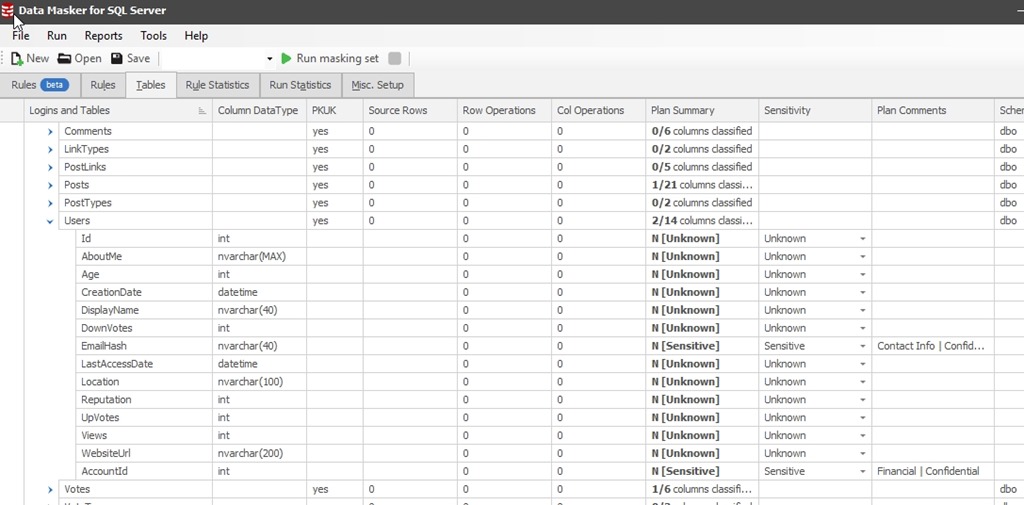
    If I expand one of these nodes, like the Users table, I see that there are columns marked as sensitive and the comment includes the classification. That’s very handy for deciding how to mask the data.

    2019-11-13 11_23_11-Data Masker for SQL Server

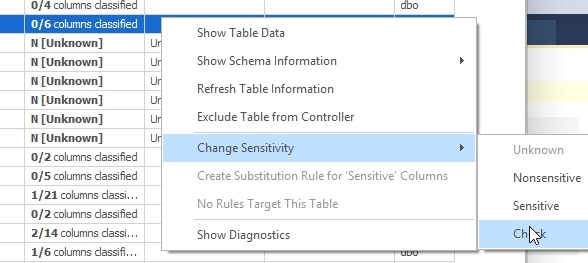
    Another welcome improvement is that I can change my plan sensitivity for all the columns in a table at once. In this case, I’ll right click the Sensitivity column for a table. I can then pick “Check”.

    2019-11-13 11_25_56-

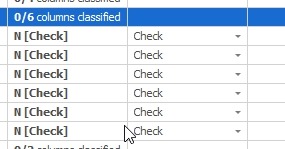
    Once I do this, all columns are set to check for this table.

    2019-11-13 11_26_07-Data Masker for SQL Server

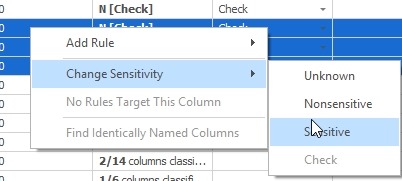
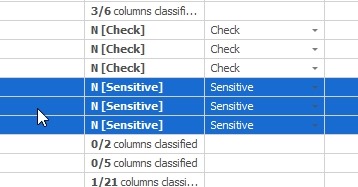
    I can also multi-select columns (with the CTRL key held down) and then right click. In this case, I can pick three and then choose “sensitive”.

    2019-11-13 11_26_53-Data Masker for SQL Server

    They’ll all be set, and I can see that I need to get to work.

    2019-11-13 11_28_35-Data Masker for SQL Server

    Quick Rules

    One other nice thing is that I can create a rule for multiple columns at once. If I have a few selected, I can right click and create a rule. I’ll choose Substitution rule here.

    2019-11-13 11_29_16-

    This brings me up a dialog with the columns already in my rule, and now I can pick the specific customizations I need for each.

    2019-11-13 11_29_24-New Substitution Rule

    It’s a little thing, but it greatly speeds up the process of masking data.

    Give It A Try

    Data Masker is part of SQL Provision, and it’s an amazing tool that allows me to mask data in almost any way I can think of to protect data in non production environments.

    There are some other nice enhancements in this v6.3.13.x release. If you haven’t given Data Masker a try, do so today.