Author: way0utwest

  • Containers, Kubernetes, and SQL Server

    Abstract: Containers and Kubernetes have become buzzwords in the application development world, but how do these technologies fit with SQL Server? This session will discuss the basics of containers and Kubernetes and explain how we can use containers with databases in SQL Server. We will also briefly look at the future of SQL Server with Kubernetes support.

    Level: 100

    Slide Deck: ContainersKubernetesSQLServer.pptx

    Code:  Containers_Kubernetes_SQLServer.zip

    Speaking Events:

  • The Redgate Way

    Recently Matt Hilbert, from Redgate Software, wrote a piece on our blog about our journey to DevOps. It’s a great read, summing up some of the things that we’ve learned in our journey across the last decade. Matt is a great writer, and it’s worth a few minutes of your time to check it out and think about all the things that we’ve been through.

    I’ve known some people at Redgate for 18+ years, and I’ve worked there for 12, so I’ve had the chance to see quite a few changes. When I started, teams worked for long periods of times, in what is really a waterfall methodology. They went through substantial phases of development, testing, and beta releases, with Brad McGehee and myself having plenty of time to learn a product and then know it would be stable for a year or so.

    That slowly started to change, as Matt describes, with teams moving to new methods of building software, experimenting and learning. The Prompt team was one of the most ambitious, working in pair programming and finding ways to release almost on demand. Over time, other teams caught up and built some amazing processes. We even had two teams working on some products, with alternating two week sprint cycles to allow them to release every week. That was an impressive coordination of software development teams.

    Even today, I’m constantly impressed by teams. They aren’t all always rock stars, but they often exceed my expectations. I will see some slowdowns when teams change their people, process, or tooling, but then they will leap forward. The Data Masker team has been impressive lately, with some fantastic productivity improvements being added to the software. I apologized recently for not taking the Data Catalog team seriously for almost a year, but they have done more than I ever imagined with that tool in the last six months.

    We do continue to improve our software development skills at Redgate. We do release often, but really, we try to also improve the quality of our software, improve the skills of our developers, while working to retain talented individuals and help them enjoy their chosen career. We still produce bugs, we never get everything done as fast as sales, marketing, or even me, would like, but I do think that the last ten years has been an incredible growth as set of software development teams. Now our challenge is more closely aligning all teams to work in a loosely coupled, but tightly integrated fashion.

    DevOps is really a better way to build software for most organizations and teams. It often doesn’t change a lot about the actual code we write, but it does get developers, infrastructure staff, and management to rethink how we work, especially how we work together. That’s the hardest part to get through to many customers. This isn’t an install-a-tool-and-things-are-great system. Tools do help, but your attitude, your focus, and your willingness to work as a team are more important.

    Read about our journey. We’ve taken 1,000 steps, but there is more for us to learn, change, and implement as we move forward. Think about how you would want to change things at your company, and maybe pass this along to your manager. It’s not easy, and it might not be quick, but it’s an incredible journey. It’s also very much worth the time and effort you put into it.

    Steve Jones

    Listen to the podcast at Libsyn, Stitcher or iTunes.
  • Setting Certificate Backup Permissions for an Instance–#SQLNewBlogger

    Another post for me that is simple and hopefully serves as an example for people trying to get blogging as #SQLNewBloggers.

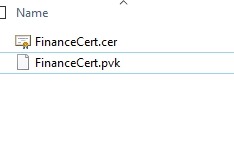
    Recently I was testing some security change, and I made a backup of my certificate from one instance. I did this on a share that I’ll use to move the files to another instance. In this case, I had these files in the folder.

    2019-08-23 14_31_13-SQL

    The problem is that by default, SQL Server locks down permissions, as it should. That means that the other instance couldn’t access the files, as its service account didn’t have permissions.

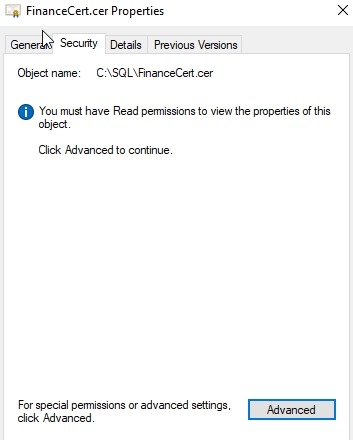
    I fixed this by opening the security tab for the file. I had to do this for each, but I’ll show one here.

    2019-08-23 14_31_22-FinanceCert.cer Properties

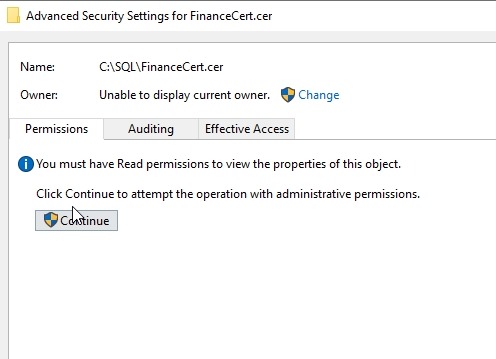
    I clicked “Advanced” to get a more detailed view of permissions.

    2019-08-23 14_31_28-Advanced Security Settings for FinanceCert.cer

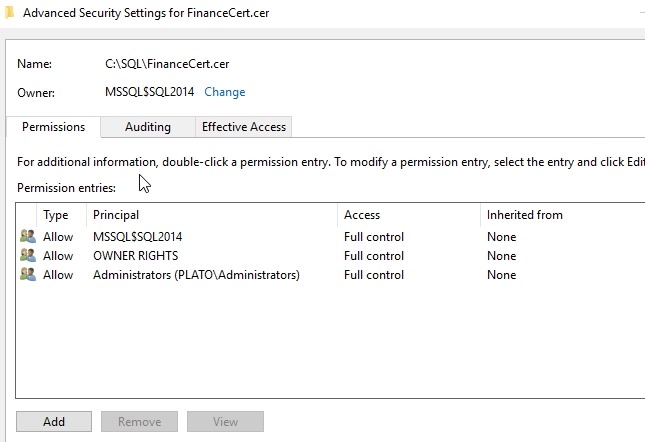
    Again, I really need to approve this view of the security settings. Once I acknowledge the UAC dialog, I can see this:

    2019-08-23 14_31_38-Advanced Security Settings for FinanceCert.cer

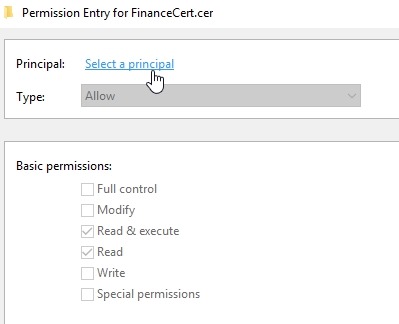
    What I needed to do here was add permissions for another service account. Clicking Add lets me select a principal.

    2019-08-23 14_31_46-Permission Entry for FinanceCert.cer

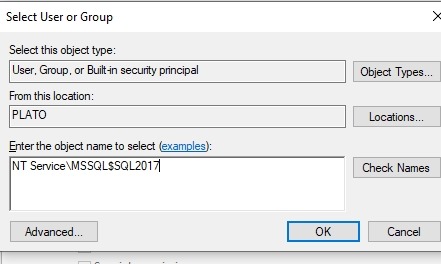
    For a local account, I need to give the “NT Service” prefix to my account, despite this not being shown as part of the service account settings.

    2019-08-23 14_31_57-Permission Entry for FinanceCert.cer

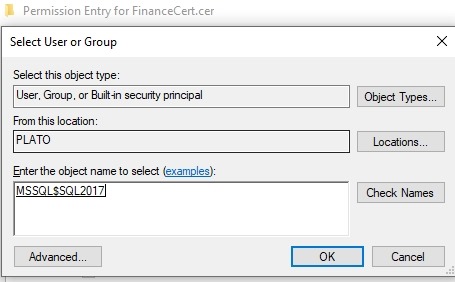
    When you click Check Names, this will shorten. If you enter this short version, it won’t work.

    2019-08-23 14_32_01-Permission Entry for FinanceCert.cer

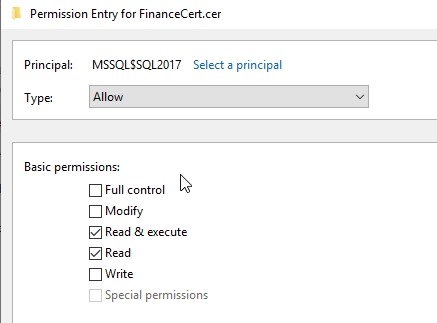
    In my case, this account really just needs Read permissions.

    2019-08-23 14_32_05-Permission Entry for FinanceCert.cer

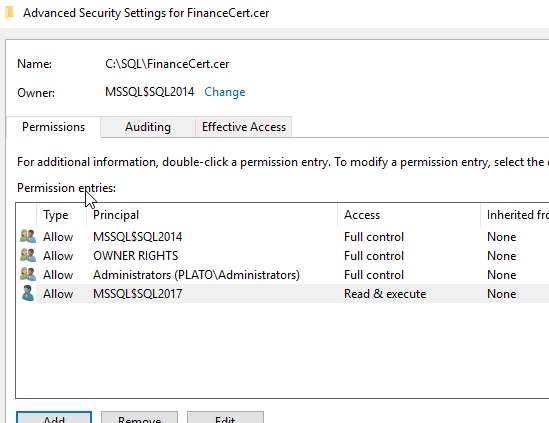
    Click OK, and I see it listed.

    2019-08-23 14_32_10-Advanced Security Settings for FinanceCert.cer

    That’s it. Now my SQL2017 instance can access the backup and create the certificate.

    SQLNewBlogger

    This is something I’d expect most people working with SQL Server on Windows would be easily able to do, but showing some knowledge here gives confidence in your abilities.

    This took longer to get screenshots than to write. You could easily do something similar.

  • The Conference Springboard

    It’s been a little over a week since the 2019 PASS Summit and Ignite conferences ended. These are two of the largest events for data platform pros, and quite a few people either attended or watched some streaming from the events. I didn’t attend sessions at either one, and I have been trying to stream a few of the sessions as I find time.

    John Morehouse, of DCAC, wrote a nice piece at the end of the 2019 PASS Summit as he was thinking about how to grow his career after the event. He included a few things that he wants to do, such as looking over notes, touching new contacts, and sharing his knowledge. His post is worth a read, and you might follow along and try some of John’s ideas.

    I am a huge fan of notes, and really, paper notes. I’ve had a laptop for decades, I’ve had a screen I could write on for eight or so years, and I’ve found that nothing replicates the feeling of writing notes on paper. Perhaps it’s the slower pace, or the ease with which I can scratch out something (as opposed to the backspace, backspace, backspace method). I find that writing things down helps me remember. I don’t go back and review them too often, but I do at times. If you didn’t take notes at this event, plan for the future. If you did, glance through them before you start sharing information with others.

    At a few places I worked, the boss actually scheduled a half day or so (or hour meetings across a few days) in order for conference attendees to share some things with others. Attendees might present something to others, or just talk about sessions they attended. I do like the USB sticks (or downloads) that PASS lets you buy. If you attended, they’re steeply discounted. If you didn’t, they’re still reasonable. This is the chance to capture the presentations and watch those that conflicted with your schedule. I know a few people will do lunch and learns, watching a session a day for weeks. Some user groups do this as well. It’s a great way to think about how you can improve something at work and show an ROI.

    I think networking is the best reason to go to a conference and not just because you might want a new job. Certainly that can be one outcome, but the best part of networking for me has been the ability to reach out later to someone and ask a question. This isn’t just to the MVPs, speakers, and other big names. I’ve made contacts that used similar software or had environments configured like mine. Being able to ask them if they have solutions has helped me at different points in my career. Make sure you reach out to people on LinkedIn if you met them. If you met me, please feel free to connect.

    A conference is a fun, busy, inspiring, tiring, and exciting event to attend. I’m very lucky I’ve attended many, and even if you’ve only gone to one, you ought to feel the same way.  Whether it’s a week at a large event or a day at a SQL Saturday, take some time and ensure you get something out of the week to carry you along for the next few months.

    P.S. If you want to share some knowledge with a wider audience, I’d love an article on something you learned at a conference.

    Steve Jones

    Listen to the podcast at Libsyn, Stitcher or iTunes.