Author: way0utwest

  • SQL in the City in Melbourne on June 14

    As a part of our down under tour, SQL in the City comes to Melbourne on June 14. It’s a day before SQL Saturday #865 – Melbourne. If you’re anywhere close, and I know there’s not a lot of cities close by, but come take two days and get lots of Database DevOps and SQL Server training for a very low cost. I’m hoping for a good turnout and the chance to come back again next year.

    Register today for a full day of training, including a catered lunch, and listen to talks about DevOps and Redgate products on Friday, then come back to SQL Saturday 24 hours later.

    I’m excited for the event. We completed our London Summit a few weeks ago and it went very well. I’m taking over the keynote from Kendra and also doing a Monitoring session as well as covering privacy and the panel.

    It’s going to be an exciting day, so if you want to improve your Database DevOps process, in a Compliant way, sign up and come on June 14.

  • Serverless Databases

    I wrote about serverless applications recently. Not a lot of people are using serverless technology for their code, but a few have had a lot of success. It seems like a move that makes sense, though there are some challenges in managing the code when you deploy functions or snippets instead of an entire codebase. I worry a bit about tracking billing, usage, versions, and deployment pipelines with serverless, but I know things will get better over time.

    Now Microsoft Azure has included a new option for databases: Azure SQL DB Serverless. This is a SQL Server database that bills you for the compute cycles used by the second. This works by essentially pausing your use of the database processing when clients are not accessing the system. You are still billed for storage all of the time, which makes sense, but storage is cheap. The system also has quite a few automatic scaling features, many of which aren’t as simple to understand as I might hope.

    How many times have you purchased a server (or rented one) and found it is barely used, trundling along at 10-20% CPU? I’ve done that quite a few times, especially when I had no idea of the workload early on. Later, it’s often not been worth my time to try and consolidate the database on another machine. Often this is often a fear based response where the cost of the machine is already gone, and I don’t want to take the chance that a burst in workload will overload another system.

    For sporadic use applications, serverless databases might be a good fit. I can avoid paying for compute during low periods, such as overnight. I’m essentially renting a machine at specific times and not at others, but the compute layer gets provisioned as I need it. That seems like the ideal situation for a lots of apps, assuming I can run them in the cloud. There are some restrictions in preview, such as the inability to pause the system unless there are 6+ hours of no activity, but I’m hoping that changes. Six hours seems like a long time.

    The one thing I think about this database service is that it will require longer timeouts and more resilient applications that can handle a warm-up period if the computer layer has been shut down. I also worry a bit about cache and the buffer pool. If you’ve ever dealt with servers that regularly restart, there is a bit of a slow period as the buffer pool fills and code is compiled. Perhaps Microsoft has ways of saving off some of these states, perhaps capturing plans in the Query Store that can avoid excessive compilations on restart, but I do worry that slow starts will increase user complaints and tickets filed. Those costs might not be worth the savings from shutting down your database resources.

    Steve Jones

    Listen to the podcast at Libsyn

  • Moving to Serverless for Azure SQL DB

    After the announcement of Serveless Azure SQL Datbase at //build/, I decided to give it a try. I have some Basic databases, so what would Serverless mean for me? I was wondering as the Basic dbs are cheap and moving to Serverless means moving to Gen 5, larger machines.

    Let’s try this.

    Reconfigure an Existing Database

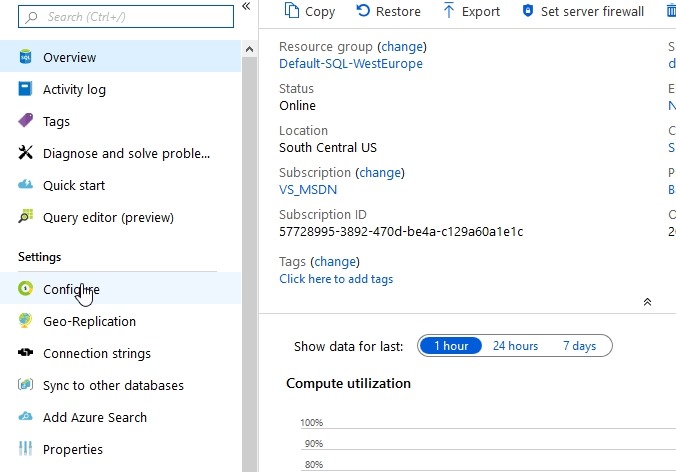
    I’ll pick one of the basic test databases I have and look for the sizing. It’s under Configure, which is where my mouse it in the image below.

    2019-05-06 16_07_02-SQLPatches - Microsoft Azure

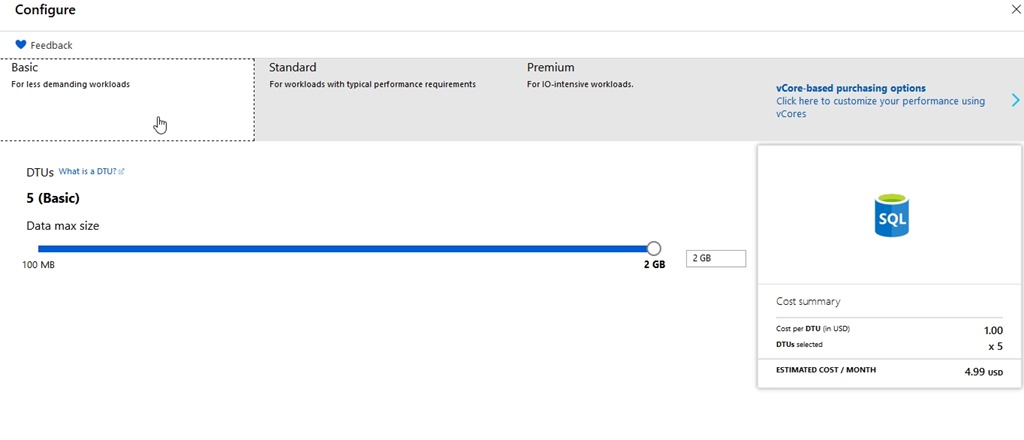
    Here’s my database config and cost. For my little dev/test environment, this makes perfect sense. I’m paying $4.99 a month in virtual cost. Since I get $150/month as part of my subscription as an MVP, I can afford to put up 5 or 6 of these test databases for different things without worry.

    2019-05-06 16_07_36-Configure - Microsoft Azure

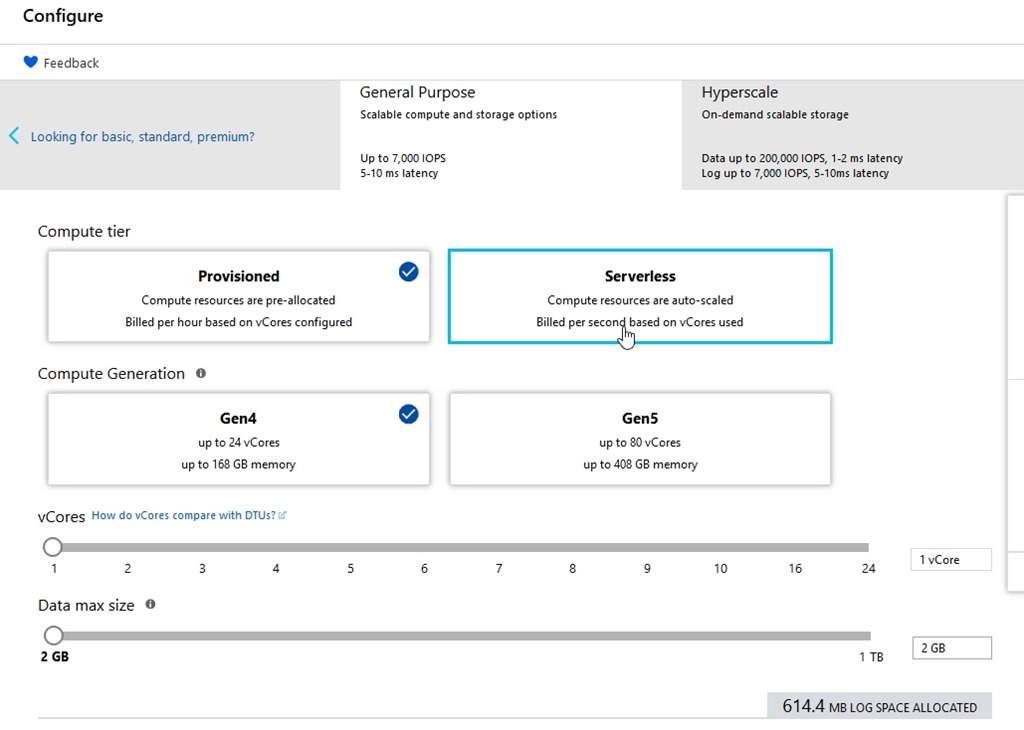
    After I click the vCore pricing, I get new options. I can see Serverless in here.

    2019-05-06 16_07_49-Configure - Microsoft Azure

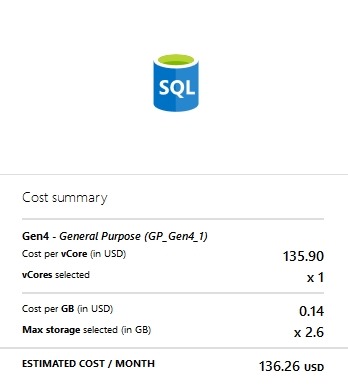
    For dev/test (for me), that’s a lot. I don’t want this kind of bill every month.

    2019-05-06 16_07_58-Configure - Microsoft Azure

    Let’s change to serverless.

    2019-05-06 16_08_14-Configure - Microsoft Azure

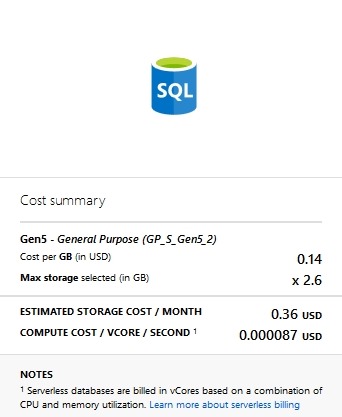
    That cost changes

    2019-05-06 16_08_19-Configure - Microsoft Azure

    That’s more affordable. I think that’s worth trying.

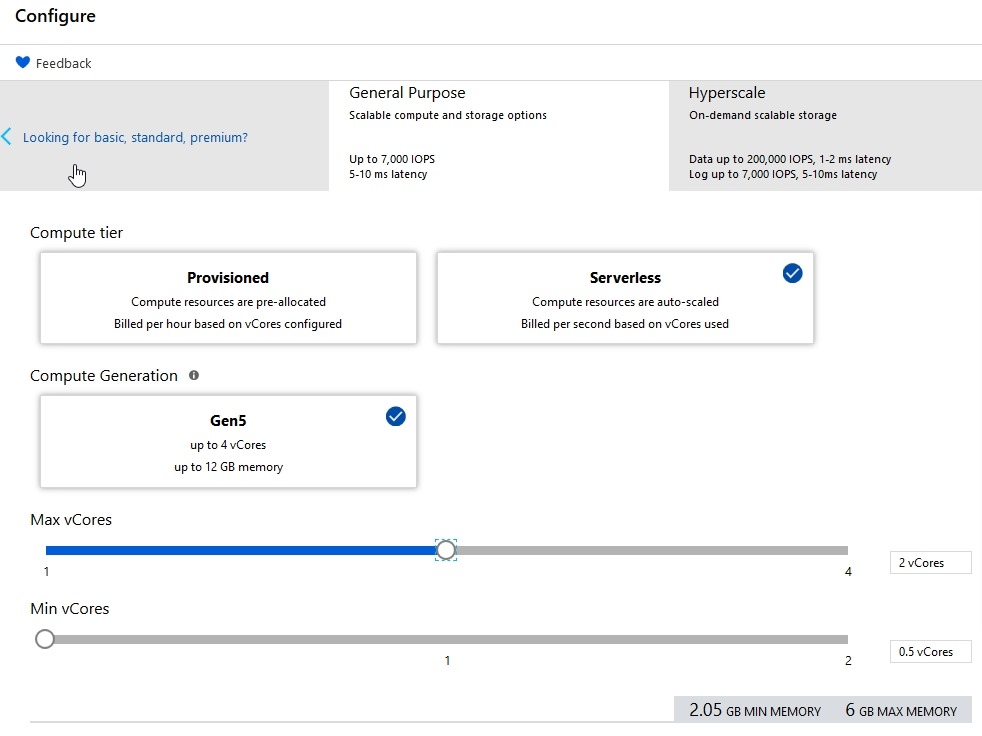
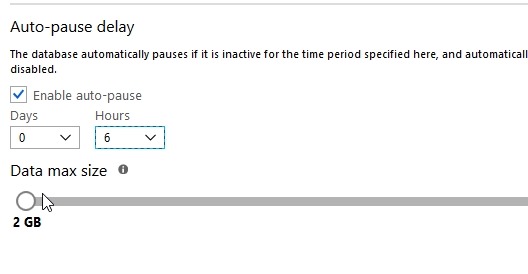
    The last thing to set is the Auto-pause delay. This is the amount of inactive time that we set before the db shuts down. We don’t want this shutting down after a few seconds of inactivity, presumably because there is overhead to shutting down and restarting. I’d expect that most people would want tens of minutes or hours before stopping.

    I hope so, because when you scroll down, you see this:

    2019-05-06 16_11_49-Configure - Microsoft Azure

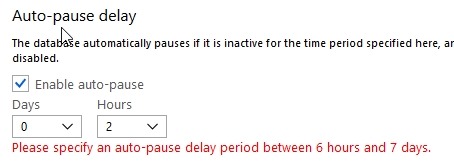
    However, that’s the minimum you can set.

    2019-05-06 16_02_12-Configure - Microsoft Azure

    Six hours seems crazy, but still, it’s better than nothing. I hope this changes after the preview period to something more like 1 hour. Perhaps this is to gather additional telemetry during preview, but we’ll see.

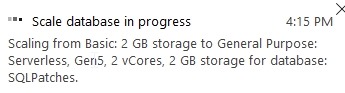
    I click “Apply” and see this:

    2019-05-06 16_15_53-Configure - Microsoft Azure

    If I go back to the overview, I see one of the cool things about Azure.

    2019-05-06 16_16_37-SQLPatches - Microsoft Azure

    I can still use the system as I’m making changes. That’s not normally what happens with IaaS or my own systems.

    Is It Worth it?

    We’ll see. I’ll check the bill next month, while making it a point to access this database and do some work. I’m guessing my bill will go down, which is good, but I’d also expect that this database will perform better than my previous one because it’s much larger.

    This is an interesting idea, but we’ll see how it goes.

  • Puzzles–T-SQL Tuesday #114

    This month we have a very interesting topic from Matthew McGiffen. He gets back to the roots of the party with code by asking a question on puzzles. It’s a good question, and one that makes me think. I’m not a big puzzler, but I think I’ve solved a few.

    Interesting Challenges

    One of the things we’ve tried to do at SQLServerCental is come up with some ways to inspire you. We have articles, numerous questions to be answered, our Question of the Day, Crosswords, and more. I’d like to do more, but one thing I’ve found is that puzzles take a lot of time.

    I have enjoyed some of the puzzles from the Advent of Code and Project Euler, which are good programming exercises. I’ve used Python and PowerShell to solve some of these, mostly to practice skills in building algorithms and implementing them.

    Solving a Puzzle

    One of the puzzles that I enjoyed solving was from the Advent of Code 2015, Day 2. This was a surface area problem, and one that reminded me of math class in high school. I always did enjoy that subject.

    In any case, I solved the issue by loading some data into a table and then digging in with a  few CTEs to

    Might not be the best solution, but it was one I enjoyed working out:

    ---- create table

    --create table Day2_WrappingPresents

    --(

    -- dimensions varchar(100)

    --)

    --go

    ---- load data

    --bulk insert Day2_WrappingPresents

    -- from 'C:\Users\Steve\Documents\GitHub\AdventofCode\Day 2 - Wrapping\input.txt'

    --go

    ---- check

    ---- select * from Day2_WrappingPresents

    --go

    -- break this down to get the dimensions

    with cteSplit (d, el, sw, sh)

    as

    (

    select

    dimensions

    , endlength = charindex('x', dimensions) - 1

    , startwidth = charindex('x', substring(dimensions, charindex('x', dimensions),20)) + charindex('x', dimensions)

    , startheight = len(dimensions) - charindex('x', reverse(dimensions)) + 2

    -- , c1 = charindex('x', dimensions)

    -- , c2 = charindex('x', dimensions, charindex('x', dimensions)+1) -

    from day2_wrappingpresents d

    )

    , cteDimensions

    as

    (select

    d

    , l = cast(substring(d, 1, el) as int)

    , w = cast(substring(d, sw, sh-sw-1) as int)

    , h = cast(substring(d, sh, len(d)) as int)

    from cteSplit d

    )

    , cteOrder

    as

    ( select

    d

    , small = case

    when l <= w and l <= h then l

    when w <= l and w <= h then w

    when h <= l and h <= w then h

    end

    , middle = case

    when (l >= w and l <= h) or (l <= w and l >= h) then l

    when (w >= l and w <= h) or (w <= l and w >= h) then w

    when (h >= l and h <= w) or (h <= l and h >= w) then h

    end

    , large = case

    when l >= w and l >= h then l

    when w >= l and w >= h then w

    when h >= l and h >= w then h

    end

    from cteDimensions

    )

    , cteFinal

    as

    (

    select

    d

    , area = (2 * small * middle) +

    (2 * small * large) +

         (2 * middle * large)

    , slack = (small * middle)

    from cteOrder

    )

    select

    sum(area + slack)

    from cteFinal

    -- drop table Day2_WrappingPresents