Traveling to the City of Angels today. Read: Where Do You End Up as a DBA?
Author: way0utwest
-
Communicate Smarter Not More
I recently installed Microsoft Teams. Not because I wanted to, or because Redgate is abandoning Slack, but because Microsoft requires it for some MVP calls. This replaces Skype for Business (S4B), and while it worked OK, I’m not sure it worked better. In fact, for the use cases I have, Teams feels like an abandonment of the Skype codebase for a newer version of the same thing. That’s fine, and I don’t really care. It’s slightly annoying as I have S4B for internal stuff at Redgate and didn’t need another tool, but with a modern, quad core, 2.xGHz CPU and 32GB of RAM, one more application isn’t going to break anything. It is, however, making me less productive.
We have lots of ways to communicate. In fact, I have Twitter (social media), Slack (work comms), Outlook (email), S4B (calls) and a mobile phone all running as I write this. I don’t get too caught up in any of them, and I have most notifications disabled, precisely for the reasons outlined in this article: the tools can be a productivity drain. I know this, and most of these tools actually live in the background, behind the various tools I use to get work done. I check them at times, but try to stay off most of the day. I need to focus, and having more communication methods is distracting.
There was a day not too long ago when I needed to find a person that had missed a meeting time. Messages went out through Slack DMs, Twitter DMs, text, Skype IM, and email, hoping that a notification would pop up for someone on some app. I know I’ve used Slack like a PA system at times, pinging other people to go find someone that wasn’t responding to messages. For someone working remotely, it’s frustrating to try and reach out to others, but I’ve seen people in an office take the same tactic, reaching out electronically, which often creates more interruptions and distractions for others. I don’t know if this is that much worse than walking around an office and physically interrupting others, but I do think it can be more pervasive as too many of us have constant notifications on devices that don’t go away when the workday ends. We also do it more, because it’s so easy. Getting up to walk around is a bar that deters some people from interrupting others.
What might be even harder to deal with is the linkage of various applications together. Now I see GitHub messages in GitHub, Slack, and Email. It’s a barrage of items that aren’t hard to handle, but they each take away a little bit of time and attention.
That’s the downside of communication methods. Each requires a little time, even if just to click/swipe/eye roll at a notification. Those little bits of time add up and don’t necessarily help us be more productive. Some things require too much time as I’ve watched people look through and consider just the right emoji to use for a reaction on Slack. Most of the time I think there should just be a couple choices, because the richness of the variety equates to the decline of quality time spent on work that needs to be done.
We constantly hear that communication skills, those soft skills of relating to others and exchanging information clearly, are important. They are, but I think there is another element to communicating well: brevity. Learning to communicate effectively, in a way that allows you yo get your message across quickly, while also being able to focus for long periods of time is a skill more of us need. Being able to turn off distractions, or delay responses when quickness isn’t needed will help you be more productive and efficient. I think one of the interview questions I’d ask in the future would be around how to deal with the constant barrage of Slack/Teams/Skype/Outlook/Github/whatever-comes-next messages.
Do you know how to reduce the overload of communications in your job? Let us know today.
Steve Jones
Listen to the podcast at Libsyn
-
A Clean Values Clause with SQL Prompt
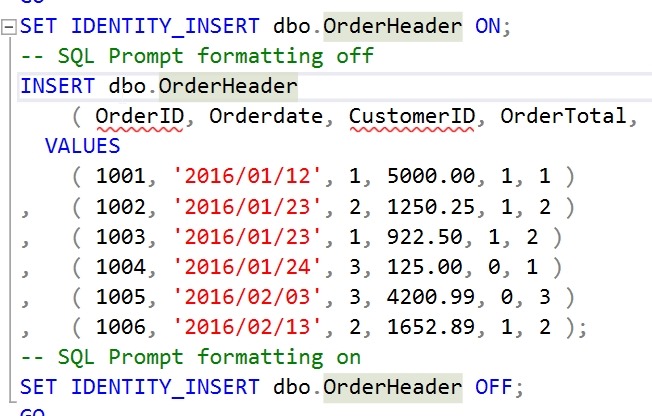
I’ve had this code in a snippet for a long time:
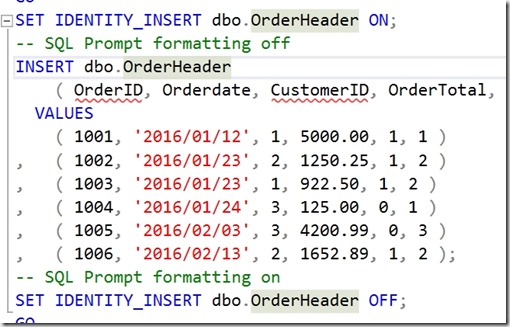
I appreciate the markup to prevent SQL Prompt from doing this, which used to always happen.

I can’t tell you how many times I’ve used CTRL+Z to undo that format, add the markup, and format again.
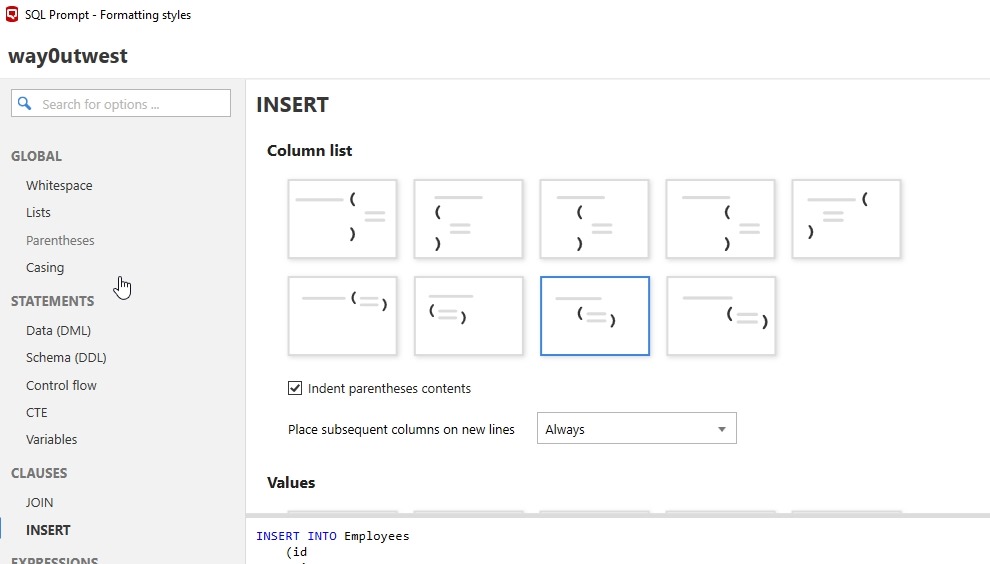
A few months back. I was talking with someone and noticed this:
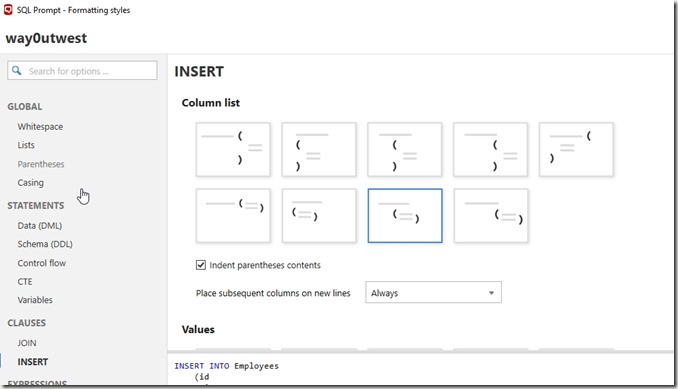
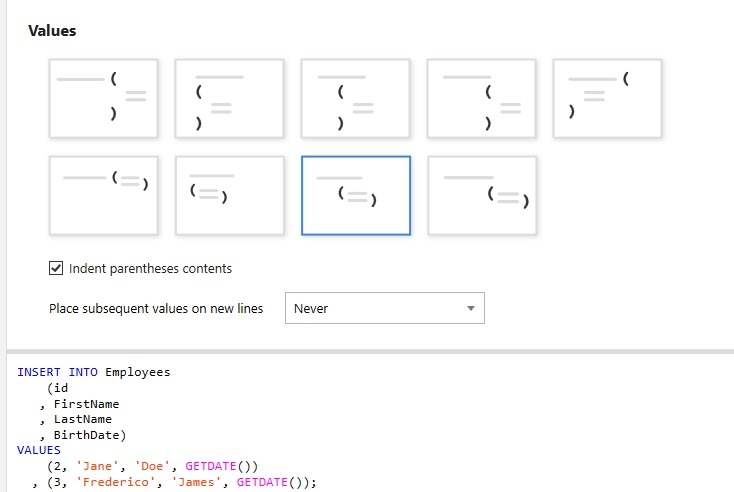
A new option for formatting called “INSERT”. This allows you to specify how you want to insert column list to appear. What’s even better, is at the bottom it says “Values”. Scroll down and you see options for separately formatting the VALUES clause, which I use all the time.
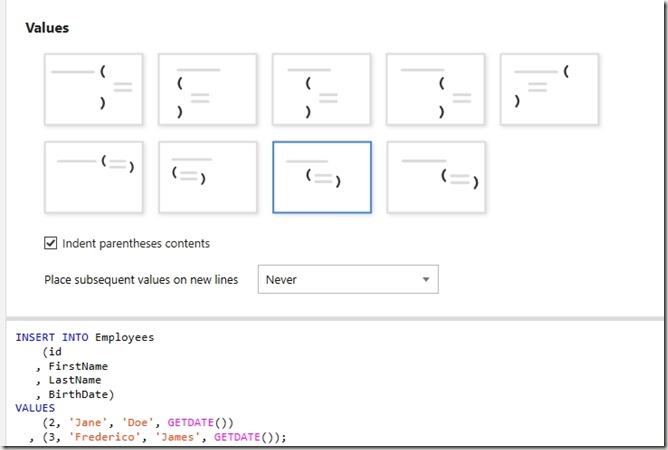
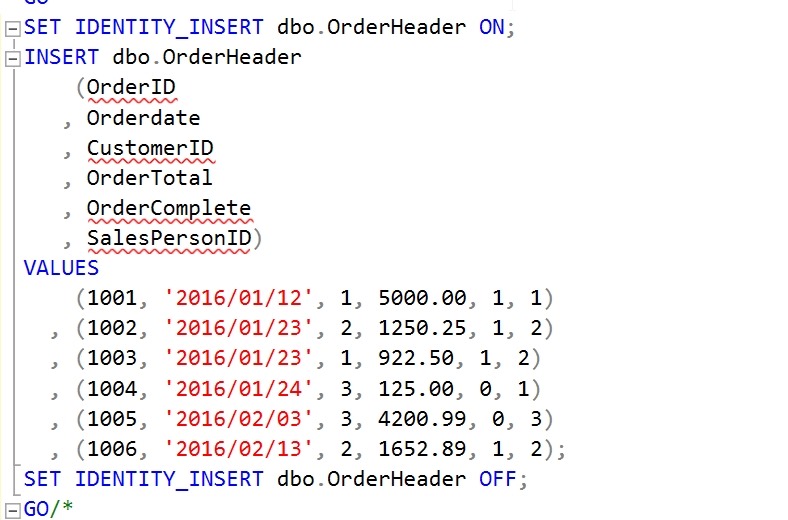
Now I can format easily without worrying my VALUES clause will get spread all over the page.
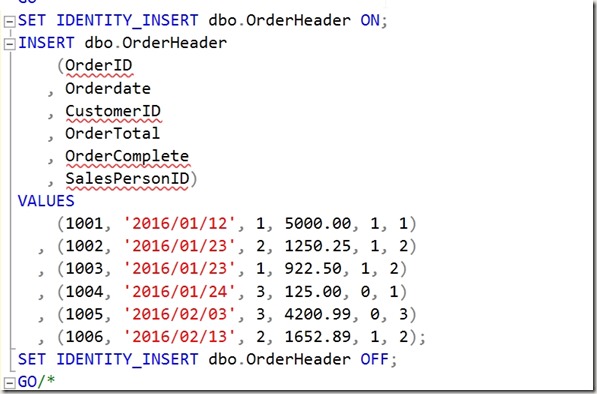
SQL Prompt is amazing. If you haven’t given it a try, download an eval today. If you have the Toolbelt, you ought to be using this every day.
-
Always Use Roles–#SQLNewBlogger
Another post for me that is simple and hopefully serves as an example for people trying to get blogging as #SQLNewBloggers.
Which of these is more complex?
GRANT SELECT ON dbo.Customer TO JoeDev
or
CREATE ROLE Sales
GRANT SELECT ON dbo.Customer to Sales
ALTER ROLE Sales ADD MEMBER JoeDev
The second one, right? What if I change this slightly. I have this code:
GRANT SELECT, INSERT, UPDATE ON dbo.Customer TO JoeDev

GRANT SELECT, INSERT, UPDATE ON dbo.Customer TO SallyDev

GRANT SELECT, INSERT, UPDATE ON dbo.Customer TO SaraDBA
or
GRANT SELECT, INSERT, UPDATE ON dbo.Customer TO Sales

ALTER ROLE Sales ADD MEMBER JoeDev

ALTER ROLE Sales ADD MEMBER SallyDev

ALTER ROLE Sales ADD MEMBER SaraDBA
What if I changed this slighly and told you that between the GRANTs to users, a few months of time had passed and you had to go figure out which rights JoeDev had because the request was “give Sally the same access as Joe.”
That’s the type of thing I’ve done often as a DBA. I’ve often had to move permissions between users, duplicate the access, or quickly remove lots of access from multiple users.
While it seems like there are just two extra statements using roles, there is often lots of time tracking down security and building statements to duplicate rights.Always use roles and your life will be easier.
Plus you can script the permissions for objects once, log them, and forget about them. From that point forward you’re just adding/dropping users from roles.