Author: way0utwest

  • A Double Failure

    Update: Perhaps not, as Evisort dispute any customer data was exposed and they’ve updated security.

    Every server ought to have a password. Every one.

    It’s 2019, and apparently that advice hasn’t sunken in. I still can’t believe there are people without passwords/codes on their mobile devices or home PCs, but there are. It’s crazy, and while I can forgive some individuals for doing this, no IT infrastructure staff or developer ought to do this. And yet, a double fail recently from Evisort.

    This is a startup doing some AI work, but apparently they set up an Elasticsearch server without a password. I’ve written about this before, and you set a password, but don’t have to. That’s both an Elasticsearch failure for not requiring one, but also a monumental failure on the part of whoever set this up inside a company.

    Use. A. Password.

    The second fail is with this server being claimed to be a “testing and development” server. If that’s the case, why was production, live data on it? I know many people do this, but if you use that data in non production environments, the data needs to be secured. I’m sure it’s especially hard for AI/ML systems to work without real data, unlike other database driven applications, but if you need live data, you need real security here.

    If you don’t want to do this, then you need masked, obfuscated, pseudonymized, generated, or other data that can be used. I’ve realized the problems and scope of this across the last few years in my work with Redgate customers, while looking at the challenges and problems brought about by using this data. We’ve also see there is a lot of potential liability with new regulations like the GDPR and the CCPA for poor data security.

    I used to worry about the state of our industry with the poor quality of so many applications written in the 80s and 90s. Now I worry even more about the problems of poor data security. I don’t have good answers, but I know we need to do better.

    Steve Jones

    Listen to the podcast at Libsyn.

  • Launching ADS from SSMS

    If you haven’t heard, SSMS v18 went GA (Generally Availability) recently. You can download it from Microsoft, though if you have a preview version, you do need to uninstall that. You also have to reboot after install Sad smile

    There is one cool feature that’s easy to miss, and I wanted to point it out.

    Azure Data Studio

    I am warming to Azure Data Studio (ADS) as an editor. I like notebooks, and I’m hopeful SQL Prompt will come soon, but it’s a nice, lightweight editor. It’s based on Visual Studio Code, and I like some things, like version control.

    Others I find annoying, like the connection dialogs, the results display, trying to use the Object Explorer, and more. That means I am often still using SSMS as a primary tool to work with SQL Server.

    Switching between tools is sometimes a pain, but things got easier.

    SSMS Integration

    With SSMS v18, there’s a small item that you may easily miss. If I right click a database, I see this:

    2019-04-25 09_51_17-SQLQuery12.sql - 192.168.1.35.sandbox (sa (58))_ - Microsoft SQL Server Manageme

    I have the option to launch ADS with a new query or notebook. The connection context passes along, which is nice. I hate the connection dialog in ADS.

    If I click “New Query”, I see this:

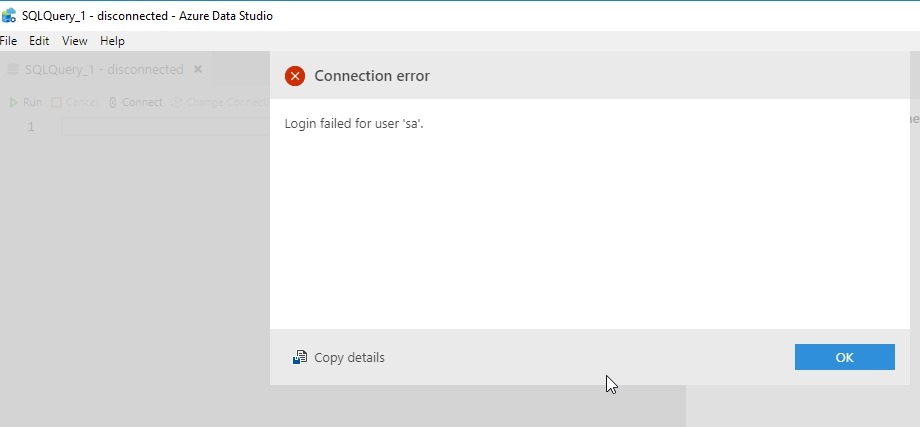
    2019-04-25 09_54_29-SQLQuery_1 - disconnected - Azure Data Studio

    Hmm, an error? No, this is actually good. The connection was SQL Auth to a Linux instance. I haven’t saved the password, so the current context can’t be passed. This is a new connection, and needs to authenticate. This is what I’d expect. When I click OK, I drop into the password box.

    2019-04-25 09_54_36-SQLQuery_1 - disconnected - Azure Data Studio

    Even if I’ve got a connection, if I go back to SSMS an open either a new query or notebook, I get the same result.

    If I have a Windows Auth connection, and I right click and choose New Query, I get this:

    2019-04-25 09_59_58-SQLQuery_1 - Plato_SQL2017.MLDemo (Integrated) - Azure Data Studio

    In this case, I was connected to Plato\SQL2017 as the instance and right clicked the MLDemo database. I also had ADS closed, with the notebook tab open when it closed. ADS restored my tab and then connected to the new database.

    A little thing, but a handy one that I expect more people will use over time.

  • Really Important Software

    I remember reading about the Boeing 787 (the Dreamliner) being designed. I was fascinated by the process and excited to fly one. I finally did and enjoyed it. Since then, I try to fly on those when I can as the spacious ceiling and other changes seem to make for a better flight. I impressed with the work they did and the scale of the changes, both in manufacturing and software. There’s a short timeline here and if you ever get the chance to take a tour of the factory, do it. It’s very cool.

    I fly a lot. Last year I took around 50 flights on airplanes, some of them Boeing, some Airbus, some 737s, 777s, 787s, A350s, and a few others. I haven’t flown on a Boeing 737-Max 8, though I did just recently fly a 737-800. When a few of those planes crashed, I somewhat chalked this up to pilot training and a lack of options on the planes. I’m not exonerating Boeing or the airlines, but I wasn’t personally concerned. I saw an interesting piece at Vox, but was still curious about the issues. After all, I’m in software, and I fly a lot.

    There’s an analysis of the crash from a software developer at the IEEE site that’s worth reading. It’s a look at the issues, the potential ways things could have been addressed and, perhaps most importantly, the idea that our software is not necessarily going to fix problems. Software is a way of reading data and then affecting changes in the hardware, but software isn’t perfect. One of the quotes in the article puts this in perspective for me: ” Every time a software update gets pushed to my Tesla, to the Garmin flight computers in my Cessna, to my Nest thermostat, and to the TVs in my house, I’m reminded that none of those things were complete when they left the factory—because their builders realized they didn’t have to be complete.”

    Data matters, but as we all know, data is sometimes incorrect, jumbled, or otherwise problematic. In this case, not only does it appear the data could be incorrect, but the plane software isn’t looking at all the data, and it certainly doesn’t take all the inputs from the pilots. While humans make plenty of mistakes, they need to have inputs and overrides in software systems.

    I don’t want to get caught up in the issue with these planes, but rather look more generally at our systems. DevOps looks at the idea that we don’t know everything about how to build our software when we start. We definitely know it is not complete and will need more work when it leaves our factory, but we also know that this is the case. We know it’s not complete. We take feedback, learn, and adjust what we do. We constantly drive quality up, or at least, that’s the goal. Money and politics can get in the way, but the more they do, the less you’re doing DevOps.

    Steve Jones

    Listen to the podcast.

  • The Minimum Upgrade Point

    These days the pace of change with SQL Server can be intimidating. Many of us work in disparate environments with multiple versions of the platform in our environment. In the distant past I’ve had people note that they often have 2 or 3 versions to support. In the last five or six years, when I’ve asked it seems that many people have 5 or 6 versions to support. That can be challenging in trying to manage your estate as a single entity and understand which scripts will run on which machines.

    Recently someone noted on twitter that they tried to convince their company to upgrade to SQL Server 2017, but apparently someone at the company wanted to stick with SQL Server 2014. I asked a question and the person responded that since Dev and QA was at the 2014 compat level, they wanted prod there.

    Pedro Lopes, from Microsoft, asked a good question: “How can I help you avert this?” I tend to agree, in that moving to 2014 now, which will fall out of mainstream support in July 2019, is silly. You’re installing a system that will be unsupported almost from the beginning. While you will get security patches for a few years, it seems short sighted to start using a version that you may want to use for 10 years.

    That got me thinking. What is the minimum upgrade point for your organization? Not the pace or the need, but if you had to pick some random instance to upgrade, where would you go? SQL Server 2017? Something sooner? Perhaps you have some requirements in your organization that limit you from moving to a very new version. I would argue that it’s important dev/test are similar to prod, but I’d also say that dev and test ought to upgrade to a recent version as well.

    I think I’d specify SQL Server 2016 SP1 as the minimum point. This changed the feature list in Standard Edition, which is what I’ve often run for systems. We run that now for SQLServerCentral, though our decision last year was a move to 2017. We probably won’t upgrade again for many years, but if we did, I think I’d be looking to get close to the most recent version.

    What would you do?

    Steve Jones
    Listen to the podcast at Libsyn.