Author: way0utwest

  • Pushing SQL Change Automation Code to Azure DevOps

    Making changes on your own system for a SQL Change Automation project is great, but if you’re the only one using the project, it might feel like a lot of overhead. I’d argue it isn’t and it’s a better way of building software, but that’s a separate discussion.

    For most of us, we need to get a good copy (and backup of code) as well as share this with others. In the previous article, I was making changes in my own SQL Change Automation project. I was committing these to a local git repo and now I want to put them into another place. This article will look at moving my repo to the cloud.

    Enter Azure DevOps

    I love Azure DevOps as a software development platform. It has everything I need, hundreds of extensions, and I can easily replace parts of it with other technology if I want. I could use my own git repo locally (or at BitBucket) and still build/release with Azure DevOps. I could use the Azure DevOps repos and build my software with Team City. Or release it with Octopus Deploy.

    I have flexibility.

    For me, I’m going to stick with Azure DevOps in this series, and I’ll show you how to add a project to Azure DevOps.

    Sign In to Visual Studio

    When I created this project, I used a git repo as the default from Visual Studio. However, as you can see, I didn’t add any remotes.
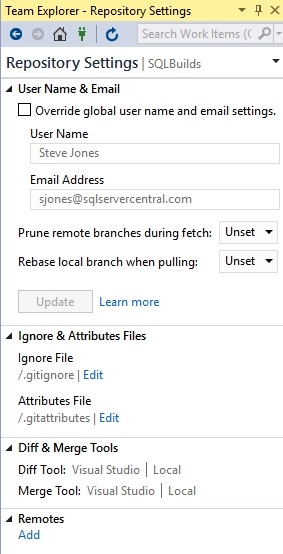
    2019-02-28 16_11_35-SQLBuilds - Microsoft Visual Studio

    I did log into Visual Studio at some point when I started it, and since I’ve used this before, I have a number of connections to different services. You can see below my connections in Team Explorer.

    2019-02-28 16_12_31-SQLBuilds - Microsoft Visual Studio

    If you go to dev.azure.com/name, you can see your organization. For me, this is https://dev.azure.com/SteveJonesRedgate/. When I log in, I see my organization, and a list of projects.

    2019-02-28 16_18_38-Projects - Home

    In the upper right is a “create project” button, and I’ll click that. When I do, I get a blade to enter some data. I can do that, and I’ll make this public, so anyone can see it.

    2019-02-28 16_19_25-Projects - Home

    The project is created, and I get a welcome screen. For now, let me ignore this and go back to Visual Studio. If I click the Sync item in Team Explorer, I’ll see this:

    2019-02-28 16_22_46-SQLBuilds - Microsoft Visual Studio

    VS sees my account. If I click advanced, I can see the projects, and I’ll select the one I just created.
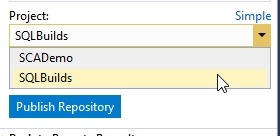
    2019-02-28 16_23_10-SQLBuilds - Microsoft Visual Studio

    When I click publish, this moves the repo up to the web. If I return to my project online, I can click “Repos” and see the code.

    2019-02-28 16_24_19-SQLBuilds - Repos

    This is the structure as my local VS project. If I had make a screen shot of the before, this would be an empty space online, with instructions for connecting local repos, adding files, and more.

    A Backup Copy

    From here, I can continue to do local development and push/pull as necessary between my local project and the online repo at Azure DevOps. I can set up branches and do more. This is also my backup in case my local storage crashes. From here I can pull down copies of my code if needed.

    In the next article, we’ll look at how we get code from this repository onto another machine.

  • The Data Incident

    I was reading a Google whitepaper and I think this was the first time I’d seen a potential loss of data referred to as a data incident. The paper deals with the response from the Google Cloud team if there are potential data loss issues, outlining a four part process for responding and ensuring the customer can get back to work. Azure has a similar plan, though AWS seems to expect the customer to do more of the work.

    This is the first public disclosure of a process, and it’s a good one. In fact, everyone should use this or have something similar in their organization. The way that the world seems to be moving, it’s likely that most of us will suffer a breach at some point, and we ought to know how to respond. Without some plan, it’s easy to have a situation spiral out of control.

    I’ve had formalized DR plans as well as incident responses for events such as a DDOS or virus attack, but the issues with data are somewhat different and probably deserve a dedicated plan of some sort. While I’ve often seen these handled under the security team response, that might not be enough for data services, especially when you have responsibility for data that is different than managing a software system or service.

    Data security is becoming a more important part of the data professional’s job, with legislation and best practices starting to require that we recognize a shared interest in sensitive data that extends beyond our organization. Whether this is something you like or dislike, it is becoming a part of our work.

    Personally I like having a crafted plan that is available for use in crisis situations. It can be hard to remember all the possible issues, and certainly crisis seem to occur when our best people aren’t available. Even more important, a plan means we have something we can practice to be sure that everyone understands how to react, limit the exposure of data, and even ensure that we can get services back up and running as soon as possible.

    Steve Jones

    The Voice of the DBA Podcast

    Listen to the MP3 Audio ( 3.4MB) podcast or subscribe to the feed at iTunes and Libsyn.

  • The Creepiness of AI

    Last year, I watched a keynote talk from Matthew Renze about AI. In his talk, there were examples of the amazing things that Artificial Intelligence can do, as well as some of the creepier things have have been developed. It was an interesting talk, one that gives me inspiration and hope for the benefits of better computer algorithms as well as the concerns for various issues that we may be unprepared to deal with as a society.

    One of the more controversial items that occurred recently with AI was the Google phone call, where a computer answers a call and interacts with a human. What’s disconcerting here is that the person doesn’t know this is a computer, and there are speech patterns the computer uses, like um interspersed in the answers, that deceive someone. While this certainly might be helpful in scheduling situations shown in the call, there is a downside. Could you imagine artificial personas used in telephone scams or phishing situations? A help desk knowing some information and then asking for verification of other data?

    There are perhaps greater concerns, such as the work done with imitations of President Obama. There are fake speeches, generated by computer. While movie studios might want fake actors used to reduce labor costs, do we worry about the implications of a computer actually being able to imitate one of us in a video call?

    The use of AI and ML, with lots of data an organization might have gathered could be good and bad, but certainly opens the world to more problems than benefits if there isn’t mandatory disclosure of the cases where this is used. Since there are always going to be criminal elements that don’t obey rules, this might be very scary.

    There are certainly other issues, such as Target predicting a pregnancy, which was the first really, creepy data analysis thing I saw. That one is a few years old, and still bothers me as it was accurate, but an unrefined use of the data. A good example of where marketing groups are a bit too excited to use AI/ML technologies and don’t think through the implications. Fortunately this case seems to have dampened some of enthusiasm for prediction in retailing.

    Perhaps this item that is a bit funny, but it is also very worrisome for me. It’s the case of an AI system playing video games. The AI system decided the best way to get the best score was to pause the game. Rather than compete and try to do better, the computer decided to just stop. A completely unexpected outcome, probably because the feedback and expectations weren’t explicit. Since it seems quite often humans don’t specify their requirements or expectations very well, I could imagine this being a very large issue in AI systems as they are used more often. It could even be deadly or problematic when a system does something we didn’t anticipate, and impacts human health.

    Most of us won’t work with AI much as a technician, other than providing or managing some of the data. I do expect AI and ML systems to touch more and more of our lives, perhaps using our data for good, perhaps not. Hopefully we can help steer applications into the former more than the latter situation.

    Steve Jones

    The Voice of the DBA Podcast

    Listen to the MP3 Audio ( 4.7MB) podcast or subscribe to the feed at iTunes and Libsyn.

  • Upper Casing All the Data–#SQLNewBlogger

    Another post for me that is simple and hopefully serves as an example for people trying to get blogging as #SQLNewBloggers.

    There was a post recently where a user asked about needing to update all the data in all their tables to upper case. A somewhat strange requirement, though one I could see in some environments where they want to ensure all  data matches in searches.

    There isn’t a good way to do this, since you have disparate table names and column names. The quick way to do this one time is with a cursor, though I’d worry about performance here if this ran at any scale, and more often than once in a very rare time.

    In any case, the way to get schema, table and column names is to query the INFORMATION_SCHEMA.COLUMNS view. I’d limit this to character columns of the non- and Unicode types. In the code below, I get that data into the cursor.

    DECLARE updatecurs CURSOR FOR
    SELECT
          c.TABLE_SCHEMA
        , c.TABLE_NAME
        , c.COLUMN_NAME
    FROM INFORMATION_SCHEMA.COLUMNS AS c
    WHERE
          c.DATA_TYPE IN ( 'varchar', 'char', 'nvarchar', 'nchar' );
    DECLARE
         @schema VARCHAR(100)
       , @table VARCHAR(100)
       , @col VARCHAR(100)
       , @cmd VARCHAR(8000);
    OPEN updatecurs;
    FETCH NEXT FROM updatecurs
    INTO
         @schema
       , @table
       , @col;
    WHILE @@FETCH_STATUS = 0
    BEGIN
         SELECT @cmd = 'update ' + QUOTENAME(@schema) + '.' + QUOTENAME(@table) 
         SELECT @cmd = @cmd + ' set ' + @col + '= UPPER(' + @col + ')'
         SELECT @cmd
         FETCH NEXT FROM updatecurs
         INTO
             @schema
           , @table
           , @col;
    END;
    DEALLOCATE updatecurs;

    The code then loops through the cursor and builds an update statement for each column. This could be enhanced to get a single statement for all columns in a table, but it’s a quick and dirty piece of code.

    There is a SELECT @cmd statement in there that shows what command is executed. To make this work, that would be changed to EXEC(@cmd), but make sure the code is what you want.

    Not pretty, but effective.

    SQLNewBlogger

    Quick, effective code. This has caveats, but works.

    If you want to write about this, change the cursor to make one update per table.