Author: way0utwest

  • Pro SQL Server Linux–Connecting and Building an App

    As part of my learning goals for 2018, I wanted to work through various books. This is part of my series on Pro SQL Server on Linux from Bob Ward.

    I set up my Red Hat server as a command line only instance, so installing VSCode or Azure Data Studio aren’t options. I could add a graphical manager, but I decided not to for now. Instead, I want to use some of the tools from my local Windows machine.

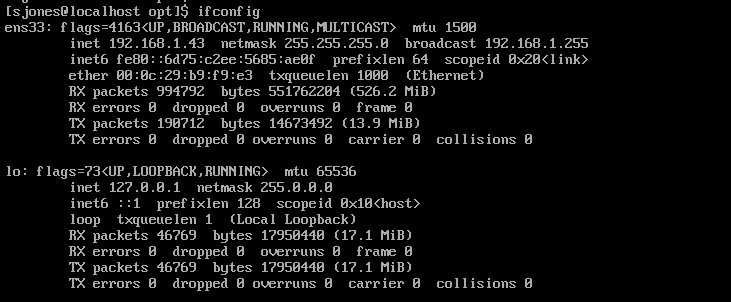
    If you’ve tried some networking with VMs recently, you’ll realize that this isn’t always simple. First, you need to figure out where your VM is. On Linux, ifconfig will do this.
    2019-01-16 18_30_32-RHEL74 Bob - VMware Workstation

    However, when I go to SSMS and try to connect to 192.168.1.43, I get the network error that the SQL Server isn’t found. I know this is because of the firewall because my SQL Server is running locally on Linux and sqlcmd.exe works.

    To open the firewall, on Red Hat you use the firewall-cmd command. This wasn’t in the book, so I had to search for the process. Once I did, this is a simple thing to do.

    2019-01-16 18_29_17-RHEL74 Bob - VMware Workstation

    Now that this is open, let’s connect from SSMS. I can see that worked.

    2019-01-16 18_32_59-SQLQuery3.sql - 192.168.1.43.master (sa (52)) - Microsoft SQL Server Management

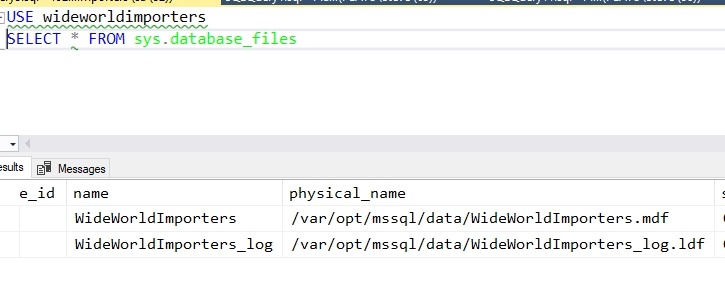
    My first step is to create a database. The standard CREATE DATABASE works, but I can see when I query metadata that this isn’t Windows anymore.
    2019-01-16 18_35_22-SQLQuery3.sql - 192.168.1.43.WideWorldImporters (sa (52))_ - Microsoft SQL Serve

    From here I used scripts to create the objects in the sample database. That’s a first step to getting an application working.  To get the scripts, I used:

    git clone https://github.com/Apress/pro-sql-server-on-linux.git

    This is the repo where Bob has his scripts. If you don’t know how to use git, start learning. I’ve got some posts, but there are lots of tutorials out there.

    Once the database is created, with some tables and data, I can now work on an application. Bob is using a node app, which I’ve never written, so this is a chance to learn a little something new.

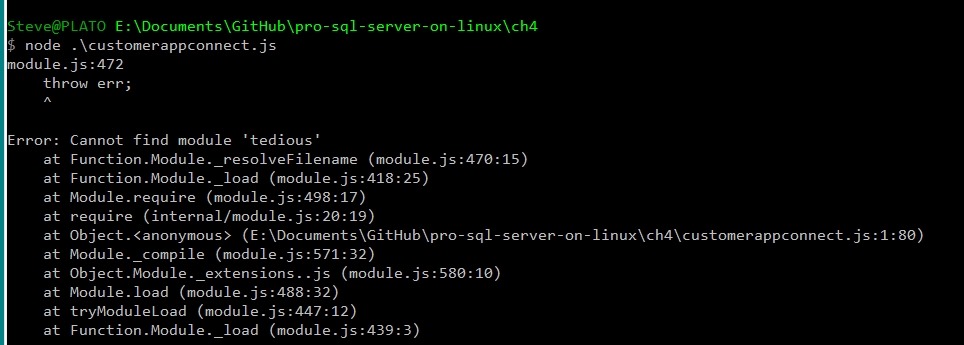
    I tried the npm installs, but had issues. I kept getting errors from installing tedious. I had to change to use http: instead of https, and I was able to instally async, but I kept getting errors.  I know this because:
    2019-01-24 17_40_59-cmd (Admin)

    Let’s try something else. I want to just connect, to see if my system is working. I could use SQLCMD, but let’s be creative.

    2019-01-24 17_46_48-cmd - python (Admin)

    I’m more comfortable in Python and this works. SQL Server 2019 here.

    There is a good tutorial with some sample code at https://www.microsoft.com/en-us/sql-server/developer-get-started/python/windows/. I took some of the code from there to get this working.

    In chapter 4, Bob shows how to use T-SQL and an application to read and write data. This is essentially sending SQL batches to the server, like I did with SELECT @@version above. I can do this stuff, and I know how to send batches. Executing code, including stored procedures, isn’t something I want to do here.

    A number of the parts of chapters 3, 4, 5, 6, 7 are normal stuff that really are a part of working with any SQL Server version. There was little I saw in here that I hadn’t learned as a part of my work on Windows with SQL Server 2012/2014/2016/2017. Not that it’s not good content, but it’s more basic.

    I read it anyway to get an idea of how Bob presents these things and there were good reminders of how things like Temporal tables or how bcp work. It’s worth reading if you aren’t familiar with the various concepts of working with SQL Server, getting performance information, and what tools are available. It certainly was a nice refresher for me.

    From here, it’s moving on to more features, hoping that I see more Linux specific things.

  • The Devil is in the Monitoring Details

    Monitoring a database server is something that many of us know is important, but we often take the process for granted. Whether we’ve purchased a tool, like SQL Monitor, or we’ve built our own system, we often set up a watcher for our systems and rarely view the details unless something goes wrong. I’m not sure that’s the wrong approach as part of the reason monitoring is set up is to allow data capture in the background and remove one more task from our daily workload.

    Monitoring isn’t necessarily simple, however, and while I still debate the best way to do this in many organizations, I realize that monitoring isn’t necessarily something I want to build in house. There is enough work to just work with the data that other systems might output that I really want some other software in place that is built to perform monitoring for specific technologies. In reading about the complexity for the Stack Overflow monitoring systems, I realize that this can become very complex for a “set it up and let it run in the background” configuration.

    The team at Stack Overflow built their own system for monitoring various systems, including SQL Server, but I think part of the mission of Stack Overflow was to build a system from scratch, which isn’t the job for most of us. Plenty of us have other tasks to deal with as a part of our job, and software development for monitoring or alerting or some other administrative task isn’t one of those jobs. I know I wouldn’t want to stop and think about data management and gathering, and more as a software process. If I’m a DBA, I want to just get the data and use it to ensure systems are running well.

    Monitoring can be a way for us to proactively look for developing issues and mitigate them before clients know there is a problem. It’s important that a system is in place and handling data. It’s even more important that there is some alerting application in place as well to ensure that when something does start to go wrong, the DBAs are alerted early enough to prevent widespread problems.

    If you read about all the thought and details of the Stack Overflow system, you quickly realize that there is a lot to consider when setting up the monitoring for your systems. I’d encourage you to think about what is important and ensure that you’ve got some way to gather and analyze that data. When something goes wrong, and something will go wrong, you’ll appreciate the time spent on the details of the monitoring system.

    Steve Jones

    The Voice of the DBA Podcast

    Listen to the MP3 Audio ( 3.2MB) podcast or subscribe to the feed at iTunes and Libsyn.

  • Less Blogs

    I’m going to blog a bit less here this year. As I evaluate my goals and life,  I feel a bit overloaded right now. I have lots of ideas, and lots of things to write about, but I need to focus a bit on some other tasks, and I don’t need to publish here 4-5 times a week, which is what I’ve done.

    As I’ve told others, if you’re changing your blog, make a note. If you stop blogging, write a post. This is that post.

    I will try to publish 2-3 times a week, some Redgate content, some SQLNewBlogger, some interesting things I see, but I’ll spread the content out more.

    I’ll re-evaluate in a few months. At that time I’ll stop coaching for the season, and perhaps life will be a bit different.

  • Your Recovery Time

    Disaster Recovery is both an exciting challenge for many DBAs and also a dreaded event that many hope they never experience. When a true disaster befalls your system, there is a tremendous amount of stress as we work to get things running again so clients can access data. Even the best laid plans will often have a glitch, and while it’s a great technical challenge, most of us would rather keep practicing and gaming possibilities than actually experience a disaster.

    The majority of our system disasters are localized to the actual machine handling our workloads. We often don’t have outside disasters, like hurricanes, with disruption and damage to other parts of our infrastructure and ever our lives. When that happens on top of a down system, it’s a level of stress that can affect our health. I’ve been lucky in that I’ve experienced both kinds of disasters, but never at the same time. I hope you can say the same thing.

    Let’s assume some local disaster defalls your system. Hardware, software, it doesn’t matter, but you end up with a corrupted database of some sort. This week I’m wondering if you have an idea of what the recovery time would be? How long before clients are up and running? Maybe more important, how long before you have system rebuilt?

    If you have some sort of High Availability (HA) plan, then you might be back up for clients quickly, in minutes or even seconds. The disaster really isn’t over, however, since you are now running on less hardware than you planned. Until you can rebuild the downed node, you’re still in disaster mode. If you’re like most of the organizations that have employed me, you’ll also be stressed as your formerly well-designed HA setup is now a single point of failure and you’re scrambling to get the main node rebuilt.

    We often think of a disaster as the time we’re down because of some event. Once clients are being served again, we tend to relax and think the disaster is over. It’s not, because until you replace the affected systems and bring them back online, you’re even more vulnerable than you were previously to another Murphy’s Law incident.

    Steve Jones

    The Voice of the DBA Podcast

    Listen to the MP3 Audio ( 3.0MB) podcast or subscribe to the feed at iTunes and Libsyn.