Author: way0utwest

  • Starting a Proof of Concept with SQL Change Automation

    One of the ways that you can more easily perform database development tasks is with SQL Change Automation (SCA). This is a plug-in from Redgate that works with Visual Studio, and while there are tutorials on Setting up SCA and starting in VS, I wanted to add my own take that might make this a little easier for some people.

    This is a short Proof of Concept (PoC) that gets you started, and I’ll add in more features over time in future articles. I’ll use the idea of a database of builds for SQL Server, which is a project that you might find useful in your organization.

    Starting in Visual Studio

    If you’re an application developer, you are familiar with building new projects. If you’re not, you can probably figure this out, but I’ll just describe and explain the process. In the File Menu, we start our PoC with a File New.
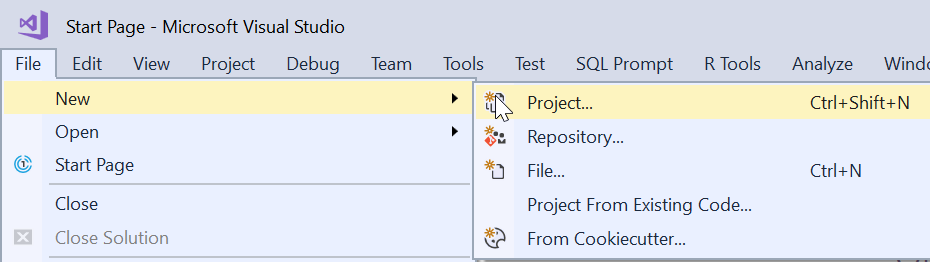
    2018-09-18 20_17_49-

    Once you do this, you’ll see a large list of project templates or types. You can see the recent, installed, or even online types. These are broken into a weird mix of languages and target platforms, but in any case, SQL Server is relegated to the “Other”. Along with SSDT projects, if SCA (or ReadyRoll) is installed, you can choose this type.
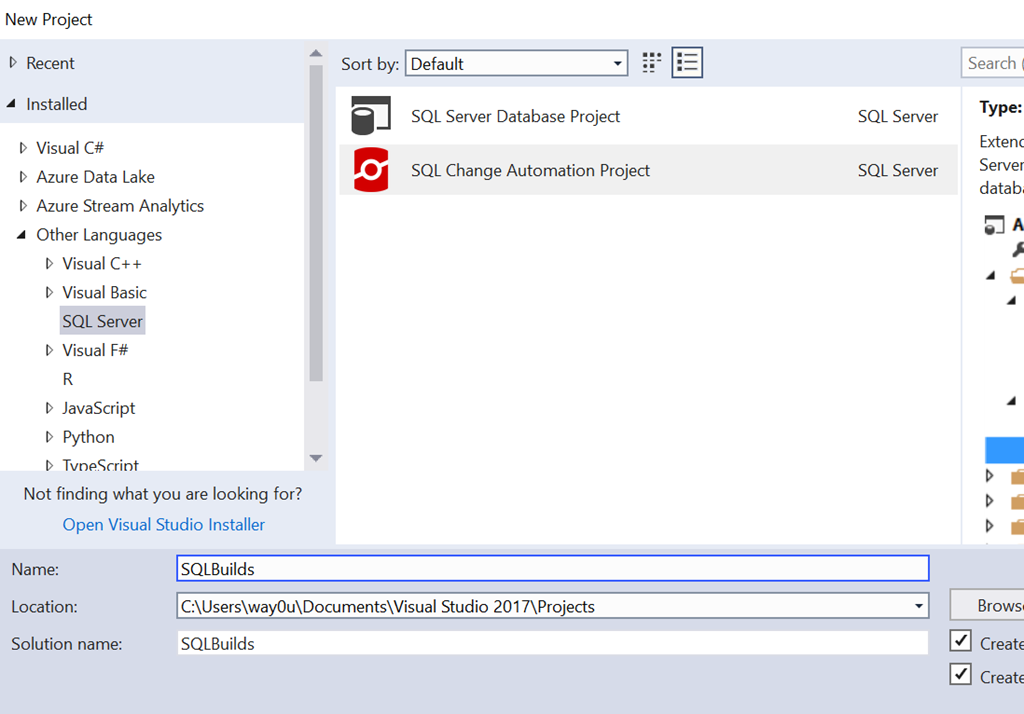
    2018-09-18 20_19_14-New Project

    Once we do this, the project is created, and an outline appears in the Solution Explorer. Before you can go there, SCA pops up a Getting Started dialog. This is designed to help you get moving since the project doesn’t necessarily lend itself to an intuitive flow.
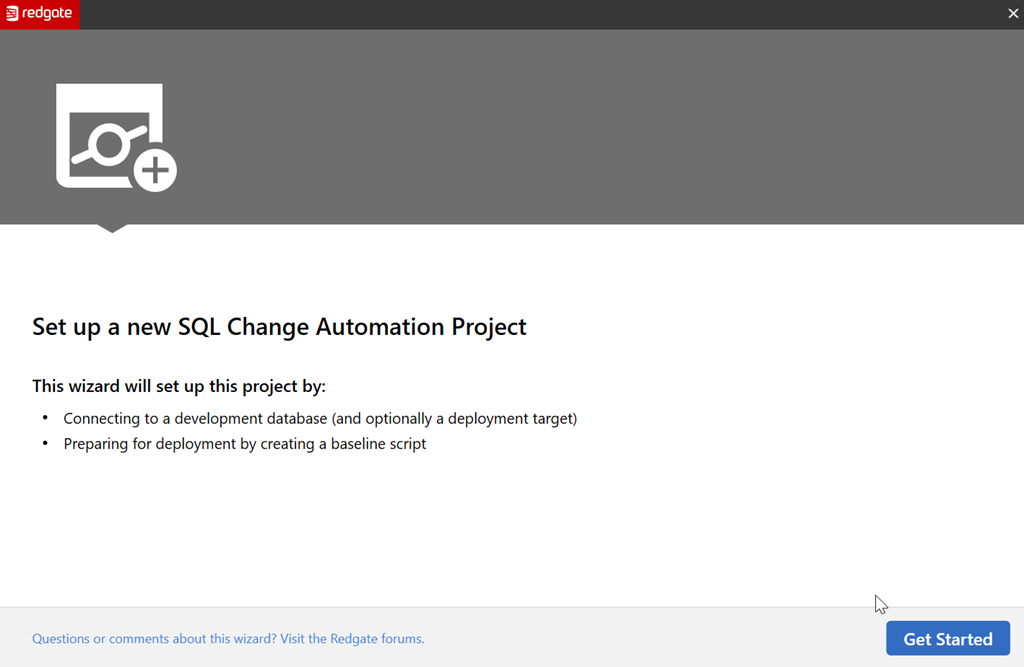
    2018-09-18 20_19_30-

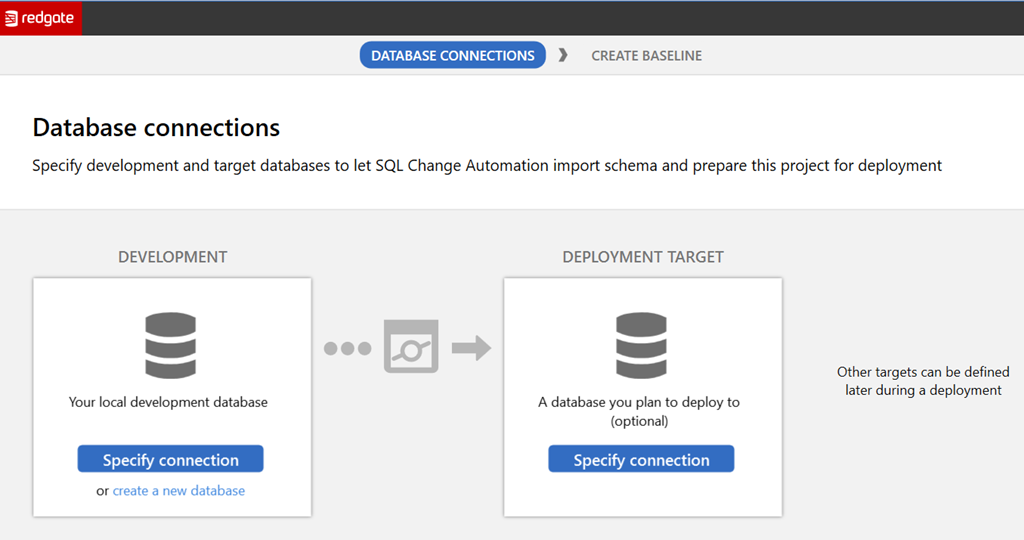
    Let’s get started, as it says. The next screen you see is the database connection. This is a slightly confusing dialog to some, but it makes sense once you understand the purpose. We have two connections with buttons and some links, as shown here.
    2018-09-18 20_19_40-

    The left side is the development database. The instance chosen is also going to be the place where your shadow database is created. You can pick an existing database here by picking the instance and database in the connection dialog. Alternatively you can create a new database, where you’ll specify the details.

    The right side is the target database, which is the downstream target you’ll use for deploying code. This could be production, or it could be a QA database. Either way, this is a default target, and this can be overridden with parameters in the SCA PowerShell cmdlets.

    For now, let’s ignore the left and leave it blank. For the right, let’s create a new database. Once we click the link, we get this.
    2018-09-18 20_20_04-

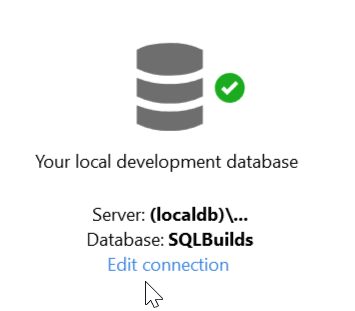
    The default database is the name of the project. The default instance is a LocalDB instance, which is an in process SQL Server. This is named (loadldb)\Projectsv13 in the  current (Aug 2018) versions of SCA. I’ll leave this alone, but the Edit Connection link would allow you to pick a new instance and database.

    Once this is created, we return to the dialog, seeing the dev database and the target, which we left blank. When we move forward, we see this dialog.
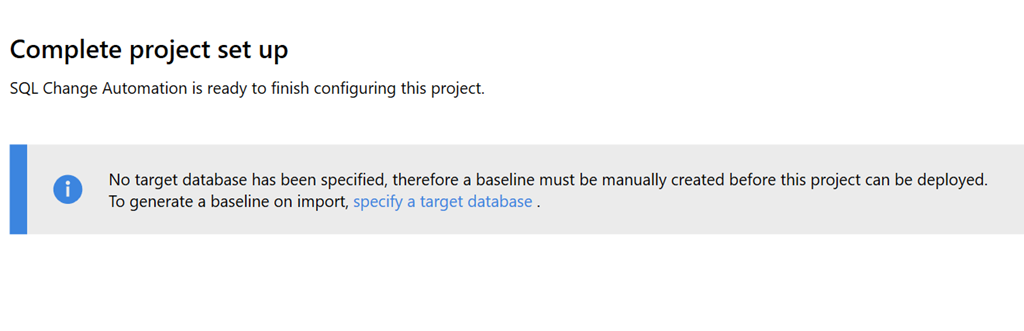
    2018-09-18 20_20_16-

    This is a reminder that we didn’t create a target, but that’s OK. We can do that later, especially since this is a new project. There is no baseline, which would be an initial script to rebuild the database to its current state. Right now our baseline is nothing.

    I’ll create the project and go back to VS. Once I go that, I can see the database on the LocaDB instance in the Object Explorer. I also see the Shadow database here.

    2018-09-18 20_27_51-SQLBuilds - Microsoft Visual Studio

    If I click Refresh in the SCA pane, I’ll get no results since there are no objects in the database.

    2018-09-18 20_27_35-SQLBuilds - Microsoft Visual Studio

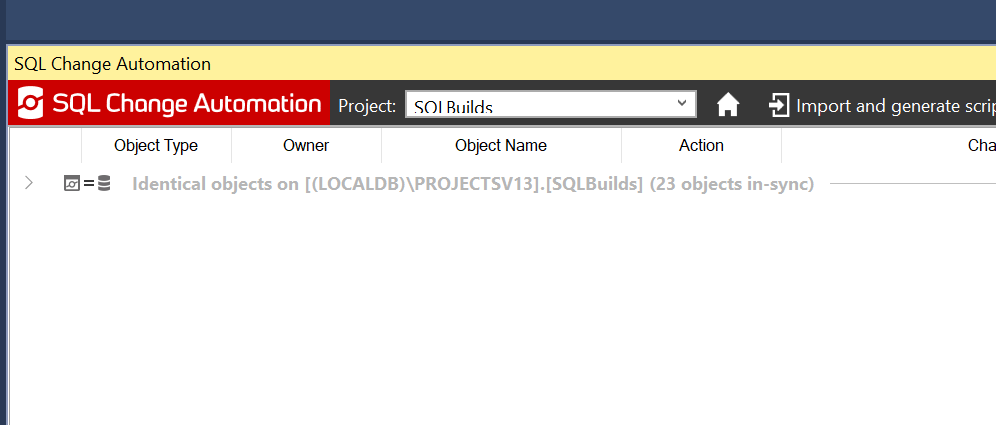
    Once this runs, I see that all objects are identical. This means the dev database and the shadow database have verified each other.
    2018-09-19 00_43_59-SQLBuilds - Microsoft Visual Studio

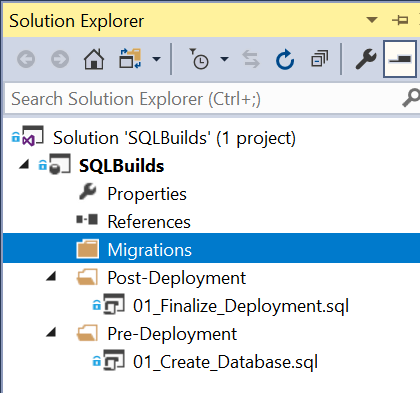
    My project is similarly blank. In solution explorer, I see the outline of the project.
    2018-09-19 00_46_24-SQLBuilds - Microsoft Visual Studio

    At this point, I can begin development. Migrations scripts I create will appear under the Migrations folder and if necessary, I can edit the pre and post scripts. Or add more scripts here. The default scripts are in place already, but I can change them as needed.

    In the next post, we’ll start development.

  • The Justification Database

    I saw an article on the security at various Department of Defense facilities that control the ballistic missile systems in the US. It’s interesting reading, especially if you want to shake your head at bad practices. I think this article summarizes just how quickly the digital world has grown faster than the ability of humans to keep up and adopt new practices, especially where constant staff turnover is the norm.

    This is a good read for anyone in an organization that must plan for security and account for new staff on a regular basis. It certainly made me think a bit about how information is presented, disseminated, and the view from the other side. It’s easy for me to consider security and focus on that from my position, but for others that are tasked with other jobs, their view is completely different.

    There was one item in here that made me stop and think. There is a section, titled “No database with written justifications”, that notes that there wasn’t a database of reasons why someone was granted access. Through random sampling, the found that lots of employees didn’t have forms filled in completely with justifications and approvals. In some cases there weren’t even forms. I assume these are digital forms, but they could be paper.

    That made me think about the ways in which I’ve granted access to individuals in databases in the past. Often in small companies the request is verbal or in email, with approvals made the same way. Certainly there’s no tracking. In larger companies there might be tickets in some helpdesk system, but how do I track those back to clicking in SSMS to add a user to a role?

    This week I’m wondering how well managed your system is for managing and approving security changes? If someone was concerned that a hacker gained access through social engineering, could you track down where, when, and why someone was granted access? Are you regulated or audited? I know some people have great processes that limit the potential for abuse, but I also know that far too many people use exceptions to get work done. I wonder how many of you allow for exceptions to your process.

    Steve Jones

    The Voice of the DBA Podcast

    Listen to the MP3 Audio ( 3.4MB) podcast or subscribe to the feed at iTunes and Libsyn.

  • Ensuring Designs have Flexibility

    One of the biggest complaints from developers about RDBMSs is that they are inflexible and hard to change. This has led to many developers in the past using existing fields for a variety of purposes, sometimes putting data from multiple places into one field. In more recent times, this has led to adding or migrating data to new data stores, with the idea that the system can adapt easily to changing requirements.

    I ran across a post on system flexibility that somewhat illustrates the issue. The writing is a little hard to understand, but the author is thinking about the process of ordering food and how a system might need to handle some of the exceptions or additional changes. While the employees in a store might deal with this in an ad hoc manner, those of us building software need to think through the possible issues and account for (at least) some of them in code.

    Software typically has much more flexibility than we do at the database level, since anyone building software is usually building on top of the database system. However, those of us that design schemas need to ensure that we take care to consider the different ways that our data store will serve the needs of the end user and design in the proper structures needed to support the data that will be stored.

    In my experience, it’s important for the database developer to question the requirements of the customer. Just as a software developer might try and tease out additional features and functions that are needed, the database developer needs to carefully query the customer to ensure that there won’t be additional data that the customer assumes is being captured. We need to be aware of relationships and cardinality between the data elements, in order to better design a system that meets the current, and potential future, needs.

    Building and designing a database isn’t that hard, but it does take some attention to detail and a meticulous nature to think through how some real world situation is modeled. While I think small, frequent DevOps releases are a way to move forward, I’d also like to ensure that we capture as much detail as early as possible to minimize disruptions. After all, refactoring and changing the schema is harder in a database system than in an application software class.

    Steve Jones

    The Voice of the DBA Podcast

    Listen to the MP3 Audio ( 3.3MB) podcast or subscribe to the feed at iTunes and Libsyn.

  • Getting Parameters Out From a Stored Procedure–#SQLNewBlogger

    Another post for me that is simple and hopefully serves as an example for people trying to get blogging as #SQLNewBloggers.

    One of the lesser used and known features of T-SQL are the output parameters from a stored procedure. I used one of these recently, so I wanted to blog about it.

    Getting a String

    I was working on part of the 2018 Advent of Code, which is a great set of programming exercises for anyone. I typically build a procedure to solve each puzzle, since that’s a common way of capturing code. If there’s a single numeric result, a RETURN code works fine.

    In one puzzle, I needed to return a string. If you try this in a procedure, it won’t work.

    2018-12-27 10_04_01-SQLQuery6.sql - Plato_SQL2016.sandbox (PLATO_Steve (58))_ - Microsoft SQL Server

    Instead, I need another solution. I could certainly SELECT back my string, but in this case, I wanted to have this assigned to a variable. I could do that in a few ways, but decided the easiest was an OUTPUT parameter.

    To add an output parameter to my procedure, I first add my variable as a regular parameter.

    CREATE OR ALTER PROCEDURE dbo.StringTest
       @s VARCHAR(10)
    AS
    BEGIN
         SELECT @s = 'Some Code'
    END
    GO

    Next, I add the OUTPUT keyword after the type.

    CREATE OR ALTER PROCEDURE dbo.StringTest
       @s VARCHAR(10) = '' OUTPUT
    AS
    BEGIN
         SELECT @s = 'Some Code'
    END
    GO

    My call to the procedure should also include the OUTPUT keyword.

    DECLARE @result VARCHAR(10);
    EXEC dbo.StringTest @s = @result OUTPUT;
    SELECT @result;

    This works fine, allowing me to pass some value back to the caller.

    2018-12-27 10_08_40-SQLQuery6.sql - Plato_SQL2016.sandbox (PLATO_Steve (58))_ - Microsoft SQL Server

    Not something I use often, but if I need to get some singular value back, this works.

    SQLNewBlogger

    This post was started at 10:00am one morning. I got back to this sentence at 10:09. That was the entire setup of the code, capturing screen shots, and writing the post. Easy for you to do as well.

    Give this a try. How would you use an OUTPUT parameter?