Author: way0utwest

  • Lack of Memory

    I was reading Brent’s look at “normal memory” for his SQL ConstantCare® clients. It’s a look at some stats from quite a few servers that customers have set up and he is monitoring. Since most of us only have a limited set of instances to examine, it’s nice to see what a wide variety of installs are using. Even though this doesn’t necessarily mean we should change anything in our environment, it does help me to understand some general trends, and perhaps think about how to recommend settings for new installations.

    When we build a server, we expect it to work a certain way. Over time, we are almost always adding data to the system, but often we don’t add more RAM. This would be like buying a vehicle and loading it up with supplies you need for work. If the amount of supplies kept growing, would you keep piling them on or buy/rent/borrow a bigger vehicle? Some would, some wouldn’t.  I’m always amazed by how far people will push a situation, especially when fairly small and inexpensive changes might make a big difference.

    Data size isn’t always a good indicator of how much memory you should allocate, but it can be. Certainly the more data we query in a workload, the more memory makes a difference. Bad code is more likely to surface issues, but memory is often cheaper than paying developers, or usually, finding and training developers to write better code. For a DBA, this might be one of the relatively few differences we can make in the short term that has a far reaching effect. Adding memory might cover up some poor coding and speed up the experience for clients in the short term. In the long term, things will likely tip over again.

    If you manage an instance, you can’t usually change code, and it can be hard to get developers to prioritize changing existing code. Most developers are pressured to move forward with new work, not refactor old work. One of the reasons I like moving clients to a database DevOps flow is that DBAs with query tuning skills can spend more time tuning some queries and giving code to developers. It’s much easier to get developers to fix bad code if you give them better code than ask them to find time to rewrite things.

    Getting the best performance out of your database server often a balancing act among various choices that each only solve a portion of the problem. Don’t be hesitant about asking for more memory over time, but also be careful that you don’t just depend on this one technique to reduce the number of customer complaints. Learn to write better code and teach others to do the same.

    Steve Jones

    The Voice of the DBA Podcast

    Listen to the MP3 Audio ( 3.9MB) podcast or subscribe to the feed at iTunes and Libsyn.

  • Thinkers and Doers

    When I was first starting work in the data space, we had an architect at the large company that employed me. This individual reviewed new application proposals, decided on platforms and technologies, and mostly went to a lot of conferences. I think this was a smart person, but they never seemed to do much work, mostly just talk about technology and ideas. As a young person in a career, I both coveted the job (good pay and hours), and thought it ought to be eliminated.

    These days I think architecture is important, at least at a coordinating level. I don’t know that it needs to be a full time job, but we need a person not too distracted by daily work examining how we build our systems. Perhaps this is the type of position that someone with a lot of experience that wants to work part time ought to hold. If you have such a position, call me in about 15 years.

    In this blog from Stitch Fix, who gets way too much money from my family, an engineer talks about the data science world, with scientists, data engineers, and infrastructure engineers. This is written as an ideal way to structure the data science/analysis part of your company, though not necessarily what is happening at Stitch Fix. The idea here is that the work of writing ETL pipelines isn’t something that anyone really wants to do, at least not as a full time job.

    I saw a note on Twitter, asking what Andy Leonard thinks of this. If you don’t know Andy, he’s one of the #sqlfamily data professionals that focuses on ETL work for clients. Andy disagrees with the piece, noting that he likes writing ETL flows. I hope so, because Andy has made a living producing data import and export routines for clients, and he’s written a number of Stairways at SQLServerCentral (SSIS, Biml, ADF). Andy really likes this stuff, though perhaps he’s an outlier.

    What I think is that most people like a little variety at work. Even if you are an expert at a very niche skill, I’m sure you look for ways to express some creativity and change your job just a bit on a regular basis. Most of the very talented craftspeople I know, whether in technology, construction, medicine, etc., like a bit of variation in routine. Even as a developer or DBA, I’ve enjoyed breaking up my job on occasion to handle some other task, from firewalls to email to project management.

    Where I see people not enjoying a change is when they are focused on a solution and their skills are not up to the task, or perhaps their skills are rusty. I think SSIS is a great platform at times, but it’s also not very intuitive to use and easy to get frustrated with the interface when trying to set up some data movement. I suspect that many data engineers that really want to focus on problem solving do hate writing ETL pipelines, if their focus and interest is in some other area.

    If you don’t enjoy most of your daily work, then perhaps you need to change. While the article has good points about engineers improving and providing ways to efficiently move data in a scalable manner, I’m not sure I want them trying to produce too many “Lego blocks” for data movement. Rather, I think they ought to be building those pipelines with patterns and best practices, providing ways for others to consume their work, or even adapt it where needed. Just avoid building bespoke work for every new request. That’s tedious, it certainly might make an engineer dread their work, and it’s a poor way of working.

    All of us in technology need to learn to be the thinkers. We need to find ways to improve processes and adopt better ways of working as computers and technology become more and more embedded in our organizations. This isn’t chasing the shiny new technologies every year, but it is ensuring that you are not working the same way year after year if there are better techniques out there.

    Steve Jones

    The Voice of the DBA Podcast

    Listen to the MP3 Audio ( 5.4MB) podcast or subscribe to the feed at iTunes and Libsyn.

  • Versions and Patches in SQL Monitor

    SQL Monitor has grown from a basic alerting system to an amazing product over the years. From it’s early days as SQL Response, where Brad and I weren’t sure this was a good idea to the current version that has two teams and releases change almost every week. In fact, new features often come out before we bundle them into a major release.

    Not that the other teams aren’t doing well at Redgate Software, but across the last 3-4 years the SQL Monitor group has been the best development team in the company. First under Daniel and now under Ben, they’ve done amazing work and it’s hard to put into words how proud and impressed I am with their results. Lots of kudos to Adam as well, who helps with UX. I enjoy our monthly chats about the progress they’ve made and future directions they’re considering.

    This post covers one of those areas.

    The SQL Estate

    There’s a new tab that’s appeared at monitor.red-gate.com:Estate. Awhile ago we started talking about the idea of scale and how do fewer DBA resources manage all their instances easily. With pressure to be more efficient and still provide rapid responses when there are issues, there has been quite a bit of work over time to help users keep track of all their database resources.

    The Estate tab is one of those areas, which has grown to 4 areas: Installed Versions, Disk Usage, Backups, and SQL Agent Jobs. Some of these are in preview, with more work planned in the future.

    2018-12-20 11_03_16-Installed Versions

    If you have ideas or requests for features, let us know. Our goal is to find ways to better ensure you get alerted to issues, can solve problems, and keep track of work that needs to be done on all your databases, no matter where they are located.

    Installed Versions

    One of the tasks I’ve often had as a DBA or sysadmin is patching systems. It’s a hassle to keep track of versions and current patches, even with resources like the SQLServerCentral Build Lists. I’ve heard similar challenges from other DBAs.

    I made a suggestion to the SQL Monitor team and they came up with the Installed Versions on the Estate tab. This let’s you easily see which versions you have installed in your monitored environment. At a quick view, you can see which SQL Server versions are installed and are up to date.

    2018-12-20 11_05_41-Installed Versions

    You can play with filters to get a quick look at your estate, which is helpful when planning your patching resources.

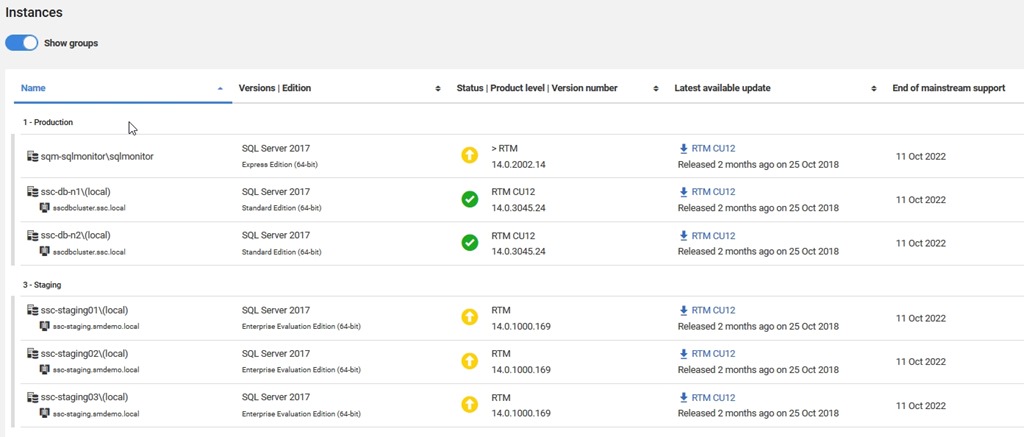
    If you look below here, you’ll see more details on the instances, broken out into the groups you’ve configured. What’s nice here is that you see each database, as well as the version and an icon to let you know if you are behind in patching.

    2018-12-20 11_05_52-Installed Versions

    Perhaps even more helpful, there’s a link to the download for the latest patch. Makes it easy for you to find the files you need to update an instance. Perhaps even nicer, you can easily see when support ends, and use that to make plans for upgrades if you need to do so.

    This is one of the simpler, but amazingly handy features to have in a monitoring system. I’ve built scripts and tools to do this in the past, and while it’s not hard, it’s also not something that is necessarily a good use of my time. This is a task that’s tedious with limited value add for my salary. Much better to have a tool that gathers and manages this for me.

    If you haven’t tried SQL Monitor, run over to monitor.red-gate.com and give it a run, or even better, download an eval and try it in your environment.

  • My Favorites from 2018

    Recently we had a webinar with Grant, Kathi, Kendra, and myself to discuss the year in review. We talked about our favorite things from the year and made a few predictions for 2019. I like to do this myself every year, usually in a general sense, looking over the entire data platform and technology world. In our webinar, Kendra asked us about some favorites, and I thought I’d look back at memorable items for me in 2018.

    I was lucky to attend a number of events this year. My speaking schedule was 25 events and 37 talks, a few of them virtual events. Around this I managed to get to 4 other events where I didn’t speak, 2 volleyball tournaments, and went on 5 family trips. A busy year, but with some exciting highlights. My two favorite talks were at security events in Cork and Washington DC. I had the chance to speak to a different audience about Database DevOps, and they were very interested and anxious to spread the word to their organizations.

    My wardrobe didn’t get quite the same upgrade as Grant’s, but I did get one new shirt this year. Only one?? (perhaps more next year) Still, I had a great time at our SQL in the City Summits, which we’re planning to repeat next year. Stay tuned for dates, but we’ll likely run a number in the US, the UK, and one other country. Fingers are crossed as this will be a new country that I’ve never visited. I missed SQL Bits this year and will next year, but that’s my recommendation if you get budget to attend an event. With lots of flight deals, you might even find it costs as much to go to the UK as attend one of the large conferences in the US.

    I have a great job with Redgate, and I really enjoy talking about our products when I can. This past year, with the GDPR coming into enforcement, has had me focused on our Protect and Preserve area. While I enjoy talking about Database DevOps overall, I gave quite a few SQL Provision demos, which is one of those amazing products that really changes how you proceed with development. I’m hoping this is a continued area of growth, both because I like the topic and product, but also I do think we need better data handling practices as an industry. Next year I hope to do more work in this area, and add in some container talks as well. I’m also thrilled with making a difference with suggestions and lobbying for the product teams. Clone Resets and Installed Versions were two of the items I’ve heard from you and suggested myself that were implemented. Keep the feedback and votes coming.

    My least favorite moments of the year were losses in the community. I took a moment to mention this in an editorial, at the PASS Summit, and in the webinar. I didn’t know Stephen Hawking, but I do miss chatting with Tom Roush, Robert Davis, Aaron Lowe, and Naomi Williams. Unfortunately part of aging is losing friends and family. I added a section to Database Weekly for obituaries, and while I don’t relish adding links, let me know if someone passes.

    I’m also excited about the new version of SQL Server 2019 coming. There are some fundamental changes coming in how we might process and query lots of data. I don’t know what I think of the Big Data Clusters and some other features as they’ll be 1.0 releases next year, I do think that this is a shift in how we might think about SQL Server that will affect us in the next decade. I certainly am looking forward to a more robust Linux feature set as well as how containers will change the way we work. If you haven’t looked at them, now might be the time to start.

    Hopefully you’ve had a great 2018 and are looking forward to ringing in 2019 tonight. Stay safe and enjoy yourself.

    Steve Jones

    The Voice of the DBA Podcast

    Listen to the MP3 Audio ( 6.0MB) podcast or subscribe to the feed at iTunes and Libsyn.