Author: way0utwest

  • The Upgrade Storm

    The Perfect Storm is a movie about the confluence of three weather events that combined to create a situation the resulted in the loss of all life on a fishing boat. It’s a good movie, and certainly one that might make anyone think twice about sailing off into the North Atlantic in bad weather. I certainly wouldn’t want to be traveling on the water when any type of hurricane might present.

    Glen Berry writes about a perfect storm of a different sort. The perfect storm to upgrade, with the confluence of three events he sees taking place soon. We have quite a few performance related changes coming in Windows 2019 Server, in CPU hardware, and storage technology. Those three changes could dramatically improve the performance you might see from your SQL Server licenses.

    If you were planning on updating a legacy system with a new version of SQL Server, you might do well to consider some of these hardware and software improvements. I don’t know what the costs might be, but that’s certainly something you will have to consider for your environment. The argument likely would be that if you’re updating the database server, why skimp? This is a limited resource and one that can affect your entire system. Spending some money here might make a significant difference to the way in which your system performs.

    This might be a perfect storm of a different sort for your budget and your accounting department as upgrades for SQL Server are likely to be pricey. The improvements could dramatically improve workloads by lowering the time users spend waiting or increasing the throughput of queries. Those might negate the cost of any hardware and software costs involved since time is a valuable resource and saving time is worth something.

    The problem for many people is that if you aren’t writing good code, then you might not get the benefits you want from the upgrade. Certainly the performance improvements might be lost under poor query performance. Upgrade to take advantage of improvements if they are something you need, but please, learn to write better code, and ensure your developers are regularly looking for better ways to use your expensive SQL Server licenses by writing more efficient code.

    Steve Jones

    The Voice of the DBA Podcast

    Listen to the MP3 Audio ( 3.2MB) podcast or subscribe to the feed at iTunes and Libsyn.

  • What is Projectsv13 in SQL Change Automation?

    I got this question recently from someone that was evaluating the SQL Change Automation client in Visual Studio. After setting up a new PoC (Proof of Concept), they were confused about why there is a new entry in their list of SQL Servers.

    If you’re wondering, this is what you see in Visual Studio 2017, for the SQL Server Object Explorer.

    2018-09-18 20_20_30-SQLBuilds - Microsoft Visual Studio

    In my case, I’ve actually got a few different instances since I’ve been working with the SQL Change Automation (SCA) for years, across a few versions.

    As the instance names list, these are LocalDB instances. LocalDB is a version of SQL Server that is spun up in process, rather than a service. Other than that, it’s a real SQL Server instance that is running. In fact, if you want, you can connect to this with SSMS.

    2018-09-18 20_22_31-Connect to Database Engine

    If I connect with those credentials, this will appear in the SSMS Object Explorer as well, the same as any other instance.

    2018-09-18 20_22_48-SQLQuery3.sql - dkrSpectre_sql2017.sandbox (DKRSPECTRE_way0u (69))_ - Microsoft

    Why is this in SCA?

    As an early part of the SCA product, when it was in ReadyRoll, there was a desire to not impose burdens on application developers. If you were working with a project for C# or ASP.NET and wanted to include the database, the idea was to keep things simple.

    The simple way to get up and running is to use LocalDB, so no install, no worries with Express and a service running, just use LocalDB. This used to be more of a default, but now it’s just one of the options.

    In my case, once I’ve setup my project to connect, the Shadow database, by default, is also right here, and I’ll see both databases under the (localdb)\Projectsv13 instance.

    2018-09-18 20_27_51-SQLBuilds - Microsoft Visual Studio

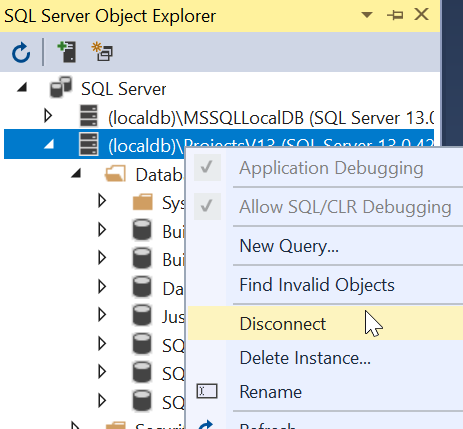
    All of this is configurable, so you can set things to work in whatever manner works best for you. If you typically have a development instance, either local or remote, you can easily use those instead, and you’ll never need to worry about LocalDB. In fact, if this bothers you, you can disconnect or even delete the instance.

    2018-09-18 20_32_02- 

    LocalDB is a lightweight way to work with SQL Server, but you don’t need to use it.

  • Rollbacks Are Normal

    Do any of you think that a rollback of a version for your application is easy? Most people struggle, and when I talk DevOps and improving your process, the number one question is about rollbacks. In fact, recently I had a few people that struggled to even listen to the early parts of DevOps because all they could think about were previous failed releases and the need to roll back. They kept saying, what about rolling back. Hopefully you can stick with me a bit longer.

    I’d argue that rollbacks are the process that needs DevOps more than ever, with smaller, more regular releases and practice at making changes. Whether forward or backward, we ought to be able to rev our software easily. I ran across a piece from the cloud platform blog at Google called Reliable releases and rollback – CRE life lessons. The title is an interesting one, but suspend some of your database skepticism until the end.

    It’s easy to consider rolling back in the early parts of the article and say “it’s way easier to roll back your application”, and it is. Applications just stomp down new (or old) versions on top of what’s there, which is often an easy thing to do. As they say at Google, “rollbacks are normal”, which certainly seems to fit with the application paradigm.

    In fact, they recommend rolling back a good release. After all, it’s much easier to practice this sort of thing when you have a working new version of software. When the release breaks your system, as mentioned in the piece, everyone’s stress level rises and the fixes often aren’t well built. Even when they work, which isn’t anywhere near all the time, there are often problems later. The idea should be to roll back and ensure everyone knows how to undo a version change. They can document the reasons for rollback and get the previous state of the application running. I hadn’t thought about this, but it makes sense. Practice in advance and be prepared. You can always re-deploy the working version.

    What about databases? They have a solution, and I like it. They want the app developers to build two versions of the application. One pre-schema change, and post. That way you deploy the first version, then the schema change(s). Then you deploy the second version. If there’s an issue, you rollback to the first version and undo the database changes. This sounds hard, but once you get into the swing of building code that survives additive changes to the database, this is easy.

    This doesn’t solve any destructive changes to the database, like dropping objects or manipulating data. I would suggest that drops are a completely separate release, and have a full backup (or snapshot) taken and saved for awhile. For data manipulation, save off the previous state of data, just in case you need to reload things.

    Becoming better at not only delivering changes to the customer, but also removing them when issues are detected is a valuable skill, and since we’re likely to have a bad release at some point, this might be a way to even further reduce the risk of deploying database changes.

    Steve Jones

    The Voice of the DBA Podcast

    Listen to the MP3 Audio ( 4.7MB) podcast or subscribe to the feed at iTunes and Libsyn.

  • The Trigger Roundup–T-SQL Tuesday #106

    This month was my turn to host T-SQL Tuesday. I chose Trigger Headaches or Happiness as the topic, and I am glad that there have been quite a few responses.

    I started the review almost immediately,and here are a few highlights. I separated these based on how I first thought of them after reading the post. If you think I’ve mischaracterized one, let me know.

    In case you don’t want to add, it’s 9 to 13, so triggers are a headache.

    Helpful Triggers

    I have to start with Burt Wagner, who gets top billing while wearing a Hawaiian Shirt. Thanks, Burt, and interesting solution. In the case where Burt wants to use Temporal Tables in pre-SQL 2016 instances, he uses triggers to manage the history table. I think that’s a great way to use triggers, and while slightly hidden, this should overall work well. The downside is that any schema changes to the table need changes to the trigger and history table, which could be slightly lost if developers don’t realize this.

    The newest evangelist at Redgate is Kendra Little, who loves triggers. Her post looks at her first experience with triggers. It was positive as a way to detect changes for downstream systems.

    Shane O’Neil has written about when triggers are good, talking about the way in which he tracks when new databases appear on his instance, with an email to auditing.

    Aaron Bertrand discusses INSTEAD OF triggers, and gives you the places where these are useful, or even necessary.

    I’ll file this as helpful when Peter Schott writes some code to disable triggers.

    Data migration is always tricky, but Jay Robinson gives a way in which triggers are helpful. I think that this is a great use, and more people ought to do this to simplify deployments and let data migrations occur over time, not all at once.

    Despite his misgivings, I think Marek Masko shows that he uses triggers effectively in code.

    I think Service Broken is amazing, and I wish that messaging and queueing processes were a pattern more of us used. Reid DeWolfe shows how triggers work in conjunction with Service Broker to get things done.

    A simple solution from Eugene Meidinger with the cautions that we need to be very careful with server level triggers.

    Headache Triggers

    Rob Farley has a discussion about some of the problems you can run into with triggers. He likes them, and has written about them before, but he offers advice for how to deal and write triggers in your organization.

    Dave Mason has a post on DDL triggers, which fire in response to event classes. If you’ve never used these, Dave gives you a few ideas on where they might be handy.

    We get a look at the good, bad, and ugly of a trigger in an AG from Bob Pusateri.

    David Fowler has a great post on nested triggers, with Service Broker in between to ensure there is no limit to the number of times the trigger fires.

    Jon Shaulis has a long post that provides an overview of triggers, where they work and don’t, and includes a few ideas for replacing triggers.

    Claudio Silva writes about triggers being hidden and wasting his time.

    I almost can’t believe the number of triggers Allen White has seen on a table, but since I have had similar customers and employers, I’m not surprised.

    Logon triggers can be headaches, and James Livingston shares one of his with us.

    The great Hugo Kornelis gives us a way to use triggers effectively and not be sad. Vote for a suggestion to make them more visible in SSMS. I voted, and I agree. We need better visibility.

    While Eduardo Pivaral writes about good and bad triggers, I think he feels triggers are somewhat bad overall. Certainly his “good fix” might not have been the best choice in his eyes, even though it worked.

    Not realizing that a trigger needs to operate on a number of records is a common mistake, so I’m putting Brian Dudley’s post in this area.

    I’d say that trigger anti-patterns fall into the headache area, and we get a few situations from Nate Johnson.

    Matthew McGiffen tells about the trouble with triggers. As with many of the other posts, he finds that triggers might be worth less than we initially think.