Author: way0utwest

  • Monitoring Costs

    I’m a believer in instrumentation and metrics being regularly gathered from your systems. Across the years I’ve built and bought monitoring software to use in various jobs, sometimes in layers where one piece of software uses data from another to provide insight about the way in which applications are performing. By gathering and analyzing this data, I can determine if more or less resources ought to be allocated to meet the demand.

    No matter how you choose to gather this information, there are costs associated with the effort. Early in the lifecycle of an application, many developers and DBAs might just check to determine if the a system is up. As time passes and dependency increases on the system, there are additional needs to understand more about the system, such as storage, processor usage, and more. SQL Server has certainly matured in this respect as well, with more and more DMVs being added over time to allow more instrumentation of the platform.

    One of the interesting things that happens when you monitor your systems is that there are various costs to your organization, some of them hidden.  Certainly purchasing or building software has a cost, but what about the other costs involved? As I work for vendor that sells this software, I’m always amazed how customers view costs. Most understand there are hardware costs, though surprisingly, a few don’t expect that.

    There are other costs, some of which are outlined in the article linked above. There are plenty of time costs, especially associated with learning and configuring the software. In fact, this can be a significant cost. Most customers fail to account for time, and regularly become frustrated as the instrumentation never seems to meet their needs. Either it hasn’t been configured to meet your needs, or you haven’t learned to use the system well. There are also some people that find the opposite, with monitoring visualizations becoming a time sink, where administrators get lost in the analysis of data and the variety of ways to examine the information available.

    It’s not just administrators, as not shortage of executives have wanted real time visualizations of metrics on systems, sometimes just standing there watching the metrics rise and fall to gain confidence in how well their systems are functioning.

    There is another cost that many people often forget about as well. Any system that monitors another will impose a load to gather that data. That could be significant, especially if you haven’t tuned your software. There will always be some load, and I think it’s necessary to have information, but you ought to be sure the load isn’t too significant.

    It’s important we monitor our systems. I would never build that system again, but rather buy some piece of software because the process is cumbersome and there are lots of choices for software that someone has spent time building. I’d rather learn to use their application well and let it help me do my job.

    Steve Jones

    The Voice of the DBA Podcast

    Listen to the MP3 Audio ( 4.8MB) podcast or subscribe to the feed at iTunes and Libsyn.

  • A Summit Contest for registering by Sept 22

    If you haven’t registered for the 2018 PASS Summit and plan to go, you might press to get registration done this week. Next week prices increase, but this week you can save.

    passpromo

    There is a promotion from PASS that will let you save $200 this week. In addition, you can beat the price increase next week, which will go up $200, so if you can register by Sept 22, you save $400 over the cost next week. Use the discount code in the graphic above.

    There’s also the chance to win a daily prize from PASSStuff.com. Plus, everyone registering this week will be entered for the chance to win a complementary admission to the 2019 Summit.

    If you’re going to the Summit, or have asked, press to get registration done this week. You’ll save some money and get the chance to win some fun SAWG and maybe even get next year’s summit registration for free.

    Register today and good luck.

  • Deleting a User that Owns a Schema

    This was an interesting question I saw posted recently. Through SQL Server 2000, trying to delete a user that owned objects was a pain. We had to actually rebuild all the objects, which was problematic. With SQL Server 2005 and later, we got schemas actually added as separate entities, so that solves some of the issue.

    To allow a user to be removed from a database when they own a schema, we need to move the ownership, or authorization of the schema to a new user.

    Here’s a short repro of what to do.

    Let’s say that I have a user in my database called SallyDev. This user is a DDL_admin and can create objects. I’ll add Sally to my database with this script:

    CREATE LOGIN SallyDev WITH PASSWORD ='SomethingStrong'
    GO
    CREATE USER SallyDev FOR LOGIN SallyDev
    GO
    ALTER ROLE db_ddladmin ADD MEMBER SallyDev
    GO

    As such. SallyDev has run this script:

    CREATE SCHEMA SallyDev
    GO
    CREATE TABLE SallyDev.Class
    ( ClassKey INT IDENTITY(1,1)
    , ClassName VARCHAR(100)
    , Active BIT
    )

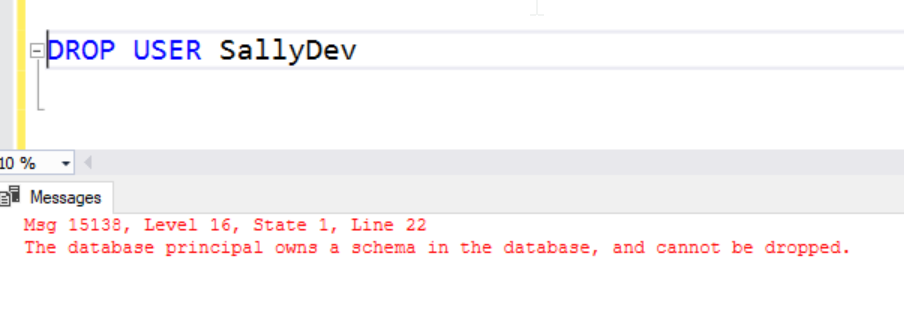
    Now, SallyDev has left the team and we need to remove her user and login. When we try to remove the user, we get this error:

    2018-09-15 01_02_05-SQLQuery1.sql - dkrSpectre_sql2017.sandbox (DKRSPECTRE_way0u (68))_ - Microsoft

    In SQL 2000, Sally would have owned the table and we would have gotten a different message. Now, Sally owns the schema, but the schema now owns the table.

    To fix this, we need a new owner for the schema. We can use any user with the ALTER AUTHRORIZATION command like this:

    ALTER AUTHORIZATION ON SCHEMA::SallyDev TO JoeDev

    I don’t recommend another user as we are just deferring the same problem. Instead, I’d move the schema to dbo.

    ALTER AUTHORIZATION ON SCHEMA::SallyDev TO dbo

    Once this is complete, we can drop the SallyDev user.

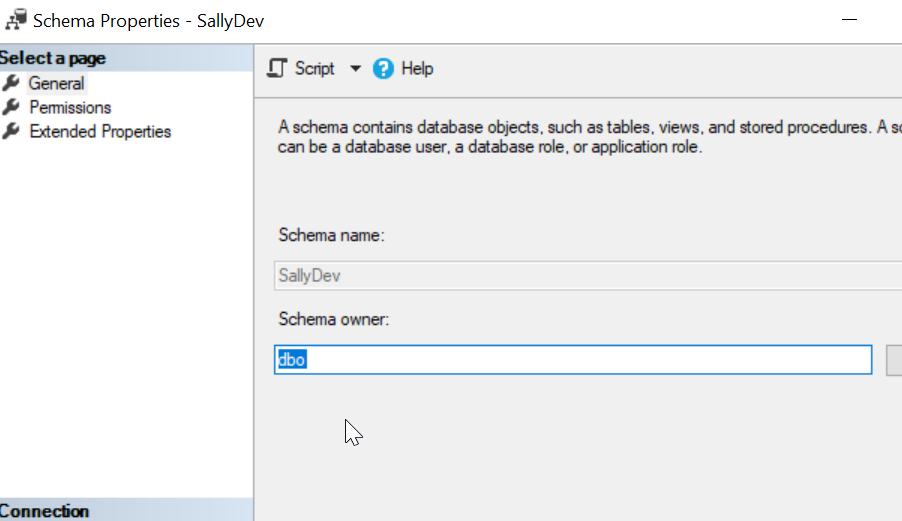
    We can also verify the schema has moved to a new user.

    2018-09-15 01_06_37-Schema Properties - SallyDev

  • Dark Reads During a Migration

    I caught a post from the Slack Engineering team titled: Re-architecting Slack’s Workspace Preferences: How to Move to an EAV Model to Support Scalability. In the post, an engineering intern describes the move from a blob table (actually a table storing JSON data) to an EAV table. EAV tables generally don’t perform well, which isn’t the same as scalability, but in the real world these two items are interrelated. I likely would have chosen a hybrid approach, using a wider table for known items, but keeping an EAV table for potential one-offs.

    In any case, I don’t want to discuss EAV solutions. Instead I want to discuss schema migrations. That’s part of the focus I have at Redgate with our Compliant Database DevOps solutions, as deploying schema changes is a challenge for many customers. It’s why DBAs usually have jobs, but the traditional built-the-script-from-developer-descriptions-and-lists-of-changes doesn’t always work smoothly. This creates stress for the individuals and risk for the organizations.

    One of the items in Slack’s post is about a dark mode of deployment. That’s similar to what I’d call dark launching, but the idea is the same. In this case, there’s a good description of how this is helpful. In this case, there is the migration of data from one table to another. The new table was populated as part of the deployment, but rather than just using the new or old table, the application was altered to pull data from both sources and compare them. This helps to ensure the data was moved correctly. I assume issues resulted in the old data being used.

    There were a couple interesting things with this approach. First, instrumentation was used to measure the time spent pulling data from the new table, as a way of measuring performance. This also allowed the system to discover read/write bugs in the new process. If your system has any headroom and a decent workload, this is a great way of trying to ensure that a data migration worked.

    If you have a new feature, you can also use this technique. Make the database changes and add application code for your feature, but don’t expose that to the user. Instead, add code that uses the feature, sending random data to the database and reading it back. In this way, you can test that your methods work and measure the load on the database. Of course, if you do this, make sure you can silently turn off the random generation if the database is negatively affected.

    I’m a big fan of dark launching and measuring the impact of changes. In so many cases our deployments might be delayed for any number of reasons, so the pressure to release the feature today rather than tomorrow or next week is silly. I’d argue the ability to measure impact, even for a day, will help ensure better code quality for the user.

    That’s if you are given time to fix any issues you find..

    Steve Jones

    The Voice of the DBA Podcast

    Listen to the MP3 Audio ( 4.1MB) podcast or subscribe to the feed at iTunes and Libsyn.