Author: way0utwest

  • SOS to ADS

    When Microsoft announced SQL Operations Studio last year, I wasn’t thrilled. The move to a VS Code shell was less of a concern to me than having a better SSMS toolset. Actually, with VS moving to MacOS, I was hoping we’d get a slimmer, closer VS version of SSMS that allowed add-ins, extensions, and plugins.

    No such luck. We got SQL Operations Studio, which had the unfortunate acronym of SOS. To top it off, I felt this was more of a developer tool, but the name implies a DBA/sysadmin tool. To me this was a tool somewhat lost in its mission.

    Now we have Azure Data Studio, the renamed SOS, which is interesting. I know there are more features than SOS and some additional work coming, but I can’t get too excited. Other than people that want native connections to a server from OSX and Linux and write T-SQL, is this that useful?

    You can download it and see what you think.

  • Azure DevOps

    I’ve been a fan of Visualstudio.com and VSTS for some time. I moved most of my demos to this platform a couple years ago and I’ve been pretty happy with it since then. There is tremendous flexibility in how you can use automation and dashboards to build software and coordinate the activities of your team.

    The VSTS system underwent a rebranding and reorgnaization renently. The various pieces of the system were renamed a part of Azure DevOps, with the different parts being given new monikers such as Azure Pipelines, Azure Boards, and more. This was combined with an initiative from Microsoft to better support open source projects by giving them unlimited build minutes for public Github repositories on a variety of platforms such as Windows, OSX, and Linux.

    I’m not a bit fan of name changes, as I think that if the software performs well and provides value, it will succeed. However, marketing people need work, too, and management inside a company often rearranges things to put their own mark on a project. I’m actually glad the marketing effort was ramped up as I think the Microsoft platform based on TFS for tracking work, version control, builds, and releases has become a fantastic platform for anyone building software. That’s not to take away from some other products like Bamboo and Octopus Deploy, which might work better for you. If they do, they plug into the Azure DevOps platform easily.

    If you haven’t tried Azure DevOps, I’d urge you to give it a try. There’s an all day recording of various parts of the system being used to produce software that will show you how to get started and use the system. I’m sure there will be more information and talks this week from Ignite. There aren’t a ton of database tools, but there are some add-ons from various companies to help you build and deploy databases alongside your application software.

    While there are challenges with databases, I’d argue that incorporating a known process will increase reliability and lower risk for making changes. This won’t help you build better code. That’s something you still need to ensure your developers are doing. This system just helps ensure simple, silly mistakes aren’t made and everyone knows exactly how your changes will be deployed to your production environment.

    Give Azure DevOps a try today and see how you can build a smooth, repeatable, reliable process for your software.

    Steve Jones

    The Voice of the DBA Podcast

    Listen to the MP3 Audio ( 4.0MB) podcast or subscribe to the feed at iTunes and Libsyn.

  • Fitting Into RAM

    RAM has always been a fairly limited resource in most of the computer systems I’ve worked with in my career. Often there is never enough RAM, and I’d always like more, often to speed up the systems. That has somewhat changed with laptops, as 16 GB really works well for me most of the time. Not that I wouldn’t take a 32GB machine, but I’m waiting for them to become more common and smaller.

    This has especially been true for database servers. It seems that I’ve rarely had a database server that could fit my entire database in RAM. Even now, I have an over-provisioned server for SQLServerCentral which has plenty of spare capacity, but I’m still slightly short on RAM. The target level for SQL Server is about one GB more than I have set. Not really worth complaining about, but still I don’t have the RAM I’d like.

    Last week I wrote about someone that attacked the RDBMS as old and troublesome technology. As a part of this, a method of storing all data in memory was presented. I’m not sure I think this is actually a good or practical idea for most systems, but I did wonder about the idea of data space and size. Certainly I have seen plenty of index space in databases, and certainly there is more index data than other data at times, but I suspect that’s not the case for many databases.

    Regardless, I was curious if anyone has large databases that couldn’t fit into RAM these days. If you think about the largest database you have, how big is it, in terms of data size. Not allocated size, but the total data space used. Would this fit into RAM if you could get 1TB or 2TB of memory? If you can, what about index sizes, are they large? There are a few scripts in this thread if you need one.

    I suspect there are certainly databases that don’t fit into RAM, and likely plenty of instances with more than 1 database that don’t have enough RAM. I still see plenty of people with less than 64GB on their servers, so that’s a battle still being fought. I certainly wouldn’t advocate an in-memory only database, likely because there are going to be other issues, but it’s still an interesting thought. Certainly my server has only 60GB allocated and the databases are well over that in aggregate.

    Maybe asking for a bit more RAM on those critical servers is the way to go, especially if you think you can get the entire database into memory.

    Steve Jones

    The Voice of the DBA Podcast

    Listen to the MP3 Audio ( 3.5MB) podcast or subscribe to the feed at iTunes and Libsyn.

  • Moving Objects to a New Schema

    Another post for me that is simple and hopefully serves as an example for people trying to get blogging as #SQLNewBloggers.

    I haven’t had the need to move an object from one schema to another in years. Really since SQL Server 2000. I wrote about deleting a user that owns a schema recently, but that’s often a first step. The next thing I might need to do is actually move objects from that schema to a new one.

    I actually ran across this command when I was looking how to move the schema to a new user. There’s actually a parameter for ALTER SCHEMA that will move objects. This is the TRANSFER argument and it works like this.

    I need a new schema for the object. In this case, I’ve got a table called SallyDev.Class. I want to move this to a new schema, and I’ll choose dbo for this example. I often have had developers build in their own schema and then I’ll transfer to the dbo schema, which is almost like a merge of code from one branch (SallyDev) to another (dbo).

    The format of the command is: ALTER SCHEMA <newschema> TRANSFER <object>

    The new schema name is just the name, with brackets if needed. Hint, if you need brackets, rename your schema, please.

    The object is the qualified name of the object, with the old schema. In this case, the command I’ll use is:

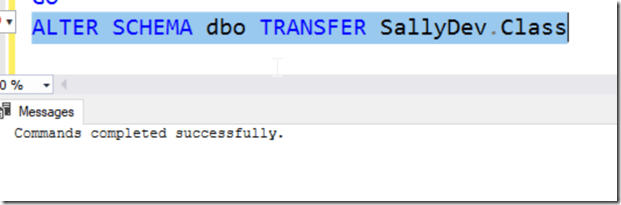
    ALTER SCHEMA dbo TRANSFER SallyDev.Class

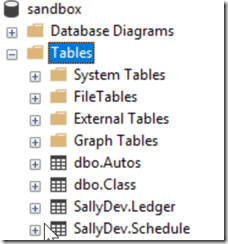
    Here’s my before look:
    2018-09-17 19_12_02-SQLQuery1.sql - dkrSpectre_sql2017.sandbox (DKRSPECTRE_way0u (68))_ - Microsoft

    When I run the code, it works:

    2018-09-17 19_13_03-SQLQuery1.sql - dkrSpectre_sql2017.sandbox (DKRSPECTRE_way0u (68))_ - Microsoft

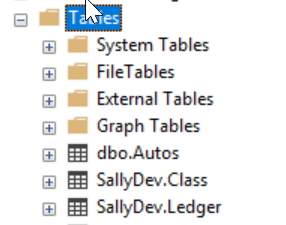
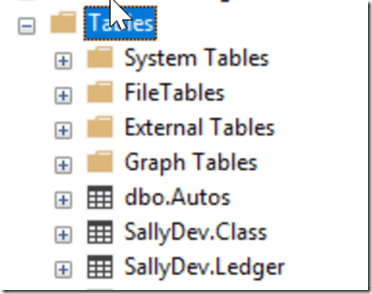
    Now my object is moved. Success!

    2018-09-17 19_11_37-SQLQuery1.sql - dkrSpectre_sql2017.sandbox (DKRSPECTRE_way0u (68))_ - Microsoft

    SQLNewBlogger

    This is a quick view of a specific skill that can be handy. I won’t use this often, but if my team worked in this flow, or we had an issue, this not only shows how to resolve a single item move, but also helps me remember the command. I hadn’t seen this before, so a quick 10 minute blog is useful.

    This also gives me ideas for other blogs, like how to automate this for a number of objects.