Category: Blog

  • Daily Coping 27 Sep 2021

    I started to add a daily coping tip to the SQLServerCentral newsletter and to the Community Circle, which is helping me deal with the issues in the world. I’m adding my responses for each day here. All my coping tips are under this tag.

    Today’s tip is to experiment with a new healthy recipe today for a meal.

    I like cooking, but even if you don’t, find something and give it to the person that cooks for you. Or try something new at a restaurant.

    My wife wanted to do the Whole 30 diet. I’m working to accomodate her, and find some recipes that work for her. I had planned on one thing, and altered it slightly for her to meet the diet. I made some sheet pan fajitas, served over lettuce. Chicken in this link, but  switched to steak.

    20210919_182955

    A big hit with the family, though she didn’t get the guacamole that the rest of us did.

  • The Tesla Charging Experience

    This is part of a series that covers my experience with a Tesla Model Y.

    It’s been a little over two weeks, and the odometer shows about 600 miles. Quite a bit, since we were gone for 5 days out of town without the car. We’ve driven most days, but not all of them, and the charging experience has been interesting.

    This was a capture recently of the main screen after a trip to town:

    20210922_103929

    If you look closely, this is plugged into a 110/120V circuit, pulling 12A, and charging at 5mi/hr. Since a trip to town is 25 miles for me (roundtrip), this means it takes about 5 hours to recharge.

    That’s slightly deceiving as I still have over 250mi of range after a trip to town. These trips usually use about 6% of my battery, but that means I could drive this without charging for over a week back and forth each day without issue.

    Well, the car would be fine. I might be a little concerned.

    Catching Up After Delivery

    We definitely had range anxiety after the first day of driving. We picked up the car and went over 100 miles. When I plugged in at home, the car said it would be over 24 hours to recharge.

    That’s disconcerting, but unlike a quick fill up at a gas station, I can keep recharging each day. While we hadn’t recovered back to a 90% charge before I drove it to the gym the next day, across 3-4 days, we did recover while also driving the car. Each overnight charging session got us a little closer to 90%, with some loss during the day from driving.

    It’s a weird feeling, but I’m getting used to relaxing about the charging.

    Maintaining 88%

    For most of these 2 weeks, I’ve had the max charge set to 88%. Tesla doesn’t recommend going to 100% unless you have a long trip the next day. I see all sorts of recommendations from 70-90, and I ended up at 88%, mostly because the granularity on the slider in the app isn’t great and I got close enough and decided to stop there.

    Almost every night I catch back up 88% after a trip or two each day to town. My wife takes it to do a few errands and some friends have wanted rides, so we sometimes get 50-80 miles of usage in a day, but rarely multiple days in a row.

    If the car hasn’t recharged to 88% before I drive it one morning, it usually does by the next day.

    Better Charging

    I was worried about recharging before I started tracking my mileage. Since then I’ve relaxed a bit, but mostly for the next month or so. In November the weather changes, and since I’ll be coaching again, there will be more trips during the week, and some longer ones to tournaments. Plus, ski season will start and I wouldn’t be surprised if we drove 100-150 miles one day for coaching and then wanted to go 200 to ski the next.

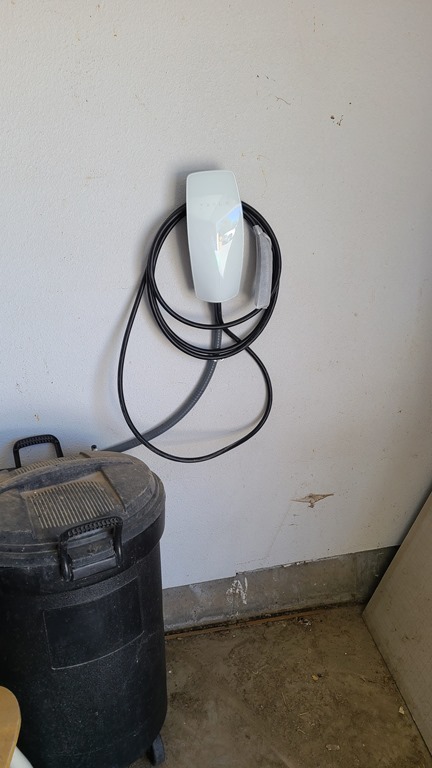
    I purchased a Tesla Wall Charger in August, but have been waiting for an electrician to come out to install it. This is a small job, and ultimately, it only took the team of 2 about 15 minutes to get it hooked up.

    I went from this:
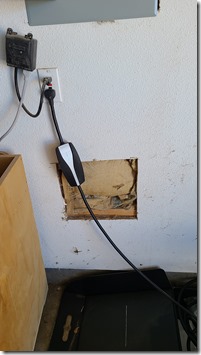
    20210922_103830

    to this:

    20210922_113910

    Charging went up as well:

    20210922_114102

    At this rate, a completely empty battery, which I wouldn’t want, could go from 0-80 in about 6 hours. That’s likely an overnight charge any day of the year for me, since I’m rarely out late.

    I don’t know that we need it, but the US$500 for the charger is worth some piece of mind. The install was $250, but with the 30% tax credit, we would likely get most of that back, so really it’s a $500 investment for me.

    The Bottom Line

    As I noted in the charging post, I think a 110V charging solution would work most of the time. At least, after tracking my mileage I think that. However, that’s summer, and I know that my pattern of driving is different in the winter.

    The Tesla charger seems like a good investment to me, but I had a setup that made this a relatively cheap install. If your breaker box isn’t close to the garage, this could cost more and a few people have said their cost was closer to $500-1000 for an install on top of the charger cost.

    We’ll see how I feel about the investment over time as I track our trips and mileage, but so far, charging hasn’t been an issue. Hopefully my range anxiety will lesson.

    The other bottom line is the cost of driving. Using a few apps (I’m testing them), it seems that I use about 3.5kW to get to town and back. With my current power rates, that’s about $0.45 for the trip. In the BMW, it’s about a $3.80-$4.00 trip right now. If we still had the Prius, this would still be about a $2.00 trip.

    It takes a long time to get a payback for that on a $50,000 car, but it certainly is a dramatic savings over what I was paying in the BMW to go to the gym.

    A video of this post is available as well.
  • Daily Coping 23 Sept 2021

    I started to add a daily coping tip to the SQLServerCentral newsletter and to the Community Circle, which is helping me deal with the issues in the world. I’m adding my responses for each day here. All my coping tips are under this tag.

    Today’s tip is to touch base with a friend and share something you appreciate about having them in your life.

    I don’t do this enough. I did earlier in the pandemic, but I’m starting to try and rebuild some of this habit.

    Today I reached out to a friend in Denver and texted back and forth for a few minutes to catch up and schedule lunch. I told them how much I appreciate the little time we get together and the change to share in each others’ lives.

  • Getting Up and Running with Dapr

    I’ve heard about Dapr a few times from developer friends, but hadn’t really understood it that well. I had a webinar coming up, so I decided to spend a bit of time working with it to understand how it might function with an application.

    I went to https://dapr.io/, and saw the basic outline of Dapr is in this video from their site. I also found this getting started video from Donovan Brown.

    What I gathered from this research is that Dapr is really a set of containers that run alongside your app or act as middleware between different components, including state stores. Most of us might think of a state store as a database.

    As a part of my learning, I went through some of the getting started tutorials.

    The Tutorial

    I followed the getting started tutorial. The first thing was to open a cmd prompt with administrative privileges and run this:

    powershell -Command "iwr -useb https://raw.githubusercontent.com/dapr/cli/master/install/install.ps1 | iex"

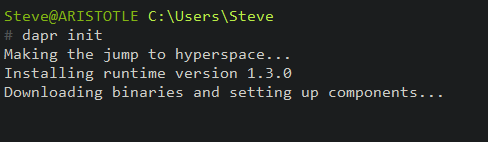
    Next, I needed to update. I ran the “dapr inti” in an elevated cmd line. I love the first part of this:

    2021-09-13 15_58_38-cmd - dapr  init (Admin)

    I already have Docker installed, with Linux containers, so I can quickly continue.

    I need to start an app so that dapr can run as a sidecar. I don’t have an app configured, but I can run this as a blank one, according to the docs:

    dapr run --app-id myapp --dapr-http-port 3500


    The next step is to test this. I am supposed to use curl to post an http request with this command:

    curl -X POST -H "Content-Type: application/json" -d '[{ "key": "name", "value": "Bruce Wayne"}]' http://localhost:3500/v1.0/state/statestore

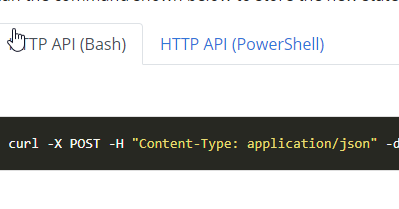
    When I do that, I get an error. Apparently, this doesn’t work in Windows, and really, it’s a bash request. Since I’m using the Windows CMD Prompt, I’m unable to read the instructions.

    2021-09-13 16_12_30-Use the Dapr API _ Dapr Docs

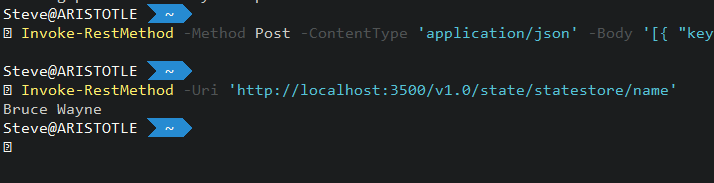
    I need to click the PowerShell option and get the Invoke-RestMethod cmd. When I do that, I see that the state is working.

    2021-09-13 16_13_16-C__Users_Steve

    I can also test this with an interactive connection to Redis. Again, in the tutorial, this lets me get to the data store.

    2021-09-13 16_14_40-cmd - docker  exec -it dapr_redis redis-cli

    That was most of the tutorial. I worked with the config file, and then looked at the Hello, World tutorial. Overall, this was pretty simple and worked well for me.

    My Thoughts

    There is a lot of stuff going on here. The concept of a sidecar, is really a container that gets a network call from your app to do something. Then the sidecar does something else. It’s like middleware, or an app server in the older client/server or 3 tier architecture, but without the tight coupling and dependency. More importantly, this allows dapr to scale out and run as a separate process rather than being part of a monolithic entity.

    More work, but also more consistency and this gest you used to building an API rather than having developers inconsistently connecting things together.

    The goal here is really to think about microservices.  I don’t know if I think that’s the best way to build thing, but it is a trend, I like the cloud native focus, and it’s helpful to understand something about this when talking with developers about pros and cons.

    By the way, after my webinar with Donovan Brown and Mark Fussell, I learned this doesn’t require microservices or containers. It can run in many different software models, but abstracts away a lot of the SDK and API struggled with different technologies.