I’ve been playing with Data Masker for SQL Server v6 and it’s an interesting product. I like the way it works, but I do find it a little challenging sometimes to figure out how to mask values. I’ve written a set of posts for different scenarios.
We had a customer ask about how to mask data across rows. The customer had some data in a table that was a standalone table, and contained data in a column that matched across rows. They wanted this changed, but the matching between rows kept.
In other words, here’s a small mocked set of the original data:
myid        Mychar     myint       mytinyint
----------- ---------- ----------- ---------
1           Steve      12345       1
1           Steve      12345       2
2           Andy       12345       3
2           Andy       12345       4
3           Brian      12345       5
3           Brian      12345       6
3           Brian      12345       7
Here are the results they want:
myid        Mychar     myint       mytinyint
----------- ---------- ----------- ---------
1           aaa      12345       1
1           aaa      12345       2
2           bbb       12345       3
2           bbbb       12345       4
3           ccc      12345       5
3           ccc      12345       6
3           ccc      12345       7
I thought this was an interesting scenario, so how do we mask this? It’s not that hard, so let me show you this.
First, let’s create a new masking set. I won’t walk through that here, but once you have a set connected to your database, here’s what we do.
First, we need to substitute data out. In this case, I’ll substitute the name only. In a real world, we’d probably need to substitute the myid and myint columns as well, but I’ll leave those again.
I add a new Substitution rule first.
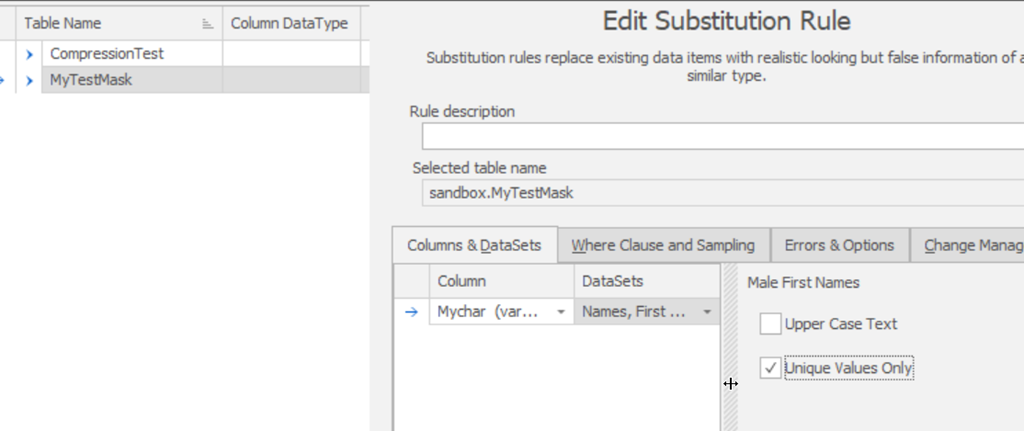
This is a standard rule. I’ll add my column and pick a dataset. In this case, I’ll just pick make first names (Names, First, Male) and use that. This will result in a random set of names. I’ve chosen unique values. This is important as across a large number of rows, I could end up with random values that match, but with different MyID values. That would be bad.
If I save and run this rule, I’ll see something like this.
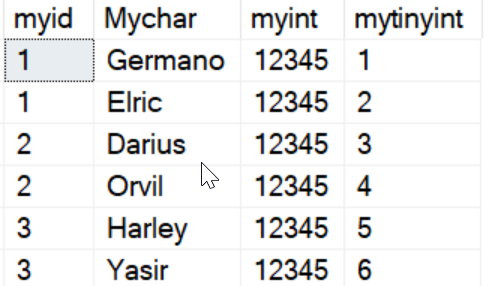
Not quite what I need, but it’s a start. The important thing is that the first myid=1 is different from the first myid = 2, which is different from myid=3.
Next we’ll add a Table Internal Sync rule. This is the rule that fixes values across rows inside a table. Here’s the basic config. Note that I choose a table and then I choose the columns that need syncing, in this case just the mychar column.
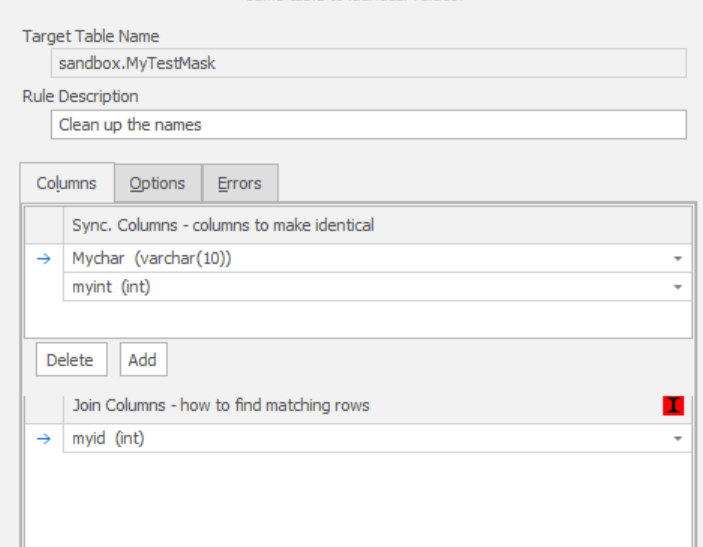
I need a way to determine which sets of rows should match. In this case, the myid column is used for that. If you examine the initial set, I have the same values for each name. This is what groups things together, so I’ll use this.
One Note: The red “I” to the right means this isn’t an indexed column. If I wanted better performance, I can add an index for this column, either permanently or just for the masking process.
Now I execute this rule, and I see these results:
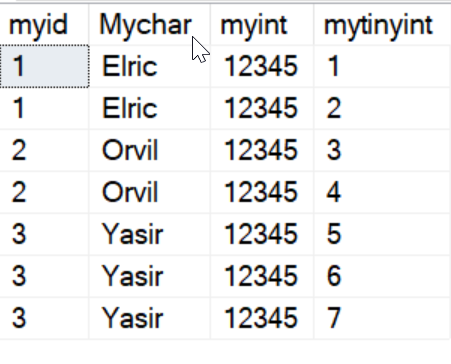
I have my groups back.
I could expand this to include other columns as well, substituting the myint column in my first rule and including it in the second.
Setup Scripts
Here is the code to set this up:
CREATE TABLE MyTestMask
( myid INT
, Mychar VARCHAR(10)
, myint INT
, mytinyint TINYINT PRIMARY KEY
)
GO
INSERT dbo.MyTestMask ( myid,
    Mychar,
    myint,
    mytinyint
)
VALUES
  ( 1, 'Steve', 12345, 1)
, ( 1, 'Steve', 12345, 2)
, ( 2, 'Andy', 12345, 3)
, ( 2, 'Andy', 12345, 4)
, ( 3, 'Brian', 12345, 5)
, ( 3, 'Brian', 12345, 6)
, ( 3, 'Brian', 12345, 7)
GO
I’d urge you to give Data Masker a try if you’re looking to ensure compliant, safe data sets for your non-production environments.
I have other articles on Data Masker if you’re interested.

