I’ve had an aging desktop for some time. I originally bought it from Glenn Berry (b | t), who I think gets a new machine every quarter or two. Seriously, I think there is a computer in every room of his house, and he has a lot of rooms.
In any case, I had an i7-930, 24GB of RAM, and 4 drives with about 3TB of storage. However, the CPU was aging and I’d get temp alarms when doing heavy video processing. In the last 4-5 years, I’d replaced the power supply and CPU cooler, but still had issues. The Windows 10 upgraded added more, with some weird freezing and loss of the Start menu. I didn’t have all of those things on my laptops (both w10, one new, one upgrade), so I decided it was time to rebuild when a simple Skype call had temp alarms going off.
Glenn is my hardware guy. If I have a question, I ask him, mostly because I don’t care about cool hardware and just want things to work. Glenn recommended these items (some of them), and I drove down to the local Microcenter after my Skype call finished.

I purchased
- ASRock Z170 Extreme6 motherboard (recommended) – $160
- i7-6700k CPU ( recommended) – $290
- CoolerMaster fan – $35
- 32GB Corsair Ballistic RAM – $150
I know I could find better prices, but I wanted this done quickly. I also needed a new video card, but I delayed that for now. I wish I hadn’t.
After a few hours of work, and a day (filled with family commitments), I sat down with parts.
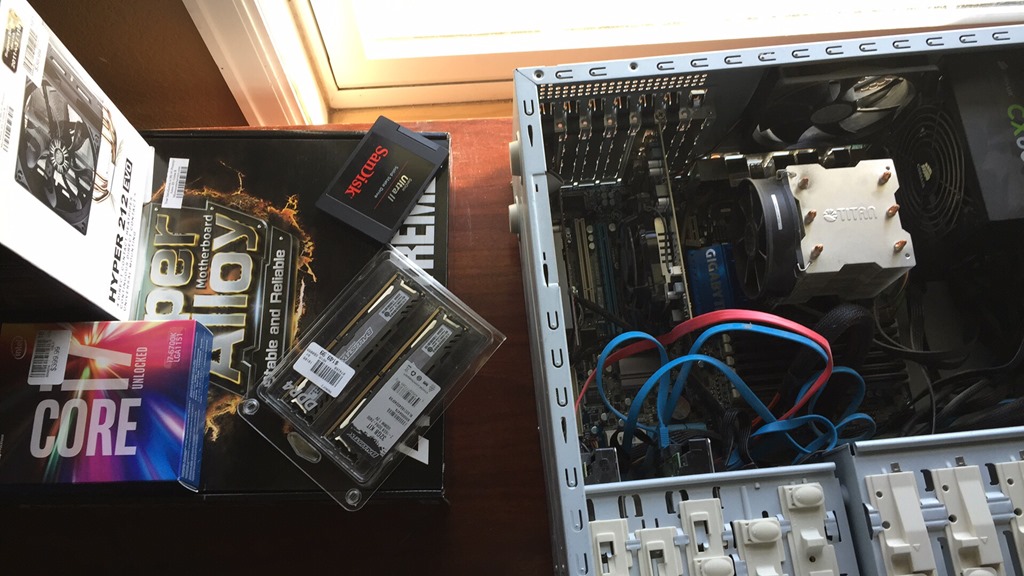
I made sure my Crashplan was up to date, and my cloud services were sync’d. I’ve tried to do this in order to become productive quickly on new machines. I also had a new SSD that I’ve been traveling with, but I repurposed that as a new boot drive. The old one was 256, and this was 1TB, so I won’t be in danger of running out of space, something that I was close to doing on the old machine.
I disconnected everything and pulled out the old (dusty) motherboard.

It’s worked well, but it’s aging. It’s also somewhat slow compared to newer technologies, though that was (hopefully) a bonus, not a requirement.
I then installed the new motherboard, which wasn’t too bad. The hardest part was getting the CPU cooler installed. Balancing the four arms and screwing things in while the large cooler wants to slide on thermal compound was a challenge. Fortunately I managed to get it secure without too much grease on my hands.
I connected all my drives back, using some of the new SATA 3 cables that came with the motherboard. I didn’t bother connecting the front side speaker stuff since those connections are covered by the video cards. I added back both video cards and then plugged in basics: monitor, power, USB keyboard/mouse. I left some things uncovered, since I’ve rarely had things work perfectly on the first assembly.

Crossing my fingers, I booted.
Or didn’t. I got lights, which I haven’t always gotten. There’s a debug LED in there and I got a 99 code. Looking that up, I realized there’s a PCIe issue. There are only 3 slots, with 2 video cards, so I pulled one. Same issue.
Pulled the second and it booted.
I had made a bootable USB (borrowed from my son) and then added the W10 install iso. Things booted up and I installed Windows.

I only had the onboard video, which worked, and I’m glad I had another machine since I needed to download the LAN drivers to connect to the network and video drivers to get beyond a basic 1024 resolution.
Total time to get Windows back up, around 90 minutes, though most of that was wrestling with the CPU cooler.
The next post will look at getting productive again, with newer hardware.