Category: Blog

  • Branding Yourself for a Dream Job–Powerpoint and Questions

    I had a few people ask about the deck, and I’ve uploaded it here: Branding Yourself for a Dream Job.

    I also had a couple good questions at the end after people had left, so I thought I’d put them here.

    What about a picture on my LinkedIn/resume?

    I have had a few people ask this in the past, and I forgot to cover this in the talk. My only advice is that if you want to put one up, use a professional picture. Have someone take one.

    Other than that, it’s a hit and miss prospect. We all have prejudices, and hiring managers/HR people are no different. If you’re a women, or old, or a minority, you might have some people exclude you based on your picture.

    Personally I don’t see much benefit to adding a picture. Keep that information back until you need to disclose it.

    Does it matter how many blogs I have?

    No. However you will likely want to maintain them, so don’t tackle too much. I would suggest no more than 2, one for your career and one for something else.

  • Python and Tweepy

    One of the projects that’s been on my list lately is to programmatically access Twitter for a few ideas I want to play with. Since I’ve been trying to learn some Python, I thought I would take a look using Python to update status and read status.

    A quick Google search showed me lots of Python clients, but Tweepy caught my eye for some reason. I’m not sure why, but I ended up popping a command line open and downloading the library.

    From there, I saw a short tutorial over at Python Central. I started by creating an app at Twitter for myself, which was very simple. Once that was done, I had a set of consumer tokens (key and secret), that I could use. Another click got me to the access key and secret. Note, the easy way to do this is over at dev.twitter.com.

    My first attempt was using this sample code.

    import tweepy

    consumer_key = “ABCDE”
    consumer_secret = “12345”
    access_token = ‘asdfasdf’
    access_token_secret = ‘98765’

    auth = tweepy.OAuthHandler(consumer_key, consumer_secret)
    auth.set_access_token(access_token, access_token_secret)

    api = tweepy.API(auth)

    public_tweets = api.user_timeline()
    for tweet in public_tweets:
    print(tweet.text)

    This gives me a list of my tweets. At least, the last 20.

    2015-11-06 13_30_24-SDTIG - [C__Users_Steve_OneDrive_Documents_Python_SDTIG] - ..._Last_10_twitter_l

    That’s progress.

    I then went to make an update by using this:

    api.update_status('Hello, Pyton')

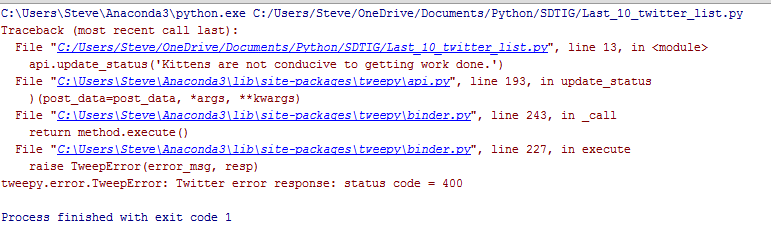
    However that returned an error:

    2015-11-06 13_50_53-Cortana

    Hmmm, I double checked the API, and this should work, but I’m guessing there’s another issue. I searched, and found there’s a bug. However, I should be using named parameters, so no big deal. Change the code.

    api.update_status(status='Hello, Pyton')

    Now it works.

    2015-11-06 13_53_06-Steve Jones (@way0utwest) _ Twitter

    This is the first step for me to look at building an app that might send some tweets on my behalf, perhaps with the data stored somewhere, like, I don’t know, maybe a database?

  • Viewing Extended Properties for Information

    Another post for me that is simple and hopefully serves as an example for people trying to get blogging as#SQLNewBloggers.

    I’ve been working a little with extended properties, adding and updating them for various objects. However in addition to altering properties, viewing the properties on an object is often necessary. This post will look at how we get the properties in a few different ways.

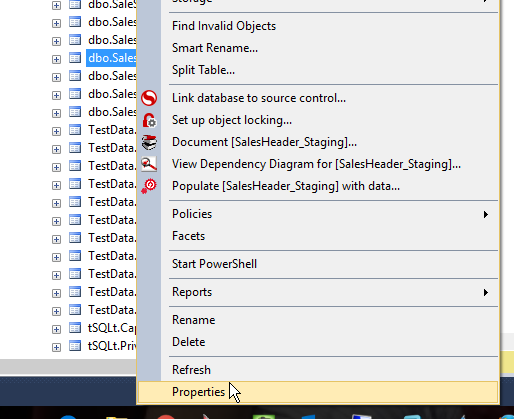
    The easiest way to see extended properties is to look at the properties of an object in the SSMS Object Explorer. For example, I can right click on a table in OE.

    2015-11-02 20_30_55-

    Once I click Properties, I get a dialog with a lot of items on the left. The bottom one is for Extended Properties, with a simple add/edit/delete grid. Here I can see the property(ies) I’ve added.

    2015-11-02 20_31_07-Table Properties - SalesHeader_Staging

    However this is cumbersome for me. I’d much rather find a way to query the information, which is what I need to do with an application of some sort. I’d think sp_help would work, but it doesn’t. If I run this, I get the following result sets:

    • header with owner, type, and creation date.
    • column list with meta data
    • identity property information.
    • RowGuid column information
    • filegroup storage location.
    • Messages with index, constraint, FK, and schemabinding relations.

    Not very helpful in this case.

    I do know that extended property information is in sys.extended_properties. I can query this view, which gives me some information, but I need to join this with sys.objects for easy to understand information.

    2015-11-02 20_38_42-SQLQuery13.sql - aristotle.RaiseCodeQuality (ARISTOTLE_Steve (69))_ - Microsoft

    This works, and this is one of the ways in which I do query properties in various tSQLt tests.

    There is one other way I’ve seen to query extended properties. When perusing the BOL page for sp_updateextendedproperty, I found sys.fn_listextendedpropery. This is a DMF, a function, that you can use to query for property values. Since it’s a TVF function, I need to use it in a query as a functional object.

    2015-11-02 20_42_27-SQLQuery13.sql - aristotle.RaiseCodeQuality (ARISTOTLE_Steve (69))_ - Microsoft

    There are lots of parameters in this function. However you can guess what they are after working with the other extended property procedures. In fact, the first time I started this post, I was disconnected and had to experiment with the function, adding parameters until it ran without an error.

    The first parameter is the name of the property. This can be NULL, in which case you’ll get all the properties that exist.

    2015-11-02 20_44_48-SQLQuery13.sql - aristotle.RaiseCodeQuality (ARISTOTLE_Steve (69))_ - Microsoft

    The rest of the properties correspond to the level 0, 1, 2 types and names that you are using to filter the results. This is actually a good technique to use with this function, and I’ll be using this more in the future.

    SQLNewBlogger

    This post followed on from the previous ones. In this case, I started this disconnected, using the knowledge I had to write the basics with SSMS and the system table. That took about 20 minutes to document and then I spent 5 minutes experimenting with the function, whose name I had on an open browser tab. Once I worked through that, I spent another 5 minutes writing.

    Thirty minutes to a post. You can do this.

    Reference

    A few items from BOL:

    sp_help – https://msdn.microsoft.com/en-us/library/ms187335.aspx

    sys.extended_properties – https://msdn.microsoft.com/en-us/library/ms177541.aspx

    sys.fn_listextendedproperty – https://msdn.microsoft.com/en-us/library/ms179853.aspx

  • Redgate DLM Demo Slides

    I had someone ask about the DLM Demo slides, so here they are:

    DLM-Demo.pptx

    I’ll put together an overview of the demo as well that you can read about.