Category: Blog

  • Database Lifecycle Workshops

    Trying to implement version control, and Continuous Integration (CI), and automated releases of code is hard. The concept is simple, but all of the various processes, tools, and links that need to be connected can be hard. I’ve seen too many organizations that struggle to get started, often because they see the entire process as just too complex and overwhelming.

    It’s not.

    Whether you’re trying to release application code or database code, you need to treat them in a similar manner. While there are lots of books, tools, blogs, and companies that can help you work with application code, the database has been more challenging.

    At Redgate, we’ve put together a few workshops to help break down the stages of engineering your database delivery and get you moving to help smooth the process of making database changes. These workshops are coming to locations all around the US and UK in the next few months. Check out our schedule, which has dates in :

    • Bellevue, WA (May 15)
    • London, UK (May 20)
    • Philadelphia (June 4)
    • Belfast, Northern Ireland (June 26)
    • London (July 8)
    • San Diego, CA (July 16)
    • Manchester, UK (July 24)
    • Baton Rouge, LA (July 31)

    There are more dates, and we’re certainly open to scheduling more locations and even private classes if you’d like. Contact us if you have a request.

    Most of these classes are delivered by experienced partners of Redgate, often consultancy organizations that have been working with clients for years to build smoother application delivery processes, and are moving into the database space. The classes use our tools, and Grant, myself, or one of our other Redgate experts will be on hand to help you learn the skills you need to start implementing DLM concepts. We can even recommend consultants to work with you for a two day DLM Health Check or on longer term projects that help you build better software. Contact DLMPartners@red-gate.com for more information.

    We find that many of our customers are struggling with different parts of building a smooth software pipeline. They want to get better, and they find the Redgate tools help, but they need a little push or confidence to implement an engineered process.

    Our three workshops are designed to teach you about different parts of a DLM environment. They map to the Database Lifecycle, helping you move to a different stage and a better engineered process at each step. The three workshops are:

    • Database Source Control – getting your database code into a Version Control System and dealing with the issues of branching, merging, team coordination and more.
    • Database Continuous Integration – learning to automate the building and testing of your code each time a change is checked into a VCS. This lets you find issues quickly.
    • Automated Database Deployment – Gain the skills to automatically generate upgrade scripts and ensure they are tested and deployed smoothly, without any of the release day stress many of you experience.

    These classes won’t solve your DLM challenges in a day, but they’ll give you the skills and confidence to move forward. Ask you boss to send you and get a bit of training to help you start building better software.

    Come join us and learn to ship often and ship safe.

  • T-SQL Tuesday #66 – Monitoring SQL Server

    tsqltuesdayThis is a T-SQL Tuesday that not only makes me smile, but makes my boss happy. In fact, I’m sure that quite a few people at Redgate Software, my employer, are thrilled with this topic since we have a product that helps you here: SQL Monitor.

    T-SQL Tuesday #66 has the theme of monitoring, hosted by Catherine Wilhelmsen. Anything having to do with monitoring is fair game. Custom scripts, home grown applications, even third party software.

    If you’re a #SQLNewBlogger, this is a great chance to keep going with a new post. If you can’t write now, come back and publish something later. If you post something on May 12, 2015, you’ll get included in Catherine’s roundup. However if you can’t make it, you’re still a T-SQL Tuesday writer.

    Either way, follow #tsql2sday and learn a few things.

    Self Monitoring

    My post is going to be more of a philosophical one, with a little code.

    Most of the time I’ve worked with SQL Server, I’d had some responsibility for a production instance. Even when I was writing code and building software, I’d still find myself as the backup, if not the primary, accidental DBA. I learned early on that I needed to have some way to track what was happening on an instance.

    One of the ways in which I did this was by ensuring each instance could monitor itself. I’d found far too many times that having a process connect remotely to the instance and gather data was a way to lose data. Too often something would get missed. The exact time that a process connected was the time things didn’t work.

    As a result, I decided to keep some monitoring on the local instance. Even though I usually had a central server roll up information, if that instance dropped off the network (or my monitoring server died), I’d still know what was going on. This was especially important when I worked in the financial industry or was bound by ISO 9000 standards.

    Note: These days I don’t bother to manage monitoring software of my own on an instance. I use SQL Monitor because I work for Red Gate, but no matter who my employer might be, I’d buy software because it’s worth the cost. I don’t have the time to worry about maintaining my own software for most monitoring tasks.

    DBAAdmin

    I had a setup routine that I used to use on every instance. It did a few things, the first of which was create a DBAAdmin database. This was the place I could put anything I needed to monitor my instance. I tried to keep all the code the same between instances, and tried to write idempotent code so that re-running the install wouldn’t cause issues.

    Once I had the database, I’d add tables and procedures for various purposes. For example, one of the things that needed to be tracked each day was the backups for the databases. So I created a table called DBBackups.

    CREATE TABLE DBBackups ( BackupID INT IDENTITY(1,1) , Backupdate DATETIME , DatabaseName VARCHAR(2000) , BackupType CHAR(1) , Filename VARCHAR(2000) , sizeGB NUMERIC(15,2) ) ;

    This table had a corresponding procedure that was designed to scan the filesystem and report back on the latest backups written to the file system. The details of each file are recorded here.

    Why? If there’s a problem with monitoring, the local machine still has the information about backups. What’s more, I can usually get more details here than I’m capturing in a monitoring system that’s looking at the last backup date or just getting full backups. If msdb history is wiped, I have a second copy here.

    However I also need to remove data over time, so this solution usually has three parts.

    • Table for data storage
    • Procedure(s) for gathering data
    • Procedure and job to remove data older than xx days

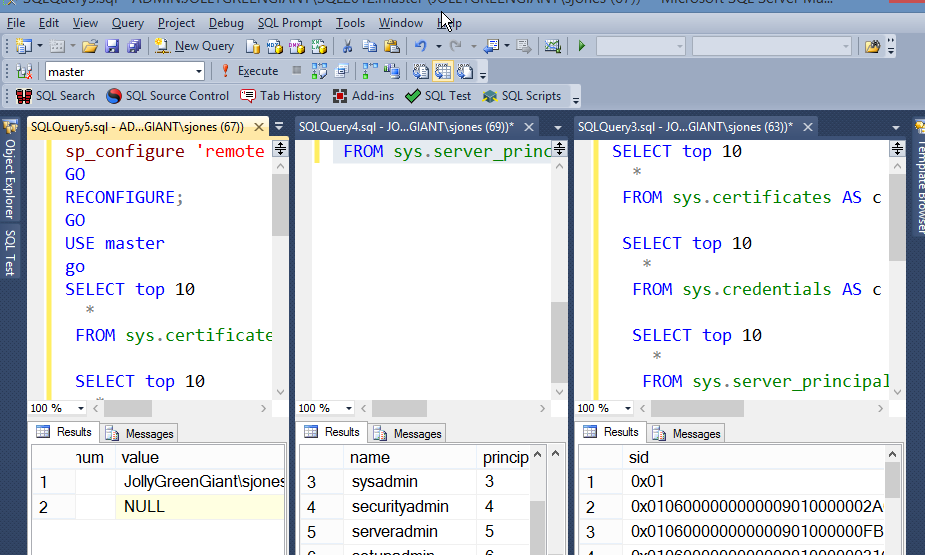
    That’s simple, but it’s a decent amount of work. However I only use this for certain areas. I used to really care about backups, but SQL Monitor captures that for me. However I might care about sp_configure settings. While SQL Monitor can alert me if there are changes, how do I know what changed? I’ve used a process like this to keep the last week’s worth of sp_configure information, captured every day to let me look back.

    As I noted above, I wouldn’t rebuild a monitoring solution for overall checking of a database, but I might capture specific information using this process, with the table and procedures tailored to the specific information I care about.

  • A Week to SQL Saturday #393 – Redmond

    Only my second SQL Saturday of the year (wow), but SQL Saturday #393 is next week in Redmond, WA. This is my first time at a SQL Saturday in Washington, though I’ve been to the area many times. I’m looking forward to the trip up with a couple days in the Seattle area and getting the chance to catch up with some friends.

    I’ll be talking tSQLt and testing at the event, and the full schedule has a lot of great sessions to choose from. If you’re in the area on May 16, 2015, I’d urge you to register and come by for the day.

    If you can’t make it, hopefully I’ll see you at another event soon.

  • PSA: Update Your PASS Profile

    I got my annual two emails from the PASS organization with the notification to update my profile to vote. I’m not sure why I get two emails to two different email addresses when I’ve only logged into one profile account in the last six or seven years, but I’m sure the data pros at PASS will deupe their list one of these days.

    Last year there were issues with voting and eligibility as many PASS members never logged into their profiles and weren’t seen as eligible to vote.

    This is your Public Service Announcement.

    If you didn’t get the email, or ignored it, go to sqlpass.org and log into your profile. I assume you can do that.

    Once you do that, you should see this checkbox in your profile. If you don’t, contact PASS

    passvote

    This is what  the email says.

    pass_update

    If you didn’t get one and think you can vote, contact PASS and let them know.