Category: Blog

  • PostgreSQL v SQL Server

    A site that’s a comparison of the platforms.

    http://www.pg-versus-ms.com/

    Certainly some good arguments being made, but (admittedly) biased towards specific workload items that the author uses.

    However, I agree with lots of the items listed. There are quite a few items, such as 1.1 and 1.2. Not having 1.5 is stupid silly. I know I can write a CLR assembly and stick this in here, but why hasn’t it just been included? 1.6 is interesting for sure and as someone that lives in BOL, it is very frustrating.

    Without a doubt there are some cumbersome things in SQL Server that I think could be made much, much easier. However, as pointed out numerous times, MS is concerned about money, and not necessarily making the product better.

    I don’t agree with the Linux v Windows debate. Lots and lots of people run Windows and the latest surveys I’ve seen of servers from automated places show Windows as close in terms of numbers.

    I’m also not sure some of the BI stuff matters a lot in a general comparison, but if that’s what you do, then this is interesting. I’d also point out that since MS is trying to move into these areas, some of these things are being addressed. SQL Server 2016 will support JSON and R.

    Enjoy the read. Don’t get too wrapped up in the details, but certainly if you think some of these items are important, let MS know.

  • Why Test Table MetaData Tests with tSQLt

    I wrote at SQLServerCentral about using tSQLt to check table metadata. In essence we are testing the API of our table. However, since the table could change, and may need to, what’s the value of having a test fail if the table changes?

    In my mind, I don’t necessarily want to have table structure tests for all my tables. After all, developers need to have flexibility to work with and change tables in our applications. If it’s a pain for a developer to change every table, because a test fails and they have to go change the test, that’s an issue.

    There’s also the problems of a developer changing a table, changing the test, and then having everything pass, without passing along information that a schema change was made.

    I would limit the API tests for a metadata to those tables that are important, with the caveat that anytime someone fails a metadata test, they need to inform the team.

    But Steve, isn’t every table important?

    Yes and no. Certainly all tables should be important to the application in some way, but really many of them are contained in the application. If changes are made, it’s not necessarily a problem to change other objects to catch up to the table change. However, some tables may cross teams or applications and they are an issue.

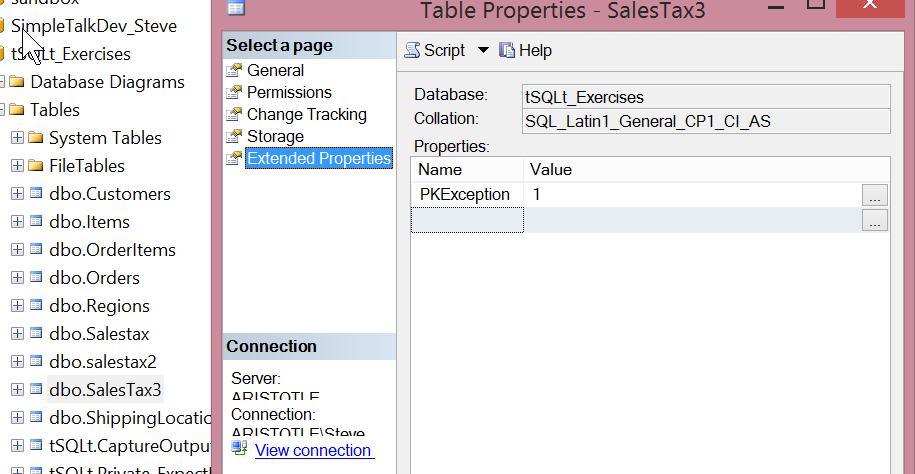
    As an example, I have lots of tables in the SQLServerCentral database.

    tablemetadata_1

    If the Blogs table, or the Articles table changes, then we need to alter stored procedures and possible ASP.NET code for our application. In fact, in this list, pretty much all of these tables could be changed by a developer without a large impact, assuming they’re going to look at the other objects or code affected.

    However the table highlighted, the emails table, along with a few others, are important. These tables not only support SQLServerCentral, the web app, they are also called by our emailer process, which is a completely separate application. In essence, these tables are the opposite of a microservice. They’re shared.

    If someone wants to change the Emails table, I want to be sure that others are informed. In fact, I might choose to include a note in the test header that various groups need to be informed or that the table affects another application. In that case, before a developer went to change the test, they might at least have a chance or noting this has far reaching implications.

    tablemetadata_2

    It’s not a perfect solution, but it does help. The other thing I could do is limit access to metadata tests for various tables/views and merely call these tests in a CI, or other automated, process. That way failures would be public, and a variety of people could be informed, preventing a developer from making changes without a discussion.

    As I mentioned, I wouldn’t do this for all tables. In fact, I’d limit this to particularly sensitive tables that might require lots of rework if they were changed. We want to speed development, and ensure code works, not slow developers down.

  • Quick Installs with Chocolatey–Screen Capture

    I have been looking for a new screen capture tool. I used to use Snagit, but it felt too heavyweight and buggy for me. I just need to snag part of a screen for my job and blog. I used Quick Screen Capture, but in Win 8 it didn’t want to accept my license key. I’d tried a few more, but none really worked well.

    I mentioned this to Andy Warren on the phone the other day and he told me to try Green something. I decided to do that today, and couldn’t remember the name, so I surfed over to chocolatey.org and searched for screen captures. Sure enough, Greenshot popped up first.

    I quickly opened an administrative level command prompt and typed “choco install greenshot” and went along with my work.

    Chocolatey is an amazing package manager and it started the install for me in the background.

    chocolatey_install

    A few minutes later I noticed the browser pop the greenshot website as the final part of the install. The program was set up with its install defaults and running on my system.

    2015-05-07 14_06_26-Administrator_ Command Prompt

    Chocolatey is amazing and I urge you to look at it for installing software on your system, especially if you’re a developer or consultant that regularly moves hardware or systems.

    If you’re a software developer, get your stuff packaged into here.

  • Getting Database Properties – DatabasePropertyEx()

    Another post for me that is simple and hopefully serves as an example for people trying to get blogging as #SQLNewBloggers.

    I had someone ask me a question about security recently, and while working through the answer, I ran across something I didn’t know well: databasepropertyex(). Here’s a few notes.

    Each database in SQL Server has all sorts of options and settings. Most people (including me) get in the habit of checking here for the information. First we right click the database (after starting SSMS if it isn’t running)

    dbproperty

    Then you get this dialog, with lots of stuff.

    dbproperty2

    And more on the other tabs.

    dbproperty4

    Time consuming, and error prone. As I get older, I find that trying to decide which selection is set for which option becomes harder. I find my finger tracing across the screen. It’s entirely possible I’d make a mistake when glancing at this to check the ArithAbort setting.

    Use T-SQL

    Scripting and querying is usually better. Not the sp_configure scripting where you get a whole list of options, but looking for a particular item. That’s where DatabasePropertyEx() comes in. This lets you query for a database property.

    The problem comes in when you run it. If you run the function, you get little information.

    dbprop_a

    Certainly you can go look at BOL to get more data, but that’s annoying. If I run sp_configure, I get data. However here, nothing. Even if I do what I think would be helpful, with a NULL parameter, I don’t get a list of stuff. SQL Prompt alerted me to the fact that the first parameter is the database, and the second is the property, but that doesn’t work.

    dbprop_b

    Fortunately, I have SQL Prompt, so I get this when I put in quotes for the second parameter.

    dbprop_c

    As you can see, the parameters don’t map to the properties, though you can figure out what they mean if you see them. They tend to follow the conventions that most application programmers use (IsAutoClose).

    That’s fine, and it just means you need to have a reference handy for properties to query. I wish MS would give all properties with a NULL parameter, or a link to BOL.

    Writing

    This one took a bit longer to write. Once I realized I didn’t know databasepropertyex() very well, I had to read about it (5 minutes) and experiment a bit. I took some screen shots, which is always cumbersome. As I wrote this, I had to change the wording and ordering a few times to try and convey a simple message. I was originally going to look at more details, but decided to keep this simple and talk about just querying properties.

    This was about 30-40 minutes for me.

    You can do this. Join the #SQLNewBlogger group and start documenting your career. You can see all my posts that fall into this area by looking through the SQLNewBlogger tag here.

    References