Category: Uncategorized

  • Getting the tSQLt Run Adapter working in Visual Studio 2017

    Last year I heard about the tSQLt test Adapter for Visual Studio from Ed Elliot. I’ve been wanting to try it, but various items got in the way. Finally I had the chance to play and it worked well in Visual Studio 2015, but I needed it in VS 2017. Fortunately Ed had a tSQLt Run Adapter beta for Visual Studio 2017, but I had a few issues. This is a debugging post.

    I downloaded the file and ran setup. Since this can cause issues with VS 2015, I unchecked that box. Unfortunately, I think I messed up my VS 2015 project. No matter, we’ll forge on.

    I had a Readyroll project where I was doing some work. In following some of the work at Redgate from a developer, I set up a new test project according to the tutorial. I got through and no tests.

    Hmmm.

    The .runsettings file is set in the root of my solution, as shown here:
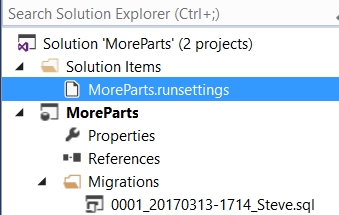
    The contents are:

    <?xml version="1.0" encoding="utf-8"?>
    <RunSettings>
      <TestRunParameters>
        <Parameter name="TestDatabaseConnectionString" value="Data Source=.\SQL2016;Initial Catalog=PartsUnlimitedDB;Integrated Security=True;" />
        <Parameter name="IncludePath" value="Tests" />
      </TestRunParameters>
    </RunSettings>

    My local instance is .\SQL2016, a named instance, and I have a PartsUnlimitedDB database on this instance.

    Here the file is selected:
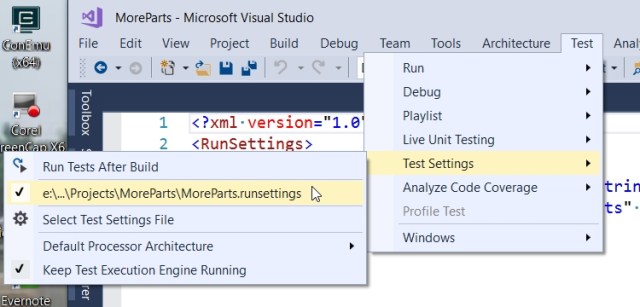
    When I run all tests, I get this:
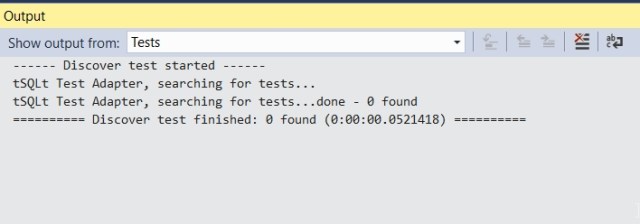
    I heard from Ed that I needed to have the name “tests” in the filename, so I changed that. Here’s the test and the file name
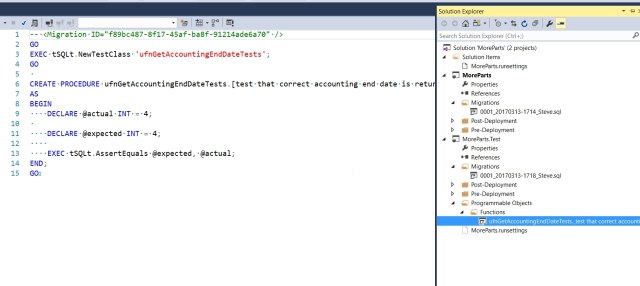
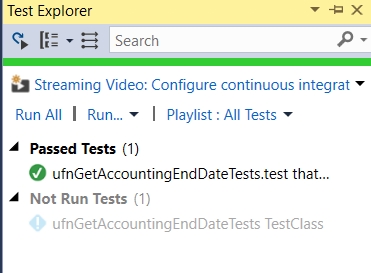
    Now I see my tests in the test explorer. Success!
    Just to check a few things, let’s try another file. Here I’ll use a shorter name, though still descriptive.
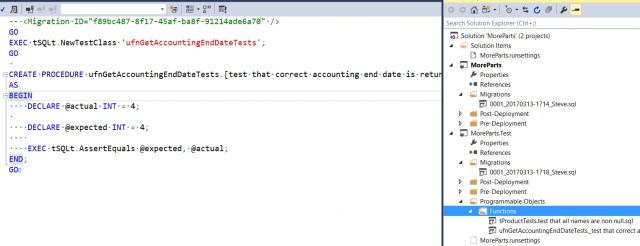
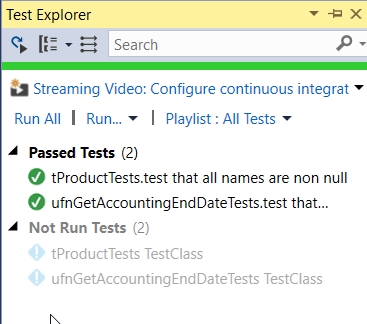
    And again, success.
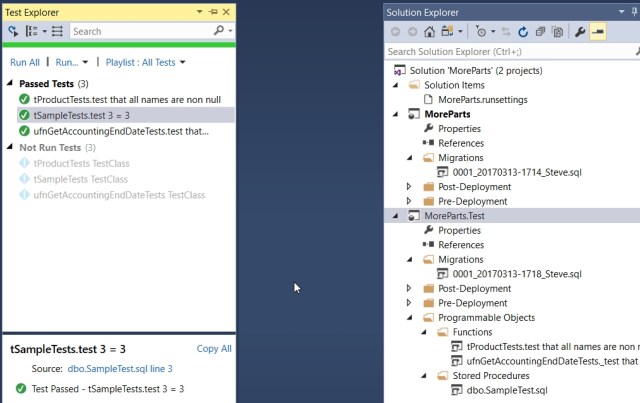
    That felt strange, but some back and forth with Ed showed me that the IncludeFile filter in the .runsettings file needs to be set to some value. In the default file I used, it’s set to “tests”. If I change it to test, and include a new test, then I things still work:
  • T-SQL Tuesday #85–Cross Version Restores

    tsqltuesdayIt’s T-SQL Tuesday time, and this month Ken Fisher hosts. His topic is backups, and while I’m sure there will be plenty of views on backups, I wanted to touch base on a relatively simple item.

    This is the monthly blog party started by Adam Machanic. Whether you want to write today or at some point in the future, this is a good chance to showcase your knowledge and test yourself on a topic.

    Cross Version Restores

    I would hope that most people know that a SQL Server database backup has a version. This version corresponds to a version of SQL Server, and for the most part, we can’t restore a database backup to an earlier version of SQL Server. Some exceptions might be a similar CU version there the database format hasn’t changed, but certainly not to any prior Service Pack.

    However, can you restore to a later version? Can I take a SQL Server 2012 database backup and restore it to a SQL Server 2016 instance? Sure I can. In fact, lots of people upgrade their systems this way. Install a new SQL Server instance, take a backup on the old version and bring it forward. In fact, you can restore (or attach) a SQL Server 2005 database backup on SQL Server 2016.

    There is a caveat, however. You cannot restore a backup of master, model, or msdb on a newer version. This is called out in the RESTORE command ( https://msdn.microsoft.com/en-us/library/ms186858.aspx).

    That’s interesting, and it means a few things. First, if you really need to upgrade msdb, then you need to upgrade the instance. Does this mean you can’t do a side by side upgrade? No, because you could do this (for 2012 to 2016):

    • Install a new SQL Server 2012 instance.
    • Restore master and msdb.
    • Upgrade to SQL Server 2016.
    • Now attach or restore your SQL Server 2012 databases.

    I wasn’t aware of this fact until browsing BOL. I had assumed I would be able to move msdb and model, though perhaps not master, to a new version.

    That’s a handy piece of information to keep around, and it means that you should always be aware of those objects outside of user databases when you upgrade. Keep scripts handy in a VCS in case you need to create them on a newer version.

  • The Biggest Data Breech (For Now)

    I keep reading the words “the largest data breach in history” in a variety of stories. In fact, given the tremendous growth of data acquisition, I’m guessing that this headline will continue to repeat itself over and over. I think I’m getting to the point where I’d rather just see a story say that xxx million customers were affected. At least then I’d be able to easily put some scale to the loss of data.

    What’s interesting in this case involving JP Morgan is there are indictments being handed down, to at least two men that somehow participated in hacks that copied over 100million people’s data. JPMorgan admits 76 million households and 7 million small businesses were compromised, which isn’t 100, but perhaps there’s something I’m missing. However the data wasn’t just sold, but rather hackers used the information to market stocks to the individuals compromised. That’s an interesting level of sophistication, and a scary one.

    Can you start to imagine criminals using the information intelligently to not directly sell the data but to make a secondary use of the information. Perhaps they will enagage social engineering by bundling the information with other data to perform some other attack on individuals? It’s entirely possible that we will see more sophisticated uses in the future as criminals work to evade or avoid the fraud detection systems that have been put in place.

    I have no doubt that bigger data breaches are coming. Perhaps we could reduce the impact and frequency with better security frameworks and development practices, but I’m not sure that any company out there will place a high priority on security over ease of access and speed of development. I do continue to hope that market forces will drive companies to build better detection and protection mechanisms, and our vendors will build better security mechanisms into all platforms.

    Steve Jones

    The Voice of the DBA Podcast

    Listen to the MP3 Audio ( 2.4MB) podcast or subscribe to the feed at iTunes and LibSyn.

  • Cloud Security Issues

    Bruce Schneier wrote a three part series (part 1part 2part 3) on cloud computing recently, part of a debate at the Economist. It’s a general look at the cloud from a few perspectives, and I think the thoughts are interesting. Whether they apply to you, or to what extent, you’ll have to decide.

    The first part asks if companies should use cloud services. I love the answer at the beginning: “Yes. No. Yes. Maybe. Yes. Okay, it’s complicated”.

    The decision is complicated and it’s not a binary decision. You may choose to use a cloud service like Dropbox to share video files, but not move any of your databases or Excel spreadsheets to the cloud. Your company might choose to outsource email, but keep all sales, finance, and inventory applications in house, or vice versa.

    I think as each of us debates the decision, we’ll be driven by data. Not only cost data from each side, not only a risk or security analysis, but actually by the data we are talking about. We have to consider the risk of losing a particular set of data through cloud provider incompetence or disclosure to third parties (successful hacks or government intrusion). As data professionals, I’d like to think we’ll be intimately involved with the discussions and arguments about the reliability, security, performance, and control we need over our data. 

    Is source code too valuable to trust outside the company? Is it worth managing email? Is a service providing CRM a better choice? There are no easy answers here. I’ve said more than a few times that I would never bother setting up or managing an email server again. However as I think about it, that might not be true. If I worked for a law firm, could I trust anyone outside of my company to prevent a breach of client confidentiality? The implications are unknown here and I wonder if a custom Gmail or Office365 solution is even defensible?

    More and more, I think any debate with regards to cloud computing has to begin with “it depends” and dive deeply from there into the potential risks and rewards.

    Steve Jones

    The Voice of the DBA Podcast

    Listen to the MP3 Audio ( 2.4MB) podcast or subscribe to the feed at iTunes and LibSyn.