Category: Uncategorized

  • Normalizing Performance

    This week I ran across a post from Glenn Berry on hardware performance that I thought framed the concept of performance value well. In the post, Glenn talks about the latest TPC-E benchmark and the SQL Server performance values that vendors release. Glenn mentions that he always tries to divide out the numbers to provide better comparisons for the various hardware choices.

    That makes a lot of sense to me, as I think very few of us would be able to afford the top of the line systems on which vendors run the benchmarks. Most of us try to somehow compare the results in some way and then make our own decisions for our smaller systems. I don’t know many people that run 36 core machines, but I do know lots that need to decide which 4 or 8 core systems they should choose.

    The idea of normalizing performance to smaller loads is something we do often. We need to do this, because we often can’t get the same size, scale, or specifications in our test systems as we have in production. As much as we’d like to have them, resources are limited, and we do need to have some way of extrapolating the results in our development and test systems forward to production.

    Glenn has a way of doing this for CPUs, and while you might not agree with his method, at least he has an organized way of doing things, and then letting empirical results provide feedback on whether this works well. You should do the same thing, whether you’re trying to gauge disk or T-SQL speed. Develop a hypothesis (or read about how other do so)  for measuring your performance on a lesser, and then your primary system. Take time to run some test the same way, even if it’s single query performance on a production system while it’s live.

    You won’t get perfect results and scalability, but you’ll develop a few metrics that allow you to determine if your decisions in development will have severe negative impacts. There still might be problems, but you should eliminate more and more of these over time.
  • Better Presentations–Hide those Windows

    This is part of a series of tips for speakers to make your presentations better.

    I wanted to give some specific SQL Server presentation items that have bothered me recently. These aren’t big things, but they do cause problems for attendees, and that might mean the difference between someone learning what you are presenting and getting lost because they can’t easily see.

    Windows

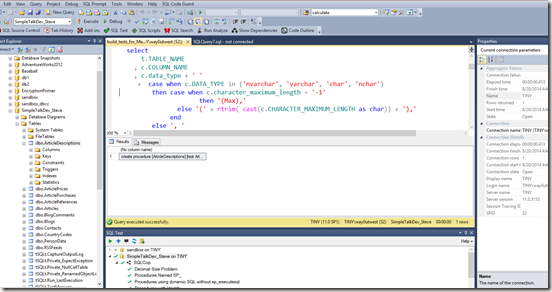
    How does this look?

    badpresent_thumb1

    It’s bad. Imagine if you were 15 feet back from the presenter, which is how this looks on a screen. I can barely see code.

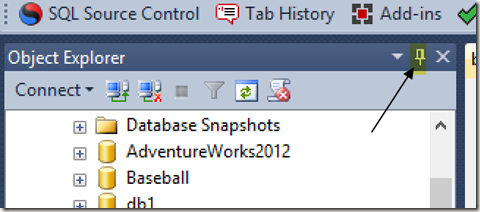
    If you look at the Object Explorer, there’s this little item in there .I’ve highlighted it below.

    objcet_explorer_a_thumb3

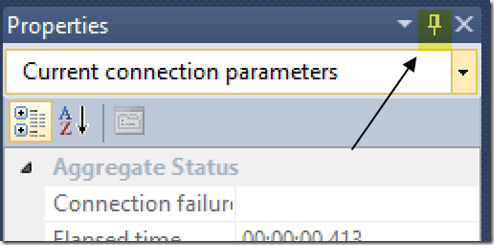
    There’s also one on the Properties window.

    properties_a_thumb1

    In fact, my SQL Test window at the bottom, most SSMS add ins and  Visual Studio windows have them.

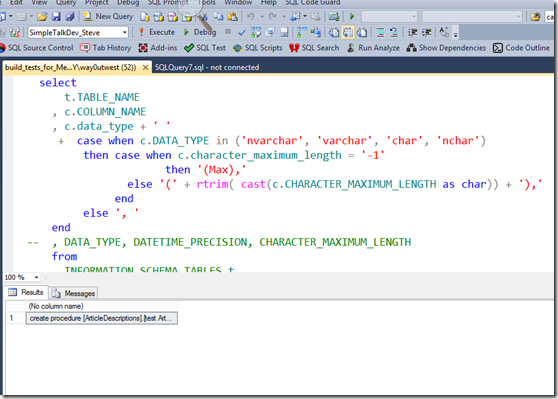
    Click them. They’ll hide the windows, like so.

    badpresent2_thumb1

    This is a much cleaner view of things.

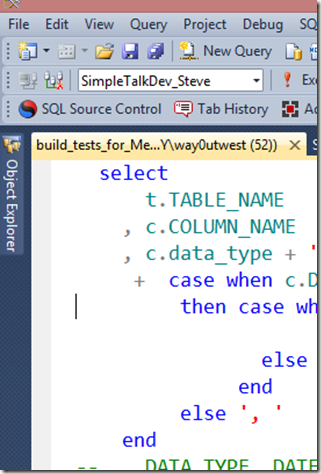
    But, Steve, you’ll say. I need those windows. I get it, I need them, too. They’re on the side of your screen and you can pop them open. They’ll stay open when you work in them, and disappear when you don’t.

    Gone when I don’t need it.

    oe1_thumb1

    Here when I do:

    oe3_thumb1

    It’s a quick tip, and it’s easy to learn. Once you practice with hiding and using windows, I’m sure you’ll find that you work more efficiently all the time, not just when on stage.

  • Fixing CREATE TABLE

    I’ve always wondered about this. When I create a stored procedure I do this:

    CREATE PROCEDURE MyProc
      @param1 int
     as
     BEGIN
       -- add code here
     END;

    As is often the case, I realize that I’ve made some mistake and need to change the code later. So I’ll do this:

    ALTER PROCEDURE MyProc
      @param1 int
     as
     BEGIN
       -- add better code here
     END;

    In both cases, I’ve repeated lots of the code that I used the first time, though hopefully less of the bugs. If I create a function or view, I do something similar. However when I build a table, I do this:

    CREATE TABLE MyTable
     ( MyInt int
     );

    If I decide that’s not enough data storage, and it’s likely not, I would do this:

    ALTER TABLE MyTable
      ADD MyChar varchar(50);

    We’re used to this, but why do we do this? Why not this?

    ALTER TABLE MyTable
     ( MyInt int
     , MyChar varchar(50)
     );

    It’s almost as though DDL mixes the idea of code submission with architectural scaffolding. It’s inconsistent, and it’s the big reason why we can’t use comments in our table code like this:

    ALTER TABLE MyTable
     ( MyInt int  -- integer to store a pointer to this row, requires unique index for integrity
     , MyChar varchar(50) -- random value of some data I need to store for this example.
     );

    I don’t have any hopes that things will change, but it does make me wonder why SQL, which is often simple and highly versatile with a few consistent structures, would create this strange inconsistency.

    Steve Jones

    The Voice of the DBA Podcast

    Listen to the MP3 Audio ( 2.4MB) podcast or subscribe to the feed at iTunes and Mevio . feed

    The Voice of the DBA podcast features music by Everyday Jones. No relation, but I stumbled on to them and really like the music. Support this great duo at www.everydayjones.com.

  • Two Steps Ahead


    think ahead
    Are you thinking ahead? Using the data from your systems to be proactive?

    Exceptional DBAs do more than respond to events and issues in their environments. In many cases, I think they even go beyond using metrics that detect problematic activity on their systems before users notify them. I think the best DBAs will actually mine the information they have about their systems to anticipate problems in advance.

    In the past I’ve had monitoring systems that would respond to issues, and I had alerts setup on the system to notify of unusual events, like an unexpected data growth. What I had started to do before I became a manager was start to write system checks that anticipated future problems and allowed me as much lead time as possible to prepare for issues. An example of this was a set of queries I wrote that calculated data growth for all databases on an instance and then used that to calculate how many days would elapse before I ran out of space on the data drives.

    You can write similar queries to look for other trends. Tracking the execution times of often-run queries, or those queries which are important to the application can allow a DBA to find potential issues. If the execution times are growing, the DBA can anticipate a problem occurring in the near future and begin taking action to rewrite, tune, change indexing, or some other measure. A broad spectrum of queries taking longer might be an indication that hardware needs to be upgraded. There’s even a site devoted to metrics.

    Instrumentation is important in understanding, analyzing, and predicting system performance. More and more tools are being released to gather detailed metrics on .NET code, in browsers, and more, but there is a wealth of information inside SQL Server on the performance of the platform. A little work can help you track and monitor the performance of your system and proactively maintain performance before your users complain.

    Steve Jones


    The Voice of the DBA Podcasts

    We publish three versions of the podcast each day for you to enjoy.