Tag: Azure

  • MSBuild and Azure SQL Database

    I saw a report of a problem building a database with ReadyRoll in Azure SQL Database. This person wanted to use a local Shadow database in LocalDB and target an Azure SQL Database. I hadn’t build that config, so I decided to give it a try.

    Update: ReadyRoll has become SQL Change Automation,and this no longer applies. Contained users are supported with SQL Change Automation projects, which will solve this issue.

    I ended up with this:
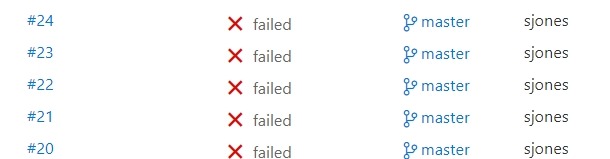
    2017-07-20 10_56_01-builds_azure-CI summary

    which was making me a little crazy. I’ve had most builds work really well. I tried a number of things, but kept getting a few items in the build. There were login errors or network errors, both of which bothered me since I could manually log in with SSMS from the same machine as my build agent.

    I suspected a few things here, one of which was the use of named pipes for the Shadow database and TCP for Azure SQL Database.

    Eventually, I decided to fall back with msbuild, ignoring VSTS, and make sure all my parameters were correct. I started here:

    C:\Windows\Microsoft.NET\Framework\v4.0.30319\msbuild builds_azure.sqlproj /p:TargetServer=”dkranchapps.database.windows.net” /p:TargetDatabase=”SSBuilds” /p:TargetUsername=”dlmdeploy” /p:TargetPassword=”astrongpassword” /p:ShadowServer=”(Localdb)\ShadowSSBuilds7″ /p:GenerateSqlPackage=True /p:SkipDriftAnalysis=True /p:ShadowUsername=”shadowuser” /p:ShadowPassword=”someotherpassword”

    I promptly got a VS build started and then this error:

    C:\Program Files (x86)\MSBuild\ReadyRoll\ReadyRoll.Data.Schema.SSDT.targets(513,5): error : An error occurred while attempting to
    create a patch script: Login failed for user ‘dlmdeploy’. [E:\Documents\Visual Studio 2015\Projects\builds_azure\builds_azure\buil ds_azure.sqlproj]
    Done Building Project “E:\Documents\Visual Studio 2015\Projects\builds_azure\builds_azure\builds_azure.sqlproj” (default targets)
    — FAILED.

    I verified the password in SSMS, verified the firewall and tried again. Same issue. Then I tried this:

    > sqlcmd -S dkranchapps.database.windows.net -U dlmdeploy -P “AStrongPassword”
    Sqlcmd: Error: Microsoft ODBC Driver 13 for SQL Server : Login failed for user ‘dlmdeploy’..

    Hmmm, that’s interesting. Why would this work in SSMS and not SQLCMD? My first thought was some driver setting, maybe ADO v ODBC, but that seems silly.

    Eventually I suspected some mismatch in databases, and found this post. It confirmed what I was about to test. I needed the same login/password in the master db as in the particular db I was using.

    I used SSMS and connected to master to create a user there.
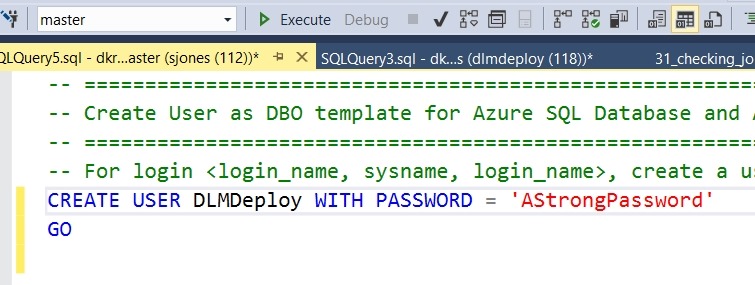
    2017-07-20 11_06_42-SQLQuery5.sql - dkranchapps.database.windows.net.master (sjones (112))_ - Micros

    Once I did this, the build ran fine, both in the command line and in VSTS.

    A couple lessons here. First, in Azure, you connect to databases, but since some processes (like MSBuild) might connect to a default, you need the user in your db and in master. If you have multiple databases (as I do), I’d suggest separate accounts for building in each db.

    Second, work with the command line first. That’s the key. Once you have things working from there, it’s easy to move to a tool and automate your command line instructions.

  • Azure Labs–Minor Cluster Issues for SQL Server Setup

    During the process of building an Azure lab, I ran into a place where my cluster was not completely validated. I think this happened when a node failed and was re-provisioned, but in any case, when I ran SQL Server setup, the program failed cluster validation and would not install.

    If you find issues, try the command line to start setup. This is what I did. For the first node, I ran setup from the command line like this:

    Setup /SkipRules=Cluster_VerifyForErrors /Action=InstallFailoverCluster

    The same GUI popped up, and I was able to set various settings and save my config file.

    For the other nodes, I ran this:

    Setup /SkipRules=Cluster_VerifyForErrors /Action=AddNode

    Pretty simple, the platform installed and worked fine. Whatever cluster issue I had must have been transient, at least for my lab purposes.

  • The Financial DBA

    I’ve got an Azure subscription. At least, I think I have just one. I know I have a few Microsoft accounts, across 4 (or more) different email addresses, that I use for various VSTS development purposes, but only one should have any Azure resources. When  I check each of them, I find that I do only have resources (and charges) for one. However, I also found a strange charge on my credit card statement from Microsoft Azure. It was just a couple dollars, but as I started digging through the various statements, I couldn’t determine where the charge was from, or what it was for. As of now, I’ve opened a support case with Microsoft to track down my usage.

    This has me thinking of the future of many data professionals, some of whom will certainly have a few assets in a cloud based environment. I have a small subscription, but plenty of resources, and keeping track of which items belong to which resources and what I need isn’t always easy. It’s quite the challenge, especially when billing and finance aren’t my job. In an organization like Redgate, I’d guess we have lots resources, some of which developer provision, need, and then might forget about. Who reconciles this and ensures the assets we have are those we need?

    As we move to a world where services are used as often as assets, perhaps interchangeably, I expect that many of us will need to be accountable for not only the usage, but tracking why we’ve engaged that service. Over time, we need to retire and get rid of assets, but ensuring we remember exactly what we’re using and why can be hard over time. With a little employee movement, many of us might find ourselves in charge of services that we don’t understand, and might not be sure are necessary. We also might not be sure these services can just be discarded. The last thing we want is some uptime disruption because we terminated some service contract.

    A whole new dimension to our job is likely coming, and for many of us, this will test our documentation and organizational skills. I wouldn’t be surprised to find many DBAs or lead developers having a standing monthly meeting with someone in finance to be sure we aren’t wasting money.

    Steve Jones

    The Voice of the DBA Podcast

    Listen to the MP3 Audio ( 3.3MB) podcast or subscribe to the feed at iTunes and Libsyn.

  • Lots of Resources

    I’ve got a small Azure subscription, but there are a lot of resources in my mini lab. Forty seven, to be exact right now.

    2017-07-18 16_31_56-All resources - Microsoft Azure

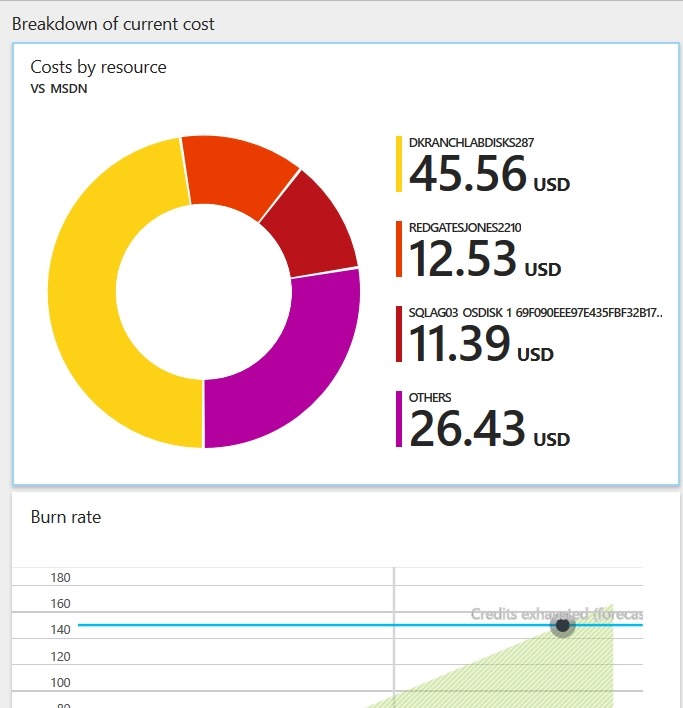
    When I look at my bill, it’s got lots of details, but not always easy to understand.I get a breakdown and burn rate.

    2017-07-18 16_33_17-VS_MSDN - Microsoft Azure

    I can also see details, but tracking these down to ensure I’m making good use of my credits and other charges is hard.

    2017-07-18 16_33_27-Costs by resource - Microsoft Azure

    I can only imagine what this looks like for a company like Redgate, and the struggles between developers, admins, and finance people trying to determine what we have, use, need, and can let go.