Tag: career2

  • Goal Progress Report for March 2020

    I made goals at the end of February, when I returned from sabbatical. Since then, the world has been turned upside down with a pandemic, and I’ve been struggling to cope.

    However, here is the progress report.

    Reading

    As I write this, I’ve had a reminder from Outlook on my screen for two days. The reminder is to work on goals, but I’ve managed to not do this. Mostly because I’ve been busy and haven’t had the time to actually combine career work with work work.

    In addition, at the end of the day, I’m worn out. I’m not looking to tackle another project. Even on weekends, I’ve been taking care of some other things and haven’t wanted to work on something. I haven’t had the mental focus.

    That being said, early in March, I did get through 4 chapters in Pro Power BI Desktop, actually following along and building my own reports.

    No other progress. I’m falling behind here.

    Projects

    One of the things I wanted to do was build a Power BI report. I actually started, though not from a database. That’s easy to correct later, but for now, I just used Excel. I got a partial report completed, but I was struggling with display v aggregates. As a result, I stopped for now, hoping to do more Power BI work.

    Falling behind here, but the whole world is. I’m giving myself a break and hoping to get more momentum in April.

  • Learning some DAX

    I’ve not done much BI work in my career, other than simple aggregates in reports. I’ve wanted to tackle projects, but I’ve rarely had a chance to spend time in this area at work.

    Recently I had a bit of time and decided to look at some Power BI courses.  At Pluralsight, when searching Power BI, I got a learning path that showed a number of courses from different authors. In the intermediate track, the first course was from Eugene Meidinger.
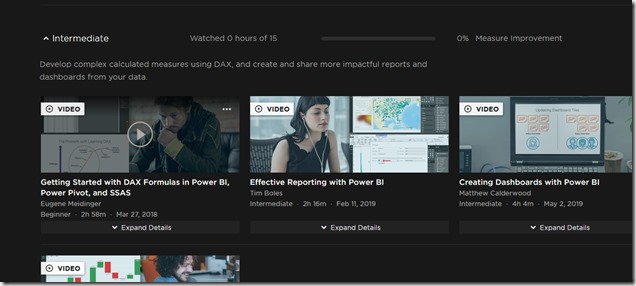
    2019-12-09 13_40_32-Microsoft Power BI for Analysts Path _ Pluralsight

    I met Eugene last year at SQL Saturday Pittsburgh and decided to give his course on Getting Started with DAX Formulas in Power BI, Power Pivot, and SSAS. Not quite what I wanted, but since I was curious about DAX, I decided to give it a try.

    Understanding DAX

    The intro is interesting. Eugene makes a good case for why DAX is important in the Microsoft stack. I tend to agree as I see this being incorporated into many products, including Excel. I’ve felt somewhat out of touch in that I haven’t known much about it and how it works. Even when I flip through our Stairway series, I’m somewhat skimming and haven’t really understood what it means.

    I think Eugene does a good job of trying to explain DAX as different than, but similar to Excel. Thinking of this as an expression language, rather than a query language, isn’t something I’ve considered. Maybe I’ve heard this, but it didn’t stick.

    He also lets me know this isn’t easy, which is what I’ve thought. I’ve seen Bill Pearson and Reza Rad talk some DAX, and it wasn’t quite clear to me. It felt clear when they were speaking, but not later. I’m hoping Gene teaches me a bit more in my office rather than in a 1 hour session.

    Going Through the Overview

    I went through the first few modules, which give you an overview and basic understanding. Eugene tries to explain the differences between DAX and SQL, which is a good way to approach the problem. Many of us are familiar with SQL, so this is helpful.

    The third module starts to get into data governance and where you use DAX with your data. This is interesting, and it’s a good look at what type of organization you deal with for data. How is your data managed, which is something that most companies don’t really have a good, or consistent, data governance strategy.

    One good thing is that Eugene explains  the different places where DAX is supported for queries. That’s good since I’ve been thinking of DAX as the Power BI language, but it’s not. It can be used in Excel with PowerPivot.

    The fourth module is the one where we start to understand column storage and the value this gives us. Still no DAX, but it’s a good module for analysts and relation people.

    In getting through 4 modules, no real technical stuff that’s helped me, but it’s given me a little better baseline.

  • Good Resume Examples

    I talk about resumes, enhancing your career, and finding your dream job at various events. This might be one of my most popular talks, and I’ve been lucky enough to give it to many audience across the years. Quite a few people have taken my advice and used it to further your careers, and I’m always pleased when I hear from them.

    I don’t give any great advice, but I do try to get people to think about how they present themselves. Your resume (or CV) is often the first way that you present yourself to a potential hiring person. Even if you’ve used your network and someone gives a recommendation for you, your resume is the first way the interviewer sees you.

    In the Brent Ozar newsletter a few weeks back, he had a link to a “how to write a resume” guide. There are a lot of tips, but I agree with Brent that the layout in a number of these samples is really nice. At least, it’s well spread out and easy to read from an organizational standpoint.

    A couple things I’d disagree on. First, be careful of colors. Personally, in the “reverse chronological resume format” example, the blue is hard for me to see, even on my 26” monitor. Be careful about colors that don’t provide enough contrast. Plenty of people hiring are my age.

    The other thing I disagree about is the skills being too prominent at the top. Remember, I won’t spent a lot of time looking at the resume, so be careful of drawing too much attention away from your summary or work experience. I usually search for skills, so take advantage of the 30s of my attention and impress me with a well written opening.

  • Production Kubernetes

    Still learning more about Kubernetes. I’ve been working through the 50 days of Kubernetes (K8s). Let’s keep exploring

    The API is the security boundary

    Everything happens with the Kubernetes API. Therefore, we want some RBAC here for the roles of individuals, as well as processes, like CI/CD pipelines. We want to ensure we have validation, security scans, etc..

    Things will go wrong

    In addition, we need some monitoring on the cluster. We need this on any system, but with scale and complexity of containers in Kubernetes, we need something in place.

    In addition, you want to test failover, which is likely between clusters. Containers do make this easier, but it’s something we want to ensure is a part of our process. This means practice. We know practice matters in most places, but we often don’t practice well in IT.

    Scaling

    There is planning to think about a large application, or maybe large for your environment means thinking about global access and ensuring that you have a way for your app to easily redirect across clusters or regions. There are also data challenges, as Brendon notes, with things like databases. It’s an opportunity to push CosmosDB, but in the relational world, we know how to handle this.

    Kubernetes will make AGs and HA easier.