Tag: career2

  • Practical Web Scraping–More Reading

    As part of my learning goals for 2018, I wanted to work through various books. This is part of  my work with Python.

    It’s the end of the month, and I’m behind. I know it’s a short month, but it’s not that short. I had time to read the last couple week and I did some reading, but I didn’t get much practice.

    First the positive, then the excuses.

    Reading

    I did manage to read through the basic tutorial in Part I for how to use he BeautifulSoup module to read through an http page. This provided more ideas for finding sections of code and extracting out sections.

    I started Part II, which talks about more in depth http, with forms and posting. I’m still inside that one, and as of this point, I’m only 30% through the book.

    The plan for this weekend is to stop and practice a bit from BeautifulSoup and see what I can accomplish by reading a few web pages.

    Life Gets in the Way

    This month I had two long events on weekends that ate into my reading/working time, as well as a work project. I’m in the middle of volleyball season, and February brought me two 3 day tournaments to coach or watch. One was coaching a 13 year old team, and that occupied a lot of time. The evenings were spent with other coaches and I didn’t bring a laptop because I knew time would be limited. Add to that the need to get a few things done before and after the trip and I couldn’t practice web scraping.

    The second trip was for my daughter, and apart from watching her, my wife was in charge of team activities and I had to help. I had my laptop, but again, no time. I also chose to enjoy some time with my wife in the evening, which was worth it.

    Work was busy. We’re trying to migrate SQLServerCentral to a new platform and I’ve had to test things, as well as try and get other work done. As a result, I’ve been busy during the week and couldn’t even make time to incorporate any web scraping into my job. I also had to get other work done, so it’s been too busy to do much learning.

  • Learning for Feb

    By the time you read this, I’ll have decided, but I just finished the first book and need to pick another. This post is more for me than anyone else, helping me to sit down and think for a minute.

    I don’t have any pressing need to work on any of the other books for work or career. It’s more that I’m interested in various topics, so I need to pick a direction. I’m also cognizant of the future and which books I want to go through.

    Recap

    Here are the books I purchased and plan to read this year:

    The question is, what’s next?

    I’m really not sure, but I do know that I’ll be relatively less busy in February, really busy in March, and April will likely be like January. As a result, I want an easier book in March.

    The challenge for me is understanding what’s easy and hard. I think the Azure/Xamarin one will be hard as I’ll need to practice skills that aren’t useful or tangential to work. The Power BI stuff is likely the opposite. The Python stuff is probably in the middle.

    The Plan

    My thoughts right now are that I need to research for a couple days. It’s Jan 31 as I write this, and I’m on vacation for a couple days. That’s both good and bad. Bad because I want to get away, good because I can find some spare time to just read and no do.

    With that in mind, I’m going to read a chapter of 3-4 books and then decide in which direction to go. By the time this publishes Monday, I should have made a choice, but I’ll be busy working on other stuff, so I won’t get to update this post.

    The four to get through a chapter on are:

    Wish me luck.

  • Pro SQL Server Linux–Connecting and Building an App

    As part of my learning goals for 2018, I wanted to work through various books. This is part of my series on Pro SQL Server on Linux from Bob Ward.

    I set up my Red Hat server as a command line only instance, so installing VSCode or Azure Data Studio aren’t options. I could add a graphical manager, but I decided not to for now. Instead, I want to use some of the tools from my local Windows machine.

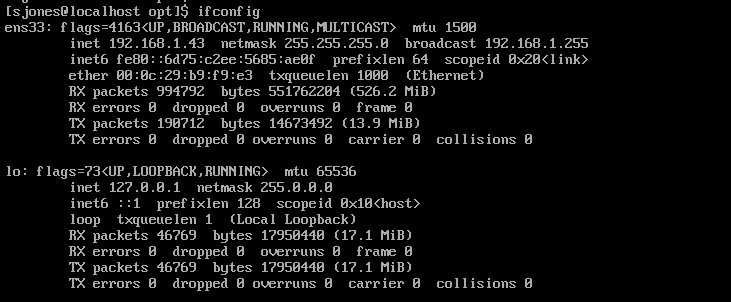
    If you’ve tried some networking with VMs recently, you’ll realize that this isn’t always simple. First, you need to figure out where your VM is. On Linux, ifconfig will do this.

    2019-01-16 18_30_32-RHEL74 Bob - VMware Workstation

    However, when I go to SSMS and try to connect to 192.168.1.43, I get the network error that the SQL Server isn’t found. I know this is because of the firewall because my SQL Server is running locally on Linux and sqlcmd.exe works.

    To open the firewall, on Red Hat you use the firewall-cmd command. This wasn’t in the book, so I had to search for the process. Once I did, this is a simple thing to do.

    2019-01-16 18_29_17-RHEL74 Bob - VMware Workstation

    Now that this is open, let’s connect from SSMS. I can see that worked.

    2019-01-16 18_32_59-SQLQuery3.sql - 192.168.1.43.master (sa (52)) - Microsoft SQL Server Management

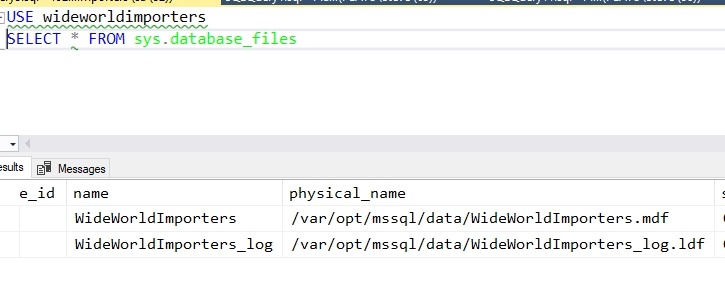
    My first step is to create a database. The standard CREATE DATABASE works, but I can see when I query metadata that this isn’t Windows anymore.

    2019-01-16 18_35_22-SQLQuery3.sql - 192.168.1.43.WideWorldImporters (sa (52))_ - Microsoft SQL Serve

    From here I used scripts to create the objects in the sample database. That’s a first step to getting an application working.  To get the scripts, I used:

    git clone https://github.com/Apress/pro-sql-server-on-linux.git

    This is the repo where Bob has his scripts. If you don’t know how to use git, start learning. I’ve got some posts, but there are lots of tutorials out there.

    Once the database is created, with some tables and data, I can now work on an application. Bob is using a node app, which I’ve never written, so this is a chance to learn a little something new.

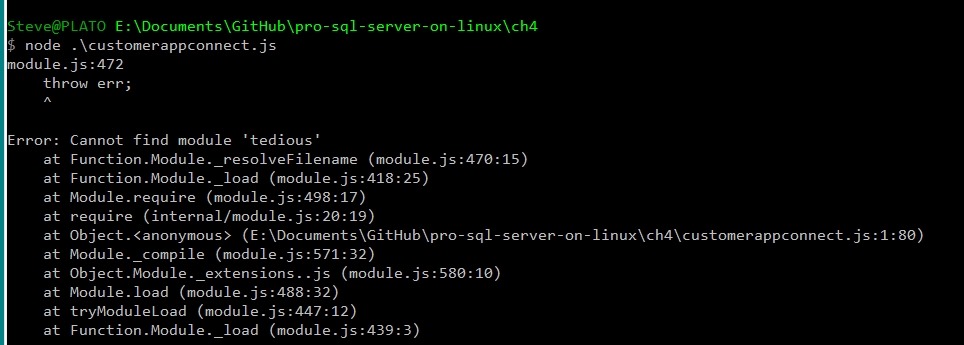
    I tried the npm installs, but had issues. I kept getting errors from installing tedious. I had to change to use http: instead of https, and I was able to instally async, but I kept getting errors.  I know this because:

    2019-01-24 17_40_59-cmd (Admin)

    Let’s try something else. I want to just connect, to see if my system is working. I could use SQLCMD, but let’s be creative.

    2019-01-24 17_46_48-cmd - python (Admin)

    I’m more comfortable in Python and this works. SQL Server 2019 here.

    There is a good tutorial with some sample code at https://www.microsoft.com/en-us/sql-server/developer-get-started/python/windows/. I took some of the code from there to get this working.

    In chapter 4, Bob shows how to use T-SQL and an application to read and write data. This is essentially sending SQL batches to the server, like I did with SELECT @@version above. I can do this stuff, and I know how to send batches. Executing code, including stored procedures, isn’t something I want to do here.

    A number of the parts of chapters 3, 4, 5, 6, 7 are normal stuff that really are a part of working with any SQL Server version. There was little I saw in here that I hadn’t learned as a part of my work on Windows with SQL Server 2012/2014/2016/2017. Not that it’s not good content, but it’s more basic.

    I read it anyway to get an idea of how Bob presents these things and there were good reminders of how things like Temporal tables or how bcp work. It’s worth reading if you aren’t familiar with the various concepts of working with SQL Server, getting performance information, and what tools are available. It certainly was a nice refresher for me.

    From here, it’s moving on to more features, hoping that I see more Linux specific things.

  • T-SQL Tuesday #109–Influence

    tsqltuesdayThis month’s T-SQL Tuesday host is Jason Brimhall. He asks everyone to write about influence, which is something that I should know about and think I have, but am somewhat uncomfortable writing about.

    That being said, here’s my entry this month.

    Influencing Others

    One of the motivations behind creating SQLServerCentral was to educate and help others. Our goal (Andy, Brian, myself) was to try and find ways that we’d had success, solved problems, or handled challenges and share that with others by writing articles, answering questions, and creating questions for our Question of the Day quiz.

    Across the years as I’ve done that, and I’ve written many editorials, there have been plenty of occasions to meet members of the SQLServerCentral community. Many of them have thanked me or talked about how the site and community made a difference in their careers, which is something I’m quite proud of. Helping others is a form or volunteerism and service, and while this is a vocation for me, it’s also a passion.

    One of the things I think that I’m most proud of us influencing others to also give back and share. I can only do so much, but if I can also convince others to share their knowledge, there is a level of helping and sharing that grows exponentially to everyone in our #SQLFamily. To that end, I have two stories.

    One is about blogging, which I tend to do regularly. I had a friend, someone I met years ago that wanted to start blogging and asked me for some hints and idea. I shared a few things that help me, but also challenged this individual to set a goal for writing. They did, and years later, they have quite a blog. Many of you have heard of this person, but I won’t mention the name here. That’s not important. What is important is they have helped many others and continue to do so today.

    The other story is a person I met at a user group meeting. I was giving a presentation and this individual had some intelligent questions to ask. Over a few meetings, as I talked with this person, I realized they were someone with a lot of talent on the data platform and encouraged them to think about speaking. I did this regularly, and while it took over a year, this person now has spoken at many events, including the PASS Summit.

    It can be scary and intimidating to share knowledge with others publicly, but it is also immensely rewarding and a way of helping others walk the path you have already covered. Perhaps I’ll influence one of you reading today to share some of what you’ve learned with those hungry to learn.