Tag: containers

  • Container Development Work

    On my new laptop, I only use containers as database servers. I made the decision not to install SQL Server or PostgreSQL and instead work on containers only. I’ve written lightly about this, but I set up docker-compose files to load different instances of SQL Server and PostgreSQL (and others) and batch files to start and stop them. I’ve also set dedicated places on my disk where I can drop backup files and access them from the host.

    It’s 2024. I moved to containers on my laptop exclusively for databases for the first time this year. This is despite the fact that I like containers, am comfortable with them, and find them handy. Moving from installed database server software to containers took a conscious effort, and it took time to configure everything. Really, it took me a bit of time to think about how I’d want to configure my system so that my work in SSMS went smoothly.

    I saw an blog recently from Microsoft on some of the devcontainer work they’ve done. I talked with a few people, who showed me how easy this was to do in ADS or VS Code and ensure your database was included as a part of your project. On one hand I was impressed. On the other, I don’t see many people with projects in ADS/VS Code and the need to spin up/down containers and connect through that tool. Plus, how easy is it to get connected with SSMS or another tool to the container?

    If there is any friction in using a new technology, most of us won’t adopt it. Even if we’re forced, we’ll be upset (and less productive) for quite some time if using something is a hassle. I believe in containers, but spinning one up from go-sqlcmd is far different from easily being able to grab a backup file from a friend and get it restored.

    While I see lots of companies where developers are excited to use containers, I see relatively few where containerized is the default, or even common, method of working with something. I see even fewer where containers are used for database work. Certainly some people use them, but not most.

    Local installs, dev servers, and VMs seem to still be very common. They’re tried, true, and familiar, Most of us like things that are familiar and we fall back to them quickly.

    Do you use containers for anything? Testing out software? Actual work? Are you even allowed to use Docker or something similar to run containers? Maybe less likely, but I’m curious, how many of you actually deploy containers in production and with what tech installed in the containers?

    Let us know today. I think containers have lots of possibilities, but they haven’t caught on as quickly or widely as I would have thought. Primarily because of friction.

    Steve Jones

    Listen to the podcast at Libsyn, Spotify, or iTunes.

    Note, podcasts are only available for a limited time online.
  • Kubernetes is Cool, But …

    Kubernetes is cool, and I think it’s really useful in helping us scale and manage multiple systems easily in a fault-tolerant way. Actually, I don’t think Kubernetes per se is important itself; more it seems that the idea of some orchestration engine to manage containers and systems is what really matters. As a side note, there are other orchestrators such as Mesos, OpenShift, and Nomad.

    However, do we need to know Kubernetes to use it for databases? This is a data platform newsletter, and most of us work with databases in some way. I do see more databases moving to the cloud, and a few moving to containers. I was thinking about this when I saw a Simple Talk article on Kubernetes for Complete Beginners. It’s a basic article that looks at what the platform consists of, how it works, and how to set up a mini Kubernetes platform on your system. It’s well written and interesting, but …

    Do we need to know anything about it? Are we running databases in containers, or will we? I think it’s possible that we might run any of our databases in containers. They are like lightweight VMs and there isn’t a reason why we wouldn’t run a database in a container. With external storage, of course, which gives you a cluster-like environment where your storage moves to a new node if the first one fails. That’s a good use case. Deploying consistent environments quickly is a good use case. Using Kubernetes to manage the containers is great, but …

    I don’t think we need to know much about Kubernetes. I don’t think most of us should run it and should outsource any container orchestration to the cloud if we decide to implement database containers. These orchestration engines are quite complex today, and there is a lot of expertise needed to manage them. I don’t know that expertise is worth trying to find, train, and retain for most organizations. We should just outsource the container management to someone else.

    We might need to know how we change the configuration of some resources, but that’s minor knowledge, and really, I suspect that outsourced K8S (shorthand for Kubernetes) will have GUI tools that let you easily pick and choose the CPUs, memory, etc. and then an export of the JSON or YAML or whatever is needed for the config. Most of us likely need the skills to export, save (in a VCS) the files, and then submit them to the cluster.

    A few years ago I went through a bunch of courses and reading material on Kubernetes. I set up some small clusters, I experimented with pods, I even was excited to think about managing containers for various services. What I discovered is that Kubernetes is complex, hard, and something I want someone else to run. Once I set up a cluster in Azure I thought I’d never want to do this on-premises again.

    Much like email. I have run email servers, but …

    I’d like to never run one again, which is how I feel about Kubernetes.

    I think containers have proven more complex and harder to work with than many people thought. I know there are plenty of people using them, but it’s a minority. I see many more organizations still building monoliths, or microservices that run as processes, or client-server apps. Not that many people are excited and using containers. That may change, and if you go to the cloud, containers give you portability that many other solutions don’t, so I’d recommend them there. However, they are still a bit immature, and hard to manage. I think it will be a while before we see lots of databases on containers.

    Even if we do, I’m not sure we need to learn Kubernetes as database people.

    Steve Jones

    Listen to the podcast at Libsyn, Spotify, or iTunes.

  • Creating a PostgreSQL Docker Container with a Volume on Windows

    This post looks at how to set up a PostgreSQL container on Windows using Docker for Windows. I’ve seen a few posts, but I had to cobble together some instructions from places, so I decided to make my own post to help me remember and keep things simple.

    tl;dr: do this:

    • Create a folder c:\docker\pgdev
    • get the Docker image: docker pull postgresql:latest
    • Run the container, command below:
    docker run --name pgdev -e POSTGRES_PASSWORD=Str0ngP@ssword -d -p 5432:5432 -v C:\Docker\pgdev:/var/lib/postgresql/data  postgres

    That’s it. Then you have a PostgreSQL instance running on port 5432 (default) with a user, postgresql, and a password, Str0ngP@ssword.

    More detailed instructions below

    Create a place for data

    Containers are ephemeral, which isn’t what we want for a database. We want to keep data around, so let’s make a place for this. This will be a volume for our container, which we will map to a particular location inside the container. Then if the container dies, we can map this to another PostgreSQL container and have our data appear.

    Create a c:\Docker folder on your machine. This is a good spot for any Docker related volumes.

    Now create a pgdev folder under c:\docker. This is the place we’ll keep data for this PostgreSQL container. It should be empty.

    2022-12-27 10_04_37-pgdev

    Get the Image

    Container images are available from Docker. I won’t cover installing Docker or setting up Linux containers, but you do need to do this. I used Windows 10, and I have WSL v2, as you can see:

    2022-12-27 10_06_23-cmd

    Docker Desktop is running Linux containers. You can see that since it say “Switch to Windows containers”.

    2022-12-27 10_07_40-

    Next, use Docker Pull. I assume you are working with the default Docker registry, so this command should work:

    Docker image pull postgres:latest

    This will start downloading the image.

    2022-12-26 13_16_43-cmd - docker  image pull postgres_latest

    When this completes, move on.

    Starting the container

    Once we have the image, we can start the container. You could do this without the folder above, but your data would be in the container and if the container were ever deleted, then the data is lost.

    The basic command for starting the container requires a few parameters. Here is a list of what I provided in the command at the beginning:

    • –name – This is a name you can use in docker commands to refer to the container. You can put anything. I chose “pgdev”.
    • The password in the database system for the postgres user. This is a default user and you send this in as an environment variable with -e. The password I used here is: Str0ngP@ssword
    • -d runs this detached, rather than interactively. This means your command shell can return command to you. Otherwise, all output from the container appears in the shell and you can’t type anything.
    • -p is the port mapping. This is host:container. In this case, we map 5432 on the host (where we use some postgreSQL driver to connect) to 5432 inside the container. You can choose any unused port for the first number, but 5432 is needed for the second number as the postgresql service is listening on 5432.
    • -v is the volume mapping. Here we map our host folder to a container folder (host:container). We enter the folder we created above and then map this to the place where postgresql stores data. That’s in /var/lib/postrgresql/data
    • postgres is the image name.

    Here is the command again:

    docker run --name pgdev -e POSTGRES_PASSWORD=Str0ngP@ssword -d -p 5432:5432 -v C:\Docker\pgdev:/var/lib/postgresql/data  postgres

    Once this executes, we should see a long hex code returned, which is the container identifier.

    2022-12-27 10_22_58-cmd

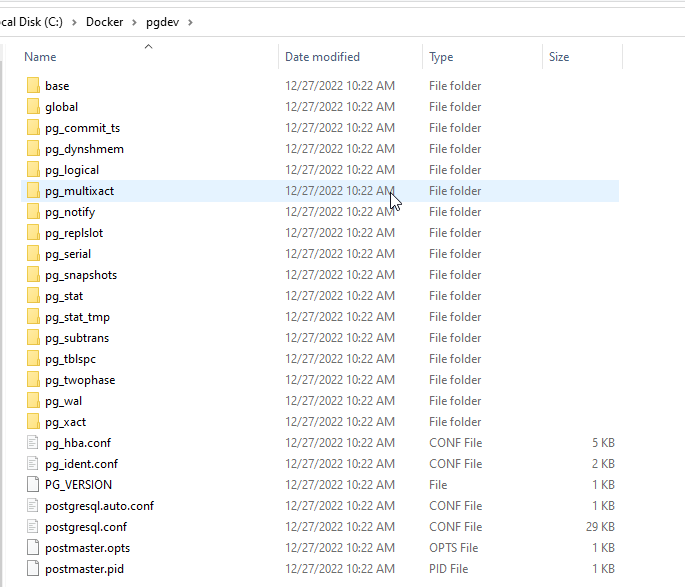
    We also see our folder is now filled with postgresql specific data files and folders:

    2022-12-27 10_23_05-pgdev

    That’s it, our container is running.

  • How Hard is Kubernetes?

    We’ve run Kubernetes inside Redgate for some research projects (like Spawn) and we are building some skills running this orchestrator. At the same time, we’ve had no shortage of challenges in keeping the clusters up at times, patching, fixing issues, upgrading to new configurations, etc. Like any software, there is work involved with managing the orchestrator.

    I’ve watched Andrew Pruski and Anthony Nocentino write about containers and Kubernetes and overall they’ve made me view the clusters like email. It’s useful and I want to use it, but I don’t want to manage or administer it. I’d want some service like AKS or EKS instead. Let someone else build expertise.

    If you use containers, do you have an orchestrator running in your data center? Mercedes does, with over 900 clusters. They found value early on with container technologies and built in-house expertise within their research arm. I think a large organization like Mercedes likely can make this investment pay off, especially as they likely don’t depend on any one person to understand and manage Kubernetes. They can afford someone like Andrew or Anthony quitting and taking another position.

    The rest of us can’t really do that, certainly not without our organization feeling containers and orchestration is a core competency.

    The key for Mercedes is automation. They note that if they added 500 more clusters, they’d need just one more engineer. That’s a key for any of us that want to manage growing numbers of systems without spending a lot of our time reviewing resumes and hoping we can hire good staff. Hiring is hard, and finding good people even harder. When you find them, set them free codifying their knowledge using DevOps, scripting, automation, and more.

    Then educate others and teach them what your talented engineer is doing. Mercedes notes that finding people is hard, and educating existing people is easier. DevOps, better coding, understanding APIs and declarative scripting are not hard skills, but they are something people need to practice to develop familiarity and skill. We want staffers to be able to easily pick up the work of another, understand it, and extend or improve it. We don’t want to depend on the person that wrote it.

    The way Mercedes has attacked this technology is the way I’d have developers and administrators tackle DevOps. Take advantage of the power of modern software development and infrastructure tools and empower your staff to make things better. They are likely to enjoy their jobs more and remain employed, reducing your need to struggle with the vagaries of finding and hiring good people, a problem no one has solved well.

    Steve Jones

    Listen to the podcast at Libsyn, Stitcher, Spotify, or iTunes.