Tag: containers

  • Setting the Container Name–#SQLNewBlogger

    I had started a Stairway series on containers (which I need to get back to), and I got a question. How do we set the name of a container?

    If I just start a new container with a generic, minimal command, I get a random name. As an example, I’d run something like this:

    docker run -p 51433:1433 -e "ACCEPT_EULA=Y" -e "SA_PASSWORD=Demo12#4" -v C:\Docker\SQL:/sql -d mcr.microsoft.com/mssql/server:2019-latest

    Now if I look at the list of containers, what I see is this container running under the name, “”. Not a huge problem, but when you have a lot of containers, this isn’t ideal. If you look below, this container is the first one in my list:

    2022-03-30 08_54_13-cmd

    However, the first name is listed as crazy_mirzakhani, not something I chose. I broke the image because it’s so wide.

    2022-03-30 08_54_29-cmd

    Let me now start a new container, same image, but with a name. I do this by adding the –name parameter with a value.

    docker run --name dockernamedemo -p 52433:1433 -e "ACCEPT_EULA=Y" -e "SA_PASSWORD=Demo12#4" -v C:\Docker\SQL:/sql -d mcr.microsoft.com/mssql/server:2019-latest

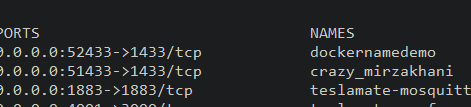
    Now if I look at the container list, I see this:
    2022-03-30 08_58_47-cmd

    And the names:

    2022-03-30 08_58_51-cmd

    This is useful to help me keep track of the containers I’ve got running.

    This doesn’t address naming standards, which I might look at as something else that can be complex. I tend to use SQLxxxx where xxxx is the version. If I need multiple ones, I tend to use SQL2019, SQL2019_2, SQL2019_3, etc. Not the best way to do things, but since I match up ports, this is easy for connections. SQL2019 is 51433. SQL2019_2 is 52433, etc.

    SQL New Blogger

    When I saw the question, it was a couple minutes to find a reference and give an answer. I decided to take 10 more minutes and just write this post, publishing a short reference on how to name a container.

    I added a short bit at the end on naming standards, which might be a good thing for you to write on as well.
  • Quick Database Copies and Branching with Spawn

    I delivered a talk last week at the Future Data Driven summit. It’s one I’ve done a few times, but I really enjoy it. It’s on the Future of Database Development, where I present a view of where I think, and hope, database development goes.

    Part of this is using the Spawn service and a neat demo a few of the Redgate Software developers came up with. In this post, I wanted to just share a neat pattern that is in the demo.

    Visual Studio Code and F5

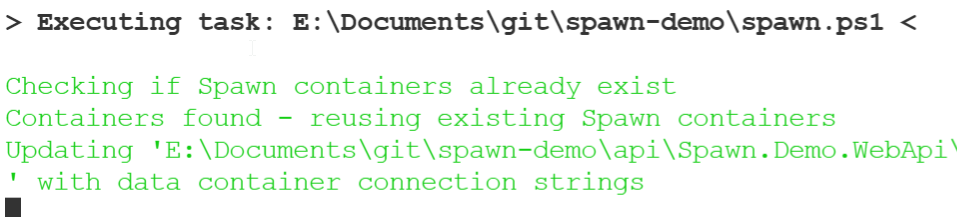
    The demo is in Visual Studio Code. I can git clone a repo and then open it in VS code. I authenticate to the spawn service and then press F5 to compile and start debugging. When I do this, I see as part of the output, this text:

    2021-09-28 12_53_36-Welcome - spawn-demo - Visual Studio Code

    This indicates that my database containers, 2 in this case, already exist and are being used. This app has some startup code in it so that any developer who clones the repo can just start running the app and writing code without worrying about what database software is installed on their machine.

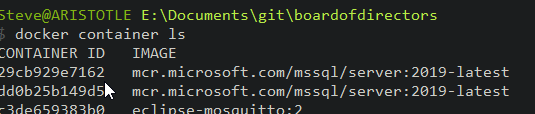
    If I check the Spawn service from the command line, I see my two database containers. In this case I am using these containers from the main branch. Hence the images (demo-todo and demo-account) get the branch added to the end.

    2021-09-28 12_56_00-cmd

    Changing Branches

    In application software, we often create a branch to start doing our own work. With databases, this might involve either re-using the same database(s) in the new branch, or doing a copy (rebuild, restore, etc.) to have a clean version of a database.

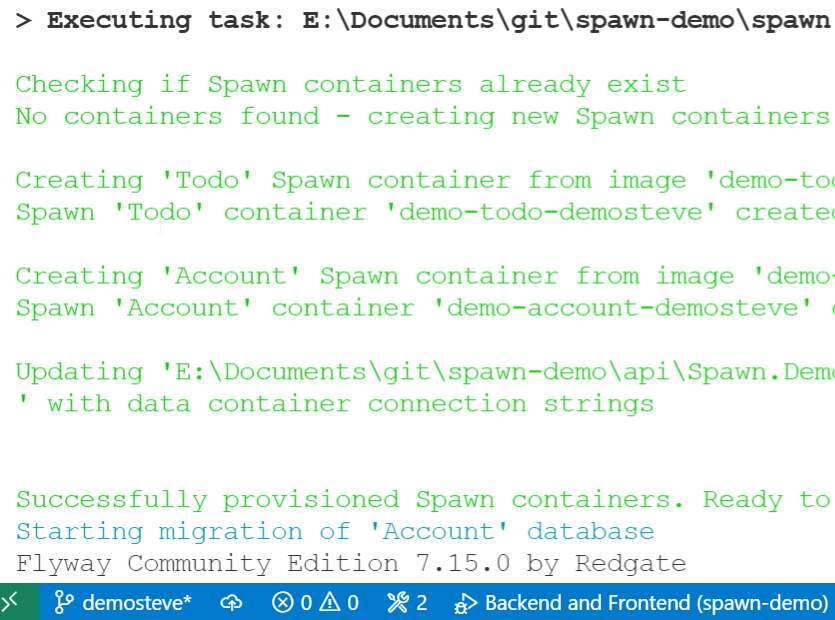
    With Spawn, I just create a new branch in VS Code. Then I click F5 again. Now I see that I need new containers. These are created with the branch name. Therefore I see demo-todo-demosteve and demo-account-demosteve as the new containers.

    2021-09-28 12_57_56-Window

    Coding in the project setup gets the credentials and ensures the app just works.

    The Future

    I think the future of better database development, especially for those “full stack” or application developers, means provisioning new databases as needed. This likely requires containers, and hopefully, a service.

    We’ll see if we get there, but I do think a lot of the trends in software development are there to try and ensure we can reduce the hassles of building new environments on developer machines.

  • The Ease of Containers

    I first heard about containers in 2012. I went to a conference on software delivery and talked with a gentleman that was using them in his Java application, mostly because the Java app had version issues and would leak memory. He could run hundreds of instances of the app on each server and handle a load, allowing each to be built, run, and then get destroyed in minutes.

    Since then, I’ve come to appreciate containers as a way to isolate workloads of specific applications. They became very popular a few years ago, and many developers and companies were looking at them. Since then, the hype has cooled, but I find that the used of containers is still growing, and certainly my use is growing as well.

    In the last year, I’ve experimented with a few different pieces of software in containers. Rather than try to install a number of dependencies on my system, I’ve downloaded a container, mapped a volume, and been up and running much quicker than I would have been otherwise. My experiments with Jekyll were one of the recent examples.

    I also got a demo from someone at Redgate recently that included a container file, allowing me to use VS Code, but develop and run in a container, avoiding dependencies on my machine. I was up and running with this software in minutes. I was truly impressed with the ease of getting started, and the simplicity for me to actually run and debug code.

    I still don’t see a lot of database container work in production, or even in development. We get requests from customers, but often it’s a wish, and they aren’t even sure how they’d get started. While I think database development with containers is fantastic, you do need to have a good dataset available that you can use inside the container to keep resource usage low and make this a viable environment.

    I still expect the future of database development to be in containers, especially as we start to have more and more applications connecting to multiple data sources. That’s going to take some time, but I still think learning about, and experimenting with, containers is a great skill for you to have. It’s also an impressive topic on which to have a few stories ready for your next interview.

    Steve Jones

  • The Future of Database Development

    Abstract:

    Containers are dramatically changing the way that application developers design and build their systems. Databases will need to be a part of this revolution as every application needs a data store. Come see a future vision of how full stack application development might look in the next few years.

    Length: 40 minutes

    Slides: FutureDatabaseDev.pptx