Tag: containers

  • Getting a List of Tags from the Microsoft Container Registry–#SQLNewBlogger

    Another post for me that is simple and hopefully serves as an example for people trying to get blogging as #SQLNewBloggers.

    I needed to write this post because I keep forgetting this. I’m hoping this will help me remember.

    I easily remember that the container registry is at mcr.microsoft.com. This isn’t helpful. On Firefox, I get a redirect.

    2020-07-07 15_22_22-Azure Container Registry _ Microsoft Azure

    In Chrome, I get less help

    2020-07-07 15_22_05-Window

    I know that the image path is under /mssql/server, but again, on Firefox, I get to to product home page. On Chrome, I get the same thing.

    2020-07-07 15_24_32-Window

    On StackOverflow, someone suggested a /v2 in front of the image path, and adding a /tags/list to the end. I did that and got redirected to this long URL: https://mcrflowprodcentralus.data.mcr.microsoft.com/mcrprod/mssql/server?P1=1594158334&P2=1&P3=1&P4=Aszj4JeNRzzbgvYq1xWs5CNXVSSIubeP%2FOko5OfNcpk%3D&se=2020-07-07T21%3A45%3A34Z&sig=ZVZdW1JcHuONk7pFh%2BGo%2FV8V6I7HKaLDsrAz0ru6dIA%3D&sp=r&sr=b&sv=2015-02-21

    2020-07-07 15_29_26-Mozilla Firefox

    That works since it apparently gets me the Docker API with the v2.

    The main problem for me was that I wanted to get the latest 2019 image, without using latest. I tried this:

    docker pull mcr.microsoft.com/mssql/server:2019-CU1-ubuntu

    However, that doesn’t work. Apparently, since there are now two versions for Ubuntu, I need to add a – with that. Either a 16.04 or an 18.04.

    Maybe I’ll remember that.

    SQLNewBlogger

    Containers are going to be important at some point and knowing how to work with them will be a desired skill. As I try different things, taking 10 minutes to document some knowledge is good. In this case, I give an interviewer a good reason to ask me if I actually remember this.

  • Weird Docker Desktop Issues – Unable to Create Hyper-V VM

    I was setting up my new machine the other day and one of the first things I did was get Docker Desktop. I grabbed this and enabled Hyper-V at the same time. When I rebooted, I had some errors, so I thought perhaps I hadn’t really enabled the Windows Subsystem for Linux and Hyper-V correctly before getting Docker running. That shouldn’t matter, but I decided to uninstall Docker Desktop, reboot, and be sure things were running.

    Once I had Hyper-V running and I connected to my local WSL, I reinstalled Docker Desktop, but still saw lots of this:

    Unable to create Hyper-V VM

    There were other errors, like the Docker.Core.Backend.BackendDestroyException, but the main problem seemed (to me) to be a Hyper-V issue.

    Checking the Hyper-V console showed no VMs created. Hmmm, what do I do?

    I tried to “Quick create” a VM, but that wizard failed. I didn’t really want to make a VM at this time, so I hesitated here, but I shouldn’t have. After searching around more, I came back and tried to ensure that I could create a VM.

    It was at this time that I noticed the default location for my Hyper-V vms was s:\virtual. I don’t have an “S:“ drive, so I was suspicious. Checking the disk location, I saw the same thing.

    This might make sense if scripting was using defaults to set up a new VM. I manually set the defaults in Hyper-V to be folders on my C: drive. Then I had Docker go back to default settings, and it worked. No errors on startup, the Docker icon in the status bar, and I could pull and start a container.

    Good to know.

    Not sure why this was an issue. This was (supposedly) a clean, new install of Windows. Strange, but something worth checking if you have issues.

  • Why Containers?

    I’ve been looking at and dabbling with containers for some time. I got more interested a few years ago as I saw the changes that Microsoft made to ensure container support for SQL Server, especially with the introduction of the WSL and Linux container support on Windows. This is one of those technologies that I think fundamentally changes the world, especially when we get good orchestration options, like Kubernetes.

    I was thinking about how the world changed as I read this piece with a little history of containers. It’s an interesting read, and eventually gets to the point of the title, the containers have changed the world. They have, and I think they will substantially change how we think about software in the next decade as more and more applications and systems move towards using containerization.

    Containers do change the idea of what we think of as a computer. It’s not quite a piece of hardware and some software. Now it’s just software and it can be running on all sorts of hardware, perhaps even at the same time with complex orchestration layered over a variety of hardware.

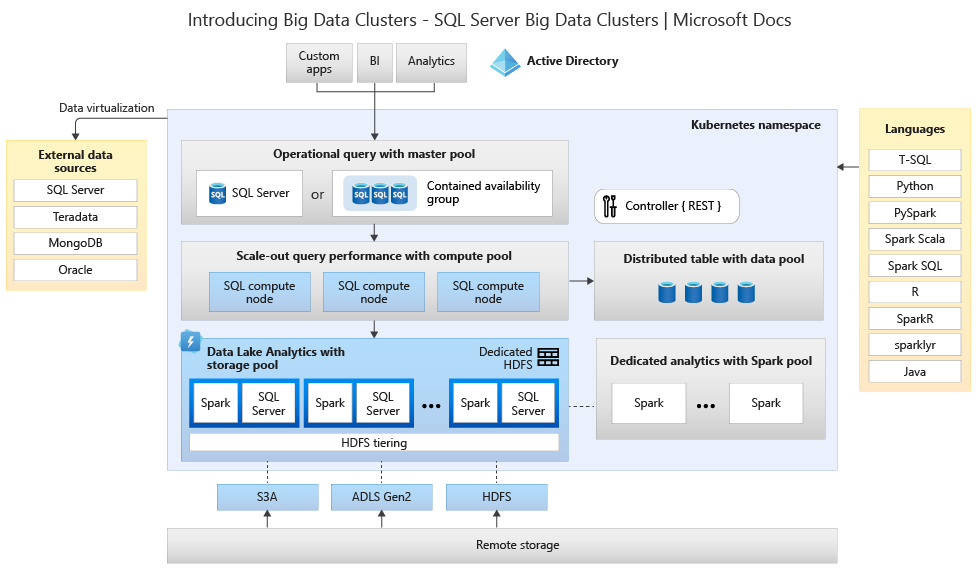
    What does that mean for us data professionals? I think this will alter the SQL Server world. This image of a Big Data Cluster is the beginning, with the same architecture likely appearing for “normal” OLTP workloads over time, though likely in some managed environment. I think hybrid, Azure Arc type of architecture, where we have SQL Server containers connected together and allowing us a highly scalable data platform.

    I suspect we’ll have lots of other software components, communicating across networks, each in its own little container. We’ll learn to build and update containers, and ensure communications between different components. I’m already seeing some uptake at Redgate in creative ways, and I suspect we’ll deliver more containerized solutions, as will many others.

    Containers are the future, more so than VMs, and I’d recommend you start learning something about them.

    Steve Jones

    Listen to the podcast at Libsyn, Stitcher or iTunes.

  • Containers, Kubernetes, and SQL Server

    Abstract: Containers and Kubernetes have become buzzwords in the application development world, but how do these technologies fit with SQL Server? This session will discuss the basics of containers and Kubernetes and explain how we can use containers with databases in SQL Server. We will also briefly look at the future of SQL Server with Kubernetes support.

    Level: 100

    Slide Deck: ContainersKubernetesSQLServer.pptx

    CodeContainers_Kubernetes_SQLServer.zip

    Speaking Events: