Tag: DevOps

  • DevOps Debugs the Demo

    I had my 24 Hours of Pass session today, Database DevOps to Ensure Compliance, and my demo broke. At least, it broke for me. I kept going and talked over things, but I hate that. It would have been impressive if it had worked.

    Debugging

    In a live session, I might have debugged this a bit more. I’ve had things fail a few times over the years, but before I was doing the DevOps thing, I couldn’t usually figure things out until I got back to a desk. With DevOps, I’ve solved a few things with the instrumentation.

    In this case, I was cognizant of time, as another session was starting after mine, without the break that usually comes. Plus since it’s online, I can’t tell if anyone really wants to know what happened.

    I do, and as soon as the webinar ended, I looked at the release and realized what happened.

    The Error

    I had this error.

    2018-06-12 16_11_47-Window

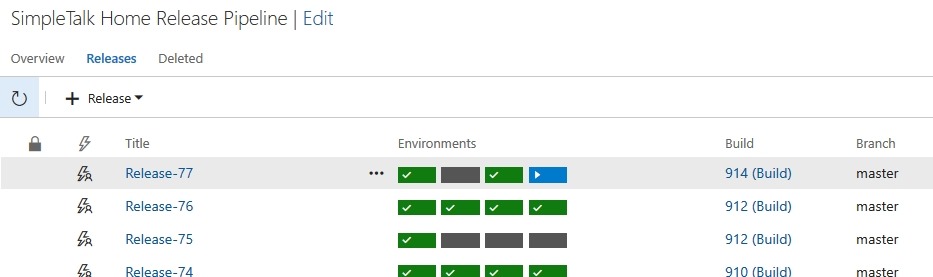
    I’d made four changes in Development that were supposed to deploy through to Production. I know they do because I’d done this not 15 minutes before the webinar, so the process was working. No errors, so what was wrong?

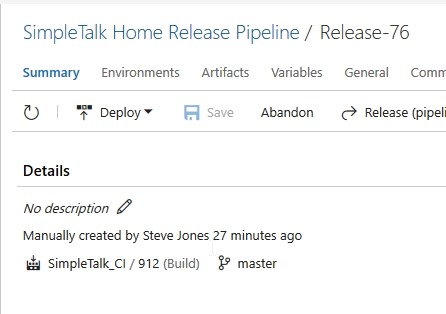
    One thing I’d done was to practice a change, which created a build. I didn’t deploy this forward, so it was essentially sitting in the VCS, but wasn’t in downstream environments. When I looked at my release, I saw this:

    2018-06-12 15_55_38-Window

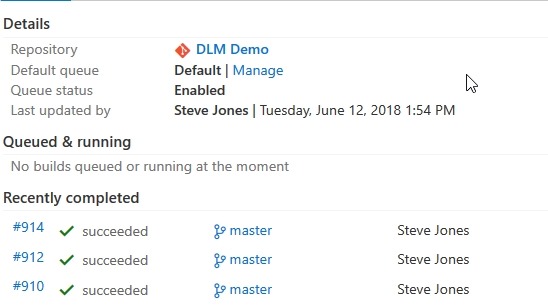
    Note the build number above, 912. This was my previous build. As soon as I clicked to the CI process, I saw that my last build was 914.

    2018-06-12 16_14_09-Window

    I’d been in such a hurry to kick off the release that I clicked too soon. The build completed, but the release page hadn’t gotten an update and picked build 912. Since I hadn’t deployed this, I didn’t get the warning that I was re-deploying a build that had already gotten to the QA database.

    I created a new release after the webinar, and it went. With ultimate confidence in myself, I just sent it to Production from QA.

    2018-06-12 16_17_29-Window

    And it worked:

    2018-06-12 16_17_53-Window

    Apologies for the issues. I’m not sure why Visualstudio.com was so slow here. Apparently the audio worked, so I’m guessing it was their site.

    In any case, I’ll be hosting a webinar doing DevOps in a slightly different way on June 28. Register and join us if you want to see something similar but different.

  • The Journey to DevOps

    Netflix is one of those companies that I find amazing. I was an early subscriber to their mail DVD service, and thought it was amazing how they processed both orders and physical objects with technology. As they pivoted to streaming, I continued to be impressed with their technology growth, from the chaos monkey to their DevOps deployments. They have been an organization often looked to as a model for other technology companies.

    I certainly think there are things to learn from Netflix, as they’ve scaled and build quite a resilient system. They aren’t necessarily worth copying, however, as the problem domain they solve is both narrow and also quite different than that many of us work in. If someone can’t watch a movie, it’s annoying, but they can pick another one. If a customer can’t transfer money, communicate with another user in an app, or schedule a ride, it’s a bigger deal for other problem domains.

    Still, Netflix didn’t build this system overnight. They didn’t come up with amazing DevOps techniques for building and deploying their software from the beginning. It’s been a journey, and they talk about some of the full cycle developer challenges in a recent blog post. This looks at one team’s journey across 6 years, from 2012 to this year. The piece is an interesting read, and it’s not advocating for their particular approach, but rather trying to explain the value that they received from moving to a DevOps model, where they have a group that must run what they build.

    As I try to help customers and clients move to Database DevOps models, I see lots of similarities to what’s in this post. As we look to optimize the entire software development life cycle, this requires a changing of roles and closer cooperation between groups. As I look at the evolution of Netflix, using a centralized group to build tools and then ensuring you have a better staffed development team that works to both build and support their software, ensuring clients get the value (or features) they need quickly.

    I’ve worked in orgs that did this in groups, and for the developers to be involved in operations is an eye opening experience. Developers will learn ensure they think about their design and test more because they don’t like getting woken up. They listen Operations and learn about the ways in which they can better build a system that works. They start to realize “works” is a feature, perhaps the most important one.

    I’ve also found my role as a DBA can facilitate DevOps. I’m often between development and Operations, with a foot in both camps. I help developers build better tools and techniques to work with databases. I understand the impact on production databases, meaning I can help ensure that deployments are smoother, and we avoid risky changes. We build indexes early, install primary keys, test queries for performance, and more. The DBA is the one of the ways in which DevOps can grow in an organization, if they work with the developers instead of against them.

    Steve Jones

    The Voice of the DBA Podcast

    Listen to the MP3 Audio ( 4.7MB) podcast or subscribe to the feed at iTunes and Libsyn.

  • No More Downtime

    At one point in my career, I worked for a wealth management firm. We managed funds for various customers, a part of which was making trades in the financial markets. Various brokers and companies used our platform to run their business, and performance was always an issue. At the time we were an NT 4.0/SQL Server 6.5 shop, though we moved to Windows 2000 and SQL Server 2000 while I was there.

    While we were looking at upgrades, a number of potential customers asked why we weren’t using AIX or Solaris or Linux. Management would come to a few of us technical leads to ask, and we usually had to provide some justification. Our success was hit and miss, though we did run into a few companies that were doing real time trading on the Windows platform, and a few of us had the chance to talk to them about how they managed their systems in an age when Windows hosts often needed patching, a requirement of which was rebooting. If you’re interested, the company actually had a fairly server oriented architecture built on top of Windows, essentially managing work by just connecting to whichever boxes were running.

    Things have changed. These days Microsoft has been working hard to build a better Windows OS to power Azure and they’ve done some amazing work. I saw a post on one of the things they’re doing, which is finding ways to patch the underlying OS without disturbing applications, including VMs that are running on the host OS.

    The work is amazing to me, and this is where we should have been going with all operating systems. We ought to be able to patch these without downtime, and certainly without disturbing guests or programs that might be running. As this rolls out to Windows hosts in our data centers, I could imagine an era when we have monthly patches for Windows that never cause downtime for SQL Server.

    Well, I guess there is some downtime. Applications such as the hypervisor are paused, which some of us might consider downtime. However, if the time frame were in the single digits of seconds, I’m not sure many clients would this as downtime. It’s along the lines of a network hiccup or a momentarily busy server. In some sense, this would be a great move forward for HA.

    On the other hand, this would raise expectation. Clients and customers would be less tolerant of downtime, which is something we can’t control with Windows and SQL Server patches. However, it is something we can control with our deployments. A system that is almost never down because of patches would put pressure on us to ensure that our enhancements to the database itself also didn’t cause downtime.

    While there’s no magic in how we make changes to objects in SQL Server, there are techniques that can make changes in stages, perform additive work, and use automation in a DevOps style workflow to limit downtime and lower the risk of making changes. To me, this might be a bigger change than cloud systems. With that in mind, I’d urge many of you to learn techniques to avoid interrupting applications when you deploy changes. There are ways to do this, but it takes some effort and practice to build better skills and habits.

    Steve Jones

    The Voice of the DBA Podcast

    Listen to the MP3 Audio ( 4.8MB) podcast or subscribe to the feed at iTunes and Libsyn.