Tag: DLM Dashboard

  • Getting Started with Database DevOps, DLM, and New Tools

    Next Tuesday is the next installment of our DLM series from Redgate. I’m off the hook, with Grant and Arneh showing off Git, Team City, and Octopus Deploy as the main tools. Register today and see how you can get started.

    We’ve been running this series for a year, with a focus on showing different tools being used to deploy database changes. Of course, we do showcase some Redgate tools from the Toolbelt, but the idea is to integrate with various other common development tools.

    68_dlm dashboard red wfillIf you’re looking for an easy way to get started, consider downloading and trying DLM Dashboard, a free tool to audit and monitor your database schemas.

    If you’ve missed any, you can see these combinations of Version Control, CI, and Release tools:

      Version Control Continuous Integration/Build Release Management/Deployment
    Webinar link Git TFS Build in VSTS Microsoft Release Management
    Webinar link TFSVC TeamCity Octopus Deploy
    Webinar link TFSVC Jenkins Octopus Deploy
    Webinar link Subversion (SVN) TeamCity Octopus Deploy
    Webinar link TFSVC TFS Build in VSTS Microsoft Release Management

    Feel free to watch any of these, or come to the next webinar and ask questions live. There are more resources in our DLM library.

    DLM really can help smooth your development and deployment process, reducing mistakes, and allowing you to deliver enhancements to customers faster.
  • The Next DLM Demo Webinar–Feb 23

    A quick note that I will be presenting a webinar on Feb 23rd at 10:00am MST. That’s noon EST and 5:00pm GMT. You can sign up here if you’d like to watch. This is similar to other DLM webinars I’ve done that look at the Redgate stack of products that help you develop database software in a smoother fashion.

    I am changing things up a bit. This time the stack is:

    • Git – version control
    • Team City – Continuous Integration or Build server
    • Octopus Deploy – Release Management tool.

    As with the other webinars, I’ll show how I track the version of the database in each environment, then show how to make changes in SSMS, commit them to my VCS with SQL Source Control, and then deploy them in an automated fashion across various environments. In this case, I’ll have this flow of environments

    • development
    • integration
    • test
    • acceptance
    • production

    It’s an impressive demonstration. As I’ve watched this grow at Redgate, I am impressed with how well things work. I wish I’d have had these tools when I built database software earlier in my career.

  • Limiting Database Permissions for DLM Dashboard

    I was talking with some of our support people recently about permissions on DLM Dashboard. A client was having issues, and we weren’t sure what was wrong. As a result, I decided to dig in a bit and see how limited I could be with permissions for the login/user that is used to track changes.

    My first step was to create a new login in SQL Server, giving the public server role and then granting very limited permissions in master and the Redgate database. Those permissions were:

    • master – VIEW ANY DEFINITION
    • master – execute on dbo.RG_SQLLighthouse_ReadEvents
    • RedGate – SELECT ON SQLLighthouse.DDL_Events

    That’s a nice, limited set of permissions. You do need sysadmin for setup, but after that, you can set these permissions for the user that you’ve configured in DLM Dashboard. The permissins are documented on the DLM Dashboard documentation site.

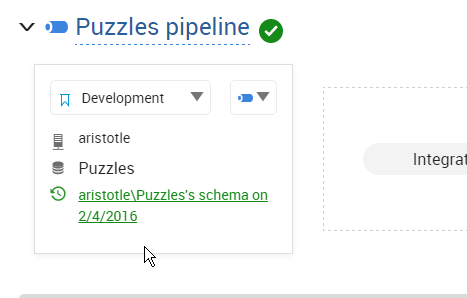
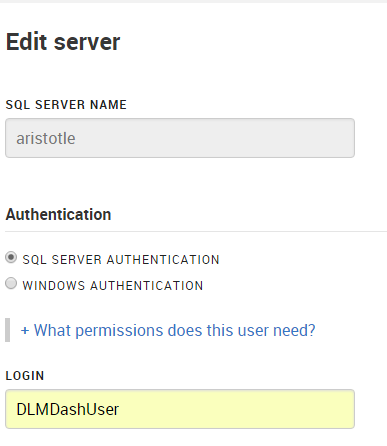
    In my case, I have a login/user, DLMDashUser, configured in the tool.

    2016-02-04 17_32_21-New notification

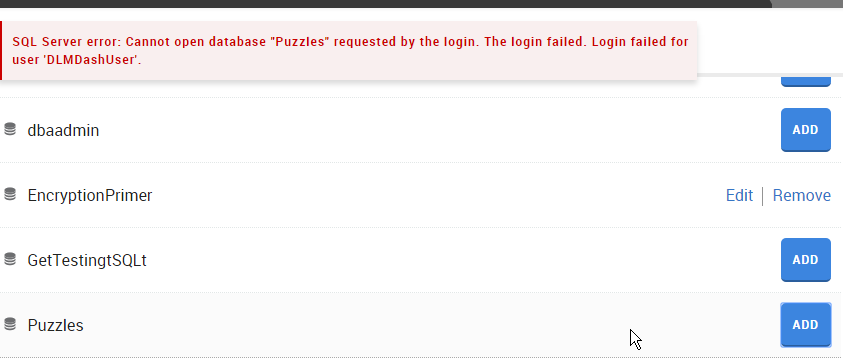
    I then went to add a new database on my local instance.  However since this login isn’t mapped to a user, nor has any high server privileges, I got an error.

    2016-02-04 17_08_18-Movies & TV

    To fix this, I connected to my instance and modified the user. Scripting is a better way to do this, and in my case, I used this script:

    USE Puzzles
    GO
    CREATE USER DLMDashUser FROM LOGIN DLMDashUser;
    GO
    GRANT SELECT ON sys.sql_expression_dependencies TO DLMDashUser
    GO

    This grants the necessary permissions to a new user in this database. You can save this script, which is especially handy for production systems where we don’t want monitoring tools to have elevated permissions.

    Now when I go to add the database, I click add and it works.

    2016-02-04 17_09_02-Movies & TV

    And I can then see the database in my monitoring dashboard.

    2016-02-04 17_09_23-Start

    The principle of least privilege should apply everywhere, certainly in production, but also in development. If you limit permissions in development, you might cause a few headaches, but you’ll understand the issues and solve them early on. More importantly, if you have security flaws, they aren’t in production systems where data is exposed.

    SQL Server security isn’t that hard, but it can be cumbersome. Set it up properly in development, keep your scripts (even from the GUI), and then use those scripts for your production systems.

    NOTE: Typically I’d create a role for this system, which is perhaps what I should do. Having a role like this would make switching users in DLM Dashboard at some point much easier.

    CREATE ROLE Monitoring
    GO

    GRANT SELECT ON sys.sql_expression_dependencies TO Monitoring

    GO
    ALTER ROLE Monitoring ADD MEMBER DLMDashUser

    In fact, I just changed to use this role, and added the role to the other databases so that my dev system is propery set up.

  • DLM Dashboard moves to 50 Databases – For FREE

    I love DLM Dashboard. It’s the product that I’ve written myself, in various ways since SQL Server 6.5. My versions weren’t as pretty, often scripts that ran queries, returning loads of data in text format, from queries, trace, or Extended Events.

    However there’s been a limitation that affected even me. When DLM Dashboard was released, it allowed you to monitor 5 databases. That increased to 10 if you registered, but that still wasn’t enough. I have 4-5 databases, many in a few environments, that I’m trying to monitor.

    I had a meeting with the DLM Dashboard team a few weeks ago, and we discussed a number of items, including the limitations. We debated the topic, and I got word recently that the limitation has been raised.

    DLM Dashboard now allows you to monitor 50 databases, which covers quite a few of your environments, and quite a few complete pipelines. I’d urge you to give it a try and download the product today.

    We understand some of you might need more, or that there are other features you’ll want. The team wants to hear from you on UserVoice, which you can also get to by clicking the "Give Feedback" link in the app.

    2015-10-23 09_22_34-Photos

    This is one of the best free products I’ve seen in a long time, and I’m excited that Redgate built it.

    Now I don’t have to at any other job in the future.