Tag: hardware

  • The Growth of Storage

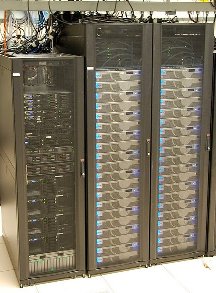
    Will we see this in a laptop in our lifetime?
    Will we see this in a laptop in our lifetime?

    Over the holidays I had a chat with my son about computers. His laptop died, and he wanted a new one. It isn’t needed for school and my wife and told him he’d need to earn the money for half of a machine and could take the rest from his savings. I’m happy to say that he has been working hard to earn money, out in the 10-20F temps caring for horses, and is getting close to making his first computer purchase.

    In setting his target amount of money to earn, we talked about specifications for various machines, looking online and in local stores. We talked about the various CPU, RAM, and storage values, and what they might mean to him in terms of the performance of a laptop. While we were talking, he asked me some interesting questions about the growth of storage. I thought they were interesting, and decided to ask you this week what you think.

    When will we get 1TB of RAM in a mainstream laptop, and when will we get 100TB of storage?

    Those are large numbers, though I know some DBAs who have one, or even two, terabytes of RAM in large servers. My first thought was that we were a long time from getting those values in consumer machines, but as I look at my phone with 64GB of storage in flash, and this recent announcement of a 2TB SSD, perhaps they aren’t as far away as I might have thought.

    My first professional computer had 4MB of RAM and 200MB-ish hard drive in the early 90s. Today I have a desktop with 24GB of RAM and 2TB of storage. Extrapolating that and I’d expect that I’d have over 1TB of RAM and 20PB of disk in 20 more years.

    What do you think? When will we have laptop machines with the specifications of the largest SQL Server instances today?

    Steve Jones


    The Voice of the DBA Podcasts

    We publish three versions of the podcast each day for you to enjoy.

  • SSD Lifetimes

    Samsung 840 SSD
    This looks like a nice SSD upgrade that’s reliable.

    One of the things that has concerned many DBAs looking at SSD drives is the possible limited life of these drives. In the past, many consumer drives have had issues, and can fail without warning. However there are plenty of people that still love them for the fact that they are crazy fast and can dramatically speed up your system. Just make sure you keep good backups of your data since it may not be recoverable.

    For servers, a number of manufacturers have been working hard to build more reliability and longer lifetimes into their drives. FusionIO has listed 2 million hours and 6 years write endurance for their cards, which is a quite a long time. Other manufacturers are working hard as well and I suspect we’ll see more and more SSDs architected into SQL Server instances over the next few years. Microsoft has a white paper on using FusionIO cards in tempdb, and I know a few SQL Server installations have been quite pleased with their results of using these cards in production systems.

    This week I saw an analysis of the Samsung SSD 840 over at AnandTech. They examined the wear of this drive and came to the conclusions that writing over 10GiB a day, you’re still get many years of service from this drive. That gives me a lot of confidence in the drive, and with Amazon listing the 250GB version for $180, it’s an upgrade you might consider for your laptop.

  • Windows 8 First Impressions

    I haven’t worked with Window 8 at all. I’m not a big beta tester, and it’s been a busy few months for me, so I haven’t bothered to mess with any of the previews. My Win 7 desktop works well for me, and I haven’t bothered to think about doing anything different.

    Today I was at Best Buy, needing to get a new UPS for my computer since I had a power outage and a failure of the battery in my existing system. I grabbed two, but as I was walking by, I saw laptops with Windows 8 on them. It isn’t supposed to release until Friday, and perhaps these were just setup since there weren’t prices, but I stopped to look at them.

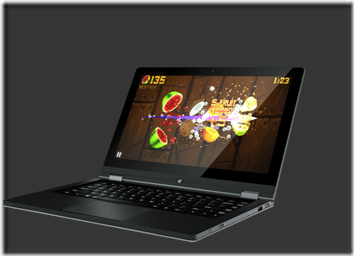
    The first one was a Lenovo Yoga. It’s interesting, and I was reading about it recently in that it has a cover that folds completely over. It can become a tablet, but the keyboard is exposed.

    yoga13_web_detail_000

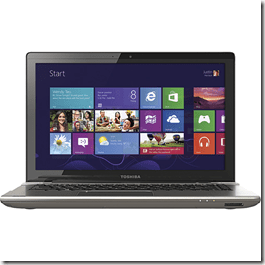
    The other was a Toshiba Satellite S4310. Nothing fancy here, but definitely a more reasonable cost. I checked later and found it at $900 for a nice setup.

    toshiba4310

    In both machines the start menu was up, and it’s obvious you pick one of the tiles to get to the app. However getting back to the start menu wasn’t obvious. I hit the Windows key, which brought it up, but I couldn’t figure out a swipe method to get it back. I’m sure there’s a shortcut, but in 4-5 minutes of trying stuff, I couldn’t figure it out.

    I did get to swipe over from the left and change applications. That was interesting, and it worked fine. It was smooth and while I only ran 3 things, this hardware performed fine. The placement of the title bar and the view was different, but the applications are the applications. They work fine.

    I will say the response to touching the screen was fast and quick, almost too quick. In trying to scroll, two fingered, OSX style, I found it trying to zoom in or out as I moved. More me than the system, and I’m sure it’s something I’d get used to quickly.

    I like the idea of having this start screen with some information on it, but that’s more for a tablet. I can’t imagine seeing this much in my work, and wouldn’t even want to bring it up as a screen saver.

    Using a few apps, browsing, typing, it just works. I’m not sure how much of the “Windows 8” experience, I’d even bother with in daily life if I didn’t have a tablet. As it is on the iPad, I mostly live in apps. The OS isn’t really important.

    Not sure if I’ll upgrade or get anything for me, but my wife needs a new laptop, and a few of these look nice. Not sure if she’d like the tablet interface, and the Yoga seems weird, but I’ll ask her and see.

  • The Dream Machine

    I could replace my desktop since I have a similar setup

    Hardware is usually important to techies. I see now shortage of discussions and debates about this laptop or that. I see people asking about this machine or that ( the W530 looks niiiiiiiccccceee) and as various Surface tablets are announced, I often find people blogging about what they like or debating the merits on Twitter. In the SQL Server world, there are a few very impressive hardware setups at people’s homes.

    I ran across this post about life at Stripe and there was one benefit listed that caught my eye. In the post, the author says “New employees are asked to send in specifications for their dream machine, which is then built and waiting for them on their first day.” I think that’s a great benefit, and it shows that the company values their employees and wants to ensure they start off with a little excitement.

    This Friday I wanted to ask you what you’d do if that were offered to you. Most of us working for corporations get the same type of machine as all other technical employees, but imagine that isn’t the case.

    What machine would you specify if your boss gave you the choice?

    Personally I like my MacBook Air. It’s small, light, comes on instantly, and I find myself really enjoying OSX. The one thing it lacks is some horsepower, and if I need more I’d have to look at either one of the new Macbook Pros or the Lenovo 530. The former is very tempting right now, but the latter would allow me to replace my desktop as well since it can drive four external monitors.

    If you could spec out your machine when starting a new job tomorrow, what would you want?

    Steve Jones


    The Voice of the DBA Podcasts

    We publish three versions of the podcast each day for you to enjoy.