Tag: hardware

  • Fix Failures Fast

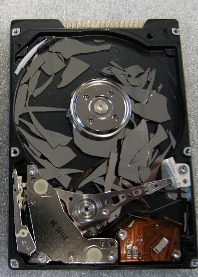
    broken hard drive
    You don’t need this kind of failure to consider replacing your hard disk.

    What makes PCs fail? Recently Microsoft Research published a research paper that looks at PC failures. The research spanned a million consumer PCs and examined failure rates and the suspected causes of those failures. The data came from the Windows Error Reporting system that runs after crashed inside of Windows, so this data doesn’t include other operating systems. It also is for fatal errors, those resulting from system crashes and doesn’t include non-fatal errors.

    It’s an interesting read, though a little boring since it’s an academic style paper. It does have a few highlights thatcaught my eye. The first is that when a failure occurs, the chance of another failure occurring soon is high. That means that disk failures predict another failure is likely in the next 30 days. Server machines might be different, but those of you with consumer grade hardware might think about an immediate backup and the purchase of a hard disk replacement if you have a fatal disk error.

    There are other highlights that over-clocking can dramatically increase CPU failure rates. It isn’t completely clear if this means a shorter lifetime, but if you’re like me, having errors that crash systems is incredibly annoying and time consuming, so I’m not sure I’d ever want a system over-clocked. There was another interesting point that said CPUs and RAM in white box (non-OEM) machines was less reliable than brand name systems. I struggle to see how a CPU would be less reliable, but that was part of the analysis. I’m not sure that would stop me from purchasing my own parts in the future, but it is something to keep in mind. Perhaps you should burn in the machine as soon as you can to allow for a parts return if you have issues.

    Laptops were more reliable, which was surprising, and also comforting since most IT pros I know use laptops. People tend to keep old memory around, which can wear out over time, so be careful about moving memory from machine to machine. There weren’t a tremendous number of surprises in the study, but it did make me appreciate my long running desktop that rarely reboots, and even more rarely crashes. I was pleased to see such a detailed analysis being undertaken by Microsoft Research using data from actual Windows systems. Hopefully there are engineers also looking at the data and improving the OS as well.

    Steve Jones

    The research paper for this editorial was highlighted in the Brent Ozar, PLF newsletter.


    The Voice of the DBA Podcasts

    We publish three versions of the podcast each day for you to enjoy.

  • Down and Dark

    I came back from vacation to find the home DSL line bouncing up and down a bit. I wasn’t overly worried, and the kids knew to restart the router when it went down, crossing their fingers for a good connection. I suspected the router might be dying, and was getting mentally prepared to go hardware shopping. I figured I’d enjoy the downtime and stay unwired for the last few days before going back to work.

    On Sunday night, our connection was down for good, with a red light on the router. I called Monday morning into the Century Link tech support line, and they informed me they knew there was an outage. Good, I thought, they’ll have it fixed soon. I packed up and spent Monday in town working at the library to not fall any further behind.

    Tuesday morning had the line still down, despite complaints to Century Link. The people answering the phone apparently are not any more informed by their engineers than I am. I find that hard to believe, but there wasn’t much I could do. I packed up again, and am in town working again.

    Broadband access has almost become a commodity, and I’d argue that for many of us, it’s a utility. We pay bills online, get sent all sorts of information online, many of us not even getting newspapers anymore. It’s not longer a luxury, but a necessity for us to make do in the modern world. For me, it’s part of my job, and the lack of a line is a huge impact to me getting work done.

    Fingers are crossed that this gets fixed soon as work is piling up.

  • The Standing Desk – Week 1

    I finally got my standing desk working last weekend and started on Tuesday (after Memorial Day) working at it on a regular basis.

    This was the initial setup

    Photo May 27, 4 35 10 PM

    I used a box of books, with 4 more under the keyboard and another box for the mouse. I had two monitors working due to a lack of cables, but this would allow me to essentially duplicate what I had upstairs. I added a short barstool (round, no back) and I was ready to go.

    I wrote a bit about this the other day, but this is a more detailed post after almost one work week (3+ days) of working.

    Tuesday when I came downstairs, I was tired, and it was chilly, and I didn’t really want to go in the basement. I spent an hour with my laptop at my regular desk before deciding to go stand downstairs. It wasn’t bad, but I realized quickly that the keyboard and mouse were too low. The ergonomic position is slightly above the elbow, so I added another box, more books and raised things up. Books make a great experimental platform for raising lowering to different heights to see what works.

    I also realized that I needed to get all four monitors going and see if I liked that. So I ordered two new cables, and kept working. I stood for 5-6 hours on Tuesday, taking a few breaks to go upstairs, run, and handle other non-desk tasks.

    Wednesday I felt better and I sat at my desk for an hour for our weekly department conference call. I don’t have a webcam on the desktop and with the books, no desk to set the laptop on. However afterwards I went downstairs and worked. My round bar stool was too short, but I did find an older, tall barstool to use. The height is just high enough that I have to raise up an inch or so to sit down. Or sit up.

    I didn’t love sitting down, but taking 10-15 minutes on the stool was nice.

    Thursday my cables came, and I hooked everything up. I got all four monitors situated in the right position in Windows 7, though I am tempted to raise my bigger monitors up to the top and put the smaller ones below. Right now I feel like I’m looking down when I’m working. It’s not too bad, and it’s similar to how you might work with paper on a desk.

    Photo May 31, 4 31 55 PM

    My legs feel a bit more tired, but not much. I notice it most when I’m running. It’s that they’re slightly more tired than normal. I suspect that I’m adapting better than most since I run every day (1370 days and counting), so I’m used to some amount of work from my legs every day.

    I do find that I take more breaks now. I can’t sit with an empty coffee cup and get lost in work for 90 minutes. Every hour or so I get up and move upstairs. It’s also changing my eating slightly. I’m eating smaller meals, and planning on going upstairs every hour for a small snack or piece of fruit. I’m not sure of the long term health effects, but I can’t think of a reason why this would be bad.

    On the extra plus side, my regular desk is fairly clean now

    Photo May 31, 12 52 10 PM

    So far I like the experiment, and I do feel like I’m burning more calories overall. I’ll give it a couple more week and then set about re-evaluating my move back upstairs.

    A few things I need to consider fixing

    • flooring – Buck talked about padding and I think I need something. I have carpet, but otherwise this is cement and I know that will take a toll. Upstairs I have wood, but probably need more padding.
    • Monitors – The smaller two of my monitors are older and dimmer. I don’t use them as much, but I don’t love looking down so much at the newer ones. I need to reverse the positions.
    • Desk space – I’m used to having space for a bottle of water and a coffee cup, plus my phone, a plate if I eat, etc. I need to consider that as I move to a more permanent setting.
    • Monitor mounts – My desk doesn’t have a lip to clamp on. Do I cut a hole in it or move this one upstairs? Decisions, decisions, and permission from my wife.

    This is cross posted to both my personal blog and the Voice of the DBA.

  • Printer Driver Fun

    I bought my new Brother HL-2270DW laser last week and had to set it up. With the need to print something quickly, I plugged my MacBook Air into a USB cable, plugged that into the printer, and wondered what would happen. I had a CD with the printer, but the MBA doesn’t have a CD drive.

    To my pleasant surprise, OSX identified the printer, made a quick search and told me it was downloading a driver inside of 10 sec. A minute later the driver installed itself, added the printer, and when I clicked print from Acrobat, I had a printed document.

    OSX score: 10.

    That’s miles beyond the hassles I’ve had with Windows machines in the past, but I was curious. I grabbed my old Windows 7 laptop, plugged the USB cable into it, and to my surprise it identified the printer, found a driver, and installed it. I was printing a couple minutes later.

    Windows 7 (direct) score: 10

    What about remote access? I had configured the printer for my network and went over to my desktop running Windows 7. I searched for the printer, and it was found on the network immediately. However when I clicked “find driver”, Windows was unable to find a driver. Strange, since the model of printer was identified by the OS.

    I manually added the driver from the CD and the printer worked immediately.

    Windows 7 (remote) score: 6

    What about remote on OSX? I went to the kid iMac and added a printer there. The printer was identified on the network, and once I clicked “add”, the driver was downloaded and installed

    OSX (remote) score: 10

    So far it seems Windows is still iffy with printer drivers, and I’m not sure why. The various hardware configs shouldn’t matter if the OS can identify the printer. It should go find the driver.

    I’m not sure why now, after decades of printing we can’t just have printers work with our operating systems, but I’m hoping at some point this will be rectified.