Tag: hardware

  • Setting Up Pi-Hole.Net

    I saw a tweet a short time ago from Drew Furgiuele about pi-hole.net. He noted this was a near use of a Raspberry Pi, and I wanted to give it a try. I got one awhile ago, and used it for a few things. We started with a media streaming device, but when I got a Fire Stick, this wasn’t needed or used. Then I tried a Bluetooth audio bridge to the stereo. It wasn’t as reliable as I’d like, and it added complexity to turning this on, letting it boot, etc.

    As a result, it’s been sitting a bit as I thought of some other project. The pi-hole seemed like something to try, so I decided to give it a go. It was pretty easy, and it blocks some ads. Not all of them, but

    First, I grabbed the latest release, Stretch, of Raspbian. I chose the lite version, since this will be headless. I downloaded that and also grabbed Etcher to flash the card. This took a bit, but I let it run in the background as I did other things.

    From there, I used Explorer to connect to the drive and create an empty “ssh” file. I read this tutorial, and ended up just creating a new text file in Windows, and removing the extension.

    Once this was done, I took the device up and plugged it into the router, both the Ethernet and the USB cables. This booted and connected the device. Back at my machine, I used Putty to connect. I did have to upgrade Putty to get the proper encryption level, but if you get a new copy, you’ll be fine.
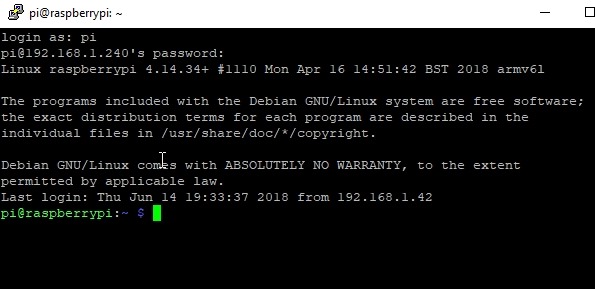
    2018-06-14 14_00_42-pi@raspberrypi_ ~

    A few people pointed out ssh is in Windows now. Great, that works, I like Putty.

    Once connected, I ran the curl command to get pi-hole installed. It was fairly simple, and once installed, walks you through some basic config and networking. I use the 192.168.1.0/24 network that most people do, but my DHCP is set to give out addresses from 2 to 199. 200 and above are statics for me, so I configured this to use one.

    After that, I got a password for the device and I went to my static IP/admin to see the Pi-hole dashboard. I logged in and I could see traffic. This is from the next day.
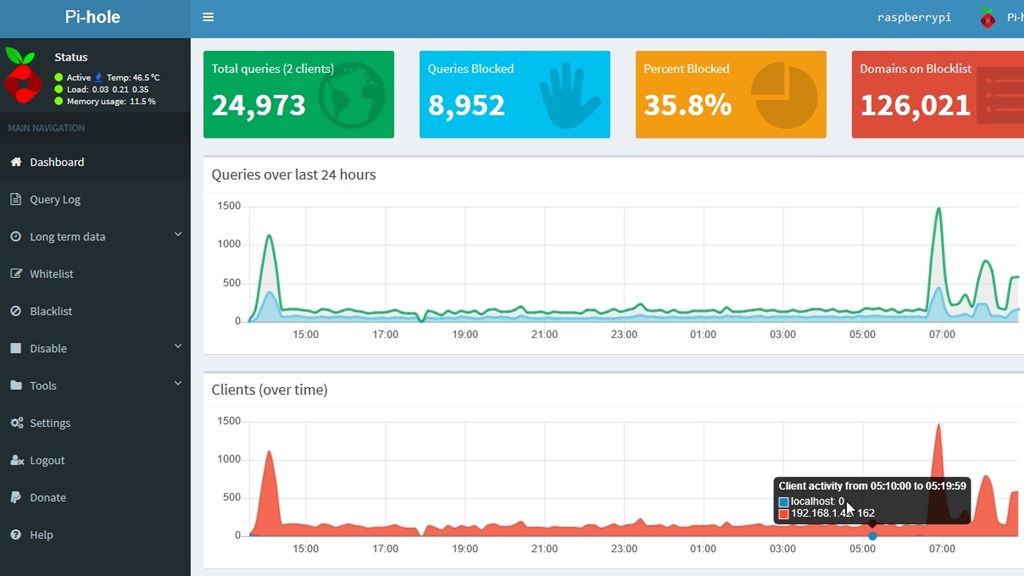
    2018-06-15 09_11_16-Pi-hole Admin Console

    It’s an interesting project and I’ll see how this goes. I could add a other software to this device, and I may. We’ll see.

    I’m not against advertising, but there are some shady sites and some data gathering. Right now, a lot of blocks are for some telemetry service, which is fine. I can’t get info on it, so I’m guessing it’s not legitimate.

    In case you are wondering, there are lots of queries to telemetry.servers.getgo.com that are being blocked.

    If you want to try it, this is a cheap experiment, and you can also play with Linux, some hardware, and SSH.

  • The Data Submarine

    For some reason, this came to mind: under the sea, under the sea. That’s what I thought of as I was reading about Microsoft sinking a data center. There are probably jokes to be made about Microsoft and sinking, though they’re less humorous as the company’s stock price has risen quite a bit in the last few years.

    The is a research project from Microsoft on future data center design. Using modular devices that can be submerged for years at a time, only having a connection for power and data back to the surface. These are designed as sealed environments, without the creature comforts needed in data centers for human technicians. The systems inside are built to live on their own, using the water for cooling the heat generated by computations.

    There won’t be any repairs or replacements for failures. With the equivalent of twelve racks of servers in the system, I wonder how long they will list. I find it interesting that the experiment is designed for a year, though the device should have a timeline of 5 years. Does that mean that Microsoft expects current hardware to last for five years? Is that the new lifecycle of modern chips and storage? Or perhaps they find the lifecycle is shorter, but this is more a test of the extreme lifetime that they expect and they’ll track and chart the failures across time of components? I expect they already know some of the expected lifetime of hardware from their massive Azure data centers, which they can compare to this environment.

    It’s an interesting idea, and one that might see smaller, modular data centers spread around bodies of water where there is enough movement to carry heat away. This should reduce power consumption, as less is needed for cooling. This can also reduce latency, with devices perhaps located closer to clients for heavy compute capabilities or even content delivery.

    I’m not sure these will work at larger scales, as heat attracts life, with plant and animals potentially migrating to be near the submersibles. Who knows if were would be interference with operations, but I wouldn’t be surprised to find that some level of maintenance is needed. We might see the rise of a new type of job, like undersea gardener or window washer that keeps the submarines clear of encroaching biology.

    Of course, I wouldn’t be surprised to see Roomba-like automated devices that put many of these humans out of work.

    Steve Jones

    The Voice of the DBA Podcast

    Listen to the MP3 Audio ( 3.4MB) podcast or subscribe to the feed at iTunes and Libsyn.

  • Get What You Pay For?

    Many items that we choose to buy have some relation between the price and the quality of the item. We often find that a more expensive appliance or automobile has better quality than a cheaper one. There’s certainly a point at which spending more doesn’t necessarily get you better quality or even value. This seems especially true today with many “over the top” products that have added features or design that don’t seem to be worth the additional cost. At the other end, there are times many of us pay less for less quality, consciously making that tradeoff. I also think that the base level of quality has risen for so many products that it might not be worth spending more than some amount for an item. They’re all close in value and performance.

    I ran across a piece that looks at the value of consumer and enterprise SSDs. This isn’t a scientific analysis, but rather a short discussion of why enterprise SSDs might be more than twice as expensive as consumer ones. There are some details, such as the architecture and spare capacity, but ultimately the author notes that people purchasing drives also worry about the perception that they might have saved money with a cheaper drive, but lost data because the warranty and support are lower. Even if the same hardware were being sold by the vendor, which I’m sure happens, having enterprise support is a crutch that can provide the employee some protection if there are issues.

    There certainly are hardware differences for most devices, though the buyer should beware and verify that they are actually buying enterprise level gear. The big difference for me is that the large over provisioning of enterprise devices offers more predictable performance sustained over longer periods of time. This is important, especially for databases that might get quite a bit of transaction log or tempdb activity. In those cases, we need sustained high rates of I/O.

    There are no shortage of white papers, articles, reviews, and vendor claims about their particular hardware. This is a very competitive and also highly profitably space. If you’ve had to purchase a new SAN device at any point, you know these are expensive and complex. Making the decision is stressful as it can take lots of time ot evalute, lots of resources to get things installed, and so it’s not easy to go back on the purchase. In addition, many of us that have to make a recommendation are usually asking management to spend 6 or 7 figures on a device. If it doesn’t perform, we will take the blame and may find our choice to be career limiting.

    I don’t envy anyone that needs to make hardware decisions for their database or organization. There are so many companies in the storage space now that it’s a large project just to evaluate the various products and try to make a decision. It’s complex enough these days that I can see why moving to the cloud is attractive for some. While we can’t control everything and we may have large monthly bills, we typically don’t ever have to face that extremely large capital purchase decision.

    Steve Jones

    The Voice of the DBA Podcast

    Listen to the MP3 Audio ( 4.5MB) podcast or subscribe to the feed at iTunes and Libsyn.

  • The Last iPhone

    A few years ago the iPhone 7 was released. This was a big release for Apple, and I knew quite a few people that were ready to plunk down their credit card on day 1 and upgrade. I wasn’t, and in fact, I upgraded to an iPhone 6s+ from a 6 a few weeks after the release. At the time, my old phone felt slow and small, and I decided to make the upgrade sooner rather than later to my last iPhone. Why? Really for one main reason.

    Most of us reading this work with technology and software. We often deal with upgrades to our tools and systems better than most of our friends, but not without complaint. Quite a few of us have been annoyed, or even angered, by the changes that Microsoft has made to software. From SSMS to Office, what the developers in Redmond might see as an upgrade, we see as a step back. One that interferes with our workflow and forces us to adapt and build new habits. The Ribbon bar in Office and the “Modern” look in Windows 8 come to mind as some of the more disruptive upgrades.

    I get it. I work for Redgate Software, and we often struggle if we make significant UI or workflow changes to software. We might have reasons to view a change as better, but without a doubt, there are a percentage of users that always disagree. We try to ensure it’s a small percentage, performing a lot of research among customers before we implement a change, but someone will dislike our decision. As a side note, if you care about your software, participate in research with your vendors. You can help them determine if something should, or should not, change.

    In the case of my iPhone, I use this device to listen to music quite often. Whether at the gym, in an airplane, or between matches I’m when I’m coaching, I depend on headphones. In my case, I prefer wired headphones and I wouldn’t buy a new iPhone because there was no headphone jack. I’m on the go, in various places, multiple vehicles, with different bags, and I don’t want to depend on a dongle, nor do I want to have bluetooth devices run out of charge. I also sweat and destroy or lose a few pairs of headphones a year. As I watched rumors, and contemplated upgrades, I decided that the iPhone 6S+ would be my last device.

    I’ve owned 5 Apple mobiles, but I’m moving away from them for good. Not because of software, which I think is similar among both major platforms, but because of hardware here. I ordered a new phone, and I’ll say goodbye to the platform. I have liked iOS, and I think there are things it does better than Android, and certainly some conveniences that apps include, but Android is close, and I’ll adapt.

    Most of us won’t do that in our career. We won’t change desktop OS or database platforms or even programming languages. We might adopt something new, but we often stick with what works. There are good reasons to do this, especially when we can take advantage of the built up knowledge. However, never say never. If there’s a very strong reason to switch, I’d like to think most of us would.

    Steve Jones

    The Voice of the DBA Podcast

    Listen to the MP3 Audio ( 5.3MB) podcast or subscribe to the feed at iTunes and Libsyn.