Tag: hardware

  • Physical or Virtual Storage

    When I started working with SQL Server, every server had what we’d call das-dee, or DASD (Direct Attached Storage Devices). These were hard drives inside the same physical case as the rest of the Windows computer. I’ve added lots of drives to various server systems over the years. As databases grew, we even had separate boxes in our racks that were attached to the main server, but only filled with drives.

    Technology has changed, and today most of us work with SAN or NAS devices, where the storage is addressed across some type of network. Either a private one (copper or fiber), or the same Ethernet that connects the various computers together. A few of us might even have cloud storage that is located at Microsoft, Amazon, or elsewhere. The Stretch Database feature takes advantage of this last configuration. In all these cases, the storage that our databases see is often cobbled together from other disks that hide the underlying organization from the system.

    Recently I read a piece from Randolph West that talked about recovering data from a RAID array. That reminded me of my early career, where I had to make decisions about how to structure storage. I’ve run RAID 1, 5, 10, 0+1, 6, and maybe more in my career to store data files. However, at some point I stopped worrying about the underlying configuration. I just expected, and trusted, the storage people to ensure that space was available. I even stopped thinking of the z: or y: drives on my database server as disks. Those drives were just storage that existed somewhere in the ether, just available for the database to use.

    In thinking about Randolph’s experiences, I wondered how many of you out there might still deal with physical drives. Do you still make decisions about RAID levels? Do you even know what RAID levels are being used by your databases? If you’re a storage admin, you might, but for those of you that aren’t, do you know anything about your storage configuration?

    Really, I’m speaking of production systems, not development ones. Certainly many of us might know there’s a development server with RAID 5 that holds a bunch of dev/test VMs, but I would expect that might even be rare. Outside of our own workstation, we likely don’t know the storage setup. Plenty of development systems these days probably even use a SAN, maybe even the same one as production, for storage.

    For me, I have no idea of our systems. I used to build the SQLServerCentral servers, and when Redgate took over that part of the business, I helped spec the initial machines we rented as physical hosts. At some point we moved to virtual machines, and while I was asked about the specifications, I didn’t care about any of the hardware. I just said that I wanted enough CPU, RAM, space, and IOPS to handle the load. Deciding what that was, and ensuring it was available, was someone else’s job.

    If you spec hardware, or pay attention, let me know. There certainly are plenty of hardware geeks, like Glenn Berry, that pay attention and prefer particular configurations. Those are the people I’m glad I can ask for advice if need it. I certainly ask for help with my personal systems, but for servers, I just need capacity. Do you feel the same way?

    Steve Jones

    The Voice of the DBA Podcast

    Listen to the MP3 Audio ( 4.7MB) podcast or subscribe to the feed at iTunes and Libsyn.

  • Simplified Networking with a Wsky USB NIC

    I used to share an office with my wife. We both needed Internet connections, with both desktops needing Ethernet cables. That was fine when my DSL router was in the office, but at some point we got a new provider and the connection to another room, where we put the new router.

    That was an interesting time as I needed to get a range extender when range extenders were rare. Many people used OpenWRT to flash one of a few devices and build a range extender. I almost did that, but discovered a Securefi Almond router that would to the same thing, give me Ethernet locally and extend my wi-fi. That worked for years, but seems to have lost some capability recently. Despite this being connected to a UPS and surge protector, it can’t find some networks and loses its range extender capability about once a week. The speed has also been flaky, seeming to lose some bandwidth at times.

    I’m alone in the office, but still need Ethernet, or so I was thinking. As I priced range extenders, I realized that I really only need one port, and I don’t need more range anymore. So I looked at wireless NICs instead. I found the Wsky Wireless adapter, with lots of capabilities, good reviews, and low cost. I ordered one and when it arrived, I started the install.

    It comes with a mini-CD, but I don’t have a CD drive anymore. I mean, why? So I found the driver on their site and downloaded it. I ran install, rebooted, then plugged in the adapter. It found my network, I entered the password, and inside of 5 minutes of opening the box, I was connected.

    My wife has tried 3 or 4 different USB adapters, with various success. All seem to die in 9-12 months, which isn’t what she wants, but most of them are < US$20, so it’s hard to be too upset. Both of us remember paying $100 for NICs in our careers.

    I’ve had this a week, and it appears to work better than my Almond was working. We’ll see how things work over time, but for now, this cleans up my spectrum of wireless devices (2 other routers) and I have one less thing to plug in.

  • DNA for Data Storage

    In all my years of working with data, there’s one think I’ve learned: it always grow. Over the years, I’ve gone from having to store data in these sizes:

    • A few KB on cassette tapes as a middle school kid
    • Using 360k floppies to 720k for programming, then 1.44MB to 100MB ZIP drives to 600MB CDs to 4GB DVDs
    • 10MB HDDs that grew quickly to be GBs and currently are TB sized in my desktop
    • A flip phone that could handle dozens of contacts with a SIM card to MBs of data in a T-Mobile G1 to a 64GB phone today

    In that time, I’ve often filled up many of those devices and needed more space. I am looking forward to seeing capacities grow again. My 64GB phone is full of pictures and video, and I need to manage the space periodically. The same thing for the 500GB in my laptop and the 2TB on my desktop. I need to add storage, and archive off some older information, but I certainly don’t want to lose any data, especially my pictures. Those might be the most valuable bits I have.

    I am alternately disappointed and amazed by storage technology advances. Capacities have grown tremendously, but speed and latency have had fits and starts. SSDs were a great improvement, and I do look forward to the newer 3D flash for laptops and high performance servers. I am glad there are these large capacity HDDs, but maybe there’s a better way to store lots of data for the long term.

    I ran cross this piece the shows the University of Washington and Microsoft working together to store data in synthetic DNA. They managed to store 200MB, which breaks the old record of 22MB. If they can improve the technology and make a commercial version, the theoretical storage could hold 1EB in a cubic inch. Even if we got 10% of this, 100TB in a little cube would be amazing. You can read more about the project at Microsoft Research.

    I have no idea what the write and read latencies are, but this could provide a nice backup for lots of data that we want to keep around, especially for images, video, perhaps even old auditing or other data that needs cheap, reliable storage that lasts years. I know I’d like to have this capability as my collection of data continues to grow, sometimes at amazing rates. I just hope this is cheap enough for general use, since as a data guy, I’d likely want 3 copies of everything. You know, just in case.

    Steve Jones

    The Voice of the DBA Podcast

    Listen to the MP3 Audio ( 4.5MB) podcast or subscribe to the feed at iTunes and Libsyn.

  • The 2017 Laptop Search

    It seems that I’m often searching for laptops. I used to get more time out of them, but as technology changes, and my job changes, I find myself refreshing hardware more often. This usually comes about because of some issue. I’ve had numerous issues, though usually around 2 years of use:

    • a machine that would not boot up, going into BIOS and requiring 2-10 hard resets to get going.
    • a machine that stopped charging, with a $600 motherboard repair bill
    • a machine that dropped and the hinges became flaky
    • the current machine that crashed and bluescreened a couple days before  a presentation.

    Fortunately my company is good about supporting this when it makes sense. In this case, I’m looking at a second travel machine. Between my losing some confidence in the reliability of my current machine, and needing to be sure I can demo software, and even a potential travel ban on planes, I think I need another laptop.

    Since this will be a second machine I carry, I want it small. I don’t need more weight or size, and I’m also hoping to stay around the cost of a loaded Surface Book. A colleague, who shall rename nameless in his house in the NE US, boasting a new jeep and puppy, spent quite a bit on that machine. I got a cheap Z Canvas early last year, and I’m hoping my two come out less than his one.

    The Choices

    I’ve been considering and looking around. I really narrowed the choice down to these (in no order):

    • Lenovo Yoga 910
    • Dell XPS 13
    • Surface Pro 4
    • HP Spectre 360

    There may be other choices, but I like all of these and they’ve gotten good reviews. I want something mainstream, with a good chance of borrowing a power adapter if I need one. The Surface line is tempting for that reason since I see so many people with them.

    Comparisons

    This is my view, which might vary across regions

    Dell XPS 13 HP Spectre x360 Surface Pro Lenovo Yoga 910
    US$1999 US $1500 US$2199 US$1300
    16GB 16GB 16GB 16GB
    512SSD 512SSD 512SSD 512 PCIe SSD
    UHD3200x1800 UHD 3840×2160 2736×1824 UHD 3840×2160
    USB3 charge
    USB C
    HDMI
    USB C
    USB C
    USB 3.1
    Displayport
    USB 3
    micro SDXC reader
    Displayport
    USB C – Video
    USB C – Charge
    USB3.0
    Active Pen Active Pen Active Pen Passive Pen
    2.93lbs 2.89lbs 1.73lbs (no keyboard) 3.09lbs

    If I glance at this, I can see that the Dell and Surface are more expensive, and I’m not sure I’m getting more. For sure, I’d then be above the cost I want to pay. I could drop to a 256SSD, which would save $$. I could use external drives for storage, which would work fine. However, for some of those, I need to drop the RAM, and while I can probably get by with 8GB, I don’t want to get in a situation where that doesn’t work. I do know that the one VM I run at times really needs 8-9GB on its own.

    That means I’m looking at HP or Lenovo, both of which are nice looking machines. I’ve got a few days to think about it with Memorial Day sales in the US. Fortunately both models are at local stores, so I can compare them, and look at them with my current machine as well.

    I was hoping, but not expecting, the new Surface refresh to be more competitive with other devices, but it’s not, IMHO. The value isn’t there when compared to the HP and Lenovo, though to be fair, they are different devices.

    In Person

    After writing the above post, I went to a local Best Buy, which carries some of these models. I spent about 10 minutes each with the Spectre, the Yoga, and the XPS. Unfortunately the XPS and Yoga weren’t the UHD ones, so I couldn’t compare screens. However, the UHD screen on the Yoga looked nice in Windows. Unfortunately I couldn’t see SMSS and VS, which are what I’m more concerned about.

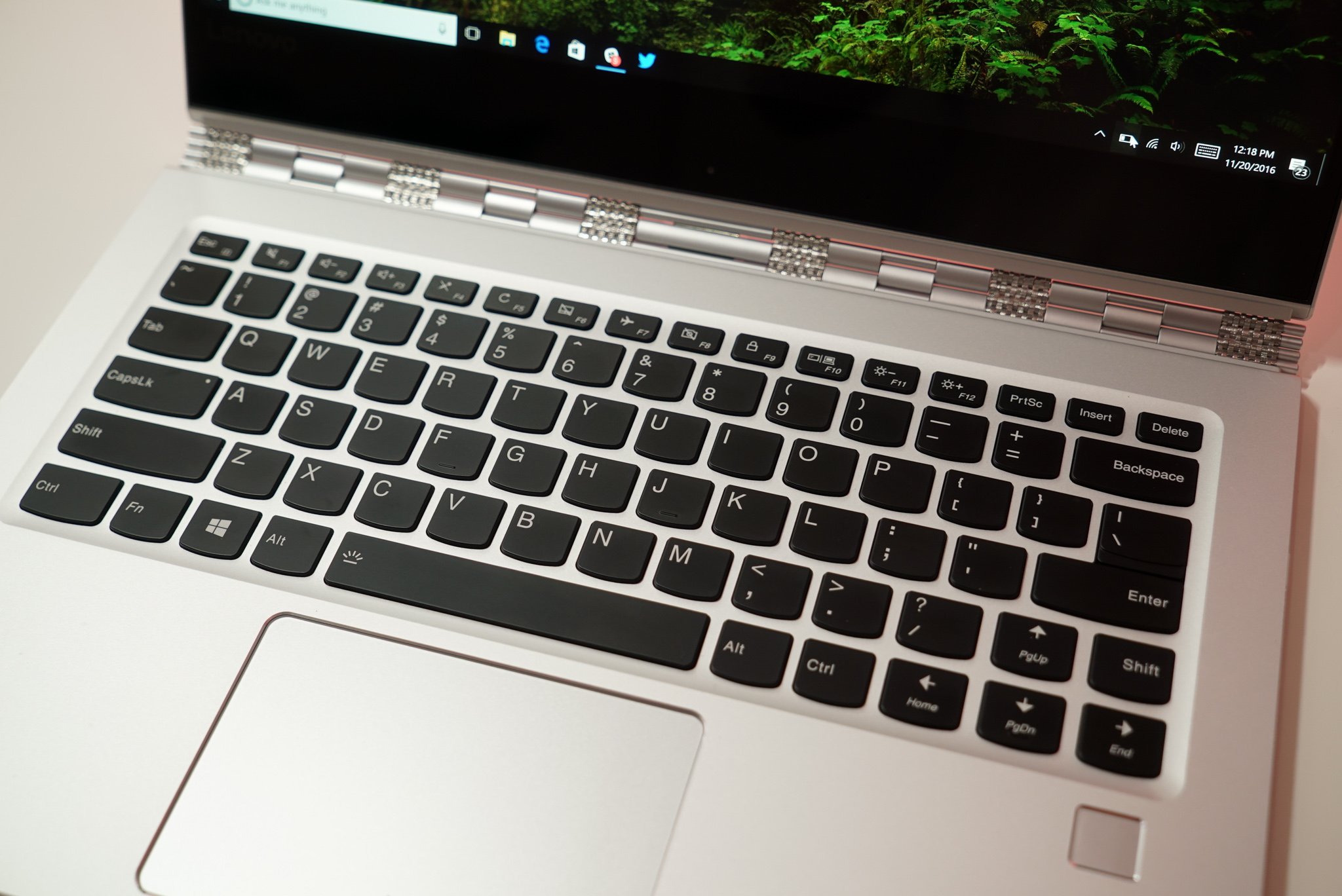
    However, I did spend some time typing on each of these machines and that was interesting. The Dell is more expensive, and probably out for me, but both the Spectre and Yoga have nice keyboards. The layout is slightly different, and for the most part I adapted well.

    Except for the right shift key.

    On the Yoga, the right shift key is half the size of the left one, and to the left of the shift key is the Page Up key. You can see it in this image. That was a problem for me as I often use the right key and I kept not getting capitals because I’d hit page up and not Shift. I’m a self-taught typist, not a traditional one, and I use a lot of muscle memory.

    I tried to adpat, and consciously I could reach my right pinky further, but it defaults to the left side of all shift keys, and I think that might be a deciding factor for me. Perhaps it’s the Spectre after all.

    We’ll see. A few more days of thinking.