Tag: Linux

  • SQL Server on Linux (Ubuntu)–Updating from Early CTP

    I’ve been testing the SQL Server on Linux for a long time. After the recent Microsoft Data Amp event, I saw the announcement for CTP-2. So I did what I’ve been doing for some time on my Ubuntu machine:

    sudo apt-get update
    
    sudo apt-get install mssql-server

    However, I got a message I didn’t expect.

    2017-04-19 10_59_27-Ubuntu 64-bit SQL Server .210 - VMware Workstation

    A few people on Twitter noted they had updated to CTP 2, but I was still on CTP1.4.

    Hmmm.

    I looked back through the apt-get log and I saw this:

    2017-04-19 11_00_22-Ubuntu 64-bit SQL Server .210 - VMware Workstation

    I’m cutting off part of the path, since I think it’s probably NDA. No worries, apparently the old location for me hasn’t been updated with new packages, which makes sense.

    I decided to check the MS docs and see how a new user would get SSoL running? At the new docs.microsoft site, I found the Install SQL Server on Ubuntu doc.

    Following the instructions, I updated the GPG keys and registered the repository with curl:

    curl https://packages.microsoft.com/keys/microsoft.asc | sudo apt-key add -
    
    curl https://packages.microsoft.com/config/ubuntu/16.04/mssql-server.list | sudo tee /etc/apt/sources.list.d/mssql-server.list

    Once those were done, I re-ran my apt-get update/install and it worked.

    2017-04-19 10_58_46-SQLQuery9.sql - 192.168.1.210.master (sa (51))_ - Microsoft SQL Server Managemen

    If you haven’t worked with Linux, it’s not really that hard. Some of you may get asked to install or manage a system, and while you should seek help for anything production related, in dev areas, play around. Read and learn a bit about Linux (I’d recommend watching the SDTIG book club meetings I, II, III, IV on Linux), download Ubuntu (or anything) and play around. Get used to a command line and try things.

    You’ll love SQL Server on Linux. It’s mostly just SQL Server, but updates and installs as simple in a test world.
  • Upgrading SQL Server on Linux

    I saw this week that there was a new CTP (v1.3) of SQL Server v.Next. I haven’t had a lot of time to work on the Linux version lately, but I thought I’d try and see how well the upgrade went.

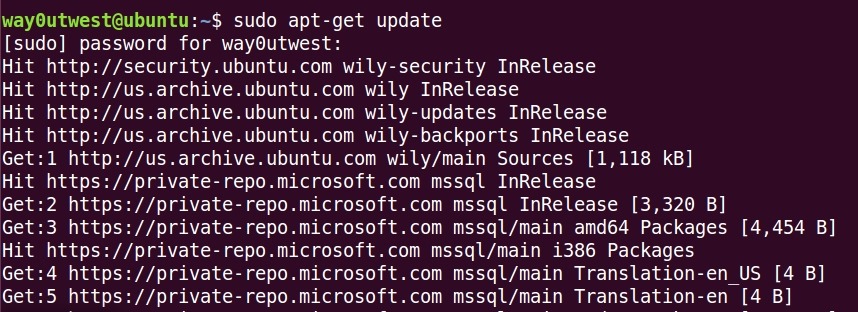
    There’s an install and upgrade page at Microsoft you can use, but on Ubuntu, things are easy. First, connect to your system and run this:

    sudo apt-get update

    That will download updated packages and get the system ready. you can see that I have a lot of stuff to update on this particular system.

    2017-02-22 15_06_08-Ubuntu 64-bit SQL Server .210 - VMware Workstation

    Once this completes, you just run

    sudo apt-get install mssql-server

    This will actually perform the install. That takes a minute, and in my case, I walked away, letting this run. When it finished. I tried to connect from a local machine, but got an error. So I ran this:

    systemctl status mssql-server

    This should give me the status, which was that things had stopped.

    2017-02-22 15_07_39-Ubuntu 64-bit SQL Server .210 - VMware Workstation

    OK, no problem. This starts the service.

    systemctl start mssql-server

    Once this completed, I could connect.

    2017-02-22 15_08_26-Ubuntu 64-bit SQL Server .210 - VMware Workstation

    I’ve done this a few times over the last year, but not since CTP 1.0, so I reminded myself of the process.

    So far, in my testing, most everything I’ve done with the core database engine, all scripts, etc., seem to work. More and more work is being done, and I’m interested to see how this version progresses.

    If you like Linux, maybe you want to give this a try.

  • Not Excited by Linux

    You’re not excited by Linux. At least most of you in this community aren’t excited. A recent poll we ran showed that nearly two thirds of the people answering aren’t interested in even evaluating SQL Server on Linux. That’s an interesting result because in some groups I’ve spoken with, quite a few people are excited by the prospect of using a different host platform for their database.

    When Microsoft first announced they were going to run SQL Server on Linux, I was excited, mostly because I think this means more applications and organizations would consider using SQL Server, which I think is a fantastic platform. It’s been the platform of choice for my entire career. However, from a business perspective, I wasn’t sure if this was a great idea. After all, Microsoft may reduce their revenue from Windows licenses if a large number of people moved to Linux for their underlying OS.

    Does the OS matter? I don’t know if it does. I’m not sure how much revenue comes in from Windows Server licenses for hosting SQL Server. I’m sure it’s a significant number, but will the number decline substantially if some people move to Linux from Windows for their SQL Servers? Perhaps, but I wouldn’t think many people make that move.

    Instead, I think the people excited by Linux hosting SQL Server are those that already are deeply committed to the Linux platform and avoid SQL Server because they don’t want to run Windows servers. There will be DB2 and Oracle databases that might move to a much less expensive SQL Server license. Certainly I expect lots of (free) Express editions installed by developers, which will allow them to gain experience, and perhaps be more comfortable in the future with SQL Server as a data platform.

    It’s hard to know if the move to Linux will result in a big change to Microsoft’s bottom line, but I do think it opens up many new opportunities for us, as data professionals, to find work. With the way that SQL Server works and the seamless way the Linux version seems to behave, I don’t even think most of us need to know much about Linux to develop or manage an instance on that platform.

    Steve Jones

    The Voice of the DBA Podcast

    Listen to the MP3 Audio ( 3.5MB) podcast or subscribe to the feed at iTunes and Libsyn.

  • PoSh Everywhere

    This week we had an announcement that PowerShell has been released as an open source project and is available on some Linux platforms as well as OSX. I was actually talking with someone else that had been informed prior to the MS announcement, and they told me to go to github.com/powershell/powershell. I first I thought I was getting some inside information. However this is a public site, obviously updated and released in time for the announcement, so no NDAs were harmed this week.
    I have an Ubuntu VM I use at times, and I decided to take a few minutes to try out PoSh on Ubuntu 16.04. Installation was easy, as are most things on Linux. Not quite as simple as Chocolatey, but close. This is certainly one of the ways that Linux is a bit easier to use than Windows. Or maybe we’re just more used to the command line in Linux. In any case, it’s a very simple process, which I documented in a blog. For those of you that use PoSh, this will be easy, and for those of you used to Linux and shell scripting, you’ll feel right at home.
     I wondered how much stuff would work, but my first few tests, grabbing some generic, non SQL Server, scripts worked fine. The .Net CORE project has already moved some of the namespaces and functionality over, and this means  that a lot of the management of your infrastructure systems is there. I don’t see the SQL Server libraries ported over (if I’m wrong, someone let me know), but there certainly are some other items, including Azure modules. I thought the demos in this Channel 9 webinar, while simple, were pretty impressive.
    Do most of us care about this? No, not really. If you’re a person that runs Windows on laptops and desktops, this doesn’t really matter to you. I run Linux for fun, but not for daily work and my use of these tools will likely be limited to testing. However, if I were to move to an Android or Linux machine in the future, it’s nice to know that I could run the same packages across various platforms without changing any code. That’s useful for collaboration with people that might want to work together on different platforms.
    This is where this makes the world easier. If you have friends running Macs, or using Linux, then you can share code. Or they can write PoSh scripts and share them with you. While I love virtualization, sometimes it’s a pain, and this is why I keep an installation of SQL Server on my host. It’s simpler and easier to work with in some situations. This is also why I look forward to a SQL Server developer edition on Linux (and hopefully OSX). It’s just a smoother world when the OS becomes a matter of choice, rather than a requirement to run some code.