Tag: Linux

  • SSoL–Elevating Privileges

    I don’t think most of us need to know Linux, but if you end up managing a system, it’s good to have a little idea of how to get around. This is a short series of posts as I remember the skills I used to have back in university.

    One of the things that you might find the need to do on a Linux system is elevate your privileges. By default when we connect and work on Linux, we are working as normal users. We do this in Windows, but when we need more privileges, Windows will give us a UAC prompt. Linux doesn’t.

    For example, when I want to check for updates of software, I use apt-get. That doesn’t work for my normal user:

    2017-06-15 09_54_59-Ubuntu 64-bit SQL Server .210 - VMware Workstation

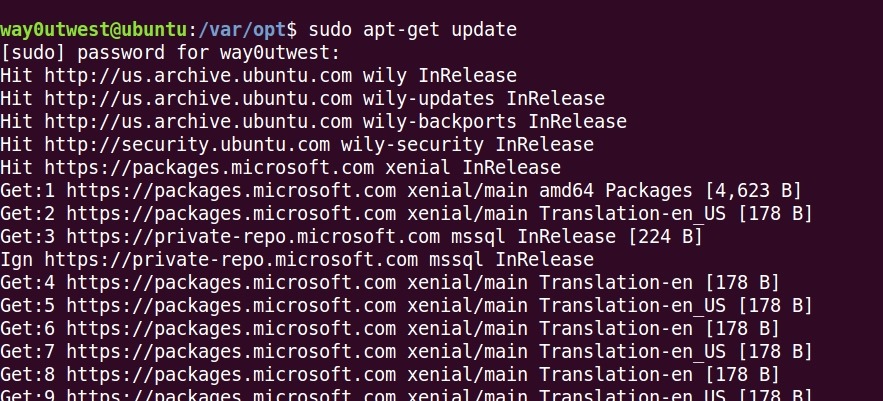
    Instead I need to use sudo to elevate privileges. You prefix a command with sudo, enter the root password, and you get elevated privileges, as shown here.

    2017-06-15 09_57_14-Ubuntu 64-bit SQL Server .210 - VMware Workstation

    If you just enter sudo -i, then you get the shell to switch and all commands execute as root.

    2017-06-15 10_00_09-Ubuntu 64-bit SQL Server .210 - VMware Workstation

    Don’t do this. DON’T. Work as a normal user until you need higher privileges. For the most part you don’t.

  • Using OPENROWSET in SQL Server on Linux

    I wanted to import the million song dataset in SQL Server on Linux. There’s a github repo that has the SQL to allow you to use this with the graph database features. However, it’s built for Windows.

    Linux is a slightly different beast. Once I started down this path, I had memories of working on SunOS in college, messing with permissions and moving files.

    I run Ubuntu in VMWare, so I first downloaded the files to my Documents folder. That’s pretty easy. However, once there, the mssql user can’t read them. Rather than mess with permissions for my home, I decided to move these to a location where the mssql user could read them.

    First, I need to use mv to move the files. However, the default location for SQL Server (/var/opt/mssql) doesn’t let me drop files in there. Instead, I need to sudo the mv.

    sudo mv unique_tracks.txt /var/opt/mssql/unique_tracks.txt

    I repeated this for each file.

    However, I still had permissions errors. Files have their own permissions in Linux, so I needed to alter those. I decided to use chown since these are temp files the SQL Server will use and once imported, I’ll delete them.

    chown mssql unique_tracks.txt

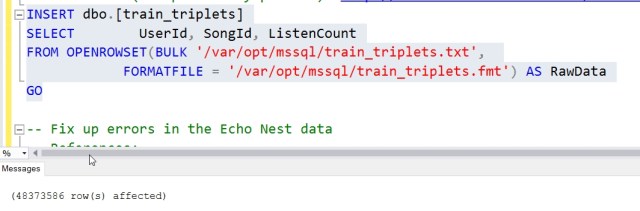
    From here, I could easily run the OPENROWSET commands and get the data loaded. Now to play around with a graph.

  • Do I Need to Learn Linux and R and Python?

    The big changes coming in SQL Server 2017 are the Linux version and the addition of Python as a language used to analyze data. In SQL Server 2016, we had the R language added, and quite a few people have been on crash courses learning R, or worrying about the fact they don’t understand how to write an R script. Now many of these same DBAs and data professionals worry that they also need to find time to pick up some Python and Linux.

    I really like Python. I spent some time with the language and still dabble here and there. It’s a clean, easy to write and read language. My son took an intro CS course this spring in college and we shared some programming thoughts and ideas in Python. If you’re interested, I’d recommend the Dive Into Python book, as well as the meeting series from SDTIG. If you want to learn R, I’ve been dabbling at TryR from CodeSchool. There are also resources from Grant Fritchey and Buck Woody. For Linux, there are tons of resources out on the Internet. I don’t have a recommendation, but feel free to leave one in the discussion.

    If you are a data professional that works with data scientists or others that might want to incorporate some machine learning or complex analysis inside SQL Server, do you need to learn R and Python? Is that the feeling that you have? Are these languages require to ensure that you can perform your job?

    I’d argue that for many of us, we don’t need to understand the language or be able to write R or Python scripts that are being run in SQL Server, or even in a tool like Power BI, to support our users. We should understand how to execute these scripts, and maybe how to correct simple typos. A working knowledge of HTML has come in handy many times for me when helping users display their data and a quick change was needed. However, I wasn’t the person you’d call to design a complex CSS and interactive HTML pages. I can just fix a few simple mistakes.

    You might feel differently, but I don’t think most SQL Server professionals, developer or DBA, really need to learn R or Python. Feel free to do so if you like, and I’d put in a recommendation for Python, which I really like, but I don’t expect that either one will be a significant part of your job in the future. Learn Linux if you want to experiment with another OS, but for the most part, SQL Server on Linux is just SQL Server. Learn some rudimentary Linux skills, but spend most of your time making sure you understand the SQL platform and you’ll be fine.

    Steve Jones

    The Voice of the DBA Podcast

    Listen to the MP3 Audio ( 3.7MB) podcast or subscribe to the feed at iTunes and Libsyn.

  • SQL Server on Linux is Just SQL Server

    I’ve been working with the SQL Server on Linux (SSoL) version for quite some time, almost a year. In all of that time, I’ve for the most part found that SQL Server is SQL Server. When I connect, run demos, check code, almost everything just works. If I didn’t bother to check @@version, this would appear to be just another SQL Server to me. That’s what a new video on Channel 9 shows as well. SQL Server is pretty much the same on both platforms. I’ve tested the Redgate tools and to all of them, SSoL is just SQL Server.

    There are some differences, which is to be expected. Any operations that access the file system and require paths work a bit differently, and for those people that end up administering the product, there will be some changes to get used to. The advanced HA features are similar, but again, some work is required. However, this isn’t all bad. I’m impressed with the apt-get process (I’m testing on Ubuntu), which is way, way easier than any patching or updating process I’ve gone through on Windows. In fact, setting up an Ubuntu VM last year was easy, and installing SQL Server was about as easy as it could be.

    The tooling on Linux isn’t as mature, and I don’t know when we will see a GUI client, but as I move more and more to PoSh or scripting to make changes in SQL Server, I expect more and more people to manage both Windows and Linux versions in the same way. Certainly using SSMS to write queries is a much nicer experience, and I would guess that many developers that might run SQL Server on OSX or Linux will want a Windows VM for SSMS. Of course, since Visual Studio is now on OSX, maybe we’ll see SSMS running natively on other platforms.

    I don’t know how many enterprises will run SQL Server on Linux, but I’m sure there are some that will. I don’t think a lot of organizations will move from Windows to Linux, unless they have loved SQL Server enough to install a single Windows host for the database and want to get rid of it now. I do think lots of developers will run SQL Server on Linux/OSX, especially in containers, where it is really easy to get a container running on their platforms.

    If you’ve experimented with SQL Server on Linux, or you are excited, let us know. If you think your organization might use this platform, let us know as well. I suspect a few of you will just because you can, which is as good a reason as any.

    Steve Jones