Tag: Linux

  • Getting SQL Agent going for SQL Server on Linux–#SQLNewBlogger

    Another post for me that is simple and hopefully serves as an example for people trying to get blogging as #SQLNewBloggers.

    It’s actually a simple procedure, but I thought I’d write a short note to help me remember. The procedure is documented in Books Online.

    When I first started playing with this version, I noticed that SQL Agent was disabled. That’s not great, since SQL Agent is a great tool for various tasks in SQL Server. I can’t start the agent from here, as the underlying implementation is different, and I’m not really a host OS admin when connecting in SSMS.

    2018-05-23 15_19_26-SQLQuery4.sql - ubuntu.master (sa (56))_ - Microsoft SQL Server Management Studi

    After checking which patch level I was at (CU6), I changed to my Linux console, and ran the configuration utility. For Linux, this is mssql-conf.

    2018-05-23 15_20_34-Ubuntu 64-bit SQL Server .210 - VMware Workstation

    The next step is to run the command listed to restart the system. I actually just ran

    sudo sysmctl restart mssql-server

    Once this was done, I refreshed SSMS.

    2018-05-23 15_22_52-SQLQuery4.sql - ubuntu.master (sa (56))_ - Microsoft SQL Server Management Studi

    This appears to work, but let’s test it. I’ll create a new job that does a backup of a database. This should be simple, and I’ll use defaults, just a filename for a full backup. I’ll use this command:

    backup database dbaadmin to disk = ‘dbaadmin.bak’ with init

    I save the job and run it. Sure enough, I have a backup.

    2018-05-23 15_28_37-Ubuntu 64-bit SQL Server .210 - VMware Workstation

    Tada, now I can move forward with work.

    SQLNewBlogger

    This is a fairly simple thing to do, but the writing helps me remember, but more importantly, I can document that I’ve done some learning here and experimenting.

    The next person thinking about interviewing you wants to know that you can learn and solve problems.

  • Would You Move to Linux for Price?

    Running software on Linux is supposed to be cheaper than Windows. After all, you don’t need to pay for an OS license, right? I’m not sure I think the price of the OS is a determining factor, since it’s a relatively low amount compared to the cost of the database license. I’m sure some of your feel differently, and I’d be happy to listen to your argument as to why the Linux is better on price.

    In any case, Microsoft is looking to push the Linux version of SQL Server. For a limited time (until June 30, 2018), you can get 30% off the cost of a SQL Server license. They’ve also gotten the cost of SUSE Enterprise Server down to $0 for a year if you are a qualified customer. This does require an annual subscription, which I assume means Software Assurance. There’s not a lot of information available on their page, and I assume you’d need to call Microsoft and go through the sales process.

    It’s an interesting offer. I wonder if this would really make a difference for some of you. For the purpose of a discussion, let’s say you run an older version of SQL Server on Windows, like SQL 2000 or 2005. You want to upgrade, but your boss has been worried about costs. Now you see a 30% savings on Linux. Do you consider moving to a Linux OS instead of Windows? Let’s assume you have some Linux resources inside the company, and so there isn’t a large learning curve. Does 30% make enough of a difference do change the underlying platform? After all, for the post part, SQL Server is SQL Server.

    What if you are a Linux shop already, and you have Oracle or DB2 in house. You’re looking to move some software to a new system, or maybe develop new applications and SQL Server is being considered for cost savings. You’ve avoided it because it has required Windows in the past. Do you now consider SQL Server a more viable candidate as a relational database inside your environment?

    Would you move to Linux for a better price?

    Steve Jones

    The Voice of the DBA Podcast

    Listen to the MP3 Audio ( 3.1MB) podcast or subscribe to the feed at iTunes and Libsyn.

  • Rebooting Ubuntu Linux from the Command Line–#SQLNewBlogger

    Another post for me that is simple and hopefully serves as an example for people trying to get blogging as #SQLNewBloggers.

    Since SQL Server 2017 is now out, and Linux is an option, I thought I’d write a bit more about little Linux things that admins might want to know.

    After installing an update, I neede to reboot my Ubuntu install. Apparently there was a dialog, but it was hidden. Unlike on Windows, I didn’t see an easy way to click a button and restart. However, since I had a terminal shell open, I was sure there was an easy way to do this.

    I could have run a quick search, but I fell back to the old standby:

    man shutdown

    This showed that there is a shutdown, as on Windows, with the same –r parameter. This needs sudo to run, and by default it reboots after a minute. The command I ran was:

    shutdown -r

    Learned something, which I should have known. I almost typed shutdown, but I decided to double check.

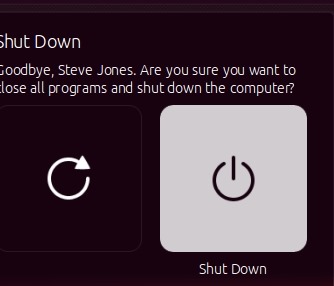
    Note: I realized later that there is a small menu in the upper right. I had the VM in a window and didn’t notice the icon. Clicking the gear gives a menu.

    2017-10-02 10_38_28-Ubuntu 64-bit SQL Server .210 - VMware Workstation

    This lets you then choose shutdown or restart.

    2017-10-02 10_38_36-Ubuntu 64-bit SQL Server .210 - VMware Workstation

  • SSoL: Adding disk space with a repartition

    I don’t think most of us need to know Linux, but if you end up managing a system, it’s good to have a little idea of how to get around. This is a short series of posts as I remember the skills I used to have back in university.

    While working with some SQL Server 2017 tests, I ran out of disk space. I tend to size my VMs around 40GB, and that works for some things, but I’ll run out of space.

    2017-06-15 10_09_14-Ubuntu 64-bit SQL Server .210 - VMware Workstation

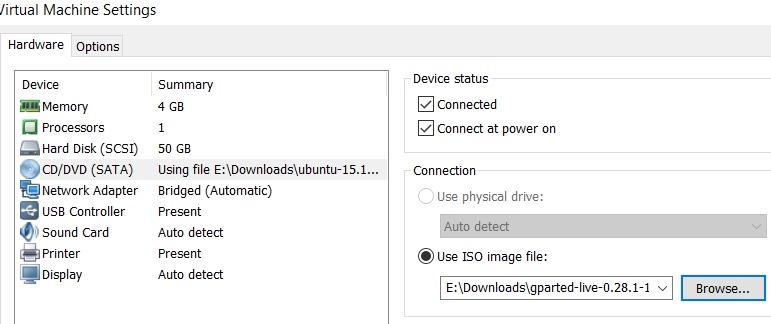
    I needed to expand the VMWare disk. That doesn’t mean Linux sees the space directly, and I had to figure out how to make the partition bigger. I could have added another disk, but I wanted to work through this process. I learned I needed to have an inactive partition, so I download gparted on a live cd and booted to that.

    2017-06-15 11_32_50-Virtual Machine Settings

    Next I started working through a few of the tutorials on Linux partitions. This one on AskUbuntu was helpful, as I ended up having to move my swap partition to the end of the disk.

    2017-06-15 11_42_23-Ubuntu 64-bit SQL Server .210 - VMware Workstation

    GParted isn’t completely intuitive for a Windows guy, but I muddled through it.

    Once I had the operations I wanted, I applied them, and partitions moved.

    2017-07-09 10_57_51-Ubuntu 64-bit SQL Server .210 - VMware Workstation

    I rebooted, and checking the main partition properties, I had space.

    2017-07-09 11_04_59-Ubuntu 64-bit SQL Server .210 - VMware Workstation

    Now, back to SQL Server on Linux.