Tag: powershell

  • More Azure Database Creation in Powershell

    I wrote about Azure SQL Database for T-SQL Tuesday #82, but I had a few mistakes in my process, at least from a cost standpoint. Since I’ll probably use this a bit more as I flesh out some CI/CD, I decided to document a bit more about the database creation process.

    The Old Code

    One of the problems I noticed right away was that I created an S2 level database in my post, which was too large. That wasn’t needed, and it might eat up my database credits. My original code was:

    New-AzureRMSqlDatabase –ResourceGroupName “Default-SQL-WestEurope” –ServerName “dkranchapps” –DatabaseName “TSQLTuesday” –Edition Standard –RequestedServiceObjectiveName “S1”

    In here, there are a few things that are obvious to me, and some that might not be. I won’t delve into detail on how to choose some of these, but I’ll define what they mean. There is a doc page for the cmdlet, which I used to check what I knew.

    ResourceGroupName

    This is the way you organize Azure resources. In my case, I have one resource group, which I named “Default-SQL-WestEurope”. This was the first group I made, intending this to be for SQL servers, and it’s in the West Europe region. Hence the name. 

    ServerName

    This is self explanatory, but you create servers to host resources in Azure. The one I created a long time ago for experiments was “dkranchapps”. I re-used it here, though I could have created another one.

    DatabaseName

    I’m not defining this. If you don’t know, stop reading.

    Edition

    This is the basic edition for your database. There are multiple options, but I used “Standard”, which was in the sample documentation code. However, a Standard incurs a charge from $0.0202/hr to $0.2016/hr. That doesn’t sound like much, but there are 720 hours in a 30 day month. That’s $14.44 to $145.15 a month. Again, not much, but this is per database. This could cause me issues with my $150/month credit.

    ServiceObjectiveName

    This is the scale within the Edition. I’m not sure why this the Edition is needed if we specify this here, but we can use a name or a value (GUID). In my case, I neglected to check the S2 syntax when I made the database. What I’d want for most things is a Basic or maybe an S level if this is short lived.

    Other Options

    There are other options. I can specify the subscription in a parameter, do a “WhatIf” to see what this would do, Force the command without user conformation, set a maximum size, and more. 

    While you might not need these options, I’d encourage you to look through the list and make sure that it’s not your intention to omit something that might be important in your situation.

    Creating a Basic Database

    One of the things I want to try is scripting the creation of a database in my CI process. That’s not quite simple, and it’s a task for another day, but here’s a basic call that I can work on adding to my builds.

    New-AzureRMSqlDatabase –ResourceGroupName “Default-SQL-WestEurope” –ServerName “dkranchapps” –DatabaseName “” –Edition Basic –RequestedServiceObjectiveName “Basic”

    Once I run this, I can check the portal, and sure enough, I see my database at the correct size.

    2016-09-21 10_52_49-SQL databases - Microsoft Azure

    That’s the first step to automating some builds. Now I need to worry about security and API keys, but for now, I can build a database.

    And, of course, remove it with Remove-AzureRMSqlDatabase.
  • PoSh Everywhere

    This week we had an announcement that PowerShell has been released as an open source project and is available on some Linux platforms as well as OSX. I was actually talking with someone else that had been informed prior to the MS announcement, and they told me to go to github.com/powershell/powershell. I first I thought I was getting some inside information. However this is a public site, obviously updated and released in time for the announcement, so no NDAs were harmed this week.
    I have an Ubuntu VM I use at times, and I decided to take a few minutes to try out PoSh on Ubuntu 16.04. Installation was easy, as are most things on Linux. Not quite as simple as Chocolatey, but close. This is certainly one of the ways that Linux is a bit easier to use than Windows. Or maybe we’re just more used to the command line in Linux. In any case, it’s a very simple process, which I documented in a blog. For those of you that use PoSh, this will be easy, and for those of you used to Linux and shell scripting, you’ll feel right at home.
     I wondered how much stuff would work, but my first few tests, grabbing some generic, non SQL Server, scripts worked fine. The .Net CORE project has already moved some of the namespaces and functionality over, and this means  that a lot of the management of your infrastructure systems is there. I don’t see the SQL Server libraries ported over (if I’m wrong, someone let me know), but there certainly are some other items, including Azure modules. I thought the demos in this Channel 9 webinar, while simple, were pretty impressive.
    Do most of us care about this? No, not really. If you’re a person that runs Windows on laptops and desktops, this doesn’t really matter to you. I run Linux for fun, but not for daily work and my use of these tools will likely be limited to testing. However, if I were to move to an Android or Linux machine in the future, it’s nice to know that I could run the same packages across various platforms without changing any code. That’s useful for collaboration with people that might want to work together on different platforms.
    This is where this makes the world easier. If you have friends running Macs, or using Linux, then you can share code. Or they can write PoSh scripts and share them with you. While I love virtualization, sometimes it’s a pain, and this is why I keep an installation of SQL Server on my host. It’s simpler and easier to work with in some situations. This is also why I look forward to a SQL Server developer edition on Linux (and hopefully OSX). It’s just a smoother world when the OS becomes a matter of choice, rather than a requirement to run some code.
  • PoSh on Ubuntu

    I heard about the PowerShell announcement recently where the platform is porting over to Linux and OSX. I think this is part of the SQL Server on Linux project, where I assume we’ll start to see the functionality that we have on Windows appear on Linux platforms. OSX is a surprise, but since more and more people run Macs, this makes sense. Hopefully we’ll see SQL Server Developer on OSX at some point.

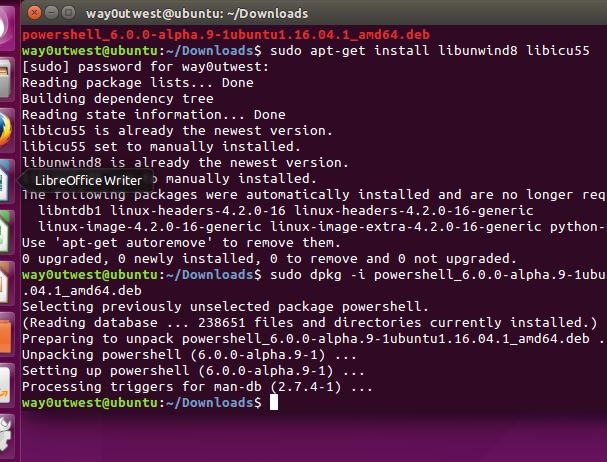
    I’ve got an Ubuntu VM, so I decided to see how well this works, so I picked the Ubuntu 16.04 package and found the instructions I ran on my VM. You can see how this worked in the image below.

    2016-08-18 12_37_14-Ubuntu 64-bit SQL Server - VMware Workstation

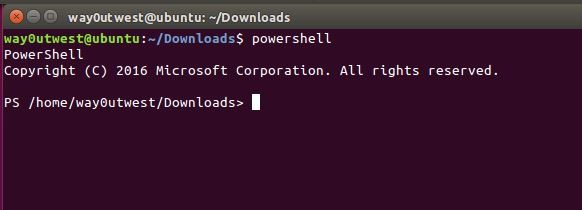
    Now that I’ve got the package downloaded, I can start PowerShell pretty simply:

    2016-08-18 12_38_51-Ubuntu 64-bit SQL Server - VMware Workstation

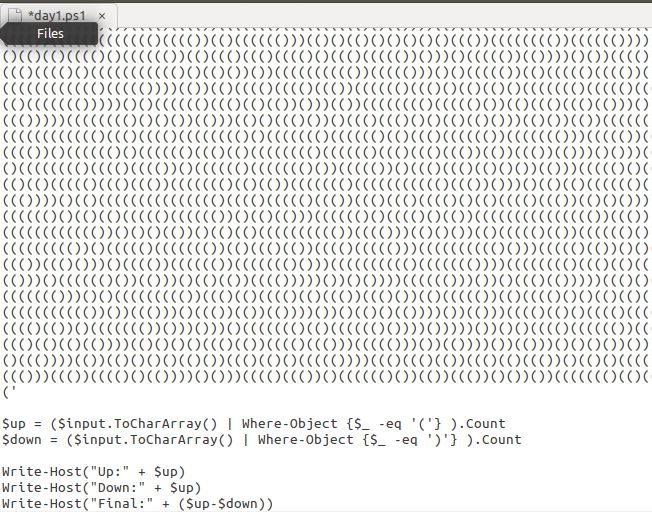
    What can I do? Well, let me grab a short PoSh script I have. This is from the Advent of Code, and it’s a .ps1 for me. Here it is interactively.

    2016-08-18 12_49_53-Ubuntu 64-bit SQL Server - VMware Workstation

    If I make a .PS1, then I can paste in the original code:

    2016-08-18 12_51_09-Ubuntu 64-bit SQL Server - VMware Workstation

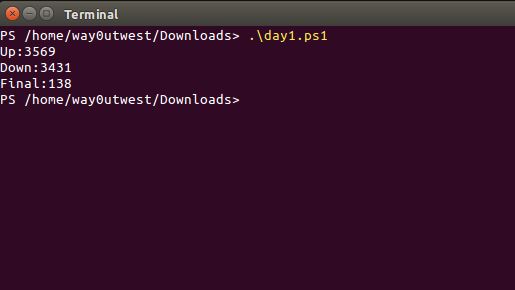
    and if I execute this:

    2016-08-19 11_07_01-Ubuntu 64-bit SQL Server - VMware Workstation

    That’s pretty cool.

    I haven’t explorer the extent of the PoSh support, and I don’t think there is SQL Server support yet for the SMO namespaces, but I’m sure it’s coming.

    If you’re a Linux person, or an OSX person, I’d encourage you to play a bit and see what you think of the port.

  • Open Source SQLPS

    I first saw PowerShell in 2007 or 2008 at TechEd. I was both fascinated and excited, finding the idea of using command line tools both nostalgic as well as handy. Certainly there have been a number of file based operations I’ve wanted to do in SQL Server in the past that weren’t easy to accomplish in DOS-style programming and even less easy in T-SQL. VBScript worked, but it was a very cumbersome, error prone method of developing scripts.

    PowerShell (PoSh) seemed elegant, and I was excited to have it come to SQL Server and integrate with SMO. SQLPS was released as a first step, but it was again cumbersome and poorly integrated into SQL Server. I found it to be more of a pain than a help, and abandoned using it. Since then I’ve tended to build my own scripts using techniques from our Powershell Tool Time series to help.

    However plenty of PoSh experts I know like the SQLPS module, but they want it improved. Apart from asking for a few changes in SQL Server 2016, there is a Connect item to open source the module. It’s an interesting idea, and certainly it does appear the Microsoft is unwilling to put many resources into SQLPS. If that’s the case, why not open source the tools? Is there any revenue impact?

    I’d argue that this is one of those areas that starts to exceed the scope of what MS can accomplish when it’s not a priority. Just like the opening of Windows Live Writer, allowing the community, including MS employees, to donate their own time to fixing and expanding the tool could allow this to flourish and grow, perhaps even helping SQL Server adoption.

    I’m certainly not a PoSh expert, but I’m curious. If you use PoSh, would you want a SQLPS module maintained as an Open Source product? Whether you do or not, what do you think about opening up ideas like this for public viewing and pull requests to integrate changes back into the product?

    Steve Jones

    The Voice of the DBA Podcast

    Listen to the MP3 Audio ( 2.8MB) podcast or subscribe to the feed at iTunes and LibSyn.