Tag: Redgate

  • Disabling #sqlprompt Formatting

    I love SQL Prompt, especially the new formatting engine. However, it’s not perfect, and there are times I don’t want code reformatted. One great example is when I write INSERT statements. Here’s what I might write:

    INSERT dbo.Payments_A
      ( [Month], SerialNumber, DateBegin, DateEnd, paid)
    VALUES
      ( 'Mar-15', '0000000000001', '3/16/2015 0:00', '4/10/2015 0:00', 5000.01),
      ( 'Apr-15', '0000000000001', '4/7/2015 0:00' , '4/13/2015 0:00', 0),
      ( 'Apr-15', '0000000000001', '4/10/2015 0:00', '4/30/2015 0:00', 15000.00);

    I often build a single row, then I might copy/paste to add the other rows and then manually change the data. When I use my reformat command (CTRL+K, Y), I get this:

    INSERT dbo.Payments_A
    (
        [Month],
        SerialNumber,
        DateBegin,
        DateEnd,
        paid
    )
    VALUES
    (
        'Mar-15', '0000000000001', '3/16/2015 0:00', '4/10/2015 0:00', 5000.01
    ),
    (
        'Apr-15', '0000000000001', '4/7/2015 0:00', '4/13/2015 0:00', 0
    ),
    (
        'Apr-15', '0000000000001', '4/10/2015 0:00', '4/30/2015 0:00', 15000.00
    );

    That’s not bad, but it’s hard to read and ends up eating up a bunch of screen space when I try to look at code. What I really want is for that INSERT statement to not be reformatted, even though  I may want the spacing and line feeds in other code.

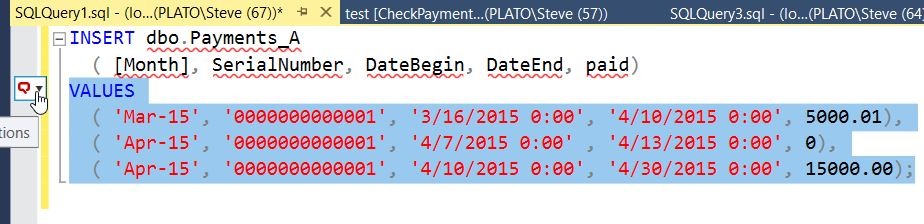
    Fortunately, SQL prompt allows me some control. If I highlight my code, I get a little box to the left of the code. There’s a hand with a finger pointing at it in the image below.

    2017-01-03 12_35_05-SQLQuery1.sql - (local)_SQL2016.sandbox (PLATO_Steve (67))_ - Microsoft SQL ServIf I hit CTRL, I get a drop down (or I can click). In this box, I can type snippets, or words. Note I’ve typed “dis” below, and I see that one of my options is to disable formatting for the selection.

    2017-01-03 12_35_14-SQLQuery1.sql - (local)_SQL2016.sandbox (PLATO_Steve (67))_ - Microsoft SQL Serv

    If I select this, I’ll get comments added to my code that SQL Prompt can read.

    2017-01-03 12_35_30-SQLQuery1.sql - (local)_SQL2016.sandbox (PLATO_Steve (67))_ - Microsoft SQL Serv

    Now I can hit CTRL_K, Y, and I’ll get all my code formatted, except what’s inside of the comments.

    2017-01-03 12_35_36-SQLQuery1.sql - (local)_SQL2016.sandbox (PLATO_Steve (67))_ - Microsoft SQL Serv

    Watch this and a few more SQL Prompt tips from a short video shown at last year’s SQL in the City:

  • Useful #SQLPrompt Tips

    One of the tools that Redgate write is SQL Prompt. This might be my favorite product, and I’m constantly impressed by the improvements that the dev team releases. In fact, I’m also impressed by the rate at which they produce changes, with updates happening every week or two.

    At this point, the product has a lot of features, some of which I’ve forgotten about, and a few that slipped by me. At SQL in the City streamed last year, I watched a short piece from Carly Meichen that taught me a couple things. I’ll write about a few of them, but take a look at this video and see if any of these will help you become more productive.

  • Quick SQL CLone Support

    I have been playing with SQL Clone for a few weeks now and liking the product. I’m looking forward to using this more and more, especially for testing ideas in development. However, there are times I have questions or am unsure of how to use things.

    I work for Redgate Software, so I have an in. I can certainly email developers if I need to, but we also have this:

    2017-01-16 14_29_03-sqlclone _ Redgate Slack

    There’s a great Slack channel where I can quickly reach developers. This comes in handy as it seems various people at Redgate pay more attention to Slack than email or other communication methods.

    No, this post won’t get you on our Slack channel.

    However, when opening the SQL Clone beta, I see this dashboard.

    2017-01-16 14_26_55-SQL Clone

    Notice the little circle in the lower right? Click it and you get this:

    2017-01-16 14_32_14-SQL Clone

    Apparently there’s a semi-live chat system that our developers are using. Chris is actually one of the SQL Clone developers, and he helped me solve the registry issue a few weeks ago.

    That’s pretty cool. If you type something in there, it will get sent to the developers, and if they’re around, they will respond. I sent a test, with a semi-legitimate question, and see this below my text:

    2017-01-16 14_34_39-SQL Clone

    Given I sent the note late in the afternoon, I’m sure all developers are gone for the day. I can hide the popup, and then will see when someone responds.

    Update: in the am, I got an email from the system, at the same time, I got a reply in my SQL Clone dashboard. As you can see, my question was answered.

    2017-01-17 08_29_47-SQL Clone

    If I click the arrow in the upper left, I can see all my conversations, which is handy if I’m trying to report or work on a few issues.

    2017-01-17 08_29_53-SQL Clone

    That’s pretty cool, and it’s an neat way to get quick feedback. Assuming it doesn’t take too much time away from developers actually developing the product.

    I suspect we’ll get support involved here, with escalations to developers. At least, that’s what I’d do, but for now, it’s good that our developers are responding to beta users and helping them use and test the product.

  • Getting My Alias in #SQLPrompt

    I got a tweet after my SQL Prompt formatting piece that said a user would be interested in upgrading from v5 if “as ‘Alias’” was transformed into “’Alias’ = “.

    Well, in v7.3, this is in there, and I didn’t realize it. You can clearly see this in the formatting actions options, which is a place I didn’t think to look.

    2017-01-17-09_00_38-sql-prompt-options

    Does this work? It sure does. Let’s examine a query you might get from a VCS or a colleague. Suppose you’re working in the new WideWorldImporters database.

    2017-01-04-08_39_52-SQLQuery3.sql-local_SQL2016.WideWorldImporters-PLATO_Steve-74_-Microso.jpg

    You prefer to see the actual columns returned in the result set at the front of the query, with an alias = format. That’s what I prefer as well, and so I want to have the column list shown as:

    PrimaryContactFullName = p.FullName,
    PrimaryContactPreferredName = p.PreferredName

    A quick CTRL+K, Y and I see this.

    2017-01-17-09_11_08-sqlquery18-sql-local_sql2016-wideworldimporters-plato_steve-70_-micros

    My aliases have moved.

    This is a great feature for those of you that need consistent formatting. There are other alias options if you prefer the alias at the end.

    Update: I originally had this as single quoted aliases, but as pointed out, that format is deprecated, so I wouldn’t use it.

    And if you want to change this back, you can have a second formatting preference that you choose to reformat code before sending it back to someone else.

    Give SQL Prompt a try today.