Tag: Redgate

  • Friday Flyway Tips–Dark Mode

    I saw a post that Flyway Desktop has a dark mode and I had to try it out.

    I’ve been working with Flyway Desktop for work more and more as we transition from older SSMS plugins to the standalone tool. This series looks at some tips I’ve gotten along the way.

    Dark Mode

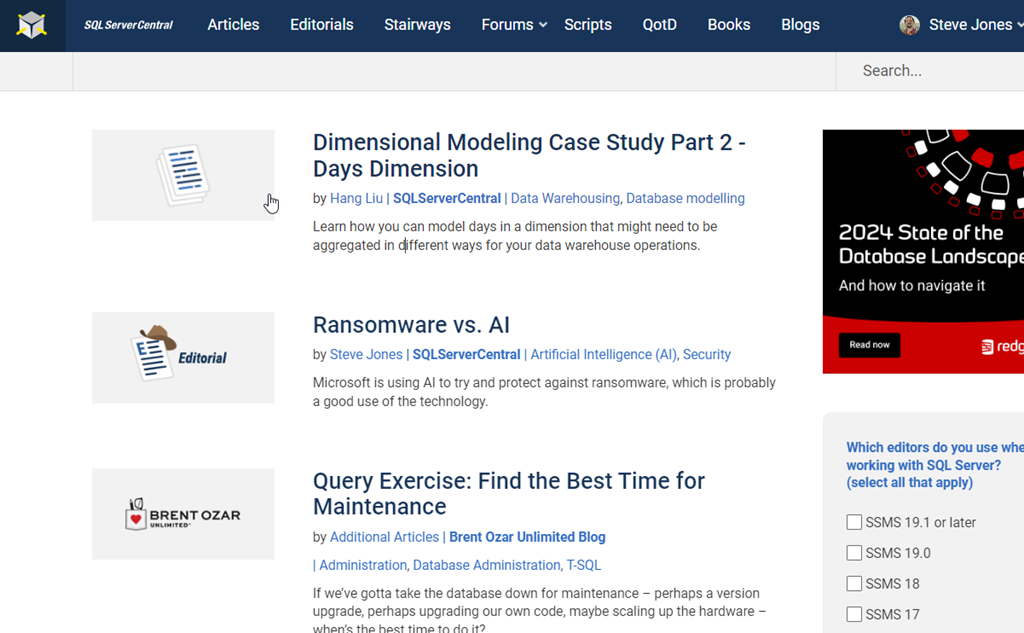
    In general, I’m not a big dark mode person. I tend to use browsers in light mode, like this:

    2024-02-07 15_17_17-SQLServerCentral – The #1 SQL Server community

    I regularly work in VSCode, which is light for me.

    2024-02-07 15_17_28-SQLSat1076.yml - sqlsatwebsite - Visual Studio Code

    And of course, SSMS is light. I know lots of people have wanted a dark mode, and you can configure that, but it’s a mess. To me, I just like light mode.

    2024-02-07 15_18_10-SQLQuery9.sql - ARISTOTLE.DMDemo_1_Dev (ARISTOTLE_Steve (55))_ - Microsoft SQL S

    However, someone posted a note internally a Redgate thanking engineers for dark mode.

    Wha??? I had to try it.

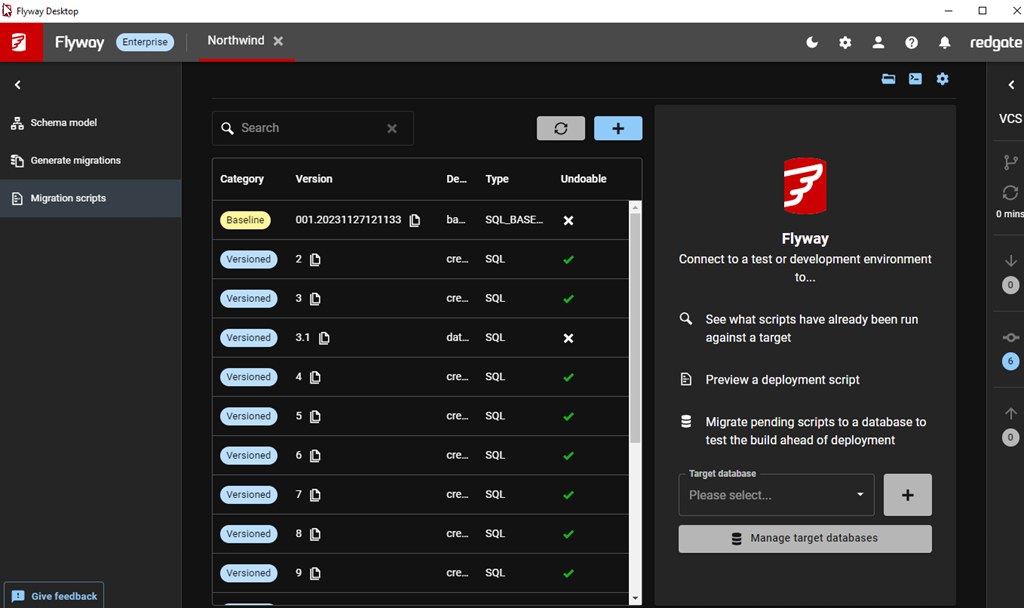
    It looks interesting.

    2024-02-07 15_20_57-Flyway Desktop

    I don’t know if I’ll use it, but it’s easy to enable, and I can switch anytime. In the top bar, there are a number of icons. There’s a moon for one, which you see above and below, because I’m in dark mode.

    2024-02-07 15_21_45-Flyway Desktop

    If I click the left-most one above, I see this:

    2024-02-07 15_22_05-Flyway Desktop

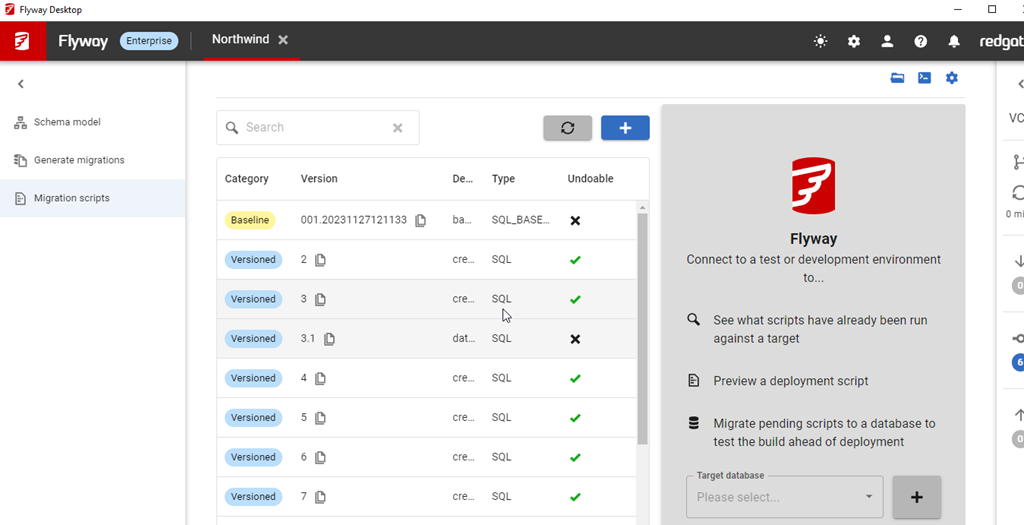
    Now I have a sun, and a light mode.

    2024-02-07 15_22_18-Flyway Desktop

    This works on all tabs, on the VCS blade, and it gives you the option to work with either a white or dark background.

    That’s pretty cool. I don’t care so much, but I know lots of people do, so they now get the option.

    Try Flyway Enterprise out today. If you haven’t worked with Flyway Desktop, download it today. There is a free version that organizes migrations and paid versions with many more features.

    Video Walkthrough

    I made a quick video showing this as well. You can watch it below, or check out all the Flyway videos I’ve added:

  • The Redgate Summit 2024

    The Redgate Summit tour is coming in 2024 to a number of cities. You can see the list here and register for events, but register soon. I know the tickets are going quickly.

    Years ago we started SQL in the City, and I was thrilled to speak at those events. We had a number of them in the US and UK, and I enjoyed going to some amazing venues to speak. It was a treat, and I think customers really enjoyed these small conferences.

    With our move beyond SQL Server, and beyond SQL as well, we’ve decided to launch new events called Redgate Summits. We also host the annual PASS Data Community Summit, so I’m glad these events are all somewhat themed.

    The 2024 Tour

    In 2024 we have four events scheduled (so far) in these cities:

    • Atlanta (Mar 13)
    • London (Apr 17)
    • Chicago (May 29)
    • NYC (Aug 21)

    I’m also scheduled for some Australian events in early May, but still waiting on them to be announced.

    I’m excited as we’ve set different tracks with a lot of Redgate specific, and general content. We have product specific sessions, thought leadership on trends (cloud, ai, devops, etc.) and deep-dives. I don’t have a final session list, though I’m busy working on content in a few areas. Hopefully more news soon.

    In the meantime, your best bet to secure a ticket is to reach out to your account representative. If you don’t know them, ping sales@red-gate.com and ask who’s assigned. I know they have more pull for tickets than I do Winking smile

    Hope to see you there and watch for more details soon.

  • The DevOps Airways Roadshow

    I love this logo.

    2024-01-31 14_25_43-Window

    Our marketing people were very creative. After the van tour last year, we decided to go with a plane this year. I wrote about the photoshoot last week, and you can compare which of these you think looks better.

    20230805_102836

    20240123_134308

    We have more photos and promos cmming soon and I’m interested to see what the artists come up with.

    Our tour is starting this month. We have quite a list of places, though I’m not doing too many. I’ve been trying to better manage travel, and since we have others that can share the load, I’m only doing a few dates.

    So far, I’m only in San Jose and Australia (not listed yet), but there are some other Redgate events I’m doing. It’s possible in Q2/Q3 I’ll do a few more, but not many.

    If you want to come talk DevOps, register today and either Grant, Ryan, or myself will see you somewhere.

  • Friday Flyway Tips–Navigating in Flyway Desktop

    Flyway Desktop changed the navigation and a few people were surprised. I was as well, so I decided to do a short tip on the changes.

    This is part of a series of posts on Flyway.

    The Old Flyway Desktop

    If you’ve been following these tips, or worked with the Flyway Enterprise system, you’ve encountered Flyway Desktop, and you might have seen something that looked like this, with the navigation across the top of the screen. We see four “tabs”, called Schema model,
    Generate Migrations, Migrations, and Version Control:

    2023-12-05 15_07_27-Flyway Desktop

    As part of a design refresh, we moved the version control tab to the right side as a bar, which shrinks it, but also gives information while a developer is working. I covered this in a previous tip. You can see that design below.

    2024-01-05 16_41_53-Flyway Desktop

    We weren’t done and I was surprised how quickly we made another change.

    Flyway Desktop v7

    This was actually in v7.0.5, which released Jan 11. We moved all the tabs to the side, though this time the first three moved to the left. As you can see below, I have the migrations tab selected and the nav is on the side panel.

    2024-02-01 16_08_17-Flyway Desktop

    The same three tabs are there, but now on the left, and what’s more, I can shrink this panel to a bar, which gives me more room in which to see code and work with my changes. The VCS tab is still on the right, with icons to let me know when I have changes to push, pull, or fetch.

    2024-02-01 16_09_48-Project Llama Assistant Window

    Summary

    This might not seem like much, but it’s a nice visual change and it gives us the ability to add more features in tabs, without running out of room or squeezing things at the top. Over time, a few more pieces of functionality will appear here as we continue to expand the capabilities of the tool.

    Try Flyway Desktop out today. If you haven’t worked with Flyway Desktop, download it today. There is a free version that organizes migrations and paid versions with many more features.

    Video Walkthrough

    I made a quick video showing this as well. You can watch it below, or check out all the Flyway videos I’ve added: