Tag: Redgate

  • Using SQL Compare for One Procedure

    A customer recently was concerned about the time to run SQL Compare for a large database. They were synching with the command line, but at times they want to just sync up a procedure or two from one database to the other.

    I knew this could be done and passed along some ideas, but decided to write a post. This post looks at how to do this.

    A CLI Comparison

    The SQL Compare command line is pretty easy to use. Lots of switches and options, but the simple thing is point it to a couple instances and databases and get a comparison. Here’s a command line.

    sqlcompare /server1:Aristotle\SQL2017 /server2:Aristotle\SQL2017 /database1:compare1 /database2:compare2

    And the result. You can see below I have a table and three procedures that are different.

    2021-06-09 17_31_32-cmd

    If I want to limit what’s compared, I can certainly use a filter, but from the command line, there’s a simple way to see certain objects. There is an INCLUDE switch that I can use to just set a filter here without creating a file.

    For example, if I want to just see stored procedures, I can do this:

    sqlcompare /server1:Aristotle\SQL2017 /server2:Aristotle\SQL2017 /database1:compare1 /database2:compare2 /Include:storedprocedure:

    This gives me just my three stored procedures.

    2021-06-09 17_42_14-cmd

    Likewise, I can also change this to a table and just get that object.

    2021-06-09 17_42_33-cmd

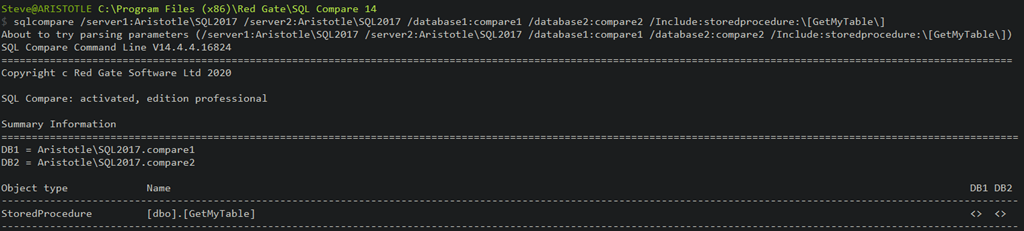
    If I want a specific object, I can get that as well. Here I use the include like this:

    /Include:storedprocedure:\[GetMyTable\]

    Then I get just my one object, with a faster compare. Only this one is checked.

    2021-06-09 17_44_12-cmd

    Then if I add the Synchonize switch, the changes will get deployed.

    I often find that people are looking to deploy quickly just a known object or two for some hotfix or out of band change. Using the command line let’s me pick an object that I know about and build a comparison for just that object.

    There are lots of options and ways to use SQL Compare, and I’d urge you to explore a bit as you look to improve your database deployments. If you don’t have it yet, download an eval and give it a try.

  • Static Code Analysis Feedback for Operations with SQL Monitor

    One of the challenges with managing a production database is that the code that gets deployed sometimes causes lots of problems. Often a production DBA or sysadmin gets called about problems that they didn’t cause, and can’t necessarily fix.

    Helping developers learn what the impact of their code is, and if it is following good practices, is something many of us would like to do, but often don’t have the time, or a good report that we can easily pass on.

    I saw recently that the SQL Monitor team had deployed a new feature to the product that makes this a bit easier. They have incorporated the code analysis from SQL Prompt into SQL Monitor, which you can see at  https://monitor.red-gate.com/overviews/sqlmon-vmw-bm.red-gate.com/cluster/workload01.smdemo.local/sql/demo#?Zoom=1619213137440%2C1619220337440&MaxTime=1619220337440&Present=true

    I’ve linked to one of the workload demo systems being monitored. If you look at the top 10 queries, and pick one, you’ll see something like this:

    2021-04-23 17_26_30-demo - Server Overview — Mozilla Firefox

    Just below the query text, there is a blue lightbulb (for a new feature) and the text: SQL Monitor has identified 2 issues with this query. Addressing them could improve performance.

    Clicking the link gives you the issues. In this case, these are code smells that I’d want a developer to address. Having a TOP without any ordering could confuse clients, but it also might mean we are gathering the wrong data, since there isn’t a guarantee on which 10 rows come back.

    2021-04-23 17_26_41-demo - Server Overview — Mozilla Firefox 

    You can screen shot this, or send this link to developers, and ask them to fix this code for the next deployment.

    SQL Monitor has become an impressive product over the years, and with multiple teams adding to it now, it is constantly evolving to meet the needs of our customers. If you haven’t tried it, consider an evaluation before you purchase a monitoring tool (or before you build one).

  • Help Build an Amazing Summit in 2021

    For a good portion of my career, I’ve been going to the annual Summit in the fall with lots of my fellow SQL Server/Data Platform professionals. I have been to 16 or 17 before last fall’s virtual one.

    This year, Redgate has purchased the trademark and brand for the Summit, and they are looking to run a virtual event in the fall. Like many other events of the last year, this will be free, and I’m excited to see how this goes.

    Redgate is looking for feedback from those of you that have attended Summits in the past, trying to understand what worked well and what didn’t. They are looking to create a memorable event and evolve the Summit into something better in the future.

    Fill out the survey before Apr 15 and you could win a Peloton bike. Not a bad prize for sharing some thoughts on an event I suspect many of you enjoyed and would like to see come back.

  • Running Scripts in Parallel with SQL Multi Script

    One of the lesser known tools in the Redgate Toolbelt is SQL Multi Script. While few customers used it, those that did loved it, as it solves a problem that many people have: deploying a script to a lot of servers at once. While Central Management Servers help a little here, they don’t quite have all the features of Multi-script, which is not only a management, but a deployment tool as well. With companies using sharding and multiple systems for clients, this is becoming more important all the time.

    A few years ago a customer asked me if we could make this run faster. At the time, we had limited the tool to 25 threads at a time, which made sense when it was developed. However, with modern hardware, I asked the developers to remove this limit. This was an easy change, and now you can scale up your script execution.

    You can do this with the “Application Options” in the menu. As you see below, parallel execution is enabled.

    2021-03-24 09_59_07-Application Options

    What’s more, this value is dynamic. If you start executing this agaisnt a series of databases and need to scale up or down, you can change this value and it will take effect immediately.

    If you’ve never given SQL Multi Script a try, and have the need to run scripts against a lot of servers, give it a try. It’s a little known, but incredibly valuable, tool.