Tag: Redgate

  • Filtering SQL Compare to a Schema

    One of the things that numerous clients have some to Redgate about is allowing a team of developers to work on a single shared database without creating conflicts. While this isn’t necessarily a simple thing to do, it is easy if you structure the projects appropriately. This post looks at one of those ways, with schema filtering.

    In a recent case, a customer had multiple schemas, and they wanted a SQL Change Automation project scoped to a single schema. Easy enough to do, as a new project gives you a place to pick your filter, but in order to do that, you need to create it first in SQL Compare. This post looks at how to do that.

    The Scenario

    I created a demo database with a couple schemas inside, and a few objects inside. I had a blank database to simulate a new QA environment. I opened SQL Compare and created a new project, pointing to these two databases. From here, I want the initial comparison. you can see this below, with a number of objects listed in different schemas.

    2021-03-12 17_09_13-SQL Compare - E__Documents_SQL Compare_SharedProjects_(local)_SQL2017.SimpleTalk

    On the left is the filter pane, and near the top is a “Custom filter rules” link. I clicked this to open up the filter dialog. In here, I see a default set with no rules.

    2021-03-12 17_10_21-Edit filter rules

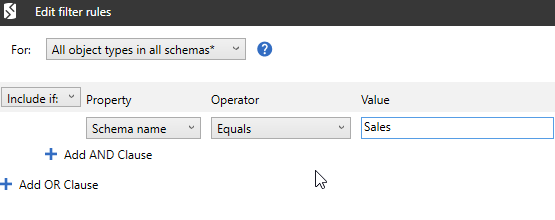
    I added a new rule to set the schema name equal to “Sales”, to filter all objects away that do not exist in Sales. This is to give me a “Sales” project that developers can use in this schema.

    2021-03-12 17_10_30-Edit filter rules

    I click OK, and then I refreshed the comparison. I saw this:

    2021-03-12 17_11_48-SQL Compare - E__Documents_SQL Compare_SharedProjects_(local)_SQL2017.SimpleTalk

    I still have the Inventory schema listed. That’s not ideal, as this could be confusing to juniors developers. Also, depending on the comparison options, this could allow dependent objects to leak into this project.

    Filtering Schemas

    Schemas are not owned by themselves, and are separate. As a result, I need an additional item in this filter. If I scroll down the left side, there is a “schema” checkbox. If I put my mouse on this, I can see that there is an “edit” link.

    2021-03-12 17_13_24-SQL Compare - E__Documents_SQL Compare_SharedProjects_(local)_SQL2017.SimpleTalk

    I click that and then create my filter rule. In this case, I want the “Object name” to equal Sales. The object is the schema.

    2021-03-12 17_14_22-Edit filter rules

    Once I click OK, the Inventory schema disappears.

    2021-03-12 17_15_08-SQL Compare - E__Documents_SQL Compare_SharedProjects_(local)_SQL2017.SimpleTalk

    I need to repeat this for each schema that I want to build a filter for. Note that there isn’t a “save as” for filter files, so I need to manually copy each one in the file system when it is complete, or create a new SQL Compare project.

    Summary

    Once I have the filter files, I can load the appropriate one into each SCA project, allowing me to have projects that only see a small portion of the objects in a database.

    One other thing I often do here is remove global type objects, like users, from the project as well by unchecking those boxes in the filter pane.

    SQL Compare is an amazing tool that underpins much of what makes DevOps tools and automation work well with Redgate tools. I’d urge you to give it a try if you never have. You’ll be amazed as how much is helps you get work done quickly.

  • Summarizing a Script with SQL Prompt

    I have never used this feature, but someone was asking for feedback on Prompt, and I noticed  this in the menu: Summarize script.

    prompt_summary_a

    I had guessed that it might look at the code and give me some outline, which is what it does, but I wasn’t sure how it might work. I decided to try it on a few scripts.

    I had a demo script for a customer, and I ran it there. I got what I expected, an ordering of various operations.

    2021-03-12 08_10_22-SQLQuery1.sql - ARISTOTLE.sandbox (ARISTOTLE_Steve (65))_ - Microsoft SQL Server

    Useful in some sense. I can see I cleaned up the CREATE with the DROP. However, I could also see that easily if I looked at the script. Depending on length, this might be helpful to remind me or let me see if I’ve dropped all the code I expected.

    I picked a longer script from some of the Advent of Code stuff I’ve been slowly working on. In this one, there is some looping, as it’s a looping type of problem (to me). In this case, I see something more complex.

    2021-03-12 08_14_16-day3.sql - ARISTOTLE.AdventofCode (ARISTOTLE_Steve (57)) - Microsoft SQL Server

    Not a lot of information from the SELECTs, but I do see some looping. The actual code is a bunch of math changes, and I could have used SET, which might have helped here. This let’s me see that the code is more of a procedural construct, which looks like this:

    2021-03-12 08_14_51-day3.sql - ARISTOTLE.AdventofCode (ARISTOTLE_Steve (57)) - Microsoft SQL Server

    What about other types of code? I looked at a CTE, which wasn’t that helpful. I can’t see the base tables here, which isn’t useful.

    2021-03-12 08_16_26-SQLQuery1.sql - ARISTOTLE.sandbox (ARISTOTLE_Steve (61)) - Microsoft SQL Server

    However, in AdventureWorks, there is a procedure that shows me a TRY CATCH. In a long set of code, this might help me make sure I’ve actually included the CATCH, among other things.

    2021-03-12 08_17_41-SQLQuery5.sql - ARISTOTLE_SQL2017.AdventureWorks2017 (ARISTOTLE_Steve (61)) - Mi

    I’m not sure how useful this feature is, but it’s now in my mind to try a few times and see what I think. What is the outline and structure of my code.

    If you have other ideas, I’m sure Redgate would appreciate suggestions. Otherwise, give it a try and let me know if it works.

    If you don’t have SQL Prompt, it’s an amazing developer productivity tool, and we now offer it as a subscription, so you can try it for a bit longer than than evaluation without committing.

  • Rebuilding SQL Saturday–Picking a Board of Directors

    With Redgate planning to donating the SQL Saturday brand, trademarks, and domain to a non-profit foundation, there is a need to build a group of individuals to voluntarily manage the organization. Redgate has tasked me with the initial work, and as I work through this process, I am looking to provide some transparency into how this works for now.

    NOTE: This is for the initial board, as someone has to make the first decisions. I expect the board themselves to decide how future directors are chosen, with input from the community.

    There are a lot of people, including myself, who have been unhappy with the way that the previous organization’s board of directors functioned. The combination of a contracted managing director and restrictive bylaws resulted in far too little transparency over the years. At least, that is my view.

    Moving forward, my vision for the foundation is to not recreate an organization that mandates, but rather serves the community, in an open, transparent way. There should be a minimal budget, and no compensation for directors, and no full-time staff.

    I am trying to think aloud here, as I work through this process. None of these items have been decided, and I welcome advice and thoughts from others.

    I also welcome interest and nominations. If you are interested, please leave a comment, or contact me. If you think someone else deserves nomination, please contact them first and ask them to contact me. I do not want to pressure anyone to serve that might not wish to or be able to donate time.

    Qualities for Directors

    I want to outline a few things that I think are important in finding individuals that can serve the foundation and steer it into the future.

    Transparency

    One of the things that bothered me with the previous organization is that there was not enough guidance on what directors would do on a regular basis, and certainly not enough information on what they had done. To me, this means that one of the main qualities for anyone serving this foundation is that they freely and willingly share information.

    My goal is that as close to 100% of debate and discussion, as well as financial information, be publicly available.

    Diversity

    Much of my career has been US focused, though that has really changed in the last decade. When we started SQL Saturday, we didn’t think about the world outside the US, but many events under the SQL Saturday banner have been outside the US.

    We need diverse thought on the issues that organizers and events face.

    This means a diversity of not only geography, but gender, race, orientation, and more. We need to understand that each of us only sees a small portion of the world, and only from our perspective. With that in mind, I aim initially aiming for a breakdown something like this:

    • US – 3-4 directors (knowing I am representing Redgate, 1 of these spots is filled)
    • EU – 2-3 directors
    • APAC – 2-3 directors
    • Rest of world – 1-2 directors

    I would like to have a number of women on the board, as I truly value the different perspectives they bring. I’d also like to have someone of a different race, ethnicity, or orientation than myself.

    If you know of someone that you feel fits this goal, please ask them to contact me.

    Financials

    I have read Steph Locke’s Lessons learnt on the PASS Board, which I think anyone who cares about this should read. She outlines a number of items, which are important in most boards. While I think that the need to fund the organization is important, when this is the main goal, this becomes a problem. Directors should have some business sense, having either run their own company, or served as a high level executive in some company, however large or small, so that they do treat financials with the appropriate importance.

    The goal of this foundation is to run itself on less than US$10,000/year. Any sponsorship funds will go towards events, not expenses.

    Community Drive

    This foundation will exist to further SQL Saturday events, providing resources and assistance where possible. Directors should be oriented towards doing good for others by supporting education and networking, giving back to the world, and driving events forward. While they will not do the work, they will be the voice and inspiration for many through this foundation.

    A director ought to be thinking: how do I get more organizers excited enough to create an event? How can we better support speakers? How do I attract and serve attendees to learn and grow their careers? How can we ensure events feel successful, whether physical or virtual, whether there are 50 or 500 attendees, whether there is one track or 12?

    These are the goals of the foundation.

    While I started my list thinking about people that are thoughtful, measured in their words, and giving of themselves, that was really the bar of what I was looking for. Finding other qualities outside of these are likely more important.

    Candidates

    I have asked a few people if they are interested, to start getting a short list together. Ultimately myself and a few at Redgate will have to make some decisions about who to choose. We’ll appoint an initial board and then let them run the foundation as they see fit, including deciding on how the next set of directors are chosen.

    I haven’t named any names, as I’m not sure it’s fair, and I don’t want to put any pressure on anyone.

    If you are interested in shaping the future of SQL Saturday, please let me know. I have a list, but I’m sure there are people I haven’t considered. If you think someone is a good candidate, encourage them to contact me.

    Above all, remember this is a community first effort, and we’re looking for people that feel the same way.


  • Quick NoLock with SQL Prompt

    First, please, please, please, avoid NoLock. You can lose data, or get strange results, as Jason Strate demonstrates (blog | video). Before you read further or try this, read his post and look at Kendra’s video.

    I had a customer request an easy way to add NOLOCK to tables in SQL Prompt. This person wanted to be able to highlight a table and make this happen. Fortunately, this is easy in Prompt.

    A snippet will allow you do this on demand. I’ll explain how.

    First, open the Snippet manager from the SQL Prompt menu in SSMS.

    2021-02-26 13_34_26-

    Click “New” to create a new snippet.

    2021-02-26 13_34_35-SQL Prompt – Options

    When the form appears, fill it out as shown. Feel free to change the snippet code if you want. The $SELECTEDTEXT$ is the key. This allows me to have this snippet available when you highlight a table name.

    2021-02-26 13_34_49-SQL Prompt - Edit Snippet

    Save this, and then when you highlight a table, you can have Prompt add nolock by pressing CTRL and then typing your snippet name. It will be in the popup list.

    I also have an animated gif to show this:

    promptnolock