Tag: Redgate

  • Setting Defaults for New SQL Compare Projects

    Recently I wrote about ignoring comments in SQL Compare. That seems like something I want to do in all my projects, so I went looking for how to set this as a default. It wasn’t obvious to me, but since I can ping the Redgate Software developers and support staff, I found an answer for this post.

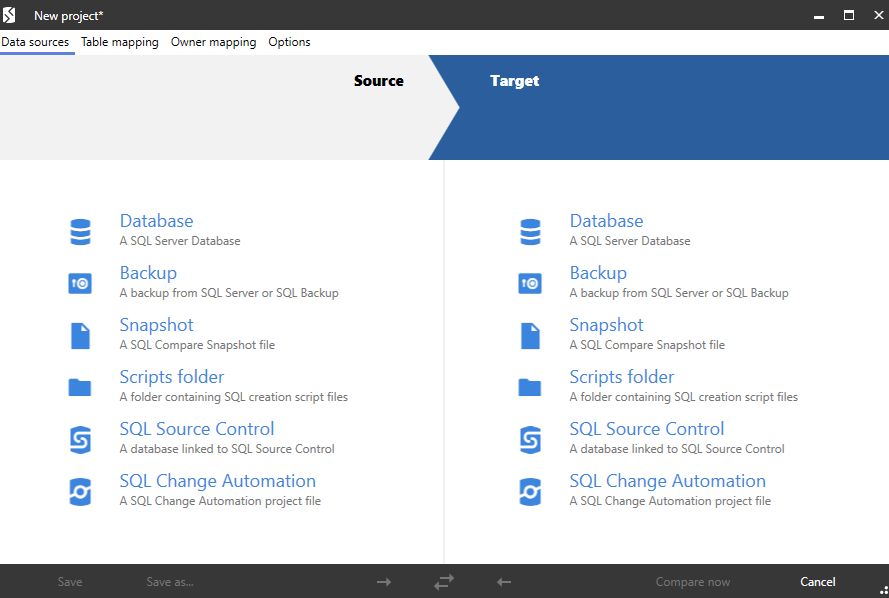
    If I start SQL Compare by clicking a project, it opens and my settings are there. When I start SQL Compare, it brings up the New Project dialog, shown here:

    2020-12-01 10_01_10-New project_

    However, if I don’t want a new project, and close that, I have a basic interface. Going through the menus, I don’t see any way to set global options.

    2020-12-01 10_02_01-SQL Compare

    There are Application Options, but these aren’t anything to do with projects.

    2020-12-01 10_02_09-Application options

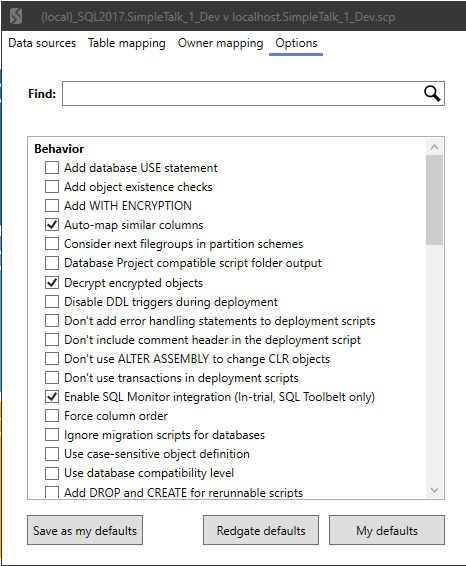
    However, I realized that I missed something a support person pointed out to me. On the options tab for any project is a button that says “Save as my defaults”.

    2020-12-01 10_03_55-(local)_SQL2017.SimpleTalk_1_Dev v localhost.SimpleTalk_1_Dev.scp

    I can set things from any project, or I can click the “My Projects” button in the toolbar, which gives me a list of projects (I don’t save many).

    2020-12-01 10_03_38-Microsoft Edge

    At the bottom of this is an “edit” button, which opens the familiar project dialog. I can click Options from there and see options.

    2020-12-01 10_08_22-(local)_SQL2017.SimpleTalk_1_Dev v localhost.SimpleTalk_1_Dev.scp

    When I do that, I can now set the items that I care about. The Ignore Comments is one, but there a few others I think cause issues. I do want to ignore encryption objects. I shouldn’t have the same ones  in dev as prod, so I’ll check that. Others:

    • Use database compat level (likely better than server version these days)
    • Online = ON
    • Ignore identity seed and increment (this could get changed)
    • Ignore WITH ENCRYPTION

    I can then click the “Save as my defaults”. This will ensure new projects have these options. If I have old projects I want to update, I can always click the “My defaults” in the project to load what I’ve saved. This animation shows how the button works.

    compare_options

    Now I can easily ensure that projects work as expected on my machine. Unfortunately, these defaults are stored in the registry, so this is a client by client basis, but you can ensure all your projects are set up the same by default.

    SQL Compare is a fantastic product to make it easy to see what has changed in a database. If you’ve never used it, give it a try today.

  • Ignoring Comments in SQL Compare

    Recently I had a client that wanted to know how they could use SQL Compare to catch actual changes in their code, but not have comments show up as changes. This is fairly easy to do, and this post looks at how this works.

    Setting up a Scenario

    Let’s say I have two databases that are empty. I’ll name them Compare1 and Compare2. I’ll run this code in Compare1:

    CREATE TABLE MyTable
    (   MyKey INT NOT NULL IDENTITY(1, 1) CONSTRAINT MyTablePk PRIMARY KEY
       , MyVal VARCHAR(100));
    GO

    CREATE PROCEDURE GetMyTable @MyKey INT = NULL
    AS
    IF @MyKey IS NOT NULL
         SELECT
               @MyKey AS MyKey, mt.MyVal
         FROM  dbo.MyTable AS mt
         WHERE mt.MyKey = @MyKey;
    ELSE
         SELECT mt.MyKey, mt.MyVal
         FROM dbo.MyTable AS mt;
    SELECT 1 AS One;
    RETURN;
    GO

    I’ll run the same code in Compare2 and then run SQL Compare 14 against these two databases. As expected, I find no differences.

    2020-11-30 14_59_33-

    I used the default options here, just picking the databases and running the comparison. Let’s now change some code. In Compare2, I’ll adjust the procedure code to look like this:

    CREATE OR ALTER PROCEDURE GetMyTable @MyKey INT = NULL
    AS
    /*
    Check for a parameter not passed in. If it is missing, then
    get all data.
    */
    IF @MyKey IS NOT NULL
         SELECT
               @MyKey AS MyKey, mt.MyVal
         FROM  dbo.MyTable AS mt
         WHERE mt.MyKey = @MyKey;
    ELSE
         SELECT mt.MyKey, mt.MyVal
         FROM dbo.MyTable AS mt;
    SELECT 1 AS One;
    RETURN;
    GO

    I can refresh my project, and now I see there is a difference. This procedure is flagged as having 4 different lines, as you see in the image below.

    2020-11-30 15_01_59-SQL Compare - E__Documents_SQL Compare_SharedProjects_(local)_SQL2017.SimpleTalk

    However, the procedure isn’t different. I’ve just added comments to one of the procs. You might view this as different, in terms of how you run software development, but to the SQL Server engine, these procs are the same. How can I avoid flagging this as a difference and causing a deployment of this code?

    Changing Project Options

    Redgate has thought of this. In the SQL Compare toolbar, there is an “Edit Project” button.

    2020-11-30 15_06_34-SQL Compare - E__Documents_SQL Compare_SharedProjects_(local)_SQL2017.SimpleTalk

    If I click this, I get the dialog that normally starts SQL Compare, with my project and the databases selected. Notice that there are actually four choices at the top of this dialog, with the rightmost one being “Options”.

    2020-11-30 15_06_40-(local)_SQL2017.SimpleTalk_1_Dev v localhost.SimpleTalk_1_Dev.scp_

    If I click this, there are lots of options. I’ve scrolled down a bit, to the Ignore section. In here, you can see my mouse on the “Ignore comments” option.

    2020-11-30 15_08_06-(local)_SQL2017.SimpleTalk_1_Dev v localhost.SimpleTalk_1_Dev.scp_

    I’ll click that, click Compare Now, which then refreshes my project. Now I all objects shown as identical. However, if I expand the stored procedure object, I can still see the difference. The difference is just ignored by SQL Compare.

    2020-11-30 15_09_36-SQL Compare - E__Documents_SQL Compare_SharedProjects_(local)_SQL2017.SimpleTalk

    This lets me track the differences, see them, but not have the project flag them for deployment. If I’m using any of the Redgate automation tools, the command line option for this is IgnoreComments, or icm. You can pass this into any of the tools to prevent comments from causing a deployment by themselves.

    This also works with inline comments. I’ll alter the procedure in Compare1 with this code:


    CREATE OR ALTER PROCEDURE GetMyTable @MyKey INT = NULL
    AS
    IF @MyKey IS NOT NULL
         SELECT
               @MyKey AS MyKey, mt.MyVal
         FROM  dbo.MyTable AS mt
         WHERE mt.MyKey = @MyKey;  -- parameter value filter
    ELSE
         SELECT mt.MyKey, mt.MyVal
         FROM dbo.MyTable AS mt;
    SELECT 1 AS One;   -- second result set.
    RETURN;
    GO

    The refreshed project sees the differences, but this is still seen as an identical object for the purposes of deployment.

    2020-11-30 15_17_15-SQL Compare - E__Documents_SQL Compare_SharedProjects_(local)_SQL2017.SimpleTalk

    If you are refactoring code, perhaps by just adding comments or clarifying something, you often may not want a deployment triggered just from changing the notes you leave for other developers. SQL Compare can help here, as can all the Redgate tools.

    I would recommend this option always be set, unless you have a good reason to allow comments to trigger a deployment.

    Give SQL Compare a try today if you’ve never used it, and if you have it, enable this in your projects.

  • Database DevOps Deployment to Azure–Webinar

    You can register now, but on Dec 3, I have a webinar with Microsoft on database devops and Azure. This is a joint effort with Redgate, so I’ll be showing some of our tools.

    In the webinar, which I recorded last week, I walk through the idea of Database DevOps in general, showing how we evolve our database development to incorporate automation, use Azure DevOps, and deploy code to an Azure database.

    Register today, and I’ll be ready for questions on Dec 3.

  • Redgate SQL Data Masker Refreshing Schema

    This is a quick blog to help me remember what is going on with the Data Masker product. This is for the SQL Server version, but I believe the Oracle one is very similar.

    I added a new column to a table, and I had a masking plan already built. How do I get my masking plan to show the new column?

    Here is my masking plan:

    2020-10-27 10_56_12-simpletalk_5_prod_ Data Masker for SQL Server

    I added a new column to the DCCheck table, which is under rule 01-0026.

    2020-10-27 11_00_47-SQL Change Automation - Microsoft SQL Server Management Studio

    If I open that mask and add a new column, I get this, but I can’t expand the dropdown. All the columns in this table are masked, and data masker doesn’t know about the new one.

    2020-10-27 10_57_23-Edit Substitution Rule

    I need an updated schema, as the rules do not update in real time. To get this to work, I need to return to the masking plan and double click the controller at the top. This is the schema manager for my set of rules.

    Note: If I mask different schemas, I need different controllers.

    Once this opens, I can see my connection to a database. In my case, I’m building this in dev areas, so it’s pointed to the QA environment.

    2020-10-27 10_57_50-Edit Rule Controller

    If I click the “Tools” tab at the top, I see lots of options, one of which is to refresh.

    2020-10-27 10_57_57-Edit Rule Controller

    Once I pick that one, I have a bunch of more options, which gets confusing, but I can click the “refresh all tables” at the top, leaving everything alone. Once that’s done, I get a note.

    2020-10-27 10_58_12-

    Once I get this, I can return to my rule, and when I add a new column, and I see it listed.

    2020-10-27 10_58_29-Edit Substitution Rule

    This isn’t the smoothest flow, but data masker isn’t something that is likely to be in constant use. For many of us, adding new schema items is relatively rare, so we can adjust our plans as needed.

    The one good thing is that I can easily find where I need to add a column, as opposed to digging through a number of .SQL scripts.