Tag: Redgate

  • Quick PoSh SQL Provision Databases for New Developers

    As part of some presentation work, I wanted to demonstrate some onboarding of new developers. To that end, as part of a demo, I wanted to build a script that would take a few parameters and generate some SQL Provision databases for development. The idea is that an admin can have a script here to set up a developer with a database for a project with SQL Provision. I imagine this would be part of a script that also cloned a repo, set up a project, etc.

    The Process

    My thought here was that I needed a script that uses some pattern to build databases. The one I decided on was that the basic image name would be used with the developer name to prevent collisions. This would work if an admin used login names or even nicknames, as long as there is some uniqueness on the instances. Of course, if you’re provisioning to a local instance, this doesn’t matter.

    In any case, the images I make are often date driven, with a format like:

    SimpleTalk_Base_20181001

    Using formats like this, I can easily strip off the beginning part of the name (SimpleTalk) and then append my _developer to the end. For me, this means I’d get a database named: SimpleTalk_Steve

    This manifests itself as a script:

    2018-10-03 20_09_05-NewDeveloper.ps1 - Minimize impact Dev Test Environments - Visual Studio Code

    That produces a new database.

    2018-10-03 20_08_57-SQLQuery6.sql - Plato_SQL2016.DataMaskerDemo (PLATO_Steve (61)) - Microsoft SQL

    I also see this in the SQL Provision dashboard as a new item.
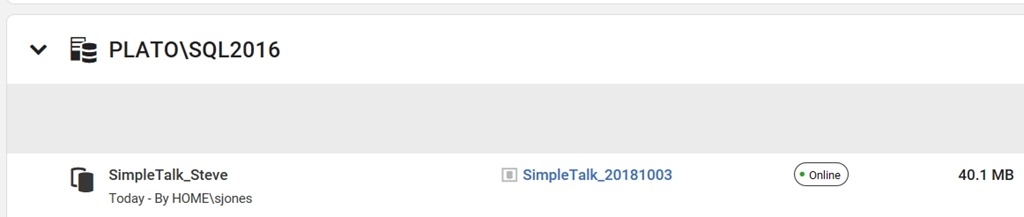
    2018-10-03 20_10_14-Microsoft Edge

    The Script

    I started this with some simple PowerShell. The first part of this script is a few parameters and a variable. Note that I’m splitting the instance name here.

    2018-10-03 20_11_48-● NewDeveloper.ps1 - Minimize impact Dev Test Environments - Visual Studio Code

    From here, I connect to the SQL Provision server and then get the instance and image objects.

    2018-10-03 20_12_01-● NewDeveloper.ps1 - Minimize impact Dev Test Environments - Visual Studio Code

    Lastly, I create the clone, making a new name from the image, and if the word “base” is included (I do this often), I strip it out.

    2018-10-03 20_12_06-● NewDeveloper.ps1 - Minimize impact Dev Test Environments - Visual Studio Code

    Quick and easy, but this allows me to demo how to onboard a new developer.

    There are lots of enhancements, and I need to add some error checking if there isn’t an instance, and if the connection fails, but for now, PoSh lets me quickly start getting some useful scripts that I can use for demonstrating some functionality. This certainly would work in an environment where I knew the Clone server was there and I had control over imaging. If not, I’d be writing more PowerShell.

    SQL Provision is pretty amazing and lets you really leverage technology to provide developers with copies of databases in seconds. Download an evaluation and see what you think.

  • Redgate Releases Sept 2018–Practicing DevOps

    At Redgate, we build tools to help you build software in the entire DevOps cycle. In fact, I love this new graphic that shows the areas that we focus on in the entire software development cycle.

    We don’t just preach DevOps, we live it. As an example, here are the releases for September:

    SQL Monitor (Sept 11, 20) – New viewing and reporting options

    SQL Clone (Sept 11, 24, 25) – Added reset, new notifications and an EAP of the  next version!!!!

    Data Masker/Figleaf – Sept 5, 14, 25, 26 – Bug fixes for Data Masker and enhancements to Figleaf

    SQL Change Automation – Sept 19 – cmdlet updates and bug fixes

    SQL Backup – Sept 6 – import registered servers

    SQL Compare/Data Compare – Sept 3, 17, 24 – bug fixes in frequent updates releases

    SQL Prompt – Sept 12, 25 – refactor insert into updates, bug fixes

    SQL Source Control – Sept 24 – bug fixes

    SQL Test – Sept 4 – bug fixes

    SQL Index Manager – Sept 3 – bug fixes

  • What is Projectsv13 in SQL Change Automation?

    I got this question recently from someone that was evaluating the SQL Change Automation client in Visual Studio. After setting up a new PoC (Proof of Concept), they were confused about why there is a new entry in their list of SQL Servers.

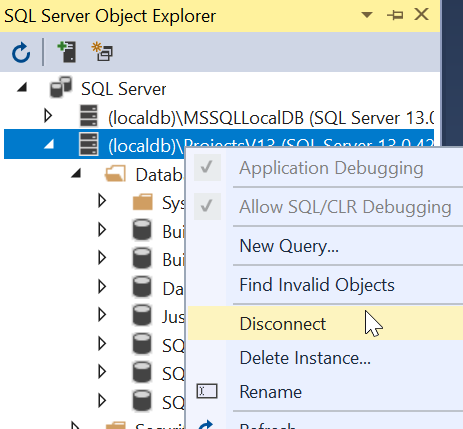
    If you’re wondering, this is what you see in Visual Studio 2017, for the SQL Server Object Explorer.

    2018-09-18 20_20_30-SQLBuilds - Microsoft Visual Studio

    In my case, I’ve actually got a few different instances since I’ve been working with the SQL Change Automation (SCA) for years, across a few versions.

    As the instance names list, these are LocalDB instances. LocalDB is a version of SQL Server that is spun up in process, rather than a service. Other than that, it’s a real SQL Server instance that is running. In fact, if you want, you can connect to this with SSMS.

    2018-09-18 20_22_31-Connect to Database Engine

    If I connect with those credentials, this will appear in the SSMS Object Explorer as well, the same as any other instance.

    2018-09-18 20_22_48-SQLQuery3.sql - dkrSpectre_sql2017.sandbox (DKRSPECTRE_way0u (69))_ - Microsoft

    Why is this in SCA?

    As an early part of the SCA product, when it was in ReadyRoll, there was a desire to not impose burdens on application developers. If you were working with a project for C# or ASP.NET and wanted to include the database, the idea was to keep things simple.

    The simple way to get up and running is to use LocalDB, so no install, no worries with Express and a service running, just use LocalDB. This used to be more of a default, but now it’s just one of the options.

    In my case, once I’ve setup my project to connect, the Shadow database, by default, is also right here, and I’ll see both databases under the (localdb)\Projectsv13 instance.

    2018-09-18 20_27_51-SQLBuilds - Microsoft Visual Studio

    All of this is configurable, so you can set things to work in whatever manner works best for you. If you typically have a development instance, either local or remote, you can easily use those instead, and you’ll never need to worry about LocalDB. In fact, if this bothers you, you can disconnect or even delete the instance.

    2018-09-18 20_32_02- 

    LocalDB is a lightweight way to work with SQL Server, but you don’t need to use it.

  • Learn about SQL Source Control in Redgate University

    I love the SQL Source Control product from Redgate. It’s not perfect, and it can be slow to run at times, but the simplicity of what it does, of getting my code quickly and easily to a VCS is fantastic. I really appreciate it.

    This is one of the tools I enjoy demoing and showing off how to ensure you get all the code from you system stored away. I wish I had been able to purchase this product years ago when I was building database software as my day job.

    We now have a course to help you learn how to use SQL Source Control at Redgate University. This is a series of 10 sections (as of now) that cover a variety of ways in which you can capture development code with SQL Source Control and even deploy those changes to another database.

    Give the course a try, and see what you might learn about this product. We’ve got other courses as at Redgate University, with more coming all the time.

    If you’ve got ideas or suggestions for the courses, send us a note at https://www.red-gate.com/hub/university.