The videos for our SQL in the City 2018 broadcast from last month are up on the Redgate channel in a playlist. If you missed anything or would like to rewatch something, you can do it.
If you’ve got questions or comments, we’d love to hear from you.
The videos for our SQL in the City 2018 broadcast from last month are up on the Redgate channel in a playlist. If you missed anything or would like to rewatch something, you can do it.
If you’ve got questions or comments, we’d love to hear from you.
I’ve been playing with Data Masker for SQL Server v6 and it’s an interesting product. I like the way it works, but I do find it a little challenging sometimes to figure out how to mask values. I’ve written a set of posts for different scenarios.
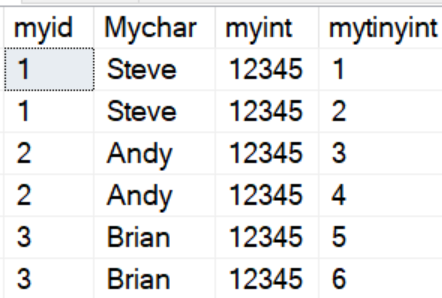
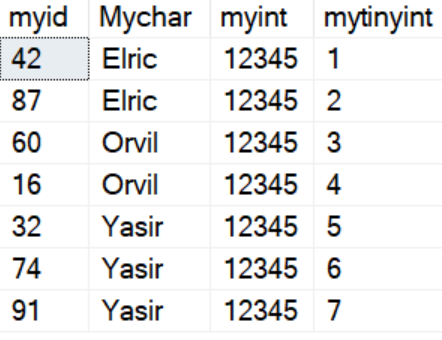
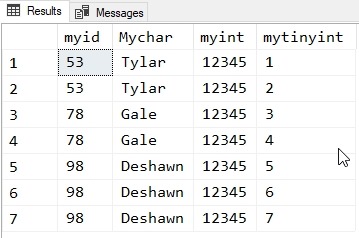
In a previous post I showed how I could change column values across rows in a table. This is useful in that it moves my data from this:
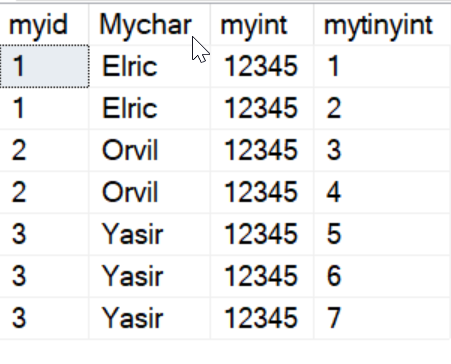
to this:
That’s good, but since I haven’t changed the myid column, I really haven’t masked things well. In fact, it would be trivial to derive the initial mychar values from the set if I knew the original values.
Let’s fix that.
My masking set looks like this for now:
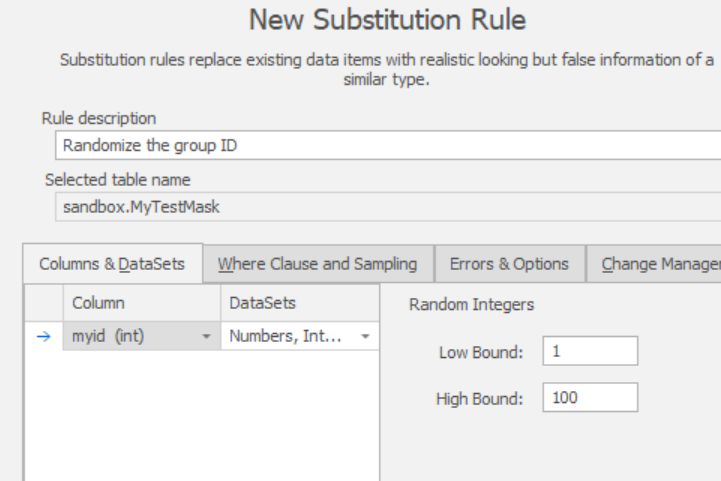
I want to add a new substitution rule that will mix up my myid values. I add the rule and configure the correct column. In this case I limit the boundaries of my random numbers to 1-100, but I could choose any value.
I save this and run just this rule. Now my data looks like this:
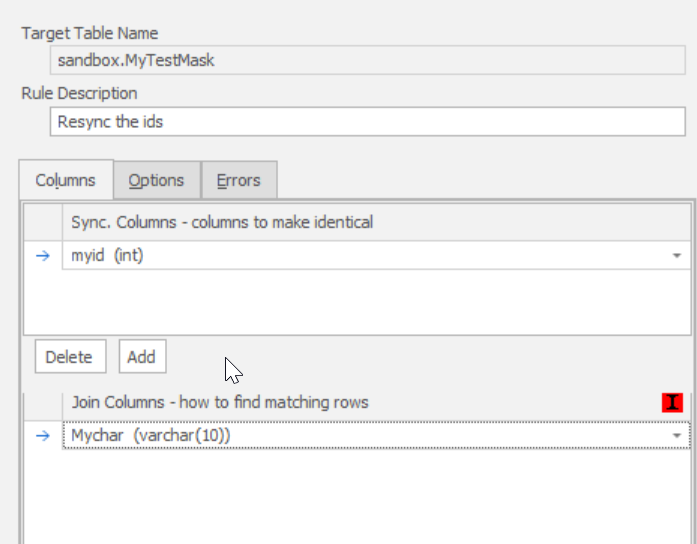
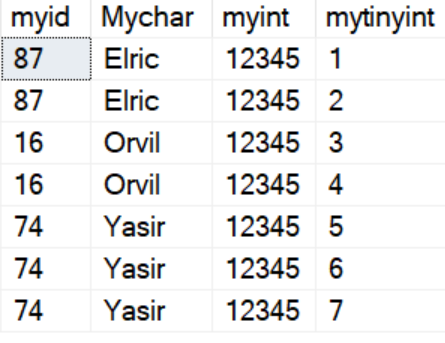
We’re partway there, but I don’t have grouping. Elric has two different values for myid, which is wrong. Let’s fix that. Just as in the previous post, we’ll now add a Table Internal Sync rule. We configure this in reverse of the previous article. Now we use the new, changed names in mychar as the group column and myid as the column to sync across rows.
If I execute this, then I get the following:
Tada.
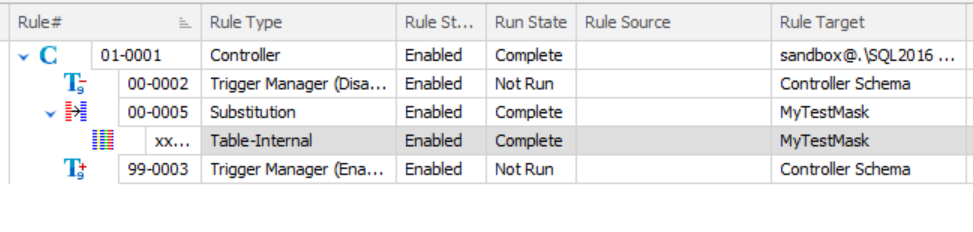
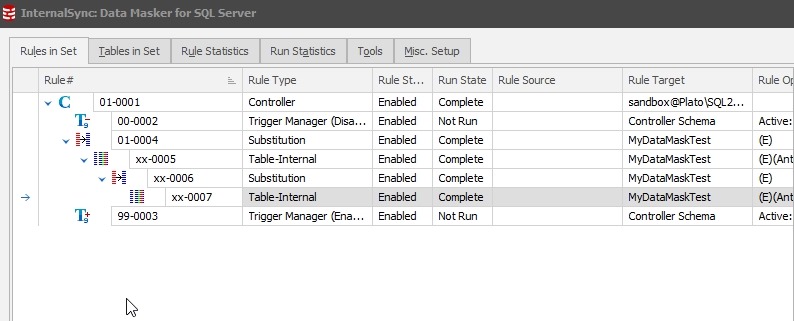
Now I just need to ensure these rules run in order (all four) with dependencies and when I run the entire set, I’ll get my table synced. Here’s the final rule set. Notice that I’ve created dependencies.
I’ll save the set, and then re-run it. Now I get these results:
Data masking is something that’s never been this easy for me. I’ve built lots of large scripts that made perfect sense for me, but were difficult to turn over to anyone else for usage and maintenance.
I’d urge you to give Data Masker a try if you’re looking to ensure compliant, safe data sets for your non-production environments.
I have other articles on Data Masker if you’re interested.
I’ve been playing with Data Masker for SQL Server v6 and it’s an interesting product. I like the way it works, but I do find it a little challenging sometimes to figure out how to mask values. I’ve written a set of posts for different scenarios.
We had a customer ask about how to mask data across rows. The customer had some data in a table that was a standalone table, and contained data in a column that matched across rows. They wanted this changed, but the matching between rows kept.
In other words, here’s a small mocked set of the original data:
myid Mychar myint mytinyint ----------- ---------- ----------- --------- 1 Steve 12345 1 1 Steve 12345 2 2 Andy 12345 3 2 Andy 12345 4 3 Brian 12345 5 3 Brian 12345 6 3 Brian 12345 7
Here are the results they want:
myid Mychar myint mytinyint ----------- ---------- ----------- --------- 1 aaa 12345 1 1 aaa 12345 2 2 bbb 12345 3 2 bbbb 12345 4 3 ccc 12345 5 3 ccc 12345 6 3 ccc 12345 7
I thought this was an interesting scenario, so how do we mask this? It’s not that hard, so let me show you this.
First, let’s create a new masking set. I won’t walk through that here, but once you have a set connected to your database, here’s what we do.
First, we need to substitute data out. In this case, I’ll substitute the name only. In a real world, we’d probably need to substitute the myid and myint columns as well, but I’ll leave those again.
I add a new Substitution rule first.
This is a standard rule. I’ll add my column and pick a dataset. In this case, I’ll just pick make first names (Names, First, Male) and use that. This will result in a random set of names. I’ve chosen unique values. This is important as across a large number of rows, I could end up with random values that match, but with different MyID values. That would be bad.
If I save and run this rule, I’ll see something like this.
Not quite what I need, but it’s a start. The important thing is that the first myid=1 is different from the first myid = 2, which is different from myid=3.
Next we’ll add a Table Internal Sync rule. This is the rule that fixes values across rows inside a table. Here’s the basic config. Note that I choose a table and then I choose the columns that need syncing, in this case just the mychar column.
I need a way to determine which sets of rows should match. In this case, the myid column is used for that. If you examine the initial set, I have the same values for each name. This is what groups things together, so I’ll use this.
One Note: The red “I” to the right means this isn’t an indexed column. If I wanted better performance, I can add an index for this column, either permanently or just for the masking process.
Now I execute this rule, and I see these results:
I have my groups back.
I could expand this to include other columns as well, substituting the myint column in my first rule and including it in the second.
Here is the code to set this up:
CREATE TABLE MyTestMask
( myid INT
, Mychar VARCHAR(10)
, myint INT
, mytinyint TINYINT PRIMARY KEY
)
GO
INSERT dbo.MyTestMask ( myid,
Mychar,
myint,
mytinyint
)
VALUES
( 1, 'Steve', 12345, 1)
, ( 1, 'Steve', 12345, 2)
, ( 2, 'Andy', 12345, 3)
, ( 2, 'Andy', 12345, 4)
, ( 3, 'Brian', 12345, 5)
, ( 3, 'Brian', 12345, 6)
, ( 3, 'Brian', 12345, 7)
GO
I’d urge you to give Data Masker a try if you’re looking to ensure compliant, safe data sets for your non-production environments.
I have other articles on Data Masker if you’re interested.
Yesterday I republished an editorial from 2014 for the holiday. The topic was production subsets of data, which has been something that many data professionals have struggled with for years. Many of us have built scripts to delete, change, obfuscate, or alter production restores as a way of providing useful, but manageable development database sets. Or maybe it’s just some of us. I’m sure more than a few of us have given up on this task and just restored production databases in entirety to test and development systems.
I changed over my career to become a fan of additively building a known dataset rather than deleting extra data. I advocate adding rows from production (properly masked/obfuscated) and maintaining this set over time as requirements change. However, this isn’t without it’s own administrative headaches. I think it’s easier, but this does require commitment from everyone to keep going over time. It’s certainly better than each developer adding their own 10 rows of data to a table for testing.
A year ago, Redgate released SQL Clone, designed to solve some of these issues. Once an image is created, new databases for test and development and be provisioned in seconds. I found this to be an amazing product that really changes how I develop against databases, though it does require me to stop getting caught up trying to undo changes or manage a single database. Instead, I need to ensure I am saving code to version control and then build the habit to drop and rebuild a baseline database.
As we’ve worked on SQL Clone, I’ve found that there are lots of companies that offer similar ways of virtualizing your data, giving you access to large, production scale systems in seconds. Data masking, obfuscation, and more are features, with some vendors requiring specific hardware. Others, like Red Gate, have software add-ons (Data Masker). All of these products cost money, which can be an issue for many organizations, but I’m glad that this technology is growing and advancing. With GDPR and other draft legislation, many of us need to take better care of our data and build more secure architectures.
Containers are another interesting way to virtualiza data, though they don’t solve the scale issues. If you can work with a smaller data set, and maintain that, then containers might provide a fantastic way for you to learn to build, teardown, and rebuild databases in seconds.
The world of databases hasn’t changed a lot in some ways across my career, but in others, I’m amazed. Data virtualization is one of these areas, and if you haven’t trialed the technology, maybe you should give it a whirl this year.
Steve Jones
Listen to the MP3 Audio ( 3.6MB) podcast or subscribe to the feed at iTunes and Libsyn.