Tag: Redgate

  • Surround Code with Comments in SQL Prompt

    I work for Redgate and write about products. I’ve got a series of SQL Prompt posts here on little things I like. SQL Prompt might be my favorite tool.  SQL Prompt will be yours as well if you give it a try.

    I can’t believe I haven’t built this snippet before now, but it’s not in my list. I’ve dealt with this for some time, but I decided enough was enough.

    Here’s what I want. Note that all the code is inside a single comment.

    2018-01-27 09_28_29-SQLQuery1.sql - (local)_SQL2016.Northwind (PLATO_Steve (66))_ - Microsoft SQL Se

    Getting There

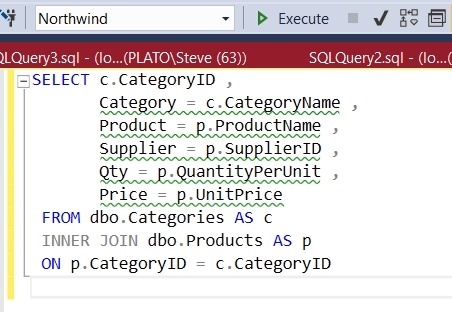
    I often have some random notes that I want to keep in a comment. For example, I might get a list of tables like this:

    2018-01-27 09_25_12-SQLQuery1.sql - (local)_SQL2016.Northwind (PLATO_Steve (66))_ - Microsoft SQL Se

    If I highlight this code and hit Ctrl, I get a list of snippets that contain a certain token. In my case, I get:

    2018-01-27 09_26_31-SQLQuery1.sql - (local)_SQL2016.Northwind (PLATO_Steve (66))_ - Microsoft SQL Se

    If I select Comment, I get the code commented, but as single line quotes.

    2018-01-27 09_26_58-SQLQuery1.sql - (local)_SQL2016.Northwind (PLATO_Steve (66))_ - Microsoft SQL Se

    That’s OK, but if I am saving something like STATISTICS output, that’s not pretty or easy for me to read. I prefer a single comment, not a series of separate inline comments. This is even more annoying with code.

    Let’s fix this with a snippet. Here’s my snippet code:

    2018-01-27 09_30_43-SQL Prompt - Create New Snippet

    The $SELECTEDTEXT$ token will take whatever text you’ve highlighted and insert it into the token. In my case, I just want this commented out.

    Let’s see how this works. Suppose I have this query:
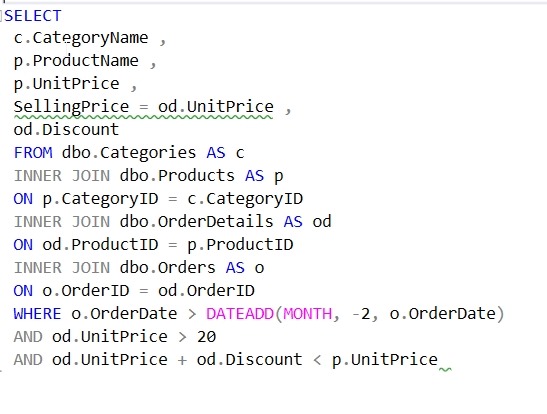
    2018-01-27 09_36_06-SQLQuery1.sql - (local)_SQL2016.Northwind (PLATO_Steve (66))_ - Microsoft SQL Se

    I really want to get the results from STATISTICS IO and TIME as I’m tuning a few things here and I want to check how well my changes work.

    Once I run this, I’d like to place the results with the query and see them to compare with the next iteration. I paste the results into the query window like this:
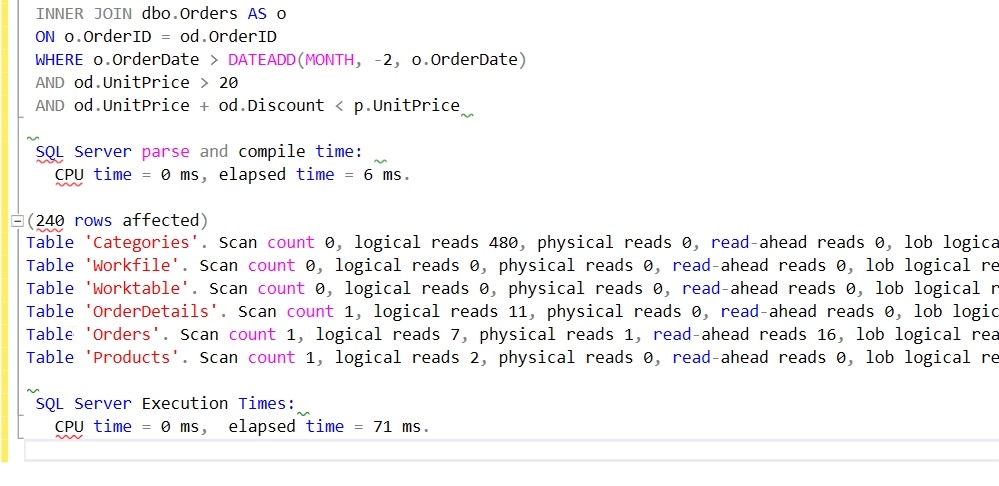
    2018-01-27 09_37_42-SQLQuery1.sql - (local)_SQL2016.Northwind (PLATO_Steve (66))_ - Microsoft SQL Se

    Now I can highlight those results and hit CTRL, type surr, and get this:

    2018-01-27 09_38_12-SQLQuery1.sql - (local)_SQL2016.Northwind (PLATO_Steve (66))_ - Microsoft SQL Se

    I hit tab and I have my notes commented out:
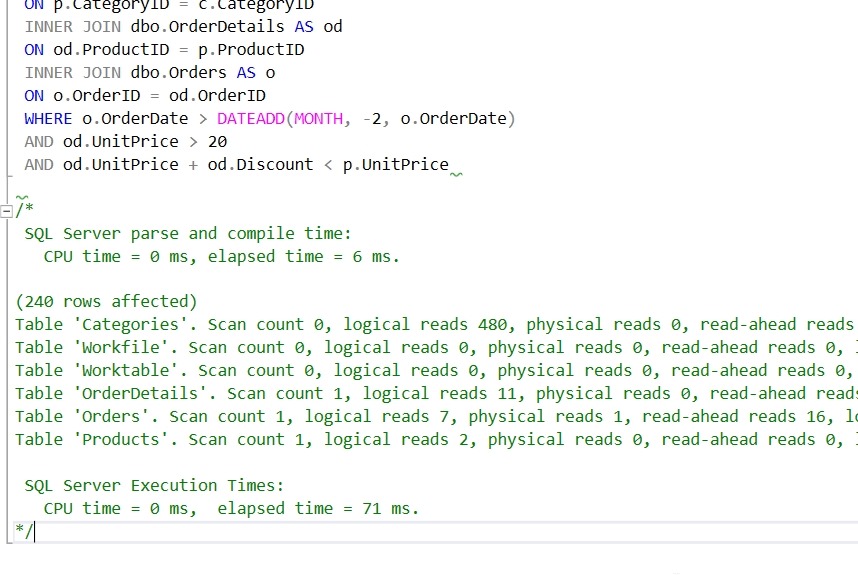
    2018-01-27 09_38_28-SQLQuery1.sql - (local)_SQL2016.Northwind (PLATO_Steve (66))_ - Microsoft SQL Se

    The next time I run the query, I can easily compare how things have changed:

    2018-01-27 09_38_37-SQLQuery1.sql - (local)_SQL2016.Northwind (PLATO_Steve (66))_ - Microsoft SQL Se

    I also use this when working through a list of results. I’ll get those in the query window, highlight them, and then surround them with a comment.

    There are lots of places you might like to use this token with SQL Prompt. For more ideas, Phil Factor has a nice scenario for using this with other tokens in the Redgate Hub.

    Give SQL Prompt a try today and see how it can improve coding and feel free to share your tips here.
  • Managing SQL Prompt Code Analysis Rules

    I work for Redgate and write about products. I’ve got a series of SQL Prompt posts here on little things I like. SQL Prompt might be my favorite tool.  SQL Prompt will be yours as well if you give it a try.

    SQL Prompt includes new Code Analysis rules that help you write better code. This iteration of the rules in v9 are items that are highlighted with a green squiggly line. These are basic rules, and may not apply in your environment, and you may want to disable some of these. Here’s how.

    Imagine you have a simple query like this one:

    2018-01-29 13_14_03-SQLQuery1.sql - (local)_SQL2016.Northwind (PLATO_Steve (66))_ - Microsoft SQL Se

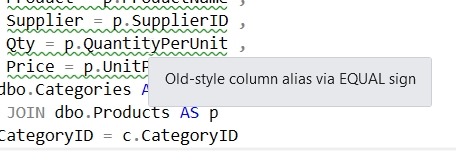
    As you can see, there are green squiggly lines under some code. These are static Code Analysis warnings from SQL Prompt. If I put my cursor on the line, I’ll see the warning about the old style column alias:

    2018-01-29 13_19_24-SQLQuery1.sql - (local)_SQL2016.Northwind (PLATO_Steve (66))_ - Microsoft SQL Se

    In this case, I know this is rule ST02, and it’s not a warning I care about. I like the equals alias construct and don’t want to constantly see this, so I’ll disable this rule.

    First, open the SQL Prompt menu. There are a few new items shown below. The “Enable Code Analysis” is below the other Prompt “Enable Suggestions”. There is also the “Manage Code Analysis Rules”. Select that item.

    2018-01-29 13_20_59-

    When the dialog opens, we see a number of rules broken into sections. Each of these is numbers, and has a prefix. Best Practices have BP prefixes, Deprecated items use DEP, etc.

    2018-01-29 13_21_50-Sql Prompt - Code analysis rules

    Scroll down to the Style rules, which have ST prefixes. We can see that ST002 is the Old-style column alias. Uncheck this box and click “Save”.

    2018-01-29 13_23_23-Sql Prompt - Code analysis rules

    Now the rule is disabled. If I wait a couple seconds, I’ll see the green lines disappear.

    2018-01-29 13_24_20-SQLQuery1.sql - (local)_SQL2016.Northwind (PLATO_Steve (66))_ - Microsoft SQL Se

    There are all sorts of items that SQL Prompt tracks as a part of Code Analysis. We’re looking to understand how you use these rules, what exceptions you need, and any additional rules you’d like to see added. Send us feedback at UserVoice.

    Give SQL Prompt a try today and see how it can improve coding and feel free to let me know how you like this new feature.

  • SQL in the City is coming Feb 28

    The next edition of the SQL in the City broadcast is coming Feb 28, and I’m planning travel now to head back to the UK for the event. The schedule is up on the Redgate Hub Livestream page.

    This edition has lots more GDPR/security/masking content as well as updates on the new products.

    Mark the date on your calendar, let your boss know it’s a training day, and get some friends together to join us for the day.

  • The GDPR Sky is Falling

    David Poole wrote a nice summary of the GDPR regulations that come into force this spring in Europe. He covers a number of the sections, trying to provide a simple explanation of the potential issues from the perspective of a data engineer. That’s likely the role most of us fill , and I think David does a good job of trying to note the items that he (and maybe you) need to be concerned about.

    If you want to read the full text, and you should, it’s here. To me, this is a more sensible, easier to understand type of regulation. It’s way better than SOX and most other regulations I’ve had to deal with, with a better view of balancing the idea that companies won’t have all the answers, and might not choose the best technology but do need to make an effort. I don’t think this will excuse just continuing to do business as you have, but it does read as though courts and authorities will have flexibility in their interpretation.

    One of the main things that should be pointed out is that the 10 million Euro fine is a max, not a minimum. The same things goes for the potential 2% of global turnover (revenue for the US folks). These are the highest potential penalties, though if you have made some effort to protect data and comply, I doubt you’d see fines at this level unless you’re negligent.

    The keys parts of this regulation are that companies should be paying more than lip service to data privacy and protection. They should be designing and building software and infrastructure that protects data, and also considers the point of view of the individual or organization that is the subject of the data. That’s a good move, in my opinion, having us actually think about the data and the ramifications of its use, sale, transfer, and release, rather than just focusing on our own goals. Most data professionals I know keep this in mind, so GDPR is a step in the right direction to push management to care.

    We’ve got information at the Redgate site, which will help guide you. We are building features into existing and new products, and we’d love to sell you software if you can use it, but we’re also learning and trying to share what we know. This goes along with the core values at Redgate of being a part of the community and giving back, through SQLServerCentral, Simple Talk, blogs, and more.

    Ultimately no one knows what GDPR will bring, and its application can present a risk to any of us that gather data from EU residents. I know Brent Ozar as already decided to stop EU business for the time being to avoid taking on this risk, and I’m sure other small companies may do the same thing. In one way that’s a shame, though a reasonable decision for a company. In another way, this opens opportunities for other businesses. People in Europe still need goods and services, and there are plenty of ways to comply with GDPR that I don’t think will be too hard, especially for those businesses based in Europe that won’t have a choice. There will be other companies that can fill any void left by companies that cease working in the EU.

    GDPR isn’t the end of the world. I think it’s a good move in the right direction to balancing data value and protections. I’d like to see a better framework in the US that also ensures individuals have rights to exercise some control over all the data being gathered about them, as well as something that forces companies to actually consider data protection in their systems. There may be some bad results from GDPR, but most of us will adapt and continue to do business as we have in the past, albeit with better data controls.

    Steve Jones

    The Voice of the DBA Podcast

    Listen to the MP3 Audio ( 5.4MB) podcast or subscribe to the feed at iTunes and Libsyn.